



C# Serialization & Deserialization: A Practical Example
Serialization & Deserialization in C#
Serialization and deserialization are essential when object data must move between applications or persist across sessions. In C#, serialization writes an object’s state to a storage medium—commonly a file—while deserialization reconstructs the object from that stored representation.
Consider a simple class, Tutorial, that holds two properties: ID and Name. By serializing an instance of this class to a file, we can later read the file and recreate the same object with its original data intact.
How to Serialize an Object in C#
Below is a step‑by‑step walkthrough that demonstrates the process in a console application.
- Create a
Tutorialclass with theIDandNameproperties. - Instantiate the class, assigning
ID = 1andName = ".Net". - Serialize the object to a file named
Example.txt. - Deserialize the object from the file and display its values on the console.
Paste the following code into your Program.cs file.
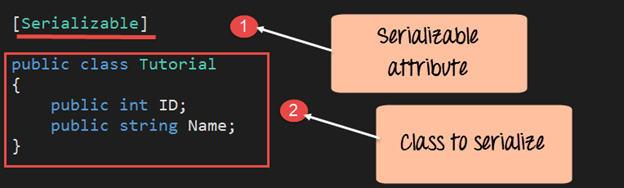
Step 1) Add the class. The first step is to add the class that will be serialized.
Code Explanation:
- The class must be marked with the
[Serializable]attribute; otherwise serialization will fail. - Define the
Tutorialclass with two fields:int IDandstring Name.
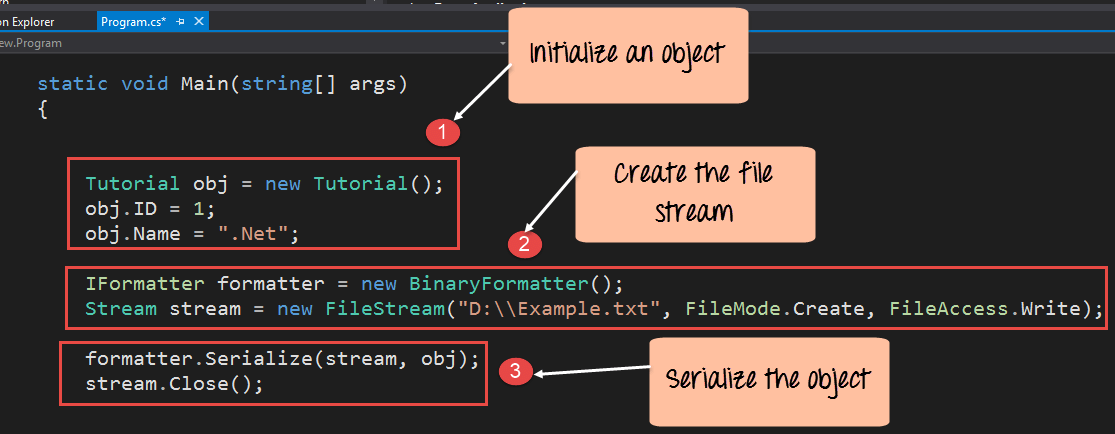
Step 2) Create the object and serialize it.
In this step, we instantiate the Tutorial object and write it to Example.txt.
Code Explanation:
- Create an instance of
Tutorialand setID = 1andName = ".Net". - Instantiate a
BinaryFormatter(note:BinaryFormatteris obsolete in .NET 5+; considerSystem.Text.JsonorXmlSerializerfor production code). - Open a
FileStreaminFileMode.CreateandFileAccess.Writeto write the binary data. - Call
formatter.Serializeto write the object to the stream, then close the stream.
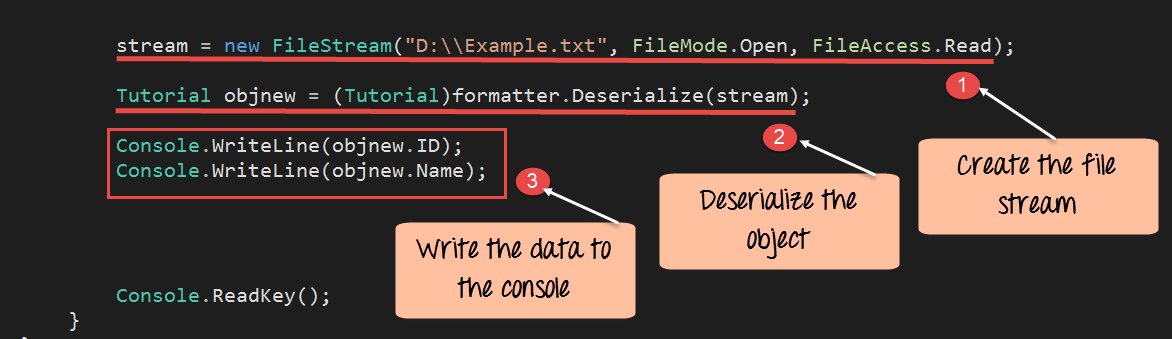
Step 3) Deserialize the object. Finally, read the data back from the file to verify the process.
using System;
using System.IO;
using System.Runtime.Serialization;
using System.Runtime.Serialization.Formatters.Binary;

namespace DemoApplication
{
  [Serializable]
  class Tutorial
  {
    public int ID;
    public string Name;

    static void Main(string[] args)
    {
      Tutorial obj = new Tutorial();
      obj.ID = 1;
      obj.Name = ".Net";

      IFormatter formatter = new BinaryFormatter();
      Stream stream = new FileStream("E:\\ExampleNew.txt", FileMode.Create, FileAccess.Write);

      formatter.Serialize(stream, obj);
      stream.Close();

      stream = new FileStream("E:\\ExampleNew.txt", FileMode.Open, FileAccess.Read);
      Tutorial objnew = (Tutorial)formatter.Deserialize(stream);

      Console.WriteLine(objnew.ID);
      Console.WriteLine(objnew.Name);

      Console.ReadKey();
    }
  }
}
Code Explanation:
- Open the file in read mode.
- Deserialize the binary data back into a
Tutorialinstance. - Print the
IDandNameto the console.
Running the program in Visual Studio produces the following output:
Output:

As shown, the values were correctly retrieved from the file.
Summary
Serialization writes object data to a file, while deserialization reads that data back into an object. This fundamental technique underpins many .NET data‑exchange scenarios.
C Language
- C++ Classes & Objects: A Practical Guide with Code Examples
- C++ Struct vs Class: Key Differences, Syntax, and Best Use Cases
- Master C# Inheritance & Polymorphism: Practical Code Examples
- C# Abstract Classes: A Practical Tutorial with Code Examples
- Understanding C# Interfaces: Definition, Example, and Practical Use
- Mastering C# File Streams: StreamReader & StreamWriter – Step‑by‑Step Guide
- Mastering C Conditional Statements: IF, IF-ELSE, and Nested IF-ELSE Explained
- Understanding Java Classes and Objects: Clear Concepts, Practical Examples
- Python OOP Fundamentals: Classes, Objects, Inheritance, and Constructors Explained
- Creating ZIP Archives in Python: From Full Directory to Custom File Selection