



Coded UI Test Automation Framework: A Comprehensive Beginner’s Guide
Automated UI testing is essential for delivering high‑quality applications. Coded UI Test (CUIT) is a powerful tool integrated into Visual Studio that lets developers and QA engineers collaborate seamlessly, creating maintainable tests for desktop and web applications.
What Is Coded UI Test?
Coded UI Test (CUIT) drives an application through its user interface, validating that every UI control behaves as expected. It converts manual test steps into repeatable scripts, ensuring consistent test coverage across builds.

Key Features of Coded UI Test
- Full functional UI testing for Windows and web applications.
- Automatic code generation in VB.NET or C#.
- Deep integration with ALM story tracking.
- Build, deploy, and test in continuous‑integration pipelines.
- Local, remote, and data‑driven test execution.
- Extensible architecture for custom test logic.
- Intent‑aware recording with resilient playback.
Supported Technologies
CUIT covers a broad spectrum of UI types:
- Windows desktop applications (WinForms, WPF)
- Web services (SOAP, ASPX, etc.)
- Windows Phone applications
- WPF (Windows Presentation Foundation)
- Web applications (HTML, Silverlight, HTML5)
Why Choose Coded UI for Automation?
- Unified language and toolset for developers and testers.
- Broad platform support—both web and desktop.
- Advanced element‑identification and synchronization.
- Playback engine offers wait utilities such as
WaitForControlExistandWaitForReadyLevel. - Remote execution via Test Agents.
- Layered framework support for sophisticated test design.
- Built‑in logging with log4net.dll for detailed diagnostics.
- Descriptive programming allows automation based on object properties.
- Native AJAX control support.
Creating Coded UI Tests
There are three primary approaches:
- Convert an existing manual test recording.
- Create a fresh test from scratch.
- Write test logic directly in code.
Typical File Structure of a CUIT Project
| File | Content | Editable |
|---|---|---|
| UIMap.Designer.cs | Auto‑generated code for UI map. | No |
| UIMap.cs | Custom modifications to UI map. | Yes |
| CodedUITest1.cs | Test class, methods, assertions. | Yes |
| UIMap.uitest | XML representation of UI map. | No |
For example, UIMap.Designer.cs contains the generated UIMap class, while UIMap.cs holds any custom logic you add. Modifying the designer file directly is discouraged because changes may be overwritten.
Executing a Coded UI Test
CUIT supports two primary execution paths:
- Record and playback the test scenario.
- Hand‑code the test logic.
Typical steps:
- Create a Coded UI test project.
- Add a new Coded UI test file.
- Record the desired user actions.
- Verify UI values (e.g., text boxes).
- Review the generated test code.
- Add additional actions and assertions as needed.
- Fine‑tune test details.
- Run the test and analyze results.
Best Practices
- Prefer the Test Builder for creating tests.
- Avoid editing
UIMap.Designer.csdirectly. - Structure tests as sequences of recorded methods.
- Keep each method focused on a single page or dialog.
- Use descriptive method names for clarity.
- Limit recorded methods to fewer than 10 actions when possible.
- Let the Test Builder generate assertions automatically.
- Re‑record affected sections when the UI changes.
- When coding directly, rely on the classes provided by the designer for reliability.
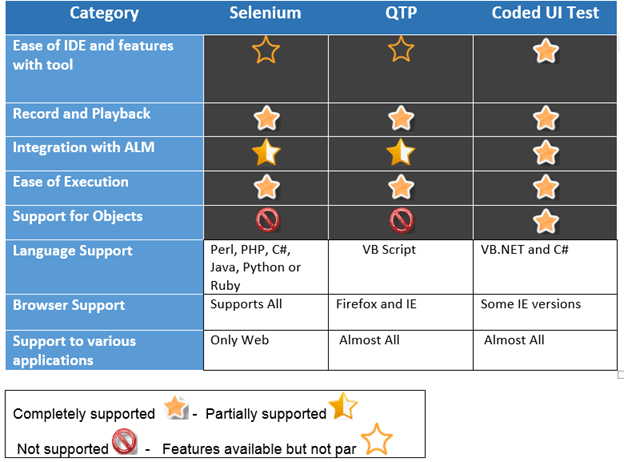
CUIT vs Selenium vs QTP
The following highlights key differences:
- Selenium focuses on web browsers and does not support WPF or native Windows applications.
- Coded UI uniquely supports Windows Store and Phone applications.
- TestComplete can test Windows apps but requires a plugin.
Takeaway
- Coded UI drives applications via their UI, making it ideal for end‑to‑end functional tests.
- It supports a wide range of technologies, from web services to Windows Phone apps.
- The framework promotes collaboration between developers and testers using a single language.
- Key project files include
UIMap.Designer.cs,UIMap.cs,CodedUITest1.cs, andUIMap.uitest.
C Language
- Labman Automation: Pioneering Bespoke Robotic Solutions Across Industries
- Spring Framework 2026: Comprehensive Overview, Features, Architecture, MVC, AOP, and Installation Guide
- Master Python Unit Testing with PyUnit: A Practical Guide & Example
- PyTest Tutorial: Install, Write, and Run Python Tests with Confidence
- Master C Programming: Comprehensive Tutorial for Beginners
- Robotic Process Automation vs. Test Automation: Key Differences & Business Impact
- Build JARVIS v1 Home Automation with Arduino Nano – Step‑by‑Step Tutorial
- AI-Driven Test Automation: Revolutionizing QA for Modern ERP Systems
- Boost Automation Success: A Proven 7‑Pillar Framework for Scaling RPA Programs
- Industrial Automation 4.0: Revolutionizing Production Efficiency