



Spring Framework 2026: Comprehensive Overview, Features, Architecture, MVC, AOP, and Installation Guide
What Is Spring Framework?
Spring is a lightweight, open‑source Java framework that simplifies building enterprise applications. It promotes loose coupling through Inversion of Control (IoC) and Dependency Injection (DI), and it serves as a foundation for other Java technologies such as Hibernate, Struts, JSF, and Tapestry.
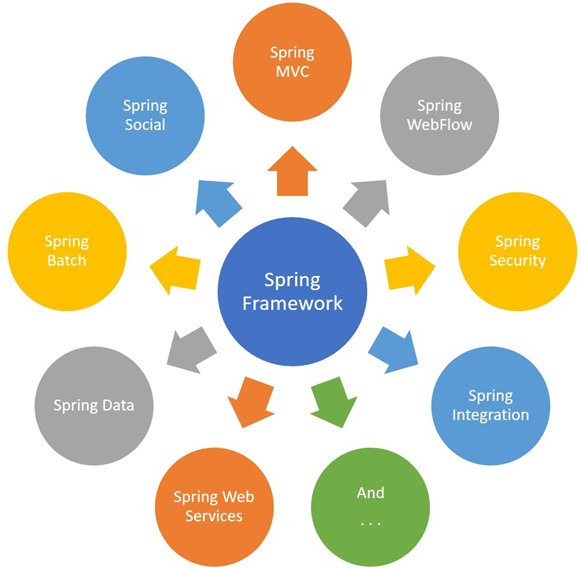
In this tutorial you’ll discover:
- The core purpose of Spring and its ecosystem
- Key features that make it popular
- Evolution of the framework through major releases
- Modular architecture and how to pick the right components
- Spring MVC fundamentals and request flow
- Aspect‑Oriented Programming (AOP) concepts
- Step‑by‑step installation instructions for Eclipse IDE
- Benefits and potential drawbacks
- Common interview questions for Spring developers
Core Features of Spring
- IoC & DI – promotes clean, testable code
- Pre‑built templates for JDBC, JPA, JMS, and more
- Fast, modular development with lightweight containers
- Declarative transaction and security support
- Rich integration with AOP, caching, and validation
- Extensive community resources and official documentation
Historical Milestones
- 2002 – Rod Johnson releases the first version
- 2004 – Spring 1.0 is officially launched
- 2006 – Spring 1.2.6 introduces early JPA support
- 2006 – Spring 2.0 arrives with improved DI and MVC
- 2007 – Spring 2.5 adds comprehensive annotations
- 2009 – Spring 3.0 delivers Java 5+ features and full JPA integration
- 2011 – Spring 3.1 introduces REST support and Java 6 compatibility
- 2013 – Spring 4.0 brings Java 8 features and optional modules
- 2015 – Spring 4.2.0/4.2.1 extend Groovy support
- 2016 – Spring 4.3 refines the core container
- 2017 – Spring 5.0 marks the shift to reactive programming with WebFlux
Spring Architecture Overview
Spring’s modular design consists of 20+ modules, allowing developers to include only what they need.
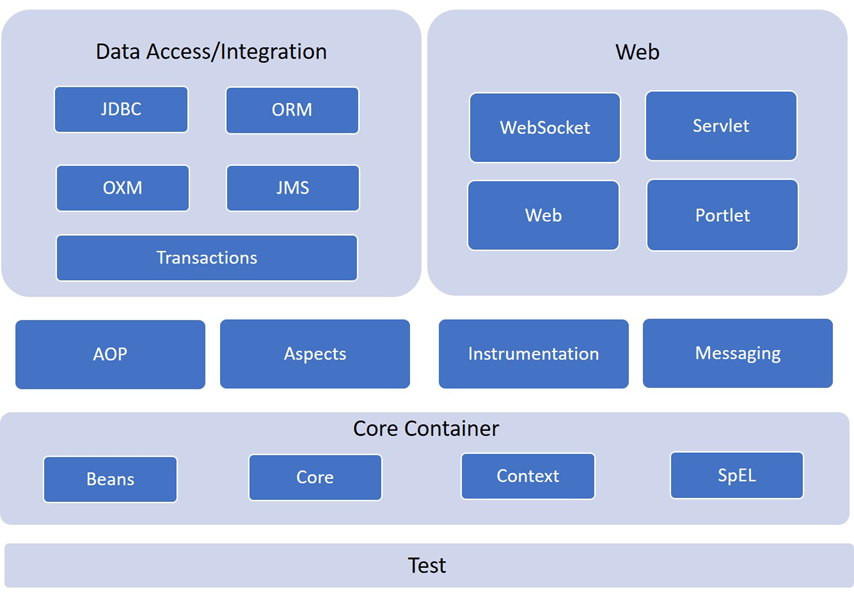
Core Container
- Spring Core – IoC and DI fundamentals
- Spring Beans – BeanFactory and advanced factory patterns
- Spring Context – ApplicationContext for global bean access
- SpEL (Spring Expression Language) – Runtime expression evaluation
Data Access & Integration
- JDBC – thin JDBC abstraction
- ORM – support for Hibernate, JPA, JDO, and others
- OXM – XML mapping utilities
- JMS – messaging support
- Transaction – declarative and programmatic transaction management
Web & MVC
- Spring Web – servlet listeners and web‑oriented context
- Spring Web‑Servlet – DispatcherServlet and MVC components
- Spring Web‑Socket – bidirectional WebSocket communication
- Spring Web‑Portlet – portlet support based on MVC
- AOP – modular cross‑cutting concerns
- Instrumentation – class instrumentation for specific servers
- Testing – seamless integration with JUnit and TestNG
Spring MVC – The Request‑Handling Pipeline
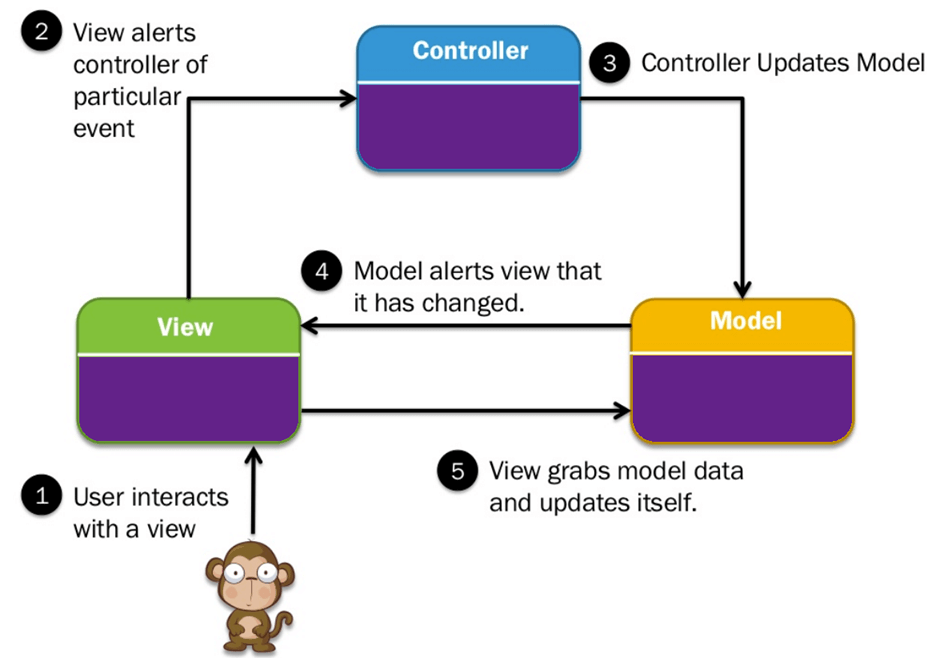
The MVC pattern decouples presentation, business, and navigation logic. Spring’s DispatcherServlet orchestrates the flow:
- Client request hits
DispatcherServlet - It consults
HandlerMappingto find the appropriateController - The controller processes data and returns a
ModelAndView - View name is resolved by
ViewResolverto a specific view (JSP, Thymeleaf, etc.) - View renders the model and sends the response back to the client
Aspect‑Oriented Programming (AOP)
AOP isolates cross‑cutting concerns such as logging, security, and transactions into reusable aspects.
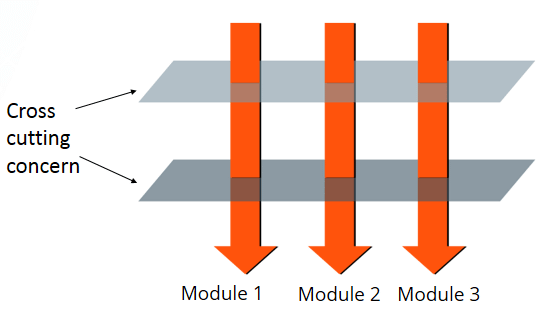
Seven Core AOP Concepts
- Aspect – modular class (or annotation) containing cross‑cutting logic
- Join‑point – a specific point during execution (method call, exception, etc.)
- Advice – the action taken at a join‑point (before, after, around)
- Pointcut – expression that matches join‑points
- Target Object – the original bean to be advised
- Proxy – runtime wrapper that weaves advice into the target
- Weaving – the process of linking aspects with the target classes
Installing Spring in Eclipse
Follow these steps to set up Spring in your Eclipse IDE:
- Visit https://www.eclipse.org and download the Eclipse IDE for Java Developers (64‑bit) for Windows.
- Run the installer or unzip the downloaded file to a chosen folder.
- Launch Eclipse and select a workspace directory when prompted.
- Open Help > Eclipse Marketplace from the menu.
- Search for “Spring” and click Install on the Spring Tools Suite entry.
- Follow the installation wizard, accept the license agreements, and click Finish.
- When prompted, restart Eclipse to activate the plugin.
Once Eclipse restarts, the Spring perspective will be available under Window > Perspective > Open Perspective > Spring.
Benefits of Spring
- Encourages POJO‑based development for maximum portability.
- Provides comprehensive, annotation‑driven templates for data access (JDBC, JPA, Hibernate).
- Abstracts away Java EE boilerplate, making code cleaner and easier to maintain.
- Facilitates modularity – include only the modules you need.
- Declarative support for transactions, caching, validation, and security.
- Rich ecosystem of community plugins and documentation.
Potential Drawbacks
- Learning curve can be steep for beginners due to numerous concepts.
- Heavy configuration can lead to verbose XML or lengthy Java config if not managed properly.
- Some developers find the abundance of options overwhelming for small projects.
Key Takeaways
- Spring is a mature, open‑source Java framework first released in 2002.
- Its 20+ modules allow developers to pick only what’s needed.
- Spring MVC, powered by
DispatcherServlet, promotes clean separation of concerns. - AOP lets you modularize cross‑cutting concerns without cluttering business logic.
- Installation is straightforward via the Eclipse Marketplace.
- Spring’s strengths lie in IoC, declarative programming, and a vast ecosystem.
- Beware of the learning curve and potential configuration bloat.
Java
- What Are Music Wire Springs? Strength, Durability, and Modern Applications
- What Are Garter Springs? Design, Function, and Sealing Applications
- How Gas Springs Store Energy: Mechanics, Function, and Applications
- Mechanical Extension Springs Explained: How They Work and Why They’re Essential
- How to Install WordPress on Google Cloud: A Step‑by‑Step Guide
- Coded UI Test Automation Framework: A Comprehensive Beginner’s Guide
- PyTest Tutorial: Install, Write, and Run Python Tests with Confidence
- Exploring 6G: The Future of Ultra-Fast Connectivity
- Expert Guide: Installing Dock Levelers for Maximum Efficiency
- Helical Springs Explained: How They Store Energy, Absorb Shock, and Restrain Forces