



Mastering Groovy: A Beginner’s Guide to Scripting on the Java Platform
What Is Groovy?
Apache Groovy is an object‑oriented, Java‑syntax‑compatible language that runs on the JVM. It compiles to Java bytecode, so any system with a Java Runtime Environment can execute it. Groovy adds dynamic typing, closures, DSL support, and concise syntax, making it an ideal companion rather than a replacement for Java.
Why Use Groovy?
- Dynamic, agile language with fast prototyping
- Seamless integration with existing Java libraries
- Natural for Java developers – minimal learning curve
- More concise, expressive code than Java
- Can be mixed freely with Java – use as much or as little as you like
Groovy History
- 2003 – Developed by Bob McWhirter & James Strachan
- 2004 – Drafted as JSR 241 (abandoned)
- 2005 – Revived by Jeremy Rayner & Guillaume Laforge
- 2007 – 1.0 released
- 2012 – 2.0 released
- 2014 – 2.3 (supports Java 8)
- 2015 – Became an Apache Software Foundation project
Key Features of Groovy
- Literal syntax for lists, maps, ranges, regexes
- Multimethods and metaprogramming capabilities
- Dynamic and optional static typing
- Operator overloading and concise syntax (no semicolons or parentheses needed in many cases)
- Closures and the MetaObject Protocol for powerful scripting
- Full compatibility with Java bytecode and libraries
How to Install Groovy
- Ensure Java is installed – Java installation guide
- Download the installer from Groovy Download Page
- Run the installer, select language, and click OK
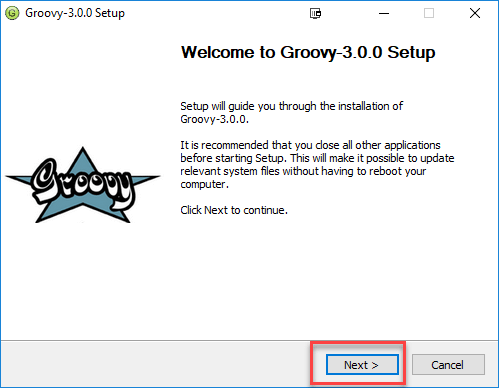
- Click NEXT on the welcome screen
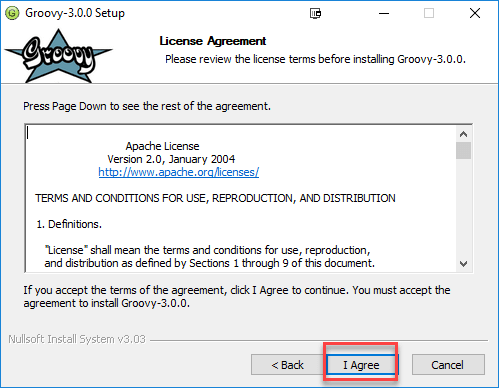
- Accept the license terms
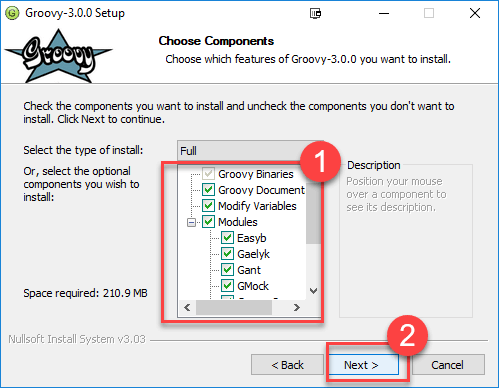
- Select components to install and click NEXT
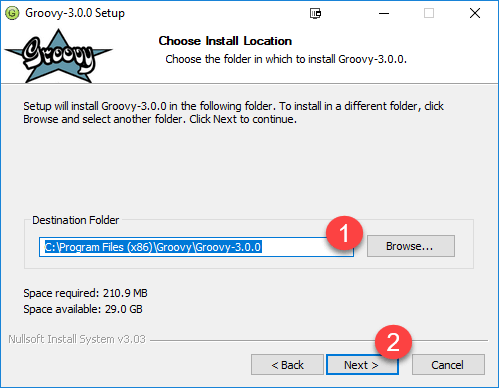
- Choose installation directory and click NEXT
- Set Start Menu folder and click NEXT
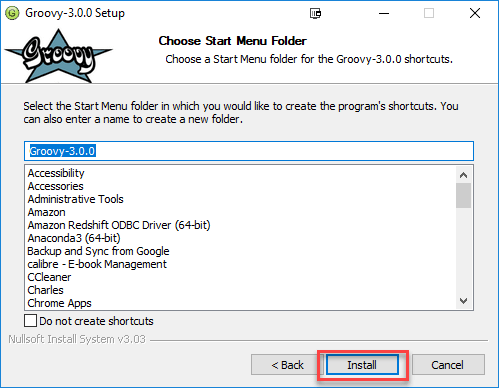
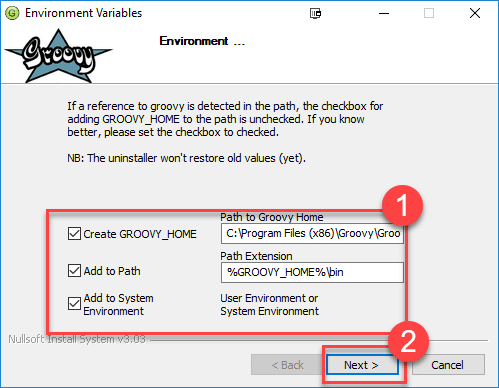
- Finish installation (paths remain default) and click NEXT
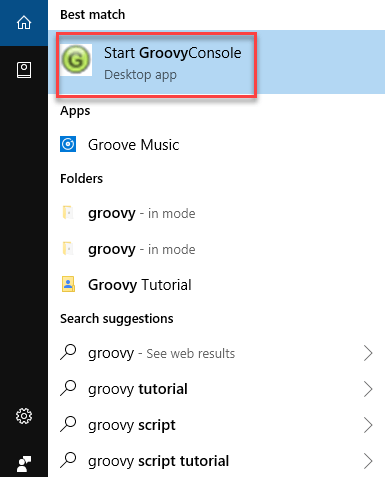
- After installation, launch Groovy Console from the Start Menu to verify
Groovy Hello World
Java version:
public class Demo {
    public static void main(String[] args) {
        System.out.println("Hello World");
    }
}
Groovy equivalent – a single line:
println "Hello World."
Groovy removes the need for semicolons, parentheses, and the verbose System.out.println.
Variables
Java requires explicit types:
public class Demo {
    public static void main(String[] args) {
        int x = 104;
        System.out.println(x);
        // x = "Guru99"; // Compile‑time error
    }
}
Groovy supports dynamic typing via def:
def x = 104
println x.getClass()
x = "Guru99"
println x.getClass()
Output:
class java.lang.Integer
class java.lang.String
Multiline strings use triple quotes:
def x = """Groovy
at
Guru99"""
println x
Operators
Groovy supports the usual categories:
- Arithmetic:
+ - * / % - Relational:
== != < <= > >= - Logical:
&& || ! - Bitwise:
& | ^ ~ - Assignment:
= += -= *= /= %=
Loops
Java for‑loop:
for (int i = 0; i <= 5; i++) {
    System.out.println(i);
}
Groovy equivalents:
0.upto(4) { println "$it" }
2.upto(4) { println "$it" }
5.times { println "$it" }
0.step(7, 2) { println "$it" }
Decision Making
| Statement | Description |
|---|---|
| if | Executed when condition is true. |
| if/else | Executes the true branch; otherwise the else branch. |
| nested if | Multiple conditional branches. |
| switch | Cleaner alternative for multi‑branch logic. |
| nested switch | Supported in Groovy. |
Lists
A list is an ordered collection of references, defined with square brackets.
- String list:
['Angular', 'Nodejs'] - Mixed list:
['Groovy', 2, 4.6] - Integer list:
[16, 17, 18, 19] - Empty list:
[]
Common list methods:
| Method | Description |
|---|---|
| add() | Append value to the end. |
| contains() | True if value exists. |
| get() | Element at index. |
| isEmpty() | True if list has no elements. |
| minus() | Return new list minus specified elements. |
| plus() | Return new list with added elements. |
| pop() | Remove last element. |
| remove() | Remove element at index. |
| reverse() | Return reversed list. |
| size() | Number of elements. |
| sort() | Return sorted copy. |
Example:
def y = ["Guru99", "is", "Best", "for", "Groovy"]
println y
y.add("Learning")
println(y.contains("is"))
println(y.get(2))
println(y.pop())
Output:
[Guru99, is, Best, for, Groovy]
true
Best
Learning
Maps
A map is a collection of key‑value pairs.
- Example:
[Tutorial:'Java', Tutorial:'Groovy']– keyTutorialwith two values. - Empty map:
[]
Map methods:
| Method | Description |
|---|---|
| containsKey() | Check for a key. |
| get() | Return value for a key. |
| keySet() | Set of keys. |
| put() | Add or replace a key/value pair. |
| size() | Number of entries. |
| values() | Collection of values. |
Example:
def y = [fName:'Jen', lName:'Cruise', sex:'F']
print y.get("fName")
Output:
Jen
Closures
A closure is a block of code treated as an object, similar to a lambda.
Simple closure:
def myClosure = {
    println "My First Closure"
}
myClosure()
With parameters:
def sum = { a, b, c ->
    return a + b + c
}
println sum(1, 2, 3)
Output:
6
Groovy vs. Java
| Groovy | Java |
|---|---|
| Default access modifier is public. | Default is package‑private. |
| Automatic getters/setters for fields. | Must be defined manually. |
| String interpolation with double quotes. | No interpolation. |
| Typing optional. | Typing mandatory. |
| No semicolons needed. | Semicolons required. |
Every script automatically extends Script class. | Needs public static void main for execution. |
Common Myths
| Myth | Reality |
|---|---|
| Groovy is only for scripting. | It’s versatile: used for web frameworks, data processing, and more. |
| Groovy is purely functional. | It borrows functional concepts but remains an OOP language. |
| Groovy is ideal only for TDD. | It supports TDD but is useful in many scenarios. |
| Groovy is limited to Grails. | Grails is a popular framework, but Groovy works independently. |
Cons of Using Groovy
- JVM startup can be slower, affecting quick scripts.
- Not universally adopted outside Java ecosystems.
- Less convenient without an IDE.
- Runtime performance may lag behind Java.
- Higher memory footprint.
- Java knowledge is essential for effective use.
Essential Groovy Tools
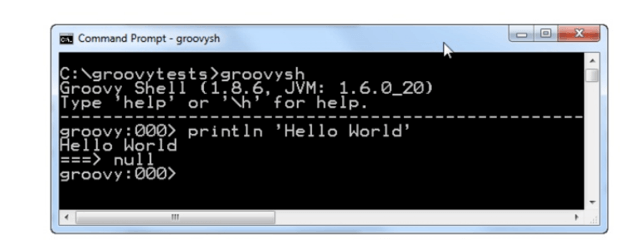
- groovysh – Interactive command‑line shell.
- groovyConsole – Swing GUI for running scripts.
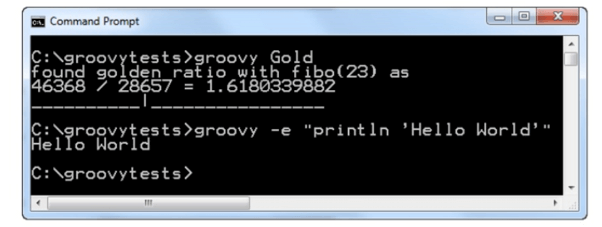
- groovy – Command‑line interpreter for executing scripts.
Examples of usage:
groovysh
- Enter statements or entire scripts interactively.
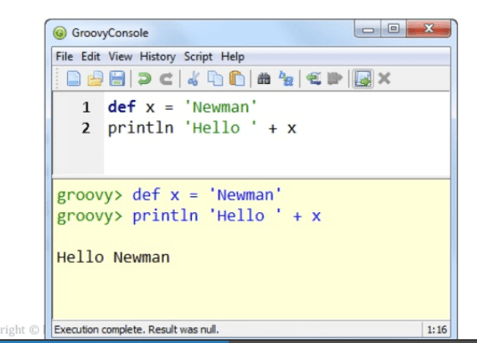
groovyConsole
- Minimal editor for writing and running Groovy code.
groovy
- Runs Groovy scripts from the command line.
Summary
- Groovy is an object‑oriented language for the Java platform.
- It offers seamless integration with Java libraries.
- Key features include dynamic typing, closures, and literal syntax.
- Groovy supports standard operators, control flow, collections, and maps.
- It automates getters/setters and eliminates boilerplate.
- While it may have performance trade‑offs, its productivity gains are significant.
- Groovy tools such as groovysh, groovyConsole, and the groovy interpreter streamline development.
Java
- Master Java For Loops: Syntax, Examples, and Best Practices
- Build a Raspberry Pi Obstacle‑Avoiding Robot – A Beginner’s Guide
- CNC Routers for Beginners: Master the Market with Effortless Precision
- Master PowerShell: Beginner's Guide to Powerful Scripting
- Master C Programming: Comprehensive PDF Tutorial for Beginners
- Mastering Groovy: A Beginner’s Guide to Scripting on the Java Platform
- JasperReports for Java: Comprehensive Tutorial with Installation, Features, and Sample Report
- Master Django: Beginner's Guide to Features, Architecture & History
- Beginner’s Guide to Using a 3D Pen: Easy Steps & Tips
- Essential Servo Motor Guide for Beginners: Learn Basics & Applications