



Apache Ant Tutorial – A Comprehensive Guide to the Build Tool and Practical Example
What Is a Build Tool?
A build tool automates the transformation of source code into a deployable application, handling tasks such as compiling, testing, packaging, and documentation generation. It frees developers from repetitive manual steps and ensures consistency across environments.
Why Apache Ant?
Apache Ant is a lightweight, Java‑based command‑line utility that converts source code into executable artifacts. Its name—Another Neat Tool—hints at its simplicity and extensibility. Ant’s XML‑based build scripts make the process transparent and easy to share among teams, while its rich set of built‑in tasks accelerates common development workflows.
What You’ll Learn in This Tutorial
- The fundamentals of Apache Ant and its architecture.
- Key benefits of using Ant for Java projects.
- A quick look at Ant’s history and evolution.
- Core features that make Ant a popular choice.
- Step‑by‑step installation on Windows.
- A working example that prints "Hello, World".
- The structure of an Ant project.
- Best practices for writing clean, maintainable build files.
- Advantages that set Ant apart from other build tools.
Benefits of Using Apache Ant
- Automates repetitive tasks such as compiling, testing, and packaging.
- Runs headless, making it ideal for CI/CD pipelines.
- Compiles only what’s necessary, saving time on large projects.
- Supports both Windows and UNIX/Linux platforms.
- Integrates smoothly with IDEs and build servers.
- Offers a rich library of predefined tasks and easy extension with custom Java classes.
Historical Milestones
- July 2000 – James Duncan Davidson creates Ant, initially used to build Tomcat.
- May 2014 – Version 1.9.4 released with advanced features.
- March 2018 – Latest stable release, 1.10.3, brings further improvements.
Key Features of Apache Ant
- Open‑source and free to use.
- Runs wherever a JVM is available.
- Extensive set of built‑in tasks (copy, compile, jar, etc.).
- Custom task support via Java classes.
- Command‑line interface, enabling easy CI integration.
- Supports deployment to test servers and beyond.
- Backward‑compatible and extensible architecture.
Installing Apache Ant on Windows
Before you begin, ensure the Java Development Kit (JDK) is installed and JAVA_HOME points to its installation directory.
- Download the binaries from Apache Ant Download Page.
- Extract the ZIP archive to a convenient location, e.g.,
C:\apache-ant-1.10.3. - Create an environment variable
ANT_HOMEthat points to the Ant root directory. - In the same directory, add
%ANT_HOME%\binto thePathvariable. - Open a new command prompt and run
ant -versionto verify the installation.
Typical output:
Apache Ant(TM) version 1.10.3 compiled on March 08 2018
Default Java version: 1.8.0_231, vendor: Oracle Corporation
Default Java home: C:\Program Files\Java\jdk1.8.0_231\jre
Practical Example – Hello, World
<?xml version="1.0"?>
<project name="HelloWorld" default="hello" basedir=".">
  <target name="hello">
    <echo>Hello, World</echo>
  </target>
</project>
Save this as build.xml and run:
ant hello
The console should display Hello, World.
Ant Project Structure
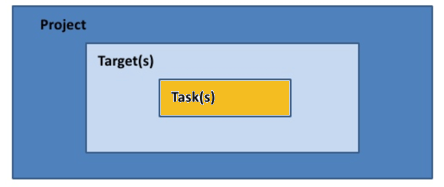
Every Ant build revolves around three core elements:
- Project – The root element that defines the overall build context.
- Target – A named set of tasks that accomplish a specific build step.
- Task – An executable operation such as
javacorjar.
Project Element
- name – Identifier for the project.
- basedir – Root directory for relative paths.
- default – Target executed when none is specified.
Target Element
- name – Required identifier.
- description – Optional human‑readable description.
- depends – Comma‑separated list of targets that must run first.
- if / unless – Conditional execution based on properties.
Task Syntax
<taskName attribute1="value" attribute2="value2" />
Use built‑in tasks or write custom ones in Java.
Best Practices
- Store build numbers in a
build.propertiesfile to maintain version consistency. - Centralize configuration in
build.propertiesandlibrary.propertiesto avoid hard‑coding. - Leverage Ant’s
<property>task to load external properties files. - Keep your
build.xmlmodular by splitting large builds into sub‑projects. - Document targets and tasks with clear descriptions for maintainability.
Why Choose Apache Ant?
- Platform‑neutral with automatic handling of file separators.
- XML syntax is familiar to developers, easing the learning curve.
- Rich library of predefined tasks covering most Java build scenarios.
- Extensible via Java, allowing custom logic without sacrificing performance.
- Command‑line friendliness supports seamless CI/CD integration.
- Open source with active community support.
- Built‑in support for Java EE development (EJB compilation, EAR packaging).
- Suitable for both small projects and large enterprise applications.
Summary
- Ant is an XML‑based build tool that automates compiling, testing, and packaging.
- Created by James Duncan Davidson in 2000, it has evolved into a stable platform with version 1.10.3.
- It offers a robust set of built‑in tasks, custom task support, and cross‑platform compatibility.
- Ant projects are organized into
project,target, andtasknodes. - Best practices include externalizing properties, modularizing build scripts, and thorough documentation.
- Its platform neutrality, extensibility, and strong community make Ant a reliable choice for Java developers.
Java
- What Is a Punch Tool? A Woodworker’s Essential Guide
- C# Abstract Classes: A Practical Tutorial with Code Examples
- Master Java Reflection API: A Practical Guide with Code Examples
- Spring Framework 2026: Comprehensive Overview, Features, Architecture, MVC, AOP, and Installation Guide
- JasperReports for Java: Comprehensive Tutorial with Installation, Features, and Sample Report
- Understanding Tool Posts: Types, Functions, and Applications on Lathes
- Pneumatic Hammers: Powerful Air-Driven Tools for Concrete, Asphalt, and Tile Work
- Understanding Allen Wrenches: Types, Uses, and How to Choose the Right One
- Crowbars Explained: Design, Uses, and History
- Lathes Explained: From Ancient Egypt to Modern Manufacturing