



Java Variables and Data Types – A Comprehensive Guide with Examples
What Is a Variable in Java?
A variable is a named memory location that holds data during a Java program’s execution. Every variable is assigned a data type that specifies the kind of value it can store and the amount of memory required.
Java variables are grouped into three main categories:
- Local variables – declared inside a method or block.
- Instance variables – declared in a class but outside methods; they belong to individual objects.
- Static variables – declared with the
statickeyword; they belong to the class itself and are initialized once when the program starts.
Using Variables: Declaration & Initialization
To work with a variable, you must:
- Declare it by specifying its type and name.
- Initialize it by assigning a value.
Variable Declaration
When declaring a variable, you provide its type and a unique name.
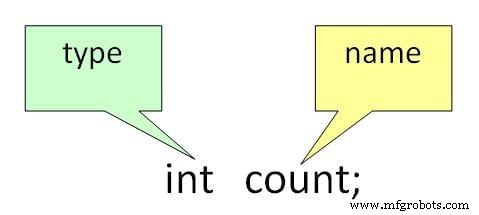
Valid declaration examples:
int a, b, c;
float pi;
double d;
char a;
Variable Initialization
Initialization assigns an initial value to a variable.
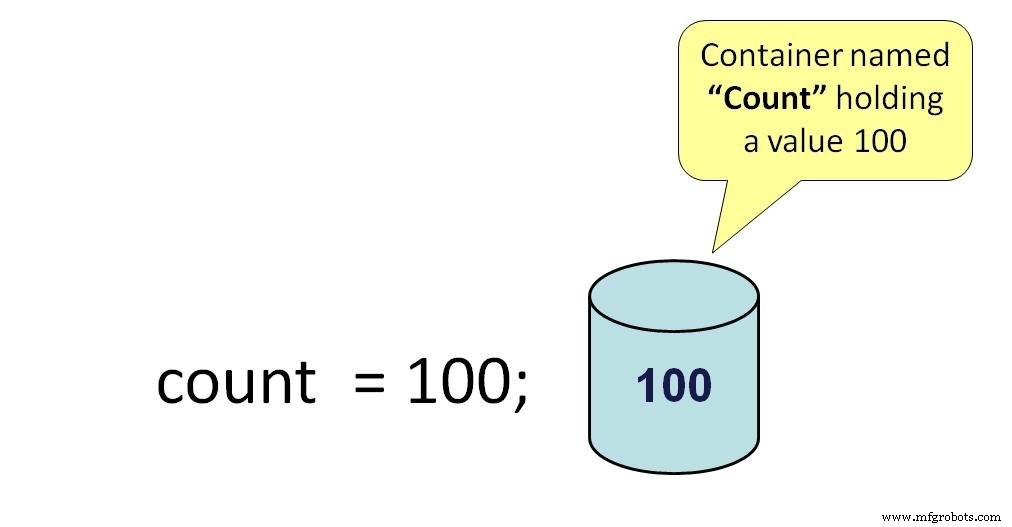
Valid initialization examples:
pi = 3.14f;
do = 20.22d;
a = 'v';
You can combine declaration and initialization in a single statement:
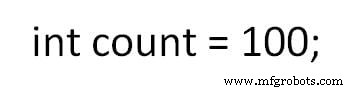
Example:
int a = 2, b = 4, c = 6;
float pi = 3.14f;
double do = 20.22d;
char a = 'v';
Types of Variables
Java distinguishes three kinds of variables:
- Local Variables
- Instance Variables
- Static Variables
1) Local Variables
Declared inside a method or block, they exist only during that method’s execution.
2) Instance Variables
Defined without the static keyword, they are tied to individual objects of a class.
3) Static Variables
Initialized once at program start, before any instance variables. They belong to the class rather than any instance.
Example: Types of Variables in Java
class Guru99 {
    static int a = 1; // static variable
    int data = 99; // instance variable
    void method() {
        int b = 90; // local variable
    }
}
Data Types in Java
Java’s data types are divided into two categories:
- Primitive types – built‑in types such as int, char, boolean, and float.
- Non‑primitive types – classes, arrays, interfaces, and other objects.
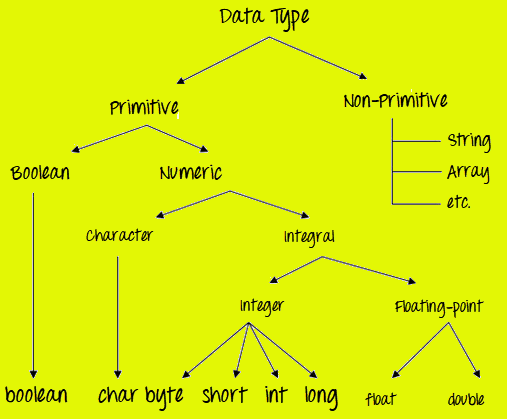
Primitive Data Types
Java provides eight primitive types, each with a fixed size and default value:
- Integer types –
byte(1 byte),short(2 bytes),int(4 bytes),long(8 bytes) - Floating‑point types –
float(4 bytes),double(8 bytes) - Textual type –
char(2 bytes, Unicode) - Logical type –
boolean(1 bit,trueorfalse)
| Data Type | Default Value | Size |
|---|---|---|
| byte | 0 | 1 byte |
| short | 0 | 2 bytes |
| int | 0 | 4 bytes |
| long | 0L | 8 bytes |
| float | 0.0f | 4 bytes |
| double | 0.0d | 8 bytes |
| boolean | false | 1 bit |
| char | '\u0000' | 2 bytes |
Key Takeaways
- All numeric types are signed (can represent positive and negative values).
- Data type sizes are consistent across platforms due to the Java Language Specification.
- Java’s
charuses 2 bytes because it stores Unicode characters, enabling full internationalization support.
Type Conversion and Casting
Java allows values of one type to be assigned to variables of another type through two mechanisms:
- Implicit Conversion (Widening) – assigning a smaller type to a larger type (e.g.,
inttolong). This happens automatically. - Explicit Casting (Narrowing) – assigning a larger type to a smaller type (e.g.,
doubletoint). The programmer must cast explicitly; otherwise, the compiler reports an error to prevent accidental data loss.
Example: Demonstrating Type Casting
Step 1: Copy the following code into an editor.
class Demo {
    public static void main(String[] args) {
        byte x;
        int a = 270;
        double b = 128.128;
        System.out.println("int converted to byte");
        x = (byte) a;
        System.out.println("a and x " + a + " " + x);
        System.out.println("double converted to int");
        a = (int) b;
        System.out.println("b and a " + b + " " + a);
        System.out.println("\ndouble converted to byte");
        x = (byte) b;
        System.out.println("b and x " + b + " " + x);
    }
}
Step 2: Save, compile, and run the code.
Output:
int converted to byte
a and x 270 14
double converted to int
b and a 128.128 128
double converted to byte
b and x 128.128 -128
Java
- Master C# Variables & Primitive Data Types: A Complete Guide
- Java Variables and Literals: A Comprehensive Guide
- Java Primitive Data Types: A Complete Guide with Examples
- Mastering C# Variables & Operators: Practical Examples & Explanations
- Encapsulation in Java: A Comprehensive Guide with Practical Example
- Understanding Java Classes and Objects: Clear Concepts, Practical Examples
- Master Java String Manipulation: Essential Functions, Methods, and Practical Examples
- Mastering the 'this' Keyword in Java: Purpose, Usage, and Practical Examples
- Java Inheritance Explained: Types, Syntax, and Practical Examples
- Understanding Java Variable Types: A Comprehensive Guide