



Seamless Modbus Sensor Integration Using EdgeX Foundry on Raspberry Pi
Seamless Modbus Sensor Integration Using EdgeX Foundry on Raspberry Pi
Industrial Internet of Things (IIoT) deployments increasingly rely on edge gateways to bridge Modbus‑enabled peripherals with cloud analytics. Building a proprietary gateway can be expensive and slow. This case study demonstrates how an open‑source framework—EdgeX Foundry—can be deployed on a Raspberry Pi to connect a Modbus temperature‑humidity sensor, stream data to the cloud, and trigger real‑time actuations with minimal effort.
Why Modbus and EdgeX?
Modbus is an open, lightweight protocol that runs over inexpensive RS‑485 links. It uses simple registers (16‑bit unsigned integers) for analog values and coils for binary states, making it ideal for industrial devices. EdgeX Foundry, an open‑source edge middleware, acts as the bridge between physical sensors and IT systems, providing device management, data transformation, and cloud connectivity out of the box.
Hardware Stack
- Raspberry Pi 4 (edge gateway)
- Modbus RTU sensor: SHT20 (temperature & humidity)
- RS‑485 to USB converter
- LEDs for visual status (GPIO‑12 & GPIO‑14)
- USB power supply
Figure 1:  Figure 1. EdgeX Foundry – open‑source edge middleware
Figure 2: 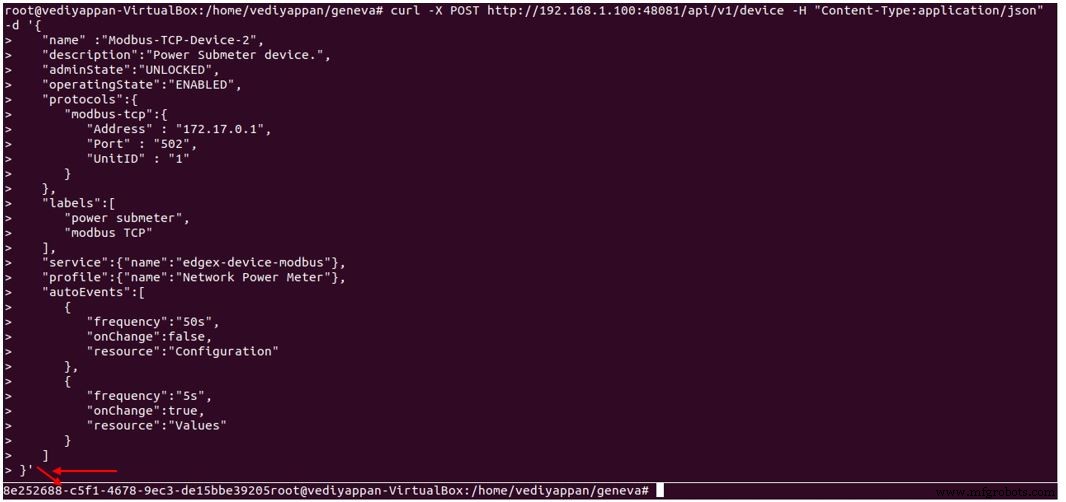 Figure 2. High‑level block diagram of the EdgeX deployment
Step‑by‑Step Integration
- Set up the Raspberry Pi
- Install Ubuntu 20.04 LTS with Docker and docker‑compose.
- Clone the EdgeX Foundry repository and launch the stack via docker‑compose.
- Simulate the Modbus device
- Use ModbusPal (GPL) to emulate up to 247 Modbus slaves.
- Configure a slave with holding registers for temperature (address 2) and humidity (address 3). Each register maps to a 16‑bit integer that will be scaled to °C and %RH.
- Start ModbusPal over TCP or serial (USB‑RS485) to verify communication.
- Upload the device profile
Send a
POSTrequest tohttps://localhost:48081/api/v1/deviceprofile/uploadfilewith the YAML file containing the profile (see below). The response returns a unique profile ID. - Register the device
Post the following JSON to
https://localhost:48081/api/v1/deviceto create the sensor entry. Theprotocols.modbus‑rtusection points to/dev/ttyUSB0at 9600 baud.{ "name": "TemperatureHumiditySensor", "description": "Industrial Grade Temperature & Humidity Transmitter SHT20", "adminState": "UNLOCKED", "operatingState": "ENABLED", "protocols": { "modbus-rtu": { "Address": "/dev/ttyUSB0", "BaudRate": "9600", "DataBits": "8", "StopBits": "1", "Parity": "N", "UnitID": "1" } }, "labels": ["TemperatureHumiditySensor","modbusRTU"], "service": {"name": "edgex-device-modbus"}, "profile": {"name": "TemperatureHumiditySensor"}, "autoEvents": [ {"frequency": "5s", "onChange": false, "resource": "TemperatureDegC"}, {"frequency": "5s", "onChange": false, "resource": "HumidityPercentRH"} ] } - Verify data flow
- EdgeX’s device service pulls data every 5 s and writes to the core service, which stores it in Redis.
- Application services forward the data to the IBM Cloud (or any cloud of choice).
- Example log entries show the Modbus request/response packets.
- Actuate LEDs with Kuiper rules engine
- Define rules: if temperature > 30 °C turn on red LED; if < 30 °C turn it off; similarly for blue LED at 28 °C.
- Kuiper pushes commands to EdgeX core‑command, which then updates the GPIO device service.
- GPIO outputs are verified via
/sys/class/gpio/gpio12/valueand/sys/class/gpio/gpio14/value.
Key Configuration Snippets
Device profile (YAML)
name: TemperatureHumiditySensor
manufacturer: ROBOKITS
model: RKI-4879
labels:
  - SHT20
description: Industrial Grade Temperature & Humidity Transmitter SHT20 Sensor High Precision Monitoring Modbus RS485
deviceResources:
  - name: TemperatureDegC
    description: Room Temperature in Degrees Celsius.
    attributes: { primaryTable: INPUT_REGISTERS, startingAddress: 2, rawType: INT16 }
    properties:
      value: { type: Float32, readWrite: R, scale: 0.1, floatEncoding: eNotation }
      units: { type: String, readWrite: R, defaultValue: degrees celsius }
  - name: HumidityPercentRH
    description: Room Humidity in %RH.
    attributes: { primaryTable: INPUT_REGISTERS, startingAddress: 3, rawType: INT16 }
    properties:
      value: { type: Float32, readWrite: R, scale: 0.1, floatEncoding: eNotation }
      units: { type: String, readWrite: R, defaultValue: %RH }
deviceCommands:
  - name: TemperatureDegC
    get: [{ index: 1, operation: get, deviceResource: TemperatureDegC }]
  - name: HumidityPercentRH
    get: [{ index: 2, operation: get, deviceResource: HumidityPercentRH }]
coreCommands:
  - name: TemperatureDegC
    get:
      path: /api/v1/device/{deviceId}/TemperatureDegC
      responses:
        - code: 200
          description: Get the temperature in degrees C
          expectedValues: [TemperatureDegC]
  - name: HumidityPercentRH
    get:
      path: /api/v1/device/{deviceId}/HumidityPercentRH
      responses:
        - code: 200
          description: Get the humidity in %RH
          expectedValues: [HumidityPercentRH]
device‑modbus TOML configuration (excerpt)
[DeviceList]
  Name = "TemperatureHumiditySensor"
  Profile = "TemperatureHumiditySensor"
  Description = "Industrial Grade Temperature & Humidity Transmitter SHT20"
  labels = ["TemperatureHumiditySensor","modbusRTU"]
  [DeviceList.Protocols.modbus-rtu]
    Address = "/dev/ttyUSB0"
    BaudRate = 9600
    DataBits = 8
    StopBits = 1
    Parity = "N"
    UnitID = 1
  [[DeviceList.AutoEvents]]
    Frequency = "5s"
    OnChange = false
    Resource = "TemperatureDegC"
  [[DeviceList.AutoEvents]]
    Frequency = "5s"
    OnChange = false
    Resource = "HumidityPercentRH"
Results
The end‑to‑end flow shows real‑time temperature and humidity data arriving in the IBM Cloud, triggering rule‑based LED status changes, and demonstrating the full capabilities of EdgeX on a low‑cost Raspberry Pi.
Conclusion
EdgeX Foundry enables rapid deployment of Modbus‑based IIoT solutions with minimal development overhead. By abstracting device management, data storage, and cloud connectivity, it frees engineers to focus on domain logic and analytics.
Acronyms
| Acronym | Expansion |
|---|---|
| AOF | Append Only File |
| API | Application Program Interface |
| AWS | Amazon Web Services |
| BACnet | Building Automation and Control Network |
| BLE | Bluetooth Low Energy |
| CURL | Client Uniform Resource Locator |
| GPIO | General Purpose Input Output |
| HTTP | Hypertext Transfer Protocol |
| IBM | International Business Machines |
| IIoT | Industrial Internet of Things |
| IoT | Internet of Things |
| IT | Information Technology |
| LED | Light Emitting Diode |
| LTS | Long Term Support |
| M2M | Man to Machine |
| MQTT | Message Queuing Telemetry Transport |
| RDB | Redis Database |
| Redis | REmote DIctionary Server |
| REST | Representational State Transfer |
| RS‑485 | Recommended Standard – 485 |
| SCADA | Supervisory Control and Data Acquisition |
| SQL | Structured Query Language |
| TCP/IP | Transmission Control Protocol/Internet Protocol |
Internet of Things Technology
- OpenDDS vs. RTI Connext DDS: Choosing the Right Data Distribution Service Solution
- A Beginner’s Guide to Open‑Source Terminology
- Accelerate Modbus Device Integration with an Open‑Source IIoT Edge Gateway
- IIoT Edge Development with Modbus: Building a Secure Sensor Data Flow on Raspberry Pi
- Designing ADC Drivers: Blocking vs. Non‑Blocking Polling Techniques
- Cisco Unveils Catalyst 5G Industrial Routers to Seamlessly Connect Enterprise and Edge Networks
- Advanced Vibration Sensors for IIoT: Empowering Predictive Maintenance & Asset Reliability
- Why Open Source Drives Innovation at the Edge – Essential eBook
- Open Source Powers the Rise of IoT and Edge Computing
- Master Edge AI Inferencing: A Practical Guide to Actionable Insights