



IIoT Edge Development with Modbus: Building a Secure Sensor Data Flow on Raspberry Pi
 Editor’s Note: The Industrial Internet of Things (IIoT) unlocks deep insights into industrial operations, boosting efficiency across connected systems. Large‑scale IIoT deployments rely on layered architectures to gather data from diverse sensors, securely transmit it to the cloud, and perform analytics that drive real‑world value. This chapter delves into IIoT edge development, focusing on the Modbus protocol as a lightweight, proven solution for serial communication.
Adapted from Industrial Internet Application Development, by Alena Traukina, Jayant Thomas, Prashant Tyagi, Kishore Reddipalli.
Chapter 3. IIoT Edge Development (Continued)
Industrial M2M Protocols – Modbus
In this section we build a compact IoT application that sends sensor data from a Raspberry Pi hub to a receiver device (a PC or cloud) using Modbus TCP, the application‑layer variant of Modbus.
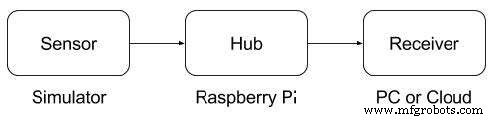
Data flow from a sensor simulator to a receiver device
Modbus is ideal for devices with constrained hardware: it’s simple, open‑source, and widely supported. Below is a concise specification snapshot to help you decide if Modbus meets your requirements.
| Key | Value |
|---|---|
| Open source | Yes* |
| OSI Layer | Transport or Application |
| Data types | Integer, float, string, Boolean |
| Limitations | • No large binary objects • Master polls devices for changes* • Max 254 devices per link* • Only contiguous transmissions |
| Operations | Read/write registers & coils, diagnostics |
| Latency | High |
| Usage | SMS, GPRS, wireline, wireless, mesh |
| Security | None |
| Compression | None |
Values marked with * vary across implementations.
Building Blocks
- Required software:
- Required hardware:
- Raspberry Pi 3 Model B
- 2 A/5 V power adapter
- 8 GB+ microSD card with adapter
- Ethernet cable for wired network
Preparing the SD Card
- Download the latest Raspbian Lite image from Raspberry Pi Downloads.
- Insert the SD card into a computer and flash the image using Etcher (https://www.balena.io/etcher/).
- Enable SSH by creating an empty file named
sshin the boot partition:cd /Volumes/boot touch ssh
- To enable Wi‑Fi, create
network.confwith:
network={
    ssid="YOUR_SSID"
    psk="YOUR_WIFI_PASSWORD"
}
Use nano to edit the file in the Linux console.
- Create the project directory:
/home/pi/hub. - In
/home/pi/hub/package.jsonadd:
{
    "name": "hub",
    "version": "1.0.0",
    "description": "",
    "main": "index.js",
    "scripts": {
        "start": "node index.js",
        "test": "echo \"Error: no test specified\" && exit 1"
    },
    "author": "",
    "license": "ISC",
    "dependencies": {
        "modbus": "0.0.16",
        "request": "^2.81.0"
    }
}
- In
/home/pi/hub/index.jsimplement the Modbus client to send data to your server. Replace the placeholders with real addresses:const modbus = require('modbus'); const request = require('request'); // Example: read sensor register and POST to remote server // (insert actual logic here)
- Create
/home/pi/hub/Dockerfile:FROM hypriot/rpi-node:boron-onbuild RUN apt-get update && apt-get install -y libmodbus5
- Create sensor project directory:
/home/pi/sensor.
- In
/home/pi/sensor/package.jsonadd:{ "name": "sensor", "version": "1.0.0", "description": "", "main": "index.js", "scripts": { "start": "node index.js", "test": "echo \"Error: no test specified\" && exit 1" }, "author": "", "license": "ISC", "dependencies": { "modbus": "0.0.16" } }
- In
/home/pi/sensor/index.jsimplement the sensor simulator and Modbus TCP client. ReplaceREMOTE-HUB-ADDRESS.comwith the hub’s IP or hostname:const modbus = require('modbus'); // Example: simulate sensor reading and write to Modbus // (insert actual logic here) - Create
/home/pi/sensor/Dockerfile:FROM hypriot/rpi-node:boron-onbuild RUN apt-get update && apt-get install -y libmodbus5
Deploying the Solution
Build Docker images, push them to a registry, and run containers on the Raspberry Pi. Ensure the hub and sensor containers can communicate over the local network. Once deployed, the sensor simulator will publish data via Modbus TCP to the hub, which forwards it to your cloud endpoint.
By following this guide you’ll have a robust, low‑overhead IIoT edge stack that demonstrates the power of Modbus in real‑world industrial scenarios.
Internet of Things Technology
- DocBox CEO on Building Data‑Centric, Interoperable Healthcare IoT Solutions
- IoT Edge Computing: Bridging Devices and Cloud for Real‑Time Insights
- Accelerate Modbus Device Integration with an Open‑Source IIoT Edge Gateway
- Prototyping IIoT Edge Devices: A Practical Guide
- Enhancing IIoT Edge Development with WebSockets: Secure, Real‑Time Connectivity
- Implementing HTTP Connectivity for IIoT Edge Devices: A Raspberry Pi DHT-12 Tutorial
- Leveraging OPC UA for Robust IIoT Edge Development
- Step‑by‑Step Guide: Extracting PLC Data with IIoT for Real‑Time Insights
- Future Outlook: Advancing Industrial IoT for Production Excellence
- Unlocking Actionable Edge Insights with AI & ML