



Fundamentals of SPICE Programming: A Practical Guide
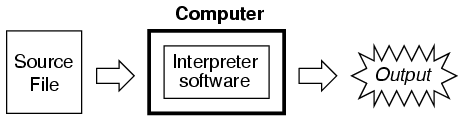
Programming a circuit simulation with SPICE follows the same principles as any other text‑based programming language. You write commands in a plain‑text file, save it, and then run an interpreter that translates the source into actions the computer can perform.
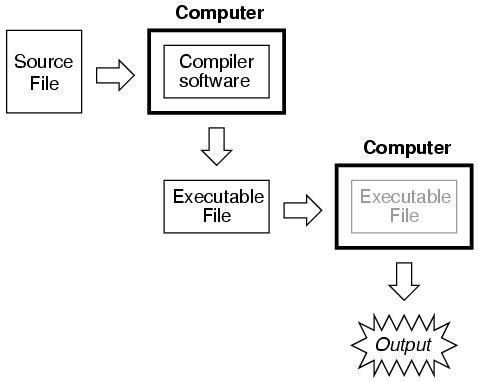
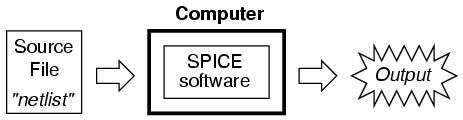
In SPICE, the interpreter is a dedicated program that must be installed on the computer. The source file – commonly called a netlist – contains a series of lines, each called a card, that describe components and special directives. Because SPICE is an interpreted language, the netlist is read and executed line by line; no separate compilation step is required.
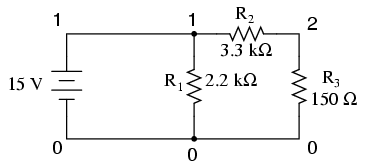
Netlists are created in a plain‑text editor (word processors should be avoided because they introduce non‑ASCII formatting that the interpreter cannot understand). The syntax is straightforward: each line defines either a circuit element or a control command, and components are connected by assigning node numbers. For example:
v1 1 0 dc 15
r1 1 0 2.2k
r2 1 2 3.3k
r3 2 0 150
.end
Here, v1 is a 15‑V DC source between nodes 1 and 0; r1, r2, and r3 are resistors connecting the indicated nodes. Nodes share the same number wherever components meet.
After creating the netlist, you invoke SPICE from a terminal. A typical command looks like this:
spice < example.cir
The spice command launches the interpreter, the < symbol feeds the contents of example.cir to it, and the simulation runs. SPICE can also pipe its output to utilities such as more for paged viewing:
spice < example.cir | more
Or redirect the output to a file for later review:
spice < example.cir > example.txt
Because the output is plain ASCII, you can edit it with any text editor or word processor, add comments, reformat headings, and print it without needing SPICE installed on the target machine.
Below is a typical console output from the example netlist. It includes the simulation header, the parsed netlist, node voltages, source currents, total power dissipation, and execution time.
1*******10/10/99 ******** spice 2g.6 3/15/83 ********07:32:42*****

0example netlist

0****   input listing                 temperature =   27.000 deg c

 v1 1 0 dc 15
 r1 1 0 2.2k
 r2 1 2 3.3k
 r3 2 0 150
 .end

*****10/10/99 *********  spice 2g.6  3/15/83 ******07:32:42******

0example netlist
0****   small signal bias solution     temperature =   27.000 deg c

  node   voltage     node   voltage

 (  1)   15.0000    (  2)    0.6522

     voltage source currents
     name       current

     v1       -1.117E-02

     total power dissipation   1.67E-01  watts

        job concluded
0         total job time            0.02
1*******10/10/99 ********  spice 2g.6  3/15/83 ******07:32:42*****

0****   input listing                 temperature =   27.000 deg c
For a cleaner presentation, you can trim the output after redirecting it to a file. A concise example might look like this:
example netlist
v1 1 0 dc 15
r1 1 0 2.2k
r2 1 2 3.3k
r3 2 0 150
.end
node    voltage    node     voltage
(  1)   15.0000    (  2)    0.6522
voltage source currents
name       current
v1       -1.117E-02
total power dissipation 1.67E-01 watts
Because both the input and output are plain text, they are universally readable and easily shareable across platforms. Feel free to enhance the output with word‑processing features, add explanatory comments, or integrate the results into reports and presentations.
Below are the key steps for using SPICE effectively:
- Compose a netlist in a plain‑text editor and save it.
- Run SPICE on the file and review the output.
- If errors appear, edit the netlist and rerun.
- Iterate until the simulation produces the desired results.
- Once validated, redirect the output to a file for formatting and printing.
By following this cycle, you’ll develop confidence in SPICE netlist syntax and learn how to debug common issues efficiently.
Note: SPICE file extensions are flexible; .cir, .inp, .txt, or no extension at all are all acceptable as long as the filename conforms to your operating system’s rules.
Images used in this article illustrate SPICE command structure and output. They are embedded as follows:
Industrial Technology
- PC Oscilloscope: Build a Low‑Cost Waveform Analyzer Using Your Computer
- Getting Started with SPICE: A Text‑Based Circuit Simulation Tool
- The Evolution of SPICE: From CANCER Roots to Modern Circuit Simulation
- Mastering SPICE Netlist Syntax: Component Naming, Passive & Active Elements, and Source Definitions
- Mastering SPICE: Common Quirks & How to Avoid Them
- SPICE Diode Modeling: A Practical Guide to Accurate Simulation
- Mastering Electric Circuit Simulation with SPICE: A Practical Guide for Designers and Students
- The Evolution of the Computer Mouse: Design, Manufacturing, and Future Trends
- Mastering C Programming Operators: A Comprehensive Guide
- Mastering the Basics of OD Grinding: Essential Techniques and Insights