



PC Oscilloscope: Build a Low‑Cost Waveform Analyzer Using Your Computer
PARTS AND MATERIALS
- IBM‑compatible PC with a sound card, running Windows 3.1 or newer
- Winscope software – free download from the internet (author: Dr. Constantin Zeldovich)
- Electronic musical keyboard
- Mono headphone plug for keyboard output
- Mono headphone plug for computer sound‑card microphone input
- 10 kΩ potentiometer
The Winscope application captures AC voltage signals through the sound‑card microphone input and displays them as waveforms on your screen. A comparable Linux utility, Oscope, is available for users of that platform. If neither program is available, the built‑in Windows “Sound Recorder” can provide a very basic waveform display.
CROSS‑REFERENCES
Lessons In Electric Circuits, Volume 2, Chapter 7: “Mixed‑Frequency AC Signals”
Lessons In Electric Circuits, Volume 2, Chapter 12: “AC Metering Circuits”
LEARNING OBJECTIVES
- Use computer software to emulate an oscilloscope
- Demonstrate the core functions of an oscilloscope
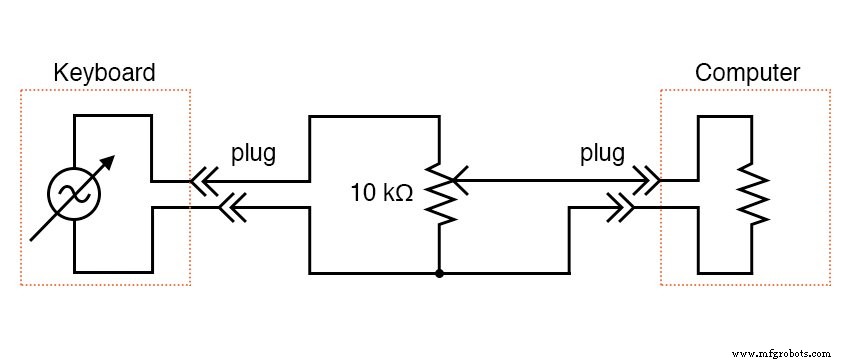
SCHEMATIC DIAGRAM
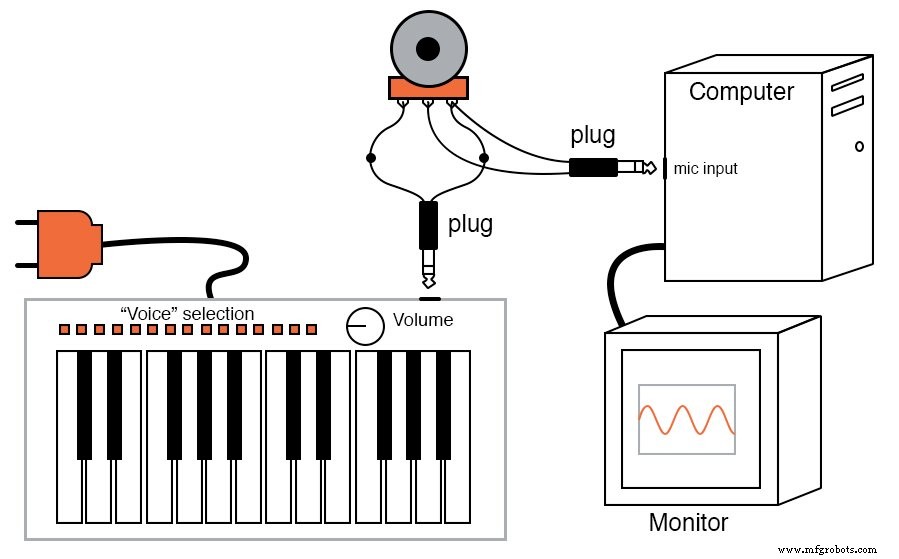
ILLUSTRATION
INSTRUCTIONS
The oscilloscope is an essential instrument for both students and professionals in electronics. Commercial oscilloscopes can be prohibitively expensive, and building one from scratch usually requires an existing oscilloscope for troubleshooting. Fortunately, the sound card of a standard PC can digitize low‑voltage AC signals in the 100 Hz–10 kHz range with adequate resolution, and free software can render these signals in oscilloscope format. For many hobbyists and educators, this presents a cost‑effective alternative.
⚠️ Safety Warning: Exposing the microphone input to voltages above the sound card’s tolerance can damage your computer. Musical keyboards typically output safe, low‑voltage signals, but other sources (e.g., function generators, power supplies) may pose a risk. Use this setup responsibly.
1. Connect the keyboard’s mono output to the outer terminals of the 10 kΩ potentiometer. Solder two wires to the ends of the microphone plug so you have “test leads.” 2. Attach the test leads to the potentiometer: connect the wiper to one outer terminal. 3. Launch Winscope and click the “play” arrow icon in the top‑left corner. 4. Press a key on the keyboard; a waveform should appear on the screen. For a clean sine wave, choose a flute‑like voice (e.g., “panflute”). 5. If the display shows a clipped square shape, reduce the signal amplitude by turning the potentiometer counter‑clockwise. 6. Experiment with different keyboard voices and observe the resulting waveforms. Notice how complex timbres generate richer harmonics. 7. Explore Winscope’s controls (zoom, amplitude scaling, trigger) to refine the view.
Limitations: The PC‑based oscilloscope cannot perform precise voltage measurements and is restricted to audio‑frequency ranges. The AC‑coupled microphone input blocks DC signals, so the display is analogous to a scope set to “AC coupling.” Nonetheless, it is an excellent teaching aid for visualizing waveform shapes and basic signal characteristics.
For those requiring higher performance, professional PC oscilloscope adapters are available for around $400 (2002 pricing) and offer far superior bandwidth, resolution, and measurement capabilities. Radio Shack’s Velleman model (catalog # 910‑3914) is one such option. Using a PC as the display provides the advantage of easily capturing and storing waveform images digitally.
Industrial Technology
- Simple Analog Averaging Circuit: A Practical Voltage Averager
- Fundamentals of SPICE Programming: A Practical Guide
- Mastering Electric Circuit Simulation with SPICE: A Practical Guide for Designers and Students
- The Evolution of the Computer Mouse: Design, Manufacturing, and Future Trends
- What Is an Automotive Oscilloscope? – A Technician’s Essential Diagnostic Tool
- High-Resolution Brain Simulations Uncover How Infectious Seeds Spread in Neurodegenerative Diseases
- Understanding Prototype Errors: Their Cost and Impact (Part I)
- Arduino UNO Breadboard Computer Programmer – Build & Code Your 8‑bit System
- Seven Proven Ways Computer Vision Drives Efficiency & Saves Costs
- Revolutionizing Industry 4.0: How Computer Vision Drives Smart Manufacturing