ASi (Anansi) Robot Companion: Build a Friendly Robot with Arduino Nano & LED Display
Components and supplies
Arduino Nano R3
×
1
SG90 Micro-servo motor
×
1
MAX7219 Red LED Dot Matrix Display Module
×
1
4xAA battery holder
a lithum ion battery 3.7 200mah aslo works
×
1
screws
×
1
Clear Plastic Acrylic Bath Bomb Mold Shells
×
1
Adafruit Trinket - Mini Microcontroller - 5V Logic
×
1
Necessary tools and machines
3D Printer (generic)
Hot glue gun (generic)
About this project
Story
This project was originally going to be an Xpider, from Thingiverse. Then I say Archimedes by Alex Glow. It blew my mind. I wanted one so bad. So, I got to work on own robotic companion. I figured I am not a owl type, and I wanted my familiar to be special. Then I remembered the African story of Anansi the spider, trickster and god of stories. I decided to design the bot with the idea of a story, and thus Asi was born (it's actually Asi_v4, v1-3 were prototypes).
Assembly
The original design was an Xpider, but I took it up a notch edit a lot of things through a lot of it out the door and ya know tinkered. These are most of the parts you have to print.
Assembly is pretty self-explanatory but here are some pics anyway.
For the electronics, you can usually put them in the top or the bottom of the head (your call), but the servo has to be attached as so. Make sure the gear is on it, please.
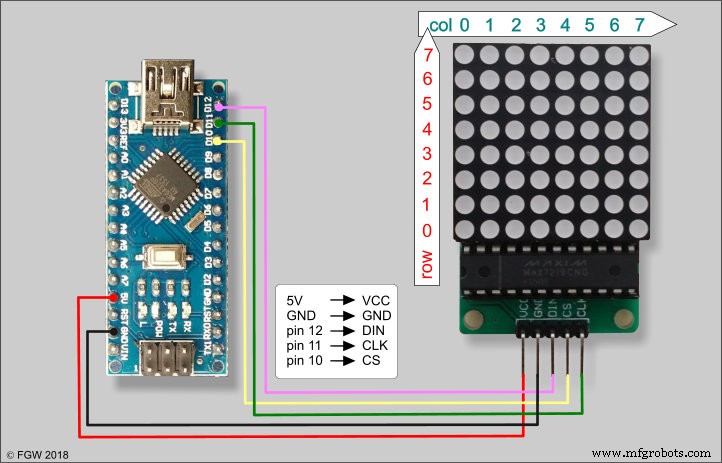
Asi is controlled by two microcontrollers, a Trinket and an Arduino Nano. The Trinket controls the movement of the eye, thanks to the servo it turns back and forth at random intervals. The Arduino Nano controls the eye. It's also random as he looks around and such, usually people assume he is looking at them.
Note, I have them on two small breadboards that are daisy chained with 4x AA batteries. (You can also use a lithium-ion battery 3.7 200mAh. With the li-on battery, I have had times for some reason where it would not work, so I would use two separate lithium batteries and attach them to the same on off switch so everything starts at once.)
The head is just a Christmas sphere I got during the holidays. I took a step back and sprayed it lightly with black spray paint. Then take some hot glue and glue it to the neck piece of Asi and BOOM there is the head!
Lastly, how I wear it. I just took some armature wire and strung it through the wholes on the bottom part of Asi, and wrapped them on my shoulder pack of my backpack.
Code
Asi Eye
Asi Neck with trinket
Asi Eye Arduino
the code for Asi eye
#include <LedControl.h>

//We always have to include the LedControl library
#include "LedControl.h"

/*
 Create LetControl object, define pin connections
 We have 2 MAX72XX for eyes.
 */
#define PIN_EYES_DIN 12
#define PIN_EYES_CS 11
#define PIN_EYES_CLK 10
LedControl lc = LedControl(PIN_EYES_DIN, PIN_EYES_CLK, PIN_EYES_CS, 2);

// rotation
bool rotateMatrix0 = false;  // rotate 0 matrix by 180 deg
bool rotateMatrix1 = false;  // rotate 1 matrix by 180 deg

// define eye ball without pupil
byte eyeBall[8]={
  B00111100,
  B01111110,
  B11111111,
  B11111111,
  B11111111,
  B11111111,
  B01111110,
  B00111100
};

byte eyePupil = B11100111;

// stores current state of LEDs
byte eyeCurrent[8];
int currentX;
int currentY;
int cntLoop = 0;
int cntEffect = 0;

// min and max positions
#define MIN -2
#define MAX  2

// delays
#define DELAY_BLINK 40

// perform an effect every # of loop iterations, 0 to disable
#define EFFECT_ITERATION 4

/*
  Arduino setup
*/
void setup()
{
  // MAX72XX is in power-saving mode on startup, we have to do a wakeup call
  lc.shutdown(0,false);
  lc.shutdown(1,false);

  // set the brightness to low
  lc.setIntensity(0,1);
  lc.setIntensity(1,1);

  // clear both modules
  lc.clearDisplay(0);
  lc.clearDisplay(1);

  // LED test
  // vertical line
  byte b = B10000000;
  for (int c=0; c<=7; c++)
  {
    for (int r=0; r<=7; r++)
    {
      setRow(0, r, b);
      setRow(1, r, b);
    }
    b = b >> 1;
    delay(50);
  }
  // full module
  b = B11111111;
  for (int r=0; r<=7; r++)
  {
    setRow(0, r, b);
    setRow(1, r, b);
  }
  delay(500);

   // clear both modules
  lc.clearDisplay(0);
  lc.clearDisplay(1);
  delay(500);

  // random seed
  randomSeed(analogRead(0));

  // center eyes, crazy blink
  displayEyes(0, 0);
  delay(2000);
  blinkEyes(true, false);
  blinkEyes(false, true);
  delay(1000);

}

/*
  Arduino loop
*/
void loop()
{
  // move to random position, wait random time
  moveEyes(random(MIN, MAX + 1), random(MIN, MAX + 1), 50);
  delay(random(5, 7) * 500);

  // blink time?
  if (random(0, 5) == 0)
  {
    delay(500);
    blinkEyes();
    delay(500);
  }

  // effect time?
  if (EFFECT_ITERATION > 0)
  {
    cntLoop++;
    if (cntLoop == EFFECT_ITERATION)
    {
      cntLoop = 0;
      if (cntEffect > 6) cntEffect = 0;
      switch(cntEffect)
      {
        case 0: // cross eyes
          crossEyes();
          delay(1000);
          break;

        case 1: // round spin
          roundSpin(2);
          delay(1000);
          break;

        case 2: // crazy spin
          crazySpin(2);
          delay(1000);
          break;

        case 3: // meth eyes
          methEyes();
          delay(1000);
          break;

        case 4: // lazy eye
          lazyEye();
          delay(1000);
          break;

        case 5: // crazy blink
          blinkEyes(true, false);
          blinkEyes(false, true);
          delay(1000);
          break;

        case 6: // glow
          glowEyes(3);
          delay(1000);
          break;

        default:
          break;
      }
      cntEffect++;
    }
  }
}

/*
  This method blinks both eyes
*/
void blinkEyes()
{
  blinkEyes(true, true);
}

/*
  This method blinks eyes as per provided params
*/
void blinkEyes(boolean blinkLeft, boolean blinkRight)
{
  // blink?
  if (!blinkLeft && !blinkRight)
    return;

  // close eyelids
  for (int i=0; i<=3; i++)
  {
    if (blinkLeft)
    {
      setRow(0, i, 0);
      setRow(0, 7-i, 0);
    }
    if (blinkRight)
    {
      setRow(1, i, 0);
      setRow(1, 7-i, 0);
    }
    delay(DELAY_BLINK);
  }

  // open eyelids
  for (int i=3; i>=0; i--)
  {
    if (blinkLeft)
    {
      setRow(0, i, eyeCurrent[i]);
      setRow(0, 7-i, eyeCurrent[7-i]);
    }
    if (blinkRight)
    {
      setRow(1, i, eyeCurrent[i]);
      setRow(1, 7-i, eyeCurrent[7-i]);
    }
    delay(DELAY_BLINK);
  }
}

/*
  This methods moves eyes to center position,
  then moves horizontally with wrapping around edges.
*/
void crazySpin(int times)
{
  if (times == 0)
    return;

  moveEyes(0, 0, 50);
  delay(500);

  byte row = eyePupil;
  for (int t=0; t<times; t++)
  {
    // spin from center to L
    for (int i=0; i<5; i++)
    {
      row = row >> 1;
      row = row | B10000000;
      setRow(0, 3, row);  setRow(1, 3, row);
      setRow(0, 4, row);  setRow(1, 4, row);
      delay(50);
      if (t == 0)
        delay((5-i)*10); // increase delay on 1st scroll (speed up effect)
    }
    // spin from R to center
    for (int i=0; i<5; i++)
    {
      row = row >> 1;
      if (i>=2)
        row = row | B10000000;
      setRow(0, 3, row);  setRow(1, 3, row);
      setRow(0, 4, row);  setRow(1, 4, row);
      delay(50);
      if (t == (times-1))
        delay((i+1)*10); // increase delay on last scroll (slow down effect)
    }
  }
}

/*
  This method crosses eyes
*/
void crossEyes()
{
  moveEyes(0, 0, 50);
  delay(500);

  byte pupilR = eyePupil;
  byte pupilL = eyePupil;

  // move pupils together
  for (int i=0; i<2; i++)
  {
    pupilR = pupilR >> 1;
    pupilR = pupilR | B10000000;
    pupilL = pupilL << 1;
    pupilL = pupilL | B1;

    setRow(0, 3, pupilR); setRow(1, 3, pupilL);
    setRow(0, 4, pupilR); setRow(1, 4, pupilL);

    delay(100);
  }

  delay(2000);

  // move pupils back to center
  for (int i=0; i<2; i++)
  {
    pupilR = pupilR << 1;
    pupilR = pupilR | B1;
    pupilL = pupilL >> 1;
    pupilL = pupilL | B10000000;

    setRow(0, 3, pupilR); setRow(1, 3, pupilL);
    setRow(0, 4, pupilR); setRow(1, 4, pupilL);

    delay(100);
  }
}

/*
  This method displays eyeball with pupil offset by X, Y values from center position.
  Valid X and Y range is [MIN,MAX]
  Both LED modules will show identical eyes
*/
void displayEyes(int offsetX, int offsetY)
{
  // ensure offsets are  in valid ranges
  offsetX = getValidValue(offsetX);
  offsetY = getValidValue(offsetY);

  // calculate indexes for pupil rows (perform offset Y)
  int row1 = 3 - offsetY;
  int row2 = 4 - offsetY;

  // define pupil row
  byte pupilRow = eyePupil;

  // perform offset X
  // bit shift and fill in new bit with 1
  if (offsetX > 0) {
    for (int i=1; i<=offsetX; i++)
    {
      pupilRow = pupilRow >> 1;
      pupilRow = pupilRow | B10000000;
    }
  }
  else if (offsetX < 0) {
    for (int i=-1; i>=offsetX; i--)
    {
      pupilRow = pupilRow << 1;
      pupilRow = pupilRow | B1;
    }
  }

  // pupil row cannot have 1s where eyeBall has 0s
  byte pupilRow1 = pupilRow & eyeBall[row1];
  byte pupilRow2 = pupilRow & eyeBall[row2];

  // display on LCD matrix, update to eyeCurrent
  for(int r=0; r<8; r++)
  {
    if (r == row1)
    {
      setRow(0, r, pupilRow1);
      setRow(1, r, pupilRow1);
      eyeCurrent[r] = pupilRow1;
    }
    else if (r == row2)
    {
      setRow(0, r, pupilRow2);
      setRow(1, r, pupilRow2);
      eyeCurrent[r] = pupilRow2;
    }
    else
    {
      setRow(0, r, eyeBall[r]);
      setRow(1, r, eyeBall[r]);
      eyeCurrent[r] = eyeBall[r];
    }
  }

  // update current X and Y
  currentX = offsetX;
  currentY = offsetY;
}

/*
  This method corrects provided coordinate value
*/
int getValidValue(int value)
{
  if (value > MAX)
    return MAX;
  else if (value < MIN)
    return MIN;
  else
    return value;
}

/*
  This method pulsates eye (changes LED brightness)
*/
void glowEyes(int times)
{
  for (int t=0; t<times; t++)
  {
    for (int i=2; i<=8; i++)
    {
      lc.setIntensity(0,i);
      lc.setIntensity(1,i);
      delay(50);
    }

    delay(250);

    for (int i=7; i>=1; i--)
    {
      lc.setIntensity(0,i);
      lc.setIntensity(1,i);
      delay(25);
    }

    delay(150);
  }
}

/*
  This method moves eyes to center, out and then back to center
*/
void methEyes()
{
  moveEyes(0, 0, 50);
  delay(500);

  byte pupilR = eyePupil;
  byte pupilL = eyePupil;

  // move pupils out
  for (int i=0; i<2; i++)
  {
    pupilR = pupilR << 1;
    pupilR = pupilR | B1;
    pupilL = pupilL >> 1;
    pupilL = pupilL | B10000000;

    setRow(0, 3, pupilR); setRow(1, 3, pupilL);
    setRow(0, 4, pupilR); setRow(1, 4, pupilL);

    delay(100);
  }

  delay(2000);

  // move pupils back to center
  for (int i=0; i<2; i++)
  {
    pupilR = pupilR >> 1;
    pupilR = pupilR | B10000000;
    pupilL = pupilL << 1;
    pupilL = pupilL | B1;

    setRow(0, 3, pupilR); setRow(1, 3, pupilL);
    setRow(0, 4, pupilR); setRow(1, 4, pupilL);

    delay(100);
  }
}

/*
  This method moves both eyes from current position to new position
*/
void moveEyes(int newX, int newY, int stepDelay)
{
  // set current position as start position
  int startX = currentX;
  int startY = currentY;

  // fix invalid new X Y values
  newX = getValidValue(newX);
  newY = getValidValue(newY);

  // eval steps
  int stepsX = abs(currentX - newX);
  int stepsY = abs(currentY - newY);

  // need to change at least one position
  if ((stepsX == 0) && (stepsY == 0))
    return;

  // eval direction of movement, # of steps, change per X Y step, perform move
  int dirX = (newX >= currentX) ? 1 : -1;
  int dirY = (newY >= currentY) ? 1 : -1;
  int steps = (stepsX > stepsY) ? stepsX : stepsY;
  int intX, intY;
  float changeX = (float)stepsX / (float)steps;
  float changeY = (float)stepsY / (float)steps;
  for (int i=1; i<=steps; i++)
  {
    intX = startX + round(changeX * i * dirX);
    intY = startY + round(changeY * i * dirY);
    displayEyes(intX, intY);
    delay(stepDelay);
  }
}

/*
  This method lowers and raises right pupil only
*/
void lazyEye()
{
  moveEyes(0, 1, 50);
  delay(500);

  // lower left pupil slowly
  for (int i=0; i<3; i++)
  {
    setRow(1, i+2, eyeBall[i+2]);
    setRow(1, i+3, eyeBall[i+3] & eyePupil);
    setRow(1, i+4, eyeBall[i+4] & eyePupil);
    delay(150);
  }

  delay(1000);

  // raise left pupil quickly
  for (int i=0; i<3; i++)
  {
    setRow(1, 4-i, eyeBall[4-i] & eyePupil);
    setRow(1, 5-i, eyeBall[5-i] & eyePupil);
    setRow(1, 6-i, eyeBall[6-i]);
    delay(25);
  }
}

/*
  This method spins pupils clockwise
*/
void roundSpin(int times)
{
  if (times == 0)
    return;

  moveEyes(2, 0, 50);
  delay(500);

  for (int i=0; i<times; i++)
  {
    displayEyes(2, -1); delay(40); if (i==0) delay(40);
    displayEyes(1, -2); delay(40); if (i==0) delay(30);
    displayEyes(0, -2); delay(40); if (i==0) delay(20);
    displayEyes(-1, -2); delay(40);if (i==0) delay(10);
    displayEyes(-2, -1); delay(40);
    displayEyes(-2, 0); delay(40);
    displayEyes(-2, 1); delay(40);if (i==(times-1)) delay(10);
    displayEyes(-1, 2); delay(40);if (i==(times-1)) delay(20);
    displayEyes(0, 2); delay(40); if (i==(times-1)) delay(30);
    displayEyes(1, 2); delay(40); if (i==(times-1)) delay(40);
    displayEyes(2, 1); delay(40); if (i==(times-1)) delay(50);
    displayEyes(2, 0); delay(40);
  }
}


/*
  This method sets values to matrix row
  Performs 180 rotation if needed
*/
void setRow(int addr, int row, byte rowValue)
{
  if (((addr == 0) && (rotateMatrix0)) || (addr == 1 && rotateMatrix1))
  {
    row = abs(row - 7);
    rowValue = bitswap(rowValue);
  }

  lc.setRow(addr, row, rowValue);
}


/*
  Reverse bits in byte
  http://www.nrtm.org/index.php/2013/07/25/reverse-bits-in-a-byte/
*/
byte bitswap (byte x)
{
  byte result;

    asm("mov __tmp_reg__, %[in] \n\t"
      "lsl __tmp_reg__  \n\t"   /* shift out high bit to carry */
      "ror %[out] \n\t"  /* rotate carry __tmp_reg__to low bit (eventually) */
      "lsl __tmp_reg__  \n\t"   /* 2 */
      "ror %[out] \n\t"
      "lsl __tmp_reg__  \n\t"   /* 3 */
      "ror %[out] \n\t"
      "lsl __tmp_reg__  \n\t"   /* 4 */
      "ror %[out] \n\t"

      "lsl __tmp_reg__  \n\t"   /* 5 */
      "ror %[out] \n\t"
      "lsl __tmp_reg__  \n\t"   /* 6 */
      "ror %[out] \n\t"
      "lsl __tmp_reg__  \n\t"   /* 7 */
      "ror %[out] \n\t"
      "lsl __tmp_reg__  \n\t"   /* 8 */
      "ror %[out] \n\t"
      : [out] "=r" (result) : [in] "r" (x));
      return(result);
}
Asi Neck with trinket Arduino
this is what I use to make sure Asi neck moves back and forth
// Servo parameters.  Pin MUST be 1 or 4 on a Trinket.  Servo position
// is specified in raw timer/counter ticks (1 tick = 0.128 milliseconds).
// Servo pulse timing is typically 1-2 ms, but can vary slightly among
// servos, so you may need to tweak these limits to match your reality.
#define SERVO_PIN  4 // Pins 1 or 4 are supported on Trinket
#define SERVO_MIN  4 // ~1 ms pulse
#define SERVO_MAX 26 // ~2 ms pulse


Adafruit_TiCoServo servo;

void setup(void) {
#if (F_CPU == 16000000L)
  // 16 MHz Trinket requires setting prescale for correct timing.
  // This MUST be done BEFORE servo.attach()!
  clock_prescale_set(clock_div_1);
#endif
  servo.attach(SERVO_PIN);
  pinMode(LED_PIN, OUTPUT);
  digitalWrite(LED_PIN, HIGH);
}

uint32_t lastLookTime = 0; // Time of last head-turn

void loop(void) {

  unsigned long t = millis(); // Current time

  // If more than 1/2 second has passed since last head turn...
  if((t - lastLookTime) > 500) {
    if(random(10) == 0) { // There's a 1-in-10 chance...
      // ...of randomly moving the head in a new direction:
      servo.write(random(SERVO_MIN, SERVO_MAX));
      lastLookTime = t;   // Save the head-turn time for future reference
    }
  }

  // Unrelated to head-turn check,
  if(random(10) == 0) { // there's a 1-in-10 chance...
    // ...of an "eye blink":
    digitalWrite(LED_PIN, LOW);  // The LED turns OFF
    delay(random(50, 250));      // for just a short random moment
    digitalWrite(LED_PIN, HIGH); // then back ON
  }

  delay(100); // Repeat loop() about 10 times/second
}
Custom parts and enclosures
the actual Leg end pieceforgot to add the turner gear for the servo, I usually printed out and fit servo attachment into the middle then screw it on the servothe body of Asithe bottom of Asithe thigh peice to Asileg jointthe screw I use to join Asi legsthe Nut that goes with the screwthe gear servo used to make Asi head turn, would recommend using a servo piece and putting it down the middlethe middle pice of Asithe holder of the servo for asi GearAsi neck plate, this is where the acrylic sphere is glued to the neck
Schematics
the circuit I used for Asi Neckthese are the ones I used to get Asi started. you can daisy chain them to power both of them from small circuit boards




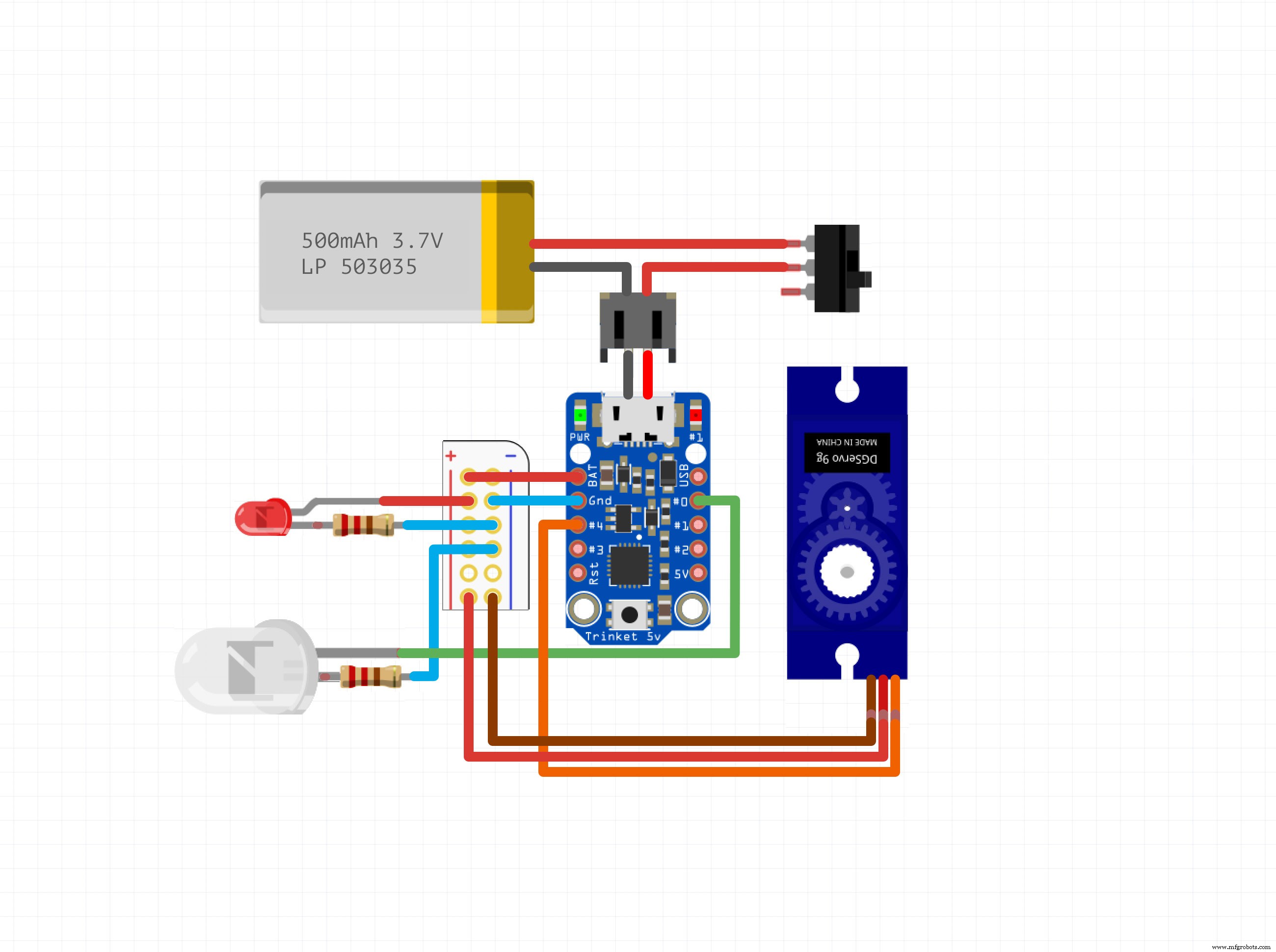 these are the ones I used to get Asi started. you can daisy chain them to power both of them from small circuit boards