Build a Bluetooth‑Controlled Nerf Turret: Parts & Assembly Guide
Components and supplies
Arduino Nano R3
×
1
HC-05 Bluetooth module
×
1
LM2596 buck converter
×
1
MG-90s servos
×
3
type 130 dc motors
×
2
FR207 rectifier diode
×
1
RFP30N06LE mosfet
×
1
2.1x5.5mm jack plug
×
1
resistors 10kΩ
×
1
resistors 330Ω
×
1
resistors 680Ω
×
1
M2x10 self taping screws
×
30
M5*20 countersunk screw
×
4
dupont connectors
×
15
1.5mm metal rod
×
1
wires
×
1
heatshrink tubing
×
1
20mm rubber band
×
1
9V power supply (2.5 amps minimum)
×
1
Necessary tools and machines
screwdriver
wire stripper
pliers
soldering iron
multimeter
crimping tool
3D printer
Apps and online services
Microsoft Windows 10
About this project
Thanks for checking my Bluetooth controlled Nerf turret project. I don't think there is too much explaining to do here, this is a Nerf turret controlled via Bluetooth either from an Android device or a PC.
Nothing super complex. The tilt and pan movement is handled by 2 servos driven by an Arduino Nano.
The darts are shot using 2 rollers spun by 2 small DC motors. A servo pushes the darts into the rollers when the order to shoot is sent.The magazine can hold 7 darts.
As mentionned above it is controlled via Bluetooth either from an android device or a PC.
HOW TO BUILD IT ?
ASSEMBLY :
The tripod and magazine comes in two different versions. One designed for MG-90s servos and the other for MG996r servos. MG996r servos can be power hungry. Make sure your power supply will be up to the job if you decide to use them.
Tripod :
Magazine :
WIRING :
SOFTWARE AND TEST !!!
SOME EXTRA PHOTOS BECAUSE WHY NOT !!!
Code
Arduino code
Arduino codeArduino
code to upload to the arduino . The code remain the same whether you choose to control the turret via the android app or a PC .
#include <Servo.h>

//-----Declare servos and variables
Servo recoil_servo;
Servo pan_servo;
Servo tilt_servo;

const byte pan_limit_1 = 0;
const byte pan_limit_2 = 180;
const byte tilt_limit_1 = 65;
const byte tilt_limit_2 = 180;
const byte recoil_rest = 180;    // Angle of the servo when at rest
const byte recoil_pushed = 125;  // Angle the servo need to reach to push the dart

//-----Variables related to serial data handling
byte byte_from_app;
const byte buffSize = 30;
byte inputBuffer[buffSize];
const byte startMarker = 255;
const byte endMarker = 254;
byte bytesRecvd = 0;
boolean data_received = false;

//-----Variable related to motor timing and firing
bool is_firing =  false;
bool can_fire =  false;
bool recoiling = false;

unsigned long firing_start_time = 0;
unsigned long firing_current_time = 0;
const long firing_time = 150;

unsigned long recoil_start_time = 0;
unsigned long recoil_current_time = 0;
const long recoil_time = 2 * firing_time;

const byte motor_pin =  12;
boolean motors_ON = false;

//8===========================D

void setup()
{
  //-----define motor pin mode
  pinMode(motor_pin, OUTPUT);
  digitalWrite(motor_pin, LOW);

  //-----attaches servo to pins
  recoil_servo.attach(9);
  pan_servo.attach(10);
  tilt_servo.attach(11);

  //-----starting sequence
  recoil_servo.write(recoil_rest);
  pan_servo.write(90);
  delay(1000);
  tilt_servo.write(105);


  Serial.begin(9600);  // begin serial communication
}

//8===========================D

void loop()
{
  getDataFromPC();
  set_motor();
  if (data_received) {
    move_servo();
    set_recoil();
    set_motor();
  }
  fire();
}

//8===========================D

void getDataFromPC() {

  //expected structure of data [start byte, pan amount, tilt amount, motor on, firing button pressed, end byte]
  //start byte = 255
  //pan amount = byte between 0 and 253
  //tilt amount = byte between 0 and 253
  //motor on = 0 for off - 1 on
  //firing button pressed = 0 for not pressed - 1 for pressed
  //end byte = 254

  if (Serial.available()) {  // If data available in serial

    byte_from_app = Serial.read();   //read the next character available

    if (byte_from_app == 255) {     // look for start byte, if found:
      bytesRecvd = 0;                   //reset byte received to 0(to start populating inputBuffer from start)
      data_received = false;
    }

    else if (byte_from_app == 254) {    // look for end byte, if found:
      data_received = true;                // set data_received to true so the data can be used
    }

    else {                            // add received bytes to buffer
      inputBuffer[bytesRecvd] = byte_from_app;     //add character to input buffer
      bytesRecvd++;                                // increment byte received (this act as an index)
      if (bytesRecvd == buffSize) {    // just a security in case the inputBuffer fills up (shouldn't happen)
        bytesRecvd = buffSize - 1;    // if bytesReceived > buffer size set bytesReceived smaller than buffer size
      }
    }
  }
}

//8===========================D

void move_servo() {

  byte pan_servo_position = map(inputBuffer[0], 0, 253, pan_limit_2, pan_limit_1);//convert inputbuffer value to servo position value
  pan_servo.write(pan_servo_position); //set pan servo position
  byte tilt_servo_position = map(inputBuffer[1], 0 , 253, tilt_limit_2, tilt_limit_1); //convert inputbuffer value to servo position value
  tilt_servo.write(tilt_servo_position); //set pan servo position
}

//8===========================D

void set_recoil() {

  if (inputBuffer[3] == 1) {        //if fire button pressed
    if (!is_firing && !recoiling) { //and not already firing or recoiling
      can_fire = true;              //set can fire to true (see effect in void fire())
    }
  }
  else {                  // if fire button not pressed
    can_fire = false;     //set can fire to false (see effect in void fire())
  }
}

//8===========================D

void set_motor() {
  //-----start and stop motors using MOSFET transisitor .

  if (inputBuffer[2] == 1) {                //if screen touched
    digitalWrite(motor_pin, HIGH);          //turn motor ON
    motors_ON = true;
  }
  else {                                   //if screen not touched
    digitalWrite(motor_pin, LOW);          //turn motor OFF
    motors_ON = false;

  }
}

//8===========================D

void fire() { //if motor byte on, turn motor on and check for time it has been on

  if (can_fire && !is_firing && motors_ON) {
    //if (can_fire && !is_firing) {
    firing_start_time = millis();
    recoil_start_time = millis();
    is_firing = true;
  }

  firing_current_time = millis();
  recoil_current_time = millis();

  if (is_firing && firing_current_time - firing_start_time < firing_time) {
    recoil_servo.write(recoil_pushed);
  }
  else if (is_firing && recoil_current_time - recoil_start_time < recoil_time) {
    recoil_servo.write(recoil_rest);
  }
  else if (is_firing && recoil_current_time - recoil_start_time > recoil_time) {
    is_firing = false;
  }

}
python files
The executable and android app can be found here : https://www.littlefrenchkev.com/bluetooth-nerf-turrethttps://github.com/LittleFrenchKev/Bluetooth_Nerf_turret
Schematics
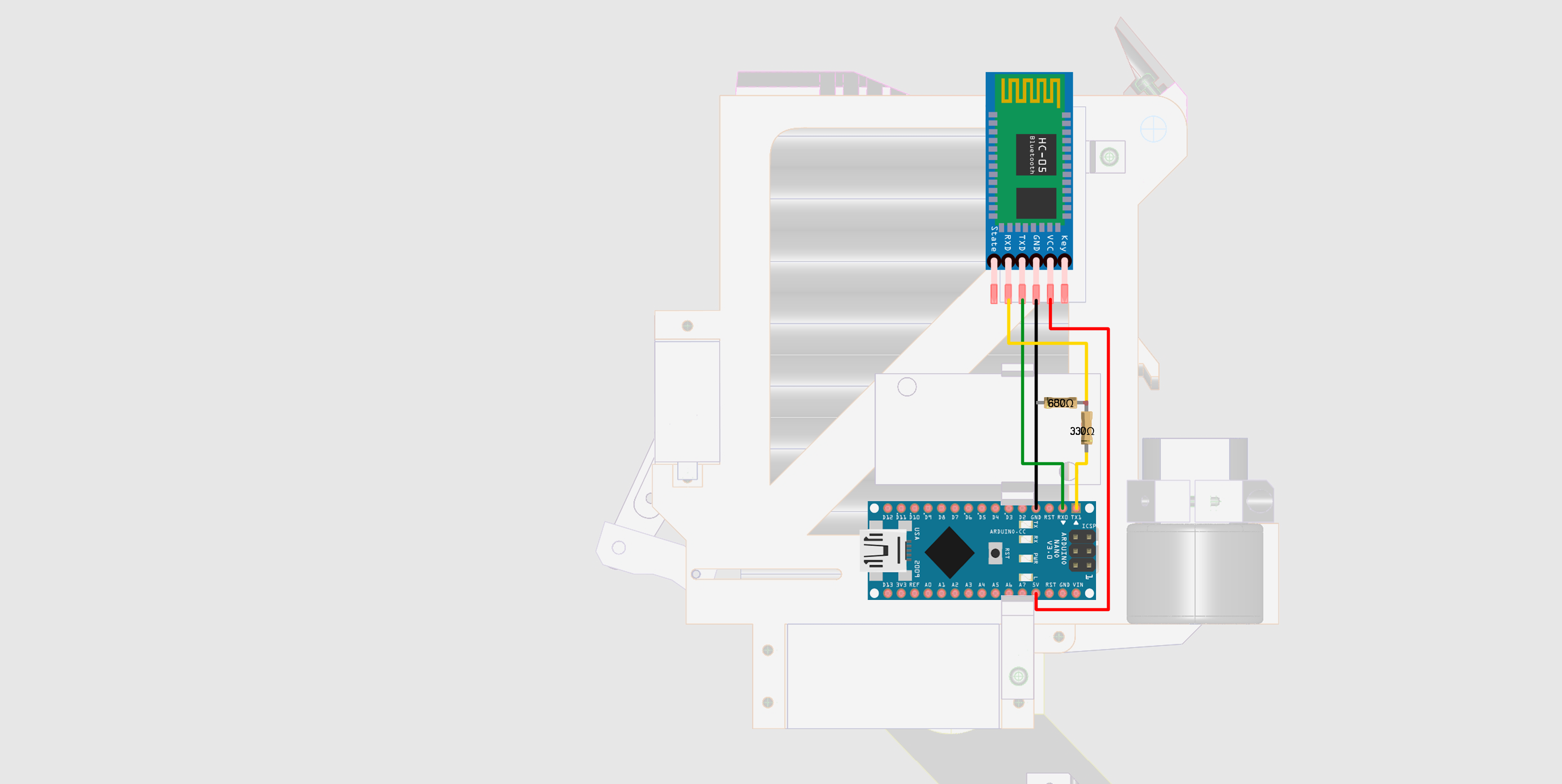
Here is the main wiring diagram . The wiring is divided small sectionS linked together using dupont connectors . This is for ease of assembly .Here is the HC-05 Bluetooth wiring . This piece of wiring include a voltage divider to allow the 5V coming out of the arduino to be stepped down to about 3.3V for the HC-05 Receiver pin .




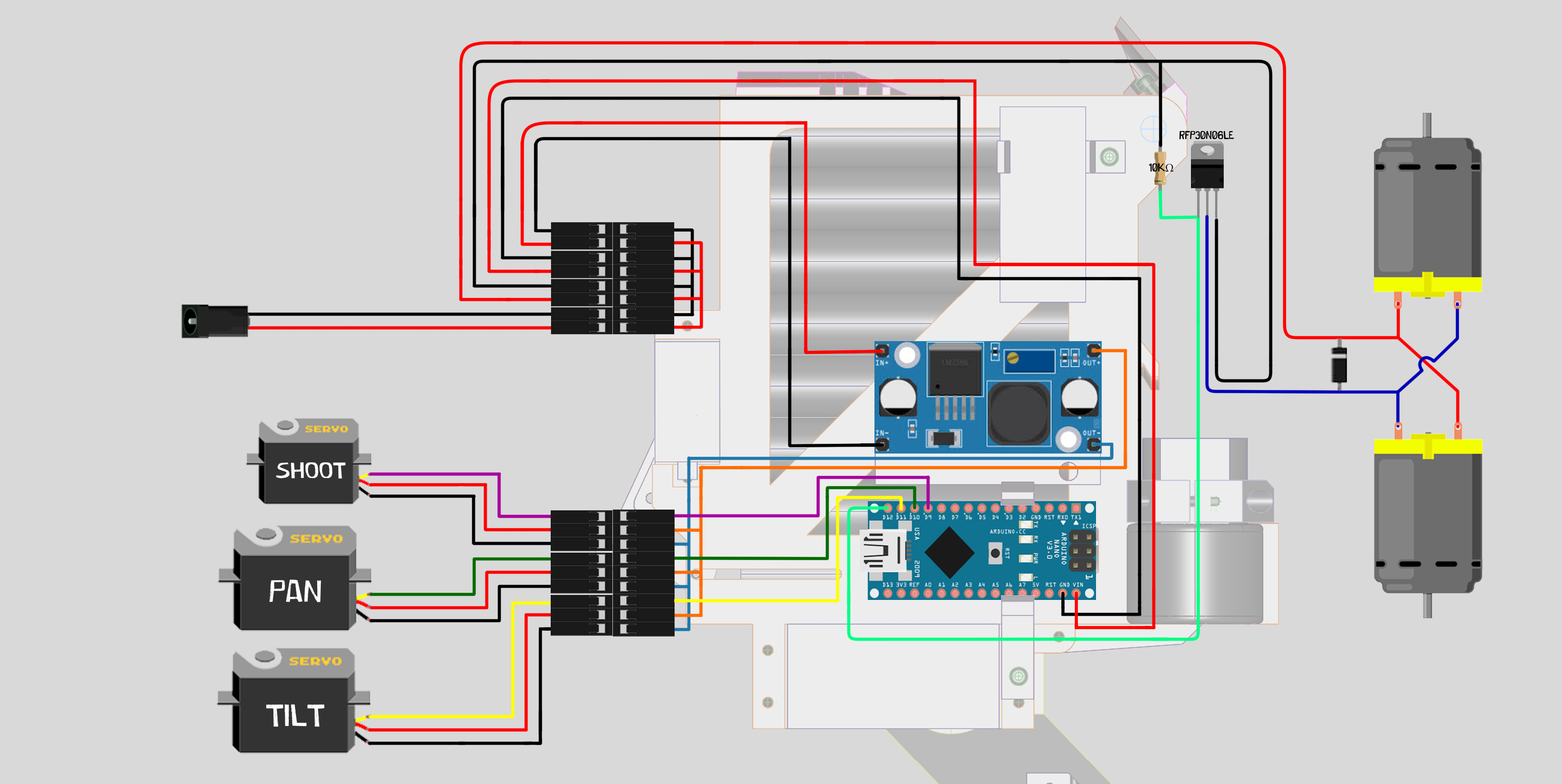 Here is the HC-05 Bluetooth wiring .