



C Programming Strings: Mastering Declaration, Initialization, and I/O
C Programming Strings
This tutorial walks you through the fundamentals of C strings: declaration, initialization, input/output, function usage, pointers, and essential library functions.
In C, a string is an array of characters terminated by a null byte \0. For example:
char c[] = "c string";The compiler automatically appends \0 to a string literal, making it a proper C string.

How to declare a string?
Strings are declared as character arrays. For example:
char s[5];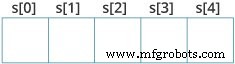
This declares a buffer that can hold up to 4 characters plus the terminating \0.
How to initialize strings?
Several initialization styles are available:
char c[] = "abcd";
char c[50] = "abcd";
char c[] = {'a', 'b', 'c', 'd', '\0'};
char c[5] = {'a', 'b', 'c', 'd', '\0'};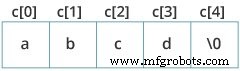
Beware of buffer overflows: char c[5] = "abcde"; attempts to store six characters (including \0) in a five‑byte array and should be avoided.
Assigning Values to Strings
Arrays cannot be assigned after declaration. Instead, use strcpy():
char c[100];
strcpy(c, "C programming");
Note: Direct assignment like c = "C programming"; causes a compile‑time error.
Reading Strings from the User
Use scanf() for space‑delimited input:
#include <stdio.h>
int main() {
    char name[20];
    printf("Enter name: ");
    scanf("%s", name);
    printf("Your name is %s.", name);
    return 0;
}
Output
Enter name: Dennis Ritchie
Your name is Dennis.
Only the first word is captured because scanf() stops at whitespace. The array name decays to a pointer, so name is passed directly.
How to read an entire line?
Use fgets() and puts():
#include <stdio.h>
int main() {
    char name[30];
    printf("Enter name: ");
    fgets(name, sizeof(name), stdin);
    printf("Name: ");
    puts(name);
    return 0;
}
Output
Enter name: Tom Hanks
Name: Tom Hanks
fgets() reads up to sizeof(name)-1 characters, including spaces. It also retains the trailing newline, which puts() prints.
Note: gets() is obsolete and removed from the C standard because it can overflow buffers.
Passing Strings to Functions
Strings are passed to functions just like arrays. Example:
#include <stdio.h>
void displayString(char str[]);
int main() {
    char str[50];
    printf("Enter string: ");
    fgets(str, sizeof(str), stdin);
    displayString(str);
    return 0;
}
void displayString(char str[]) {
    printf("String Output: ");
    puts(str);
}
Strings and Pointers
String names decay to pointers, enabling pointer arithmetic:
#include <stdio.h>
int main(void) {
    char name[] = "Harry Potter";
    printf("%c", *name);          // H
    printf("%c", *(name+1));      // a
    printf("%c", *(name+7));      // o

    char *namePtr = name;
    printf("%c", *namePtr);       // H
    printf("%c", *(namePtr+1));   // a
    printf("%c", *(namePtr+7));   // o
}
Commonly Used String Functions
- strlen() – returns the length of a string (excluding the null terminator).
- strcpy() – copies one string to another.
- strcmp() – compares two strings lexicographically.
- strcat() – concatenates two strings.
C Language
- Mastering C# Strings: Fundamentals, Operations & Advanced Techniques
- Mastering C Programming Operators: A Comprehensive Guide
- Master Python Strings: Creation, Formatting, and Manipulation
- Mastering Java Strings: Creation, Methods, and Best Practices
- Mastering String Representations in Java Enums
- Java Strings Class: Mastering String Creation & Manipulation
- C Strings: How Null-Terminated Character Arrays Work
- Mastering C++ Strings: C-Style vs std::string
- Mastering Strings in C#: Best Practices & Tips
- Mastering Python Strings: Creation, Access, and Manipulation