



Preventive Maintenance Software Explained: Types, Benefits, and Integration Strategies
Maintaining equipment is only part of the picture when resources are tight and audit deadlines loom. Relying mainly on reactive fixes not only increases downtime but can cost a company millions in lost productivity and unplanned repairs. Establishing a proactive maintenance program, however, is often the most effective way to protect assets, improve reliability, and control expenses.
Fortunately, modern technology gives maintenance teams the tools they need to shift from firefighting to forecasting. By selecting the right preventive maintenance software and integrating it with other enterprise systems, organizations can automate work, track KPIs, and make data‑driven decisions that keep operations running smoothly.
Key Types of Preventive Maintenance Software
Not all maintenance solutions are the same. Understanding the distinct categories helps you choose the right mix for your facility.
Computerized Maintenance Management Systems (CMMS)
A CMMS is the backbone of any preventive maintenance program. It centralizes asset data, work orders, inventory, and scheduling in a single platform, enabling teams to:
- Automate work order creation and routing
- Schedule routine inspections and repairs
- Manage maintenance workflows and resources
- Provide detailed repair guidance
- Generate audit‑ready reports and KPIs
CMMS platforms typically come in two flavors: cloud‑based, which offer scalability and remote access, and on‑premise, which provide full control over data residency and custom integration.
Enterprise Asset Management (EAM)
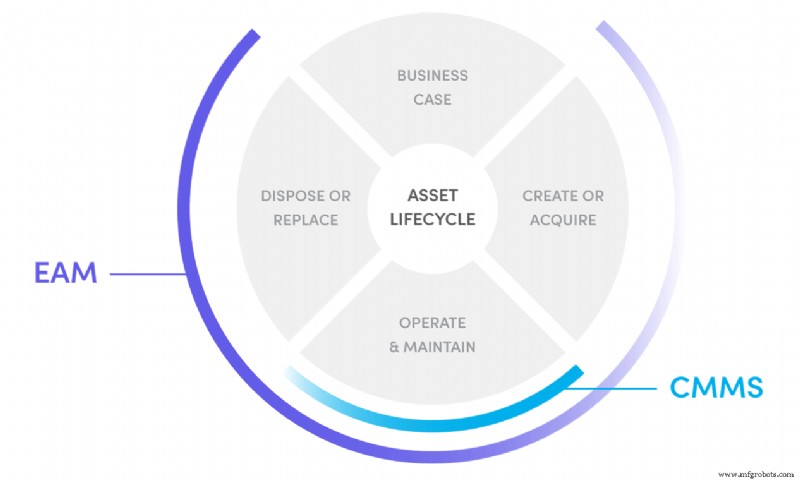
EAM software extends the CMMS focus to the entire lifecycle of an asset—from procurement and installation to disposal and replacement. It tracks contracts, labor, inventory, costs, and performance metrics, giving senior leaders a holistic view of physical assets.
Asset Performance Management (APM)
APM solutions fuse IoT sensors, AI analytics, and real‑time data to continuously assess asset health. By identifying early warning signs, APM helps teams intervene before failures occur, maximizing uptime and extending asset life.
Enterprise Resource Planning (ERP)
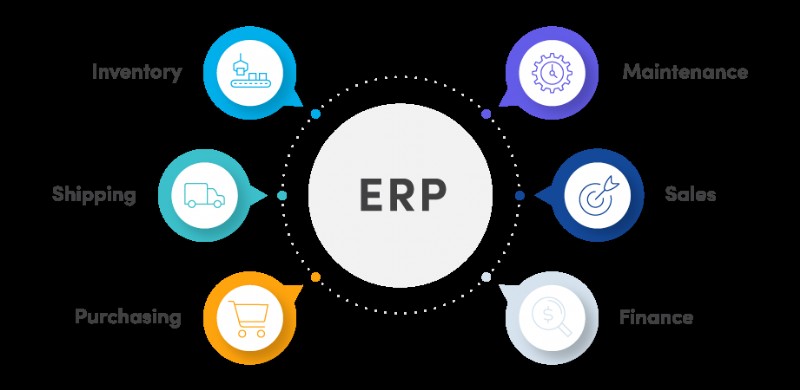
While ERP systems are not maintenance‑specific, they provide the single source of truth that keeps finance, procurement, HR, and maintenance aligned. Seamless ERP integration ensures accurate inventory levels, cost tracking, and procurement workflows.
Manufacturing Execution System (MES)
MES controls the production floor, coordinating orders, resources, and processes to deliver high‑quality output efficiently. Its real‑time data feeds support predictive maintenance and production optimization.
SCADA Systems
SCADA (Supervisory Control and Data Acquisition) gathers data from field devices—sensors, PLCs, and actuators—and presents it to operators. Though not a maintenance tool per se, SCADA’s real‑time alerts can trigger CMMS work orders, preventing costly downtime.
For example, a SCADA alarm for an overheating motor can prompt a maintenance technician to inspect and replace a worn bearing before a catastrophic failure.
Other Emerging Technologies
- 3D printing enables rapid fabrication of spare parts that are hard to source.
- Embedded sensors track temperature, vibration, and usage, feeding data into APM platforms.
- Virtual and Augmented Reality improve technician training and on‑site repair accuracy.
- Wearable devices allow technicians to access schematics, log observations, and request assistance in real time.
Positioning Maintenance Software in Your Facility
Each system excels in its domain—ERP excels at enterprise data orchestration, MES drives production throughput, and CMMS masters maintenance execution. When these systems operate in silos, gaps appear: inventory may be mismanaged, maintenance budgets can inflate, and decision makers lack a unified view.
Integrating these platforms closes those gaps. For instance, an IoT sensor reports an asset’s vibration trend to SCADA; SCADA analyzes the data and, upon detecting an anomaly, raises an alert to CMMS, which automatically creates a work order. The parts required for the repair are logged in ERP, ensuring procurement aligns with maintenance needs and finance tracks the true cost.
Choosing the Right Preventive Maintenance Software
Buying a system is only the first step. Success hinges on user adoption across all teams. Begin by:
- Assessing your organization’s specific maintenance goals and pain points.
- Mapping out required features—work order automation, real‑time monitoring, reporting, and integration capabilities.
- Evaluating budget constraints and scalability needs.
- Engaging stakeholders from maintenance, procurement, finance, and IT to ensure buy‑in.
Our CMMS buying guide offers a structured framework to clarify requirements, benchmark solutions, and secure stakeholder approval. By aligning technology with business objectives, you can unlock significant efficiency gains and protect your bottom line.
Equipment Maintenance and Repair
- Solvay’s Cladding Solution Cuts Blowouts and Saves $200k Annually
- Boeing Announces Closure of Wichita Facility by End of 2013
- Transforming Maintenance Planning & Scheduling into a Profit‑Generating Engine
- Turning Bad News into Positive Outcomes: The Power of Excellent Customer Service
- Master Maintenance Management with Limble CMMS – Video Tutorials & Proven Results
- Allen Bradley Powerflex Servo Drive Failure: Causes, Symptoms, and Quick Repair Guide
- Data-Driven Insights: Answering Five Critical Questions About Your Maintenance Team’s Performance
- Maintenance Software vs Spreadsheets: Why CMMS Outperforms Manual Tracking
- Hydraulic vs. Electric Actuators: Which System Delivers Superior Accuracy
- Mastering Maintenance Leadership: Execution & Motivation – Part 3