



Essential CMMS Setup: Choosing Assets & Structuring Your Asset Tree
When clients start a CMMS, two questions dominate the conversation: Which assets should I track? and How should I organize them? The answers vary by context, but a few guiding principles can help you make the right choices.
1. Selecting the Right Assets
Your CMMS must serve three stakeholders: you, your staff, and your end‑users. Two key criteria should shape your asset list:
- Operational usability – The system should allow users to locate an asset quickly without sifting through irrelevant details.
- Data value – Sufficient detail is required to extract actionable insights, such as cost attribution and maintenance trends.
Keep It Functional
In practice, asset granularity should match the level at which work orders are created. For example, a school might list a “lighting system” per classroom. Users can then open a work order for “Lighting – Classroom A001” and assign a technician to replace a bulb. Listing every individual bulb would overwhelm users and add no real benefit, as technicians will still need to locate the problem on site.
Enable Insightful Reporting
Conversely, if your goal is to analyze maintenance spend by system, you must retain enough detail. In the school scenario, including separate assets for the lighting, HVAC, and heating systems of each classroom allows you to aggregate costs by category across the campus.
In short, balance detail with usability: too little detail obscures analysis; too much detail hinders daily use.
2. Structuring Your Asset Tree
The asset tree is the hierarchical blueprint of your CMMS. Think of it as the “where is it” map that maintenance staff consult when they need to locate an asset. An intuitive structure mirrors everyday language. For instance, saying “the fridge in the kitchen” is far clearer than “the second fridge in Building A.”
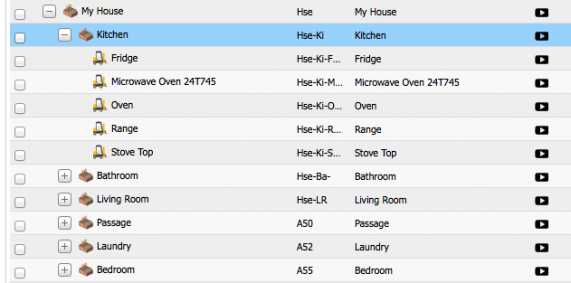
Use clear naming conventions and avoid ambiguous labels. For mobile assets—vehicles, welding trolleys, or portable generators—group them under parent categories such as Mobile Fleet or Mobile Workshop Tools. This grouping reflects how users talk about the equipment and speeds up asset lookup.
3. How Many Assets Should You Include?
Our field studies show that companies with more than 25 assets per user maintain higher CMMS adoption rates after the first two months. In contrast, users with 25 or fewer assets often experience low engagement. Adding a modest number of assets—at least 25 per user—provides a robust foundation for both operational tasks and data analysis.
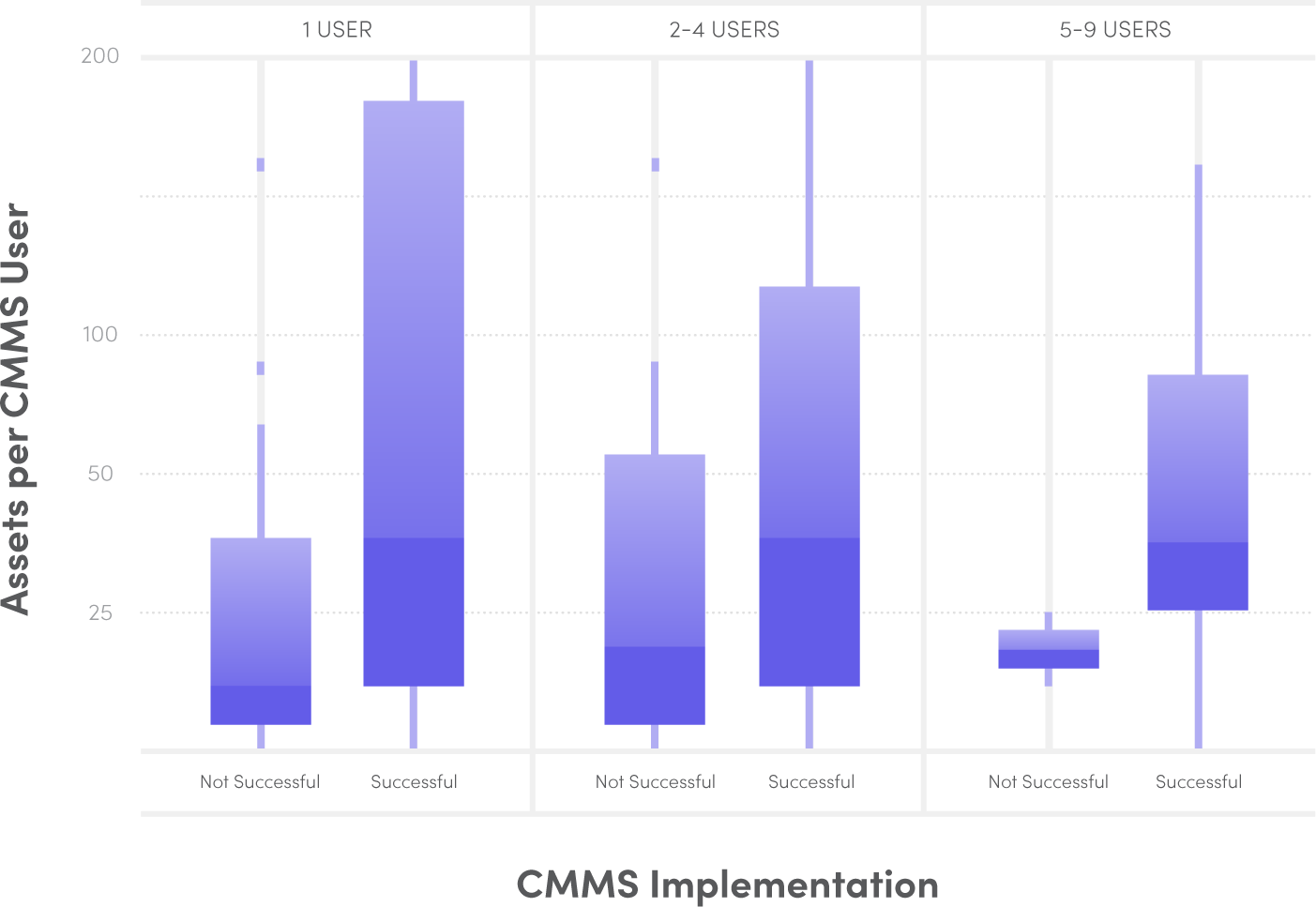
Ultimately, a well‑balanced asset set and a logical tree structure set the stage for efficient maintenance workflows and reliable reporting.
Equipment Maintenance and Repair
- Launching Predictive Maintenance: Key Questions and Practical Steps
- 7 Proven CMMS Tips to Accelerate Setup and Boost Productivity
- The Critical Role of Maintenance in Research Laboratories
- Master Fiix CMMS: 7 Expert Tips for Rapid Implementation and Efficient Asset Management
- Expert Answers to Your Top 3D Printing Questions
- 7 Proven CMMS Strategies for Optimal Asset Maintenance
- Is a Facility Audit Essential for Your CMMS? Expert Guidance
- Heat Exchangers Explained: Comprehensive Answers to Your Top Questions
- How CMMS Drives Higher Asset Turnover
- The Critical Role of Accuracy in Maintenance Reporting