



Fiix CMMS Purchase Order Module: Streamline Parts Procurement & Inventory
Fiix proudly introduces its CMMS Purchase Order module, closing the loop on parts management by tracking items from request to use—fully integrated into your CMMS platform. The module supports formal Requests for Quotation (RFQs) and Purchase Orders (POs) that you can send directly to suppliers via the intuitive Fiix purchase planning board.
Key Feature – The Purchase Order Planning Board
The Purchase Order Planning Board is the heart of the purchasing module. Every action starts here, and every part that requires ordering finds a dedicated space. From this hub you can issue RFQs and generate POs, ensuring a seamless flow between user requests, supplier engagement, and inventory updates.
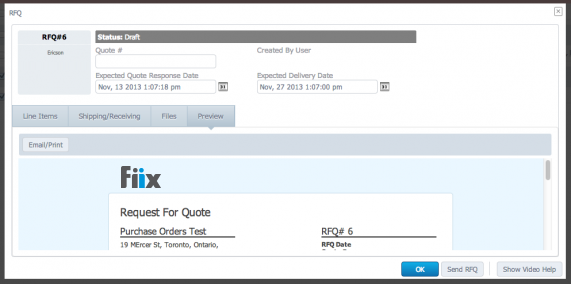
After selecting a supplier, the purchase planner can send RFQs and POs directly. To add a part to an RFQ or PO, simply check its box and click Request Quote or Generate RFQ. The board is organized by supplier, and parts can be moved between suppliers with a single click.
The module is designed for flexibility—new parts, RFQs, and POs can be added at any stage.
Submit a Purchase Request
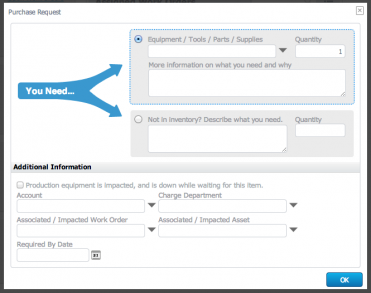
If you need a part or supply, click the  button in your CMMS or the
  on your dashboard. Enter the part details and quantity, and the item will appear on the Purchase Planning Board, ready for ordering.
Request for Quotation (RFQ)
An RFQ enables a supplier to provide a firm price for your required goods. From the Planning Board, add essential details—expected delivery date, part numbers (if known)—then send the RFQ. If the supplier is interested, they will return a quote.
Need to send multiple RFQs? Issue one to the first supplier, switch to a second, and send a second RFQ—all from the same board.
Purchase Order (PO)
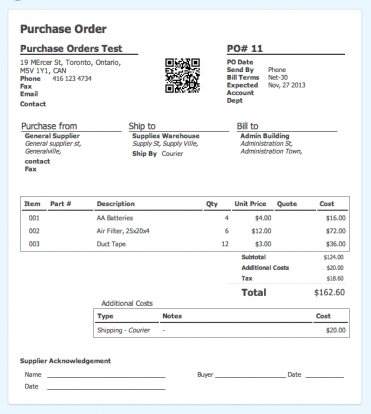
A PO is a formal promise to pay for the goods requested. To create one, check the part’s box on the Planning Board and click Create PO, or generate it directly from an approved RFQ. Complete the necessary fields—delivery address, terms—and send the PO to the supplier. Expect delivery as soon as the goods become available.
For businesses requiring purchasing officer approval, Fiix CMMS enforces it effortlessly. The officer receives an email, logs into the CMMS, and approves or denies the request with a single click.
Receiving
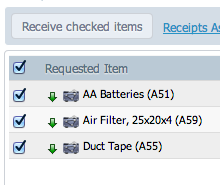
When parts arrive, record the receipt by selecting the delivered items, noting quantity and storage location, then clicking Receive. The parts are now fully integrated into the CMMS and available for work orders.
Consume Parts During Work Orders
Skip manual stock takes—every time a part is used in a work order, simply record it. The system automatically deducts the quantity from your inventory.
Automatic RFQs for Low‑Stock Items
Set minimum and restock thresholds for each part. When inventory falls below the minimum, Fiix automatically generates an RFQ to your chosen suppliers. Once you select a supplier, send the resulting PO with ease.
Equipment Maintenance and Repair
- 20 Proven Benefits of a CMMS: Boost Efficiency, Cut Costs, and Enhance Safety
- 3 Proven Steps for a Successful CMMS Implementation
- Maintenance Software vs Spreadsheets: Why CMMS Outperforms Manual Tracking
- Boost Reliability with Visual Operating Procedures in Your CMMS
- Add & Scan Barcodes in Your CMMS: Upcoming Mobile App Features
- Introducing Multi‑Site CMMS: Centralize, Secure, and Scale Your Maintenance Operations
- The Rise of Small Business CMMS: Affordable, Agile, and Powerful
- How a CMMS Transforms Facility Management: Key Benefits Explained
- Streamline Work Order Management Using CMMS for Greater Efficiency
- Streamline School Maintenance with a CMMS-Driven Work Order System