



Add & Scan Barcodes in Your CMMS: Upcoming Mobile App Features
In the next few months, we’re launching a native mobile app for our CMMS. Last week, we introduced the first visible sign of this update: rendered barcodes. When the app is released, you’ll be able to scan a barcode and jump directly to the corresponding asset page. For now, assets with barcode numbers will display a clear, printable image of the barcode within the CMMS.
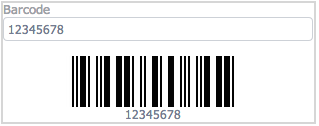
Add Barcodes to Your CMMS
The simplest way to showcase a barcode is to assign one to an asset. Then, navigate to the Asset Categories tab in the CMMS settings. From there, you can choose the appropriate barcode type for each category—there are several options to fit your workflow.
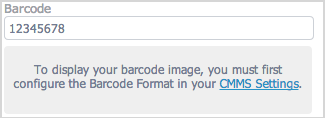
Follow the links to enable barcodes in your CMMS
To access barcode settings directly, go to Settings > CMMS Settings, click any asset category, and a dialog will prompt you to set the barcode type.
In the coming weeks we’ll add batch‑printing capabilities, letting you print labels with all the barcodes you’ve configured. If you have other barcode use cases in mind, share them in the comments below.
Want to See Barcodes in Action?
If you’re new to our CMMS, you can log in to the free test drive to preview rendered barcodes. Simply enter a number in the barcode field of any asset, save, and the barcode image will appear instantly.
Equipment Maintenance and Repair
- 20 Proven Benefits of a CMMS: Boost Efficiency, Cut Costs, and Enhance Safety
- 3 Proven Steps for a Successful CMMS Implementation
- Maintenance Software vs Spreadsheets: Why CMMS Outperforms Manual Tracking
- Boost Reliability with Visual Operating Procedures in Your CMMS
- Fiix CMMS Purchase Order Module: Streamline Parts Procurement & Inventory
- Introducing Multi‑Site CMMS: Centralize, Secure, and Scale Your Maintenance Operations
- The Rise of Small Business CMMS: Affordable, Agile, and Powerful
- How a CMMS Transforms Facility Management: Key Benefits Explained
- Top 7 Criteria for Choosing a Long‑Range Barcode Scanner
- Enhancing 3D Scanning Accuracy for Automotive Quality Control