



Introducing Multi‑Site CMMS: Centralize, Secure, and Scale Your Maintenance Operations
New Feature – What is a Multi‑Site CMMS?
With the launch of our V5 release, Fiix now offers multi‑site functionality, making cross‑location collaboration smoother than ever. Prior to this update, every user could view all maintenance data—preventive schedules, work orders, and more—across the entire system. Multi‑site allows you to run multiple businesses, divisions, locations, or facilities from a single, centralized CMMS database. By partitioning the system, you can grant distinct access rights to users based on their location, while user‑group permissions still control functional access such as reports or settings.
Enabling multi‑site is straightforward. Work‑order data is automatically filtered to the technicians and managers who need to see it, reducing noise and boosting productivity. The following data types are partitioned between sites:
- Work Orders
- Scheduled Maintenance
- Work Requests
- Assets
- Personnel
- Suppliers, Vendors, and Service Providers
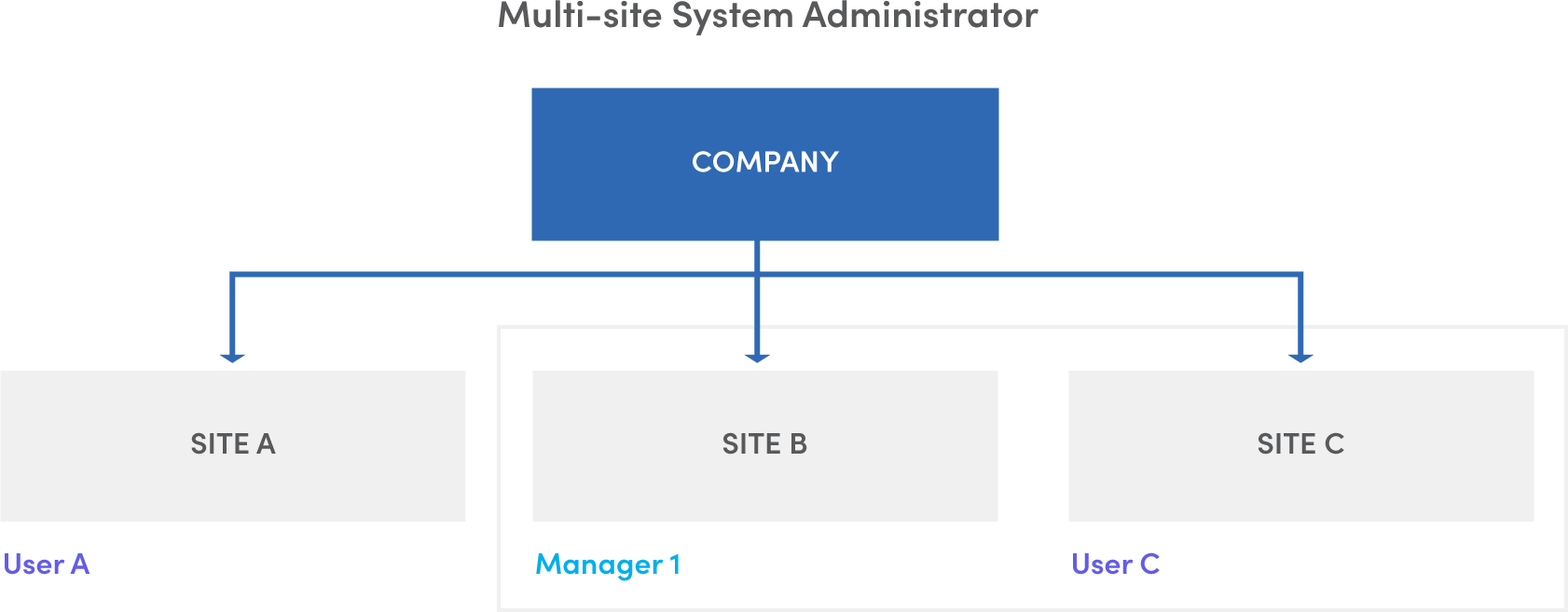
For example, User A can view maintenance data for Site A, User C for Site C, while Manager 1 sees data for both Site B and C. The multi‑site administrator has full visibility across all sites.
What Does Multi‑Site Mean for Your Organization?
- Larger enterprises can deploy Fiix globally, yet maintain local site segmentation of data.
- Standardize maintenance procedures and culture across the organization from a single CMMS.
- Compare equipment performance across sites with advanced reporting.
- Add new sites without compromising existing data integrity.
- Enhance security by isolating data between sites.
- Earn recognition from top management for expanding your CMMS footprint.
How Does It Work?
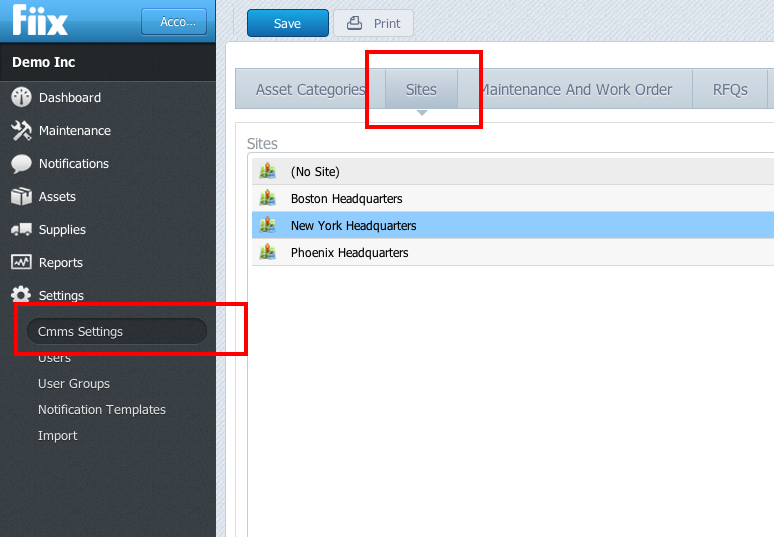
Once multi‑site is enabled, you convert your top‑level locations into sites via the settings section. Assets remain in their original hierarchy, but all related work orders and preventive maintenance records follow the site assignment.
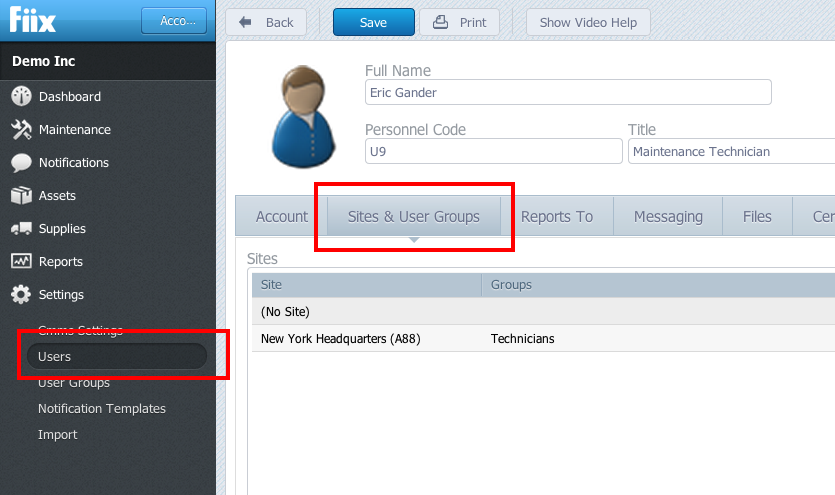
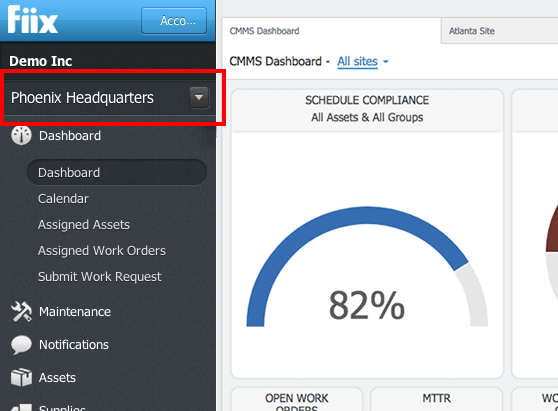
In a user’s profile, assign them to a site. When they log in, they only see maintenance and asset data for that site. If a user has access to multiple sites, a toggle dropdown appears in the top right of their account, allowing them to switch contexts seamlessly.
For a step‑by‑step walkthrough, watch our multi‑site implementation video.
Things to Consider Before Implementing Multi‑Site
The Gatekeeper – Assign a dedicated administrator who can edit global settings such as maintenance types or custom asset fields. This role also manages all multi‑site configuration changes, including adding, deleting, or modifying sites.
Common Parts Database – Technicians can view inventory quantities across all sites, enabling them to source parts from another location or order new stock. Parts consumed in a work order must come from inventory at that site; if a part is shipped from another site, you must update the CMMS to reflect the transfer before it can be consumed.
Asset Naming – If you have a “Mill 1” at Site A and another “Mill 1” at Site B, reports across all sites may become confusing. Implement a clear naming convention to uniquely identify each asset.
Implementing Multi‑Site
We designed the multi‑site module for quick, painless deployment. To enable and configure multi‑site, simply contact support@fiixsoftware.com. Our team will activate the feature and guide you through the setup process.
Equipment Maintenance and Repair
- Launching Reliable Plant: Your Trusted Guide to Maintenance Excellence
- 20 Proven Benefits of a CMMS: Boost Efficiency, Cut Costs, and Enhance Safety
- 9 Key Benefits of a Multi‑Site CMMS for Your Organization
- 3 Proven Steps for a Successful CMMS Implementation
- Setting Up a Multi‑Site CMMS: Choosing the Ideal First Location
- Introducing Fiix Mobile: The Next Generation CMMS for Field Teams
- Add & Scan Barcodes in Your CMMS: Upcoming Mobile App Features
- Fiix CMMS Purchase Order Module: Streamline Parts Procurement & Inventory
- Discover Our New Searchable MRO Parts Database – Effortless CMMS Data Import
- Introducing Multi‑Site CMMS: Centralize, Secure, and Scale Your Maintenance Operations