



Master Fiix CMMS: 7 Expert Tips for Rapid Implementation and Efficient Asset Management
7 Key CMMS Tips and Tricks
Wondering how fast you can get a CMMS up and running? While some systems take months, Fiix can be configured in hours. Download our free CMMS Tips & Tricks eBook for a step‑by‑step guide to a smooth, rapid implementation.
Below is a sneak‑peek of the most valuable tips you’ll find:
#1 – Multiple Assets of the Same Type
When your facility houses several identical assets, leverage the copy function to avoid repetitive data entry. Follow this streamlined workflow:
- Create an asset, adding custom fields, documents, images, or links.
- Build a BOM parts list and attach it to the asset.
- Define task lists for the asset’s scheduled maintenance.
- Populate the scheduled maintenance with the task list.
- Use the copy feature on the asset line item to duplicate the asset and its entire maintenance package.
Future updates to the task list automatically propagate to all scheduled maintenance records for that asset type.
#8 – Use Asset Categories to Organise Similar Assets
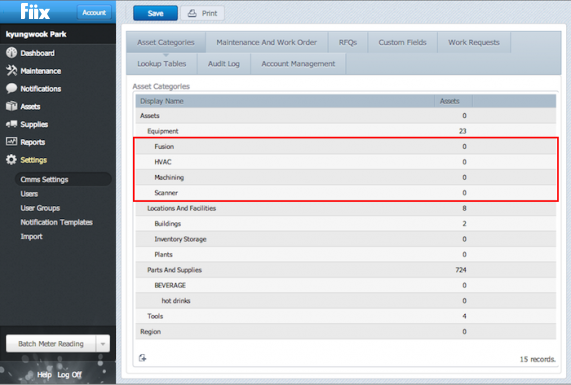
Asset Categories act like file types, grouping similar equipment together. During rollout, you might start with a single “Equipment” category and later refine it to reflect specific asset families. Categories simplify comparative reporting and enable category‑based custom fields.
#14 – Locating Assets in the CMMS
When every generator is simply labeled “Generator,” finding the right unit becomes a nightmare. Implement a clear asset‑labeling convention at the start of your deployment. This naming strategy makes assets instantly recognizable. For guidance, read our asset labeling convention blog.
#17 – Create Standardised Checklists or SOPs Using Task Groups
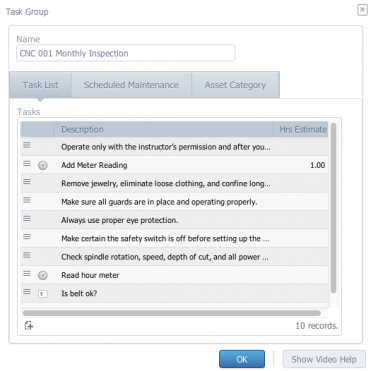
Checklists counteract human memory limits and enforce consistency. In Fiix, Task Groups allow you to:
- Define recurring tasks for PMs, installations, projects, de‑installations, setups, and upgrades.
- Insert a Task Group into any work order or scheduled maintenance with a single click.
- Update the Task Group once and have every related maintenance record refresh automatically.
#19 – Inspection Rounds
The core purpose of a maintenance inspection is early detection of reliability issues that could evolve into major failures. Instead of creating separate scheduled maintenance for each asset, use Fiix’s multi‑asset function:
- Create a single scheduled maintenance that includes all relevant assets.
- When the PM triggers, the user receives one work order covering all selected equipment.
#38 – Automated Recovery Checklists
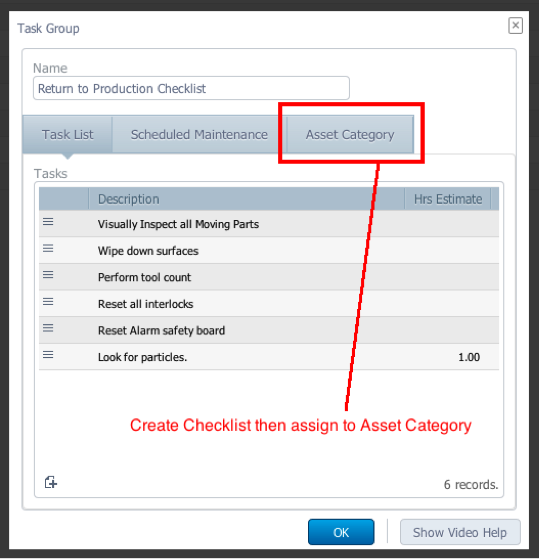
Automated recovery checklists guarantee that all critical system checks complete before a system returns to production, boosting reliability and minimizing scrap. Use Task Groups to build and auto‑populate these checklists for each asset category:
- Create the recovery checklist.
- Assign it to the desired asset category.
- Every new work order for assets in that category auto‑loads the checklist.
Equipment Maintenance and Repair
- Essential Cloud Computing Strategies for Startups and Enterprises
- Why Mobile Maintenance Matters – Fiix Guest on Asset Reliability @ Work Podcast
- 7 Essential Tips for Choosing the Right Asset Management Software
- Four Proven Strategies to Scale Your CMMS Pilot Project
- How Maintenance Teams Can Cut Audit Costs and Pass with Confidence
- 7 Proven CMMS Tips to Accelerate Setup and Boost Productivity
- Mastering Inconel Welding: Expert Tips for High‑Performance Applications
- Mastering IIoT Asset Management: 4 Essential Tips & Common Challenges
- Top 5 Safety Tips for Using Industrial Ladders & Platforms
- Mastering Diamond Machining: Proven Tips & Advanced Techniques