



How to Build an Efficient Maintenance Work Request System

Extended equipment downtime not only compromises safety but also erodes productivity, driving costs upward. While preventive maintenance can mitigate many issues, an organized work request system is essential for responding quickly to faults when they arise.
Implementing such a system is simpler than you might think—once you understand the purpose of a work request within the larger maintenance workflow. Below we outline the key components and best practices for building an effective ticketing process.
What is the purpose of a work request?
A work request is a formal notice that brings a maintenance issue to the attention of the maintenance team. It details a defect that impairs the operation of a specific asset or facility.
Across industries, it goes by several names—maintenance ticket, repair order, problem report, and so forth. Requests can be lodged manually or electronically by:
- Customers: tenants, employees from any department, or operators on the shop floor.
- Partner facilities: schools, offices, or factories that outsource maintenance to vendors.
- Maintenance personnel: technicians or machine operators who spot anomalies during routine checks.
Its role in the maintenance process
Once submitted, a work request becomes the foundation for planning, prioritizing, and assigning tasks to technicians. A robust ticketing system shortens response times, reduces mean time to repair, and eliminates idle periods that erode productivity.
Many people conflate work tickets with work orders. The distinction matters: a work request is the initial appeal for service; after review and approval, it transforms into a work order that authorizes the work.
Maintenance managers, supervisors, planners, or coordinators evaluate each ticket based on:
- Availability of maintenance funds
- Current inventory of tools, spare parts, and labor
- Priority of the issue, considering safety risks and potential loss of production
High‑risk or high‑impact problems—those that threaten safety or critical production—are typically green‑lit first.
The elements you should find on a work request form
A clear, concise description of the problem gives technicians the context they need to act swiftly. In some cases, the requester may also suggest a corrective action.
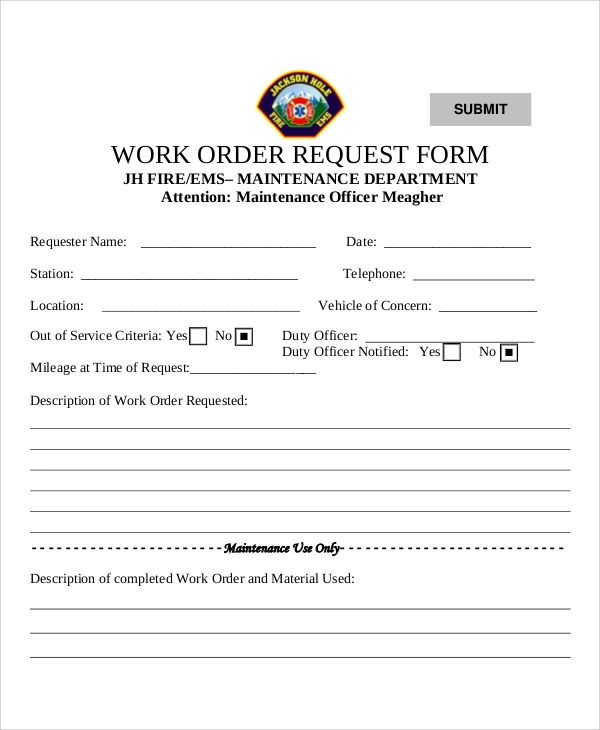
Below is a sample basic work request template:
And a more advanced example that includes additional fields:
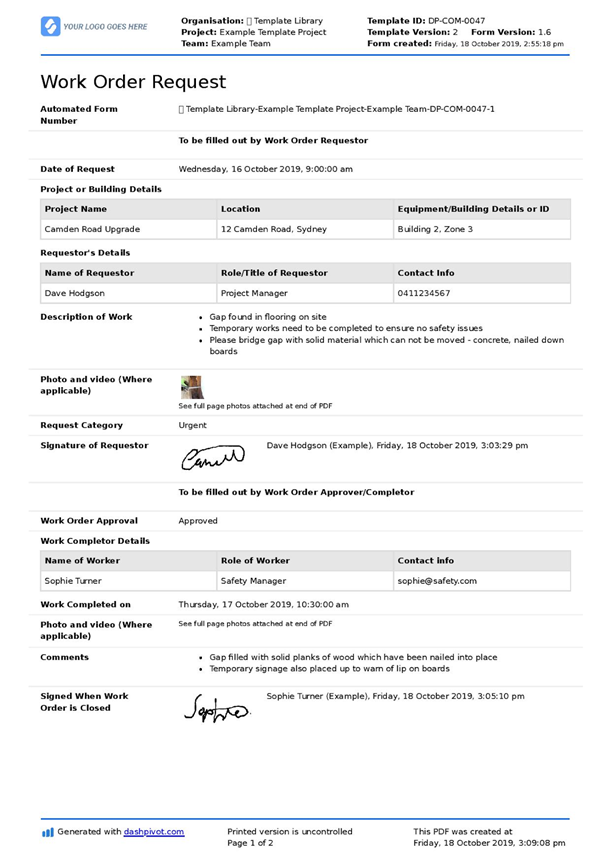
Key sections of an effective form include:
1) Requester information
Identifying the person—tenant, department head, production employee, or technician—ensures the maintenance team can follow up if needed. This is critical when work is outsourced.
2) Problem description
Provide a straightforward, complete narrative of the defect. If possible, attach a photo taken with a mobile device to aid troubleshooting. Clear descriptions save time for technicians.
3) Asset location
Specify the exact location or part of the equipment affected. For mobile assets, GPS or RFID can pinpoint positions; for fixed assets, barcodes scanned via mobile devices can uniquely identify the unit.
4) Priority and budget (optional)
These details are especially useful for outsourced maintenance. Their inclusion depends on the terms of the maintenance contract.
Setting up a smooth work request system
A well‑designed system expedites repairs, whereas a convoluted one can create backlogs. Consider the following steps to streamline the process:
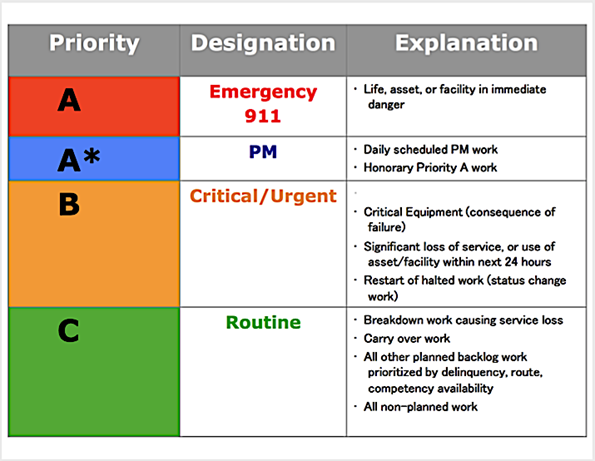
Set clear prioritization guidelines
When multiple requests arrive simultaneously, the maintenance team must rank them against asset criticality and planned work. A simple risk‑based decision matrix—illustrated below—helps align priorities.
Standardize submission procedures
Uniform submission methods prevent duplication. Clearly communicate:
- Who may submit requests
- Who approves them
- Required and optional information
- How to submit and track progress
Centralize incoming requests
Centralization—via a CMMS or a designated help desk—ensures all tickets are visible, tracked, and free from loss or duplication. Digital tools eliminate time‑bound constraints of a physical help desk.
Automate the workflow
A digital solution lets requesters log issues from anywhere, attach photos, and generate a unique tracking number. Algorithms can flag duplicates or invalid entries, freeing up planners to focus on high‑priority tasks.
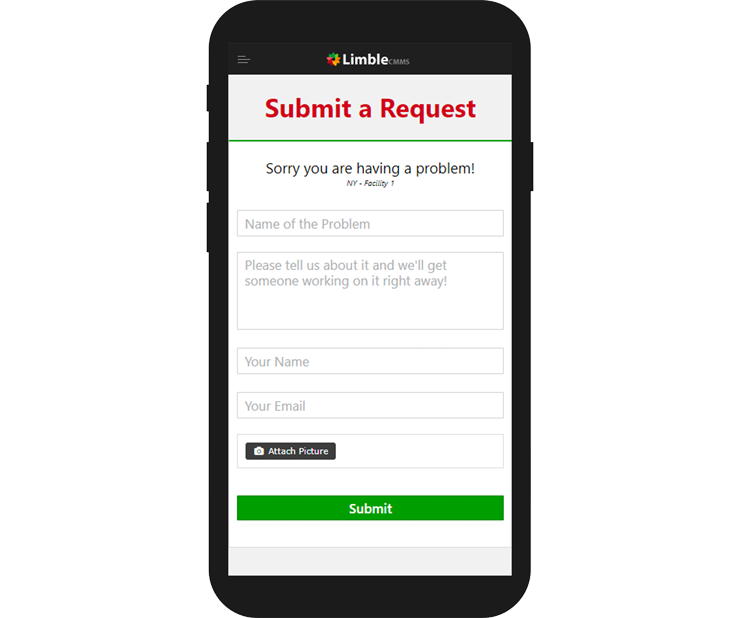
Using Limble CMMS to submit a work request
Manage work requests with Limble CMMS
Limble’s work request portal lets you share a single link with your entire organization. Anyone can submit a ticket with the required details, and the software handles routing, approvals, and tracking automatically.
Watch this video to see how Limble streamlines work request management:
If you also need to share work orders with external vendors, Limble’s vendor‑management module covers that as well. Learn more about our capabilities here.
It is time to go digital
Transitioning to a digital work request system offers clear advantages: faster response, reduced downtime, and better data for continuous improvement. Even a lightweight tool can deliver these benefits without the full suite of CMMS features.
Investing a few hundred dollars a month in a reliable solution is far less costly than the losses incurred from prolonged downtime. Your future self will thank you for the efficiency gains.
Equipment Maintenance and Repair
- Modernizing Facilities Management: Key Trends for a 40% Construction Growth
- Why Autonomous Operator Maintenance Drives Efficiency and Workforce Empowerment
- Mastering Teamwork, Planning, and Scheduling for Plant Reliability
- When Is It Acceptable to Deviate From a Maintenance Schedule?
- Reevaluating Maintenance Supervisors: From Desk to Floor
- Master Work Order Planning & Scheduling: Proven Strategies of Top Maintenance Teams
- Mastering Maintenance Contracts: Expert Tips for Facility Managers
- Mobile EAM: A Real‑Time Maintenance App for Field Technicians
- Comprehensive Guide to Automatic Bar Feeders: Features, Benefits, and Best Practices
- Robotic Workcells Unveiled: Design, Options, and Benefits