



Troubleshooting 101: Mastering Device Repair for Reduced Downtime
Everything will break eventually. When a reboot doesn’t solve the problem, we brainstorm potential causes and test hypotheses to pinpoint the issue. That is troubleshooting in a nutshell.
Malfunctions can become costly quickly, so a proven troubleshooting track record gives you credibility when you recommend replacement instead of repair.
This article covers:
- What troubleshooting is
- Common causes of equipment failure
- How to streamline the process with a CMMS
What is troubleshooting?
Troubleshooting is a systematic approach to identifying a root cause and determining the most effective fix to restore operation. It applies to both catastrophic breakdowns and subtle performance dips. Mastering this skill is a cornerstone of proactive asset management, diagnosis, and repair.
Properly operated and regularly maintained machines rarely suffer major failures, but zero risk never exists. Every piece of equipment will eventually need attention.
When and why to troubleshoot?
Troubleshooting is essential in the following scenarios:

1) Device failure
This is the most urgent case: the machine is completely out of commission and must be repaired quickly to resume operations. Unplanned downtime can cost companies hundreds of thousands of dollars per minute. A skilled maintenance team that can troubleshoot efficiently can drastically reduce high‑severity outages and save money.
Using a modern CMMS like Limble for troubleshooting checklists shortens downtime. It also turns every technician into a more valuable asset.
2) Unexpected operation
Each device has a defined performance envelope. While slight deviations are normal, operating outside that envelope signals a problem that should be addressed promptly. These situations are less critical than a full failure, but they can evolve into costly breakdowns if ignored.
Consider plant cooling fans that intermittently cease to blow air or produce cooler temperatures. Failure to correct this early can cause downstream equipment to overheat and fail. Prompt logging of such anomalies—via email, QR scan, or the CMMS—creates a written history that speeds future troubleshooting.
Operational staff should report faults immediately to prevent a minor issue from escalating.

With detailed asset history and seasoned troubleshooting, technicians can resolve issues independently, freeing time for higher‑value tasks.
What are the benefits of troubleshooting?
Reactive maintenance can drain resources, but the hidden costs extend beyond dollars. Effective troubleshooting yields tangible benefits.
A penny saved is a penny earned
Immediate costs include unplanned repair expenses that often alarm finance teams. Repeated breakdowns can compel expensive vendor interventions and asset replacement.
When you can diagnose problems quickly and keep repair costs low, you can turn the narrative around finance from “Why is maintenance so costly?” to “How much did we save this time?”.
The show must go on
Downtime is expensive—not just the repair cost but lost production revenue. A recent study by Vanson Borne for GE Digital surveyed 450 service and IT decision‑makers worldwide and found:
- 82 % of companies experienced unplanned downtime in the past three years; average outage lasted 4 hours and cost $2 million.
- 46 % lost the ability to deliver services to customers, 37 % lost critical production time, and 29 % could not service specific equipment.
Your reputation on the line
Repeated breakdowns erode trust among employees and customers. If equipment fails and support is delayed, teams become frustrated, and customers may look elsewhere. A reliable maintenance program preserves brand loyalty.
In 2019, California’s Pacific Gas & Electric forced a power cut for over 2 million people to catch up on deferred maintenance, which ultimately led to two dozen deadly wildfires. The company later filed for bankruptcy after being held liable for billions in damages.
When troubleshooting stalls, problems compound, turning maintenance from proactive to reactive and risking catastrophic outcomes.
Replace or repair dilemma
Sometimes replacement is more economical than repair. However, convincing finance to approve unplanned capital can be tough. By tracking maintenance, costs, and downtime in a CMMS with robust reporting, you can present hard data that justifies replacement.
Limble’s custom dashboards illustrate how often an asset fails and the associated financial impact, turning a maintenance conversation into a data‑driven decision.
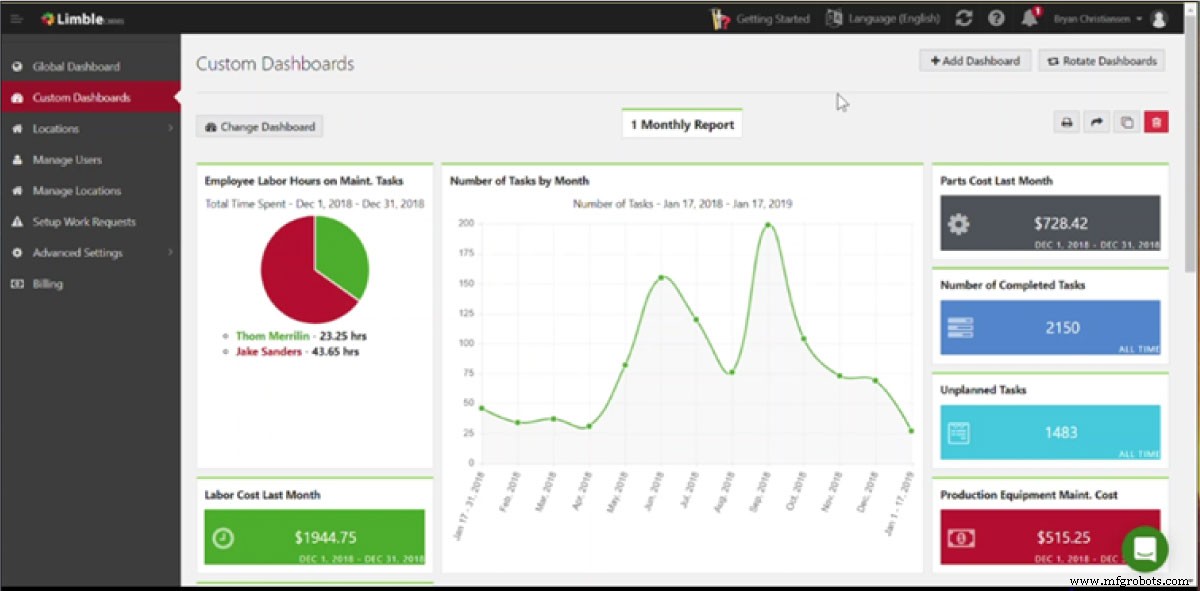
Example of a custom dashboard in Limble CMMS
Repeatedly troubleshooting the same device becomes frustrating; data‑backed replacement recommendations save time, money, and headaches.
Who performs troubleshooting?
Experienced technicians typically lead troubleshooting. Yet, 60 % of seasoned maintenance professionals will retire in the next few years. Their knowledge—gained through trial and error—must be captured.
When this expertise is codified into a central hub like Limble, you preserve institutional knowledge and empower newer staff to handle routine issues. Autonomous maintenance—where operators perform visual checks and basic troubleshooting—further frees specialists for complex tasks.
Troubleshooting steps
Follow these six steps regardless of experience level:
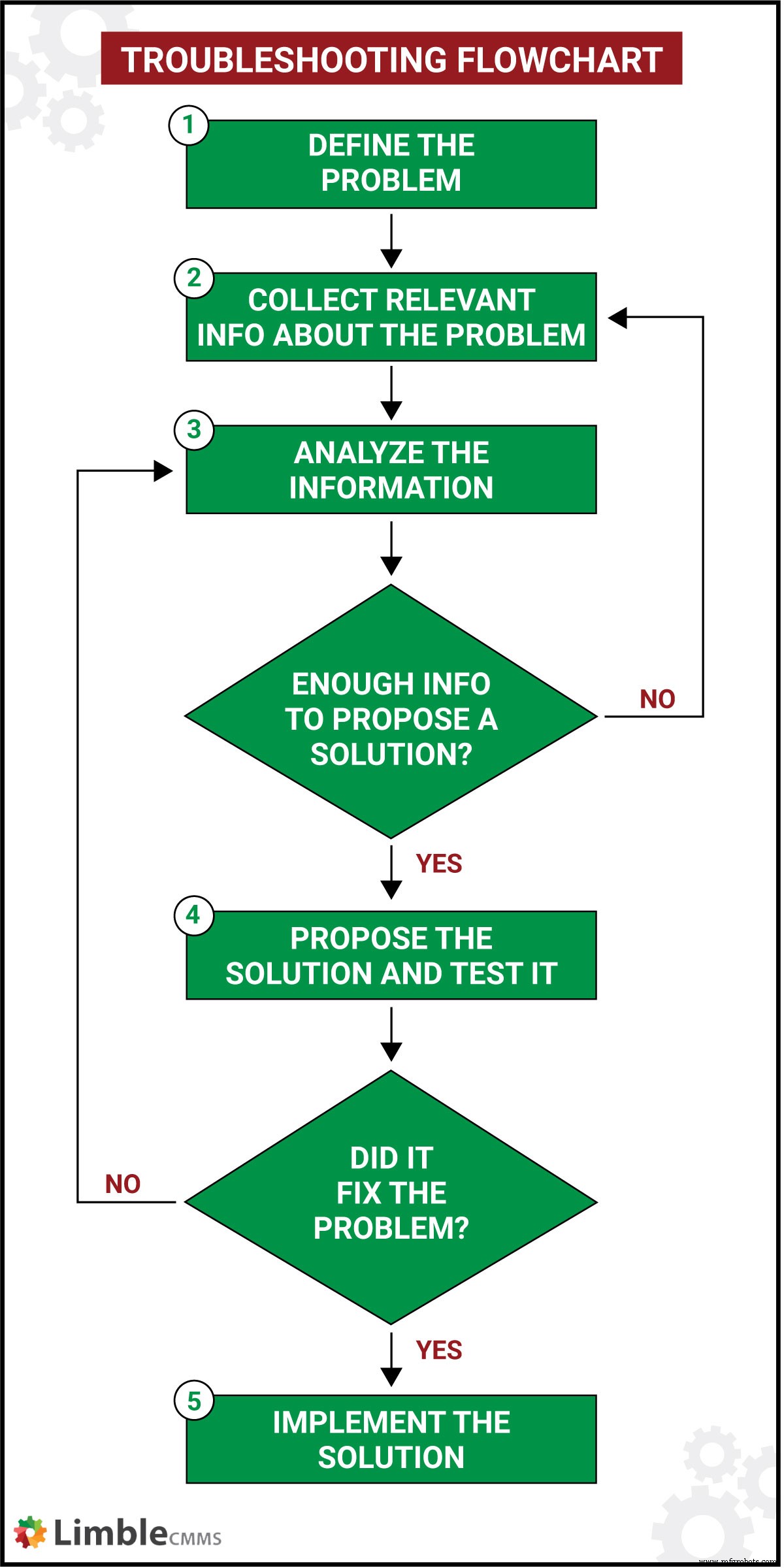
Step 1: Define the problem
Clearly articulate the issue. Determine whether it’s a total failure, unexpected operation, user error, or anomaly. Many machines signal trouble with alarms, flashing lights, or warning messages; others simply stop.
Step 2: Collect relevant information
Gather manuals, operation logs, maintenance history, and fault reports. Store digital copies in your CMMS. If possible, consult the OEM for guidance; sometimes a quick call resolves the issue faster than an onsite investigation.
Step 3: Analyze collected data
Use data, checklists, and expert input to pinpoint root causes. Consider recent changes: new parts, upgrades, material variations, operational changes, or electrical surges. If the cause remains unclear, return to Step 2 for additional data.
Step 4: Propose a solution and test it
Formulate hypotheses and test them in a logical order, starting with the simplest fix. Evaluate safety, cost, implementation complexity, long‑term viability, and potential biases.
Step 5: Implement the solution
Apply the chosen fix, retest, and verify proper operation before closing the work order. Document every action to build a knowledge base for future incidents.

Bonus step: Document the fix
Record the solution in the CMMS asset log. Include notes, images, and any lessons learned. A robust maintenance toolkit—available in Limble—captures work orders, parts, technician details, and custom notes.
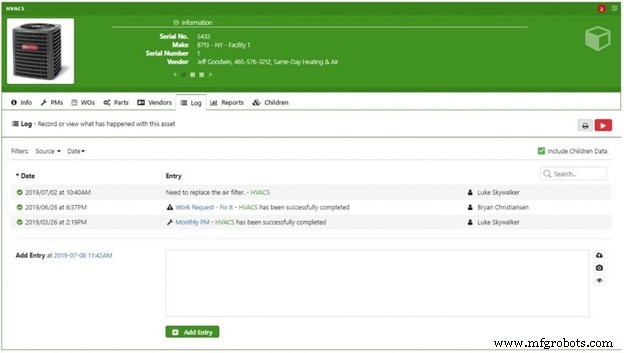
Example of an asset log entry in Limble CMMS
Maintaining a complete audit trail makes repeating repairs quick and reduces the risk of misdiagnosis.
Ways to make troubleshooting easier
Effective troubleshooting requires organized tools and clear processes.
Troubleshooting checklists
Checklists standardize the approach to common problems, reducing reliance on memory. CMMS platforms allow you to create, store, and access checklists on mobile devices for field use. Collaborate with senior technicians to develop step‑by‑step instructions that include warnings and visual aids.
A modern CMMS
A centralized CMMS consolidates all the information you need: OEM manuals, vendor contacts, maintenance logs, work request details, checklists, and condition‑monitoring data. Limble, for example, uses QR codes to give technicians instant access to asset data with a simple scan.
Limble CMMS turns a QR scan into a work order, creating a single hub for fault reporting, historical data, and corrective actions.
Quick, easy access to documentation speeds troubleshooting and preserves knowledge as staff move on.
The future of troubleshooting
Automation is reducing the need for operators, increasing the importance of skilled maintenance teams. Emerging technologies are making troubleshooting faster, safer, and more predictive.
A robot with a crystal ball
Machine learning empowers systems to learn from data and predict failures—an essential part of predictive maintenance. Prescriptive analytics can guide machines to diagnose themselves and propose solutions.
Enhancing the real world with AR
Augmented reality overlays digital information onto physical equipment. With a tablet or phone, technicians can view component layers, receive guidance, and confirm correct installation.
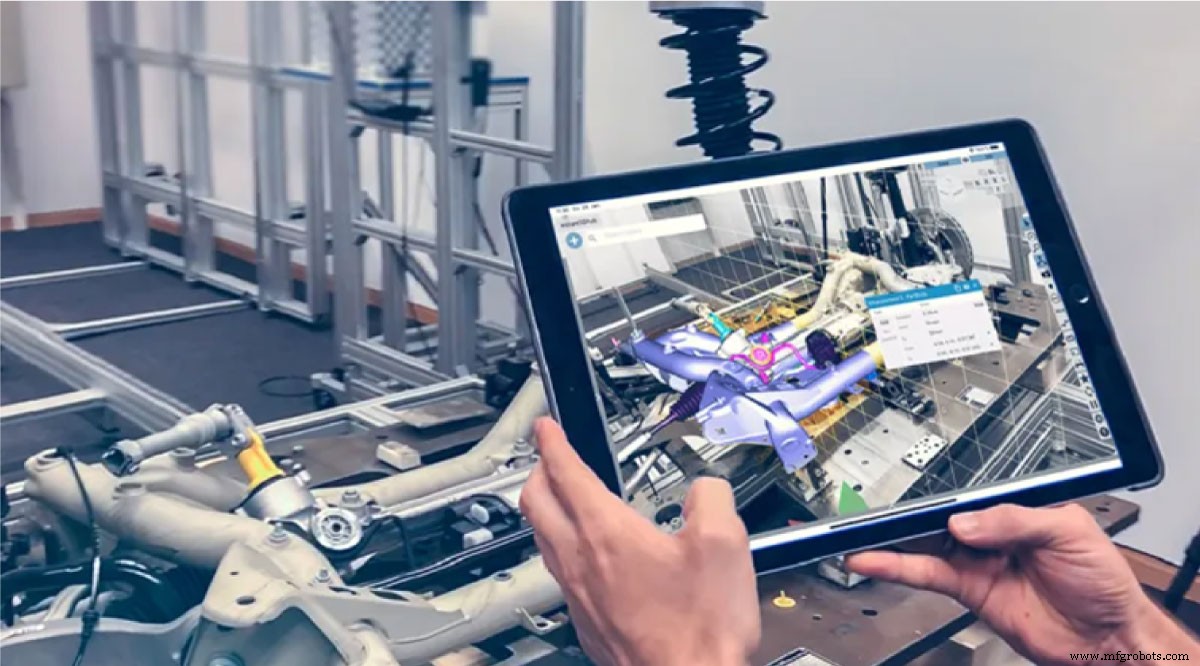
Augmented reality in quality control. Source: Metrology.news
Simulations and virtual reality
VR offers a risk‑free environment to practice repairs before working on actual equipment. It turns training into an immersive, game‑like experience.
Digital twin
A digital twin is a virtual replica of a machine that aggregates sensor data and applies analytics across installations. When a failure occurs, OEMs can compare it to data from other units, accelerating diagnosis and recommending fixes.

Digital twin in manufacturing. Source: Siemens
That’s it
A malfunctioning device can be a mild annoyance or a catastrophic safety incident that cripples a business’s bottom line. Rapid, organized response reflects well on the maintenance department and showcases skilled staff. Invest in knowledge retention, train operators, and leverage modern CMMS tools to keep downtime—and costs—under control.
Have questions about troubleshooting? Drop a comment below or start a free trial of Limble CMMS today.
Equipment Maintenance and Repair
- Essential Troubleshooting Checklist: Strategies to Diagnose System Failures Quickly
- First Impressions Matter: A Professional Guide to Equipment Troubleshooting
- Reliability Engineering Fundamentals for Plant Engineers
- Step-by-Step Guide to Safely Removing a Bearing for Repair
- Motor Troubleshooting Essentials: Thermal, Electrical, and Insulation Tests to Save Costs
- Essential PLC Troubleshooting Tips to Minimize Downtime
- Key Factors to Evaluate Before DIY Repairing Industrial Electronics
- Expert Guide: Servo Motor Repair & Troubleshooting Tips
- Top 6 Encoder Repair Tips to Minimize Downtime
- Expert Guide to Rapidly Diagnose and Fix Hydraulic System Issues