



Fanuc G68 Coordinate Rotation: Precise Axis Alignment for CNC Machining
G68 Coordinate Rotation
Fanuc G68 Coordinate Rotation G-Code makes it easy for cnc machinist to run a pattern of operations in a rotated angle.
In short: By designating a rotation angle with G68 in the program, actual machining will be performed on the rotated coordinate.
You can specify the Center-point (origin) and Angle-of-rotation, and whole the pattern of operation will be executed there.
Programming
G68 X…Y… R…
Parameters
| Parameter | Description |
|---|---|
| X,Y | Centre of rotation. |
| R | Angle of rotation (R+ = Anti-clockwise). |
If the X & Y values are not programmed with G68 Coordinate Rotation then the current tool position becomes the rotation pole center.
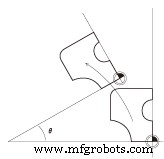
G91 Incremental Mode
The X, Y & R are established as incremental values if G68 is specified with a G91 code.
G69 Cancel Coordinate Rotation
The Rotation must be cancelled with G69 when finished.
Programming
G69
Fanuc G68 Coordinate Rotation G‑Code Example for CNC Machining
Fanuc Subprogram Example: Simplify CNC Programming with Subroutine Techniques
CNC Machine
- Fanuc iRVision – Advanced 2D Robot Vision System for R-30iA Controllers
- Comprehensive Guide to CNC G‑Codes for Fanuc Controls
- Fanuc G68 Coordinate Rotation G‑Code Example for CNC Machining
- Fanuc G68 Coordinate Rotation: Practical Subprogram Example for CNC Machining
- Fanuc G04 Dwell: Mastering CNC Pause Commands
- Comprehensive Fanuc G-Code Reference for CNC Programming
- Fanuc CNC Program Example: G52 Local Coordinate & G15/G16 Polar Coordinates
- Comprehensive Guide to Selca CNC G51 Offset & Coordinate Rotation – Program Example
- Complete Makino Pro 3 G‑Code Reference for Fanuc 16i/18i CNC Controls
- Fanuc G15/G16 Polar Coordinate Interpolation – End & Begin Operations