



Mastering Haas CNC Circular Interpolation: Practical G02/G03 Programming & Examples
Haas CNC Milling Circular Interpolation Programming explanation with cnc example programs, these examples shows how IJK or R can be given in cnc program while programming Circular Interpolation with G02 G03 G-codes.
Haas Circular Interpolation
Why Use IJK when R is Easier to Program?
R is easier to define, though it’s easier to make a mistake and get an incorrect radius. If R is used, and you make a mistake with the start point or the end point, and the machine can still do the radius, and does it, then you’ll have an incorrect radius.
If you make a mistake with the I, J , K method, the machine will be more likely to stop and give you an alarm before executing it.
Though using an R in a G02 or G03 is still easier and the preferred method to manually program an arc.
What is R
R is the distance from the starting point to the center of the circle.
What is IJK
“I” = Incremental distance from Start Point to arc center in the “X axis.”
“J” = Incremental distance from Start Point to arc center in the “Y axis.”
“K” = Incremental distance from Start Point to arc center in the “Z axis.”
When to Use Negative R
With a positive R, the control will generate a circular path of 180 degrees or less, but to generate a circular path of over 180 degrees, then specify a negative R. When R is used, a complete 360 degree arc is not possible. X, Y, or Z is required to specify an endpoint different from the starting point. So anything under a 360 degree arc can be performed with an R command in a G02 or G03.
How to Cut 360 Degree Arc or Full Circle
Use of I, J, or K is the only way to cut a complete 360 degree arc; in this case, the starting point is the same as the ending point and no X, Y, or Z is needed. To cut a complete circle of 360 degrees (360°), you do not need to specify an ending point X, Y, or Z; just program I, J, or K to define the center of the circle.
Example Program
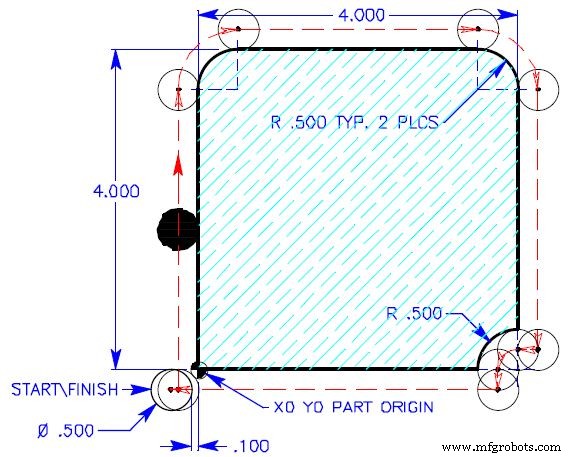
NOTE: Example of circular moves are not using cutter compensation, so the circular moves are defined from the center of the cutter around arc.
G02 G03 with R
O0010 (INTERPOLATION EXERCISE)
T1 M06 (1/2 DIA. 4FLT. END MILL)
G90 G54 G00 X-0.35 Y-0.25
S1450 M03
G43 H01 Z0.1 M08
G01 Z-0.625 F50.
X-0.25 F14.5
Y3.5
G02 X0.5 Y4.25 R0.75
G01 X3.5
G02 X4.25 Y3.5 R0.75
G01 Y0.25
X4.
G03 X3.75 Y0. R0.25
G01 Y-0.25
X-.35
G00 Z1. M09
G28 G91 Z.0 M05
M30
G02 G03 with IJK
O0010 (INTERPOLATION EXERCISE)
T1 M06 (1/2 DIA. 4FLT. END MILL)
G90 G54 G00 X-0.35 Y-0.25
S1450 M03
G43 H01 Z0.1 M08
G01 Z-0.625 F50.
X-0.25 F14.5
Y3.5
G02 X0.5 Y4.25 I0.75 J0.
G01 X3.5
G02 X4.25 Y3.5 I0. J-0.75
G01 Y0.25
X4.
G03 X3.75 Y0. I0. J-0.25
G01 Y-0.25
X-.35
G00 Z1. M09
G28 G91 Z.0 M05
M30
CNC Machine
- Precision Foam Cutting Using CNC Milling Machines: A Proven Solution
- Mastering Hard Milling on CNC Machines: Expert Tips & Best Practices
- CNC G02 Circular Interpolation (Clockwise) – Practical G‑Code Programming Example
- CNC Program Example: G03 Circular Interpolation – Master the Math Behind CNC Machining
- CNC G02 Clockwise Circular Interpolation: Beginner‑Friendly Sample Program
- CNC Milling Circular Interpolation: Practical G02/G03 G‑Code Program Example
- CNC Milling Machine Programming: Beginner-Friendly Example Guide
- Mastering C‑Axis Lathe Programming with Live Tooling on Haas CNC
- Master Haas CNC M97 Local Sub-Program Calls: Step-by-Step Example
- Master Circular Interpolation: Step-by-Step Programming Example #2