



Anilam G171 Circular Profile Cycle – Efficient Interior & Exterior Circle Profiling
G171 Circular Profile Cycle
Anilam G171 Circular Profile Cycle cleans up the inside or outside profile of an existing circle.
Programming
G171 Xn Yn Hn Dn Zn An Rn Bn Sn In Jn Kn Pn
Parameters
| Parameter | Description |
|---|---|
| X | X coordinate of the center. Default: present position. Optional. |
| Y | Y coordinate of the center. Default: present position. Optional. |
| H | Z absolute starting (rapid) height (must be 0.1 inch or 2 mm above surface to be cut into). Executed in rapid. Required. |
| D | Finished diameter of circle. If you enter a negative value, both the direction of cut and the starting and endpoints reverse. Required. |
| Z | Absolute depth of the finished profile. Required. |
| A | Setting for cutting on the inside of the profile (In) or the outside (Out). Selection required. 0=In, 1=Out. |
| R | Ramp distance used for each pass. Optional. |
| B | Z-axis increment used for each pass. Optional. |
| S | Amount of stock left by the machine before the finish pass. Default: 0. Enter a negative value to leave the stock without making a finish pass. Optional. |
| I | Z-axis feedrate. Optional. |
| J | Rough-pass feedrate. Optional. |
| K | Finish-pass feedrate. Optional. |
| P | Retract Hght. |
Operation
When executed, the CNC rapids to Ramp#1 starting position, rapids to H (StartHgt), then feeds to the depth of the first cut.
The machine feeds into the profile along Ramp #1, cuts the circle to the specified D (Diameter) then ramps away from the work along Ramp #2.
When cutting an outside profile, the tool ramps into the work along Ramp #1 and away from the work along Ramp #2 as illustrated in Figure
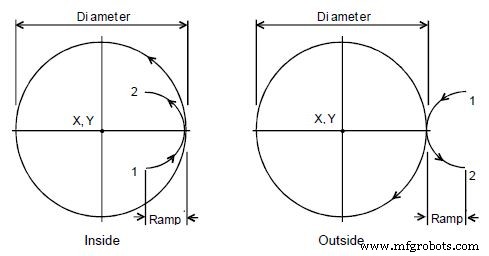
Ramp Position for Inside and Outside Profile
The Circular Profile Cycle automatically compensates for tool diameter. Activate the correct tool diameter before the G171 block.
Notes
If you enter a Depth Cut = B (Z Max.cut), the CNC executes the number of passes required to get from the H (Z Start Hgt.) to Z (Z Depth), cutting to the Depth Cut = B (Z Max.cut) on each pass.
When you enter an S (Finish Stock) value, the CNC leaves the specified stock on the profile and depth for a finish pass. The CNC finishes to the entered diameter on the finish pass. Enter a negative S (Finish Stock) to leave the finish stock without making a finish pass.
If you do not enter a J (Rough Feed) or K (Finish Feed) value, the CNC executes feed moves at the current feedrate. J controls feedrate of the roughing cycle. K controls the feedrate of the finishing cycle.
CNC Machine
- Balancing Cycle Time and Surface Finish: Optimizing Productivity and Quality
- Fanuc G70 & G71 Roughing & Finishing Turning Cycle CNC Program Example
- Mastering the G90 Turning Cycle: A Comprehensive Guide to CNC Rough Turning and More
- Anilam CNC Mill 6000M G‑Code Reference – Complete Guide
- Anilam 4200T CNC Turning Controls: Master G Code Functions
- Master Circular Interpolation: Step-by-Step Programming Example #2
- Comprehensive Haas G72 Type I Rough & G70 Finish Facing Cycle Program for Fanuc-Compatible Lathes
- Optimized Fanuc G71 Turning Cycle for CNC Lathe Precision
- Heidenhain CNC Programming: Circular Pattern (Cycle 220) Tutorial
- Anilam G172: Efficient Rectangular Profile Milling Cycle