



Mastering the G90 Turning Cycle: A Comprehensive Guide to CNC Rough Turning and More
G90 Turning Cycle Format
G90 turning cycle is called with many names like,
G90 Fixed Cycle, G90 Straight Cutting Cycle, G90 Rough Turning Cycle, G90 Rough Turning Canned Cycle, G90 Box Cycle.
G90 turning cycle is used for simple turning however multiple passes are possible by specifying the X-axis location of additional passes.
Related: G90 Turning Cycle Fanuc – CNC Program Example Code
G90 rough turning canned cycle can be used for
- Straight turning.
- Boring operation.
- Taper cutting.
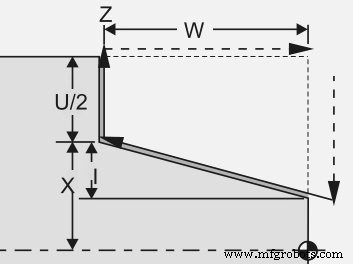
Programming
G90 X... Z... I...
or
G90 X... Z... R...
Parameters
| Parameter | Description |
|---|---|
| X | Diameter to be cut. |
| Z | End point in z-axis. |
| Q | Angle on the starting point. |
| I or R | Distance and direction of taper (Radius value). |
Note – some cnc controls use “I” for taper in G90 straight cutting cycle and some newer cnc controls use “R” for taper value.
Incremental Values
You can use incremental values like U and W instead of X and Z in the G90 turning cycle.
G90 U... W...
U – x-axis incremental distance to target.
W – z-axis incremental distance to target.
Working/ Operation
- Take tool to the start position.
- Make cut with G90 turning cycle by giving X Z values
- Make extra cuts/passes by just giving X-axis values (extra passes are optional)
- End the G90 turning cycle by making a motion command with G00, G01 etc.
G90 turning cycle gives us the ability to control every pass depth.
CNC Program Example
G30 U0 W0
G50 S2000 T0100
G96 S200 M03
G00 X56.0 Z2.0 T0101 M08
G90 X51.0 W-32.0 F0.25
X46.0
X41.0
X36.0
X31.0
X30.0
G30 U0 W0
M30
Code Explanation
As you can see in the above cnc program code,
First cut is made at X51
Second cut is made at X46
Third cut is made at X41
…
Last cut is made at X30
Cancellation of G90 Turning Cycle
G90 turning cycle is a modal G code.
“Modal” G code meaning that they stay in effect until they are cancelled or replaced by a contradictory G code.
It means G90 turning cycle remains active until another motion command is given like G00, G01 etc. As in the cnc program example above G90 G code is cancelled with G30 G code.
Put simply G90 turning cycle must be ended by making a motion command like G00, G01 etc.
G90 Turning Cycle vs G71 Turning Cycle
G90 turning cycle can only make straight and taper cuts, you can’t cut any arc (circular interpolation) with G90 turning cycle.
Instead G71 Turning Cycle cuts straight, taper and arc also.
CNC Machine
- Master Taper Turning Using G90 Modal Cycle: CNC Programming Guide
- Fanuc G90 Turning Cycle: CNC Program Example for Efficient Turning Operations
- G71 Rough Turning Cycle One-Line Format: Simplify CNC Fanuc Programming
- Mastering the G20 Turning Cycle on Fanuc 21TB CNC Lathes
- CYCLE81 Drilling Cycle on Sinumerik 840D Turning – Expert Guide
- Optimized Fanuc G71 Turning Cycle for CNC Lathe Precision
- Step Turning with G90 Cycle: Fanuc 0‑TC CNC Programming Guide
- Fanuc G90 Turning Cycle Example: 0‑TC Program for Efficient Turning
- Master Fanuc G90 Turning Cycle for Efficient Component Machining
- G90 Turning Cycle Example on GSK 980 TDc CNC Lathe – Straight and Taper Turning