



DATRON Next: The Future of CNC – Intuitive, Visual, and Effortless Control
Imagine cutting parts on a CNC machine after just one day of training, even without prior machining experience.
With DATRON next, that possibility becomes reality.
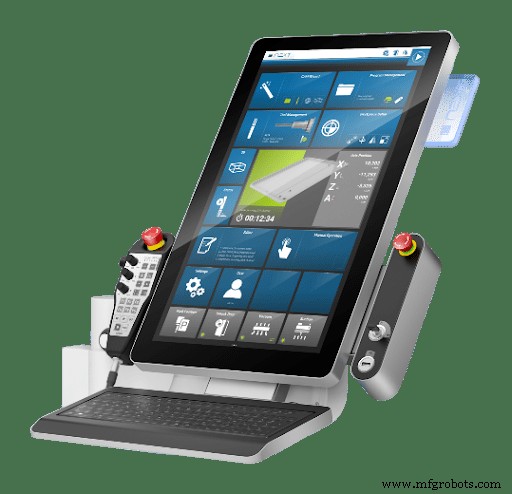
The DATRON next interface is intuitive, visual, and user‑friendly—fundamentally different from conventional CNC controls.
Why DATRON Reimagined CNC Interfaces
When DATRON launched the DATRON neo in 2016, it aimed to overhaul CNC machine operation entirely.
Designed for prototyping and R&D, the neo addressed environments lacking full‑time CNC operators, demanding a control system that novices could master without prior experience.
Achieving this required a fundamental redesign, best understood by examining the evolution of CNC controls.
A Brief History of CNC Controls
In 1949, MIT introduced the first numerically controlled (NC) machine, employing punched tape—akin to a player piano—to govern tool movement. Unlike manually driven tools, operators could simply load tape, start the machine, and let it run.
By the 1960s, computers supplanted punched tape, ushering in computer numerical control (CNC). Limited memory forced compact machine instructions, giving birth to G‑code—a text‑based language that remains in use today.
These constraints produced interfaces centered on push buttons, dials, jog wheels, and tiny monochrome displays showing G‑code lines. Mastery required extensive training, and this layout became the industry norm across numerous brands.
Although CAD/CAM software grew more user‑friendly, the physical machine interface remained largely unchanged.
Until DATRON flipped the paradigm in 2016.
The DATRON next interface’s success—from novices to seasoned machinists—led to its adoption as the default control across all DATRON machines.
CNC Interface for Today’s Workforce
Today’s manufacturing talent pool differs markedly from past decades: seasoned machinists are scarce, while a new generation of tech‑savvy professionals enters the field.
Nearly everyone uses a smartphone—intuitive and self‑explanatory. Imagine a CNC control that feels just as natural.
Thus DATRON next was conceived: to make CNC operation intuitive, natural, and even enjoyable.
Clean Design, Simple Operation
Key features of the DATRON next control include:
- A 23” adjustable color touchscreen
- A handheld remote for setup inside the work area
- A few essential physical controls, such as the main power switch
No unnecessary complexity.
Users tap, pinch, and swipe to set up jobs, load tools, and run programs—just as on a smartphone. The icon‑driven interface is clean and visual, displaying a keyboard only when required.
Streamlined Main Menu
The main screen features clearly labeled tiles for core functions. Tap a tile to navigate guided steps. Core tiles include:
- CAM Assistant – Assisted set up that guides you through the entire process
- Program Management – Manage stored files
- Tool Management – Set up and assign cutting tools
- Workpiece Setup – Define your coordinate origin
- Editor – View and modify program code
- 3D Simulation – Verify programs before machining
Additional tiles manage door control, user profiles, vacuum status, and more.
Faster, Visual Workpiece Setup
Workpiece setup is where DATRON delivers its greatest impact.
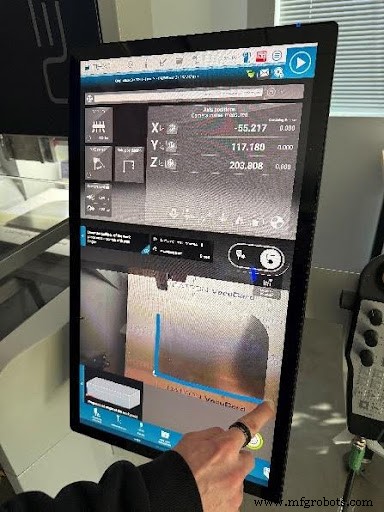
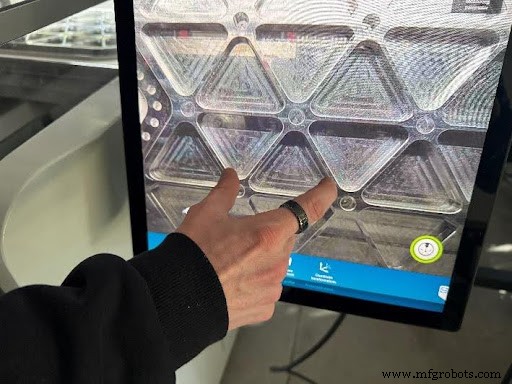
A camera beside the spindle streams a live view of the table. Users can pan the view by dragging their finger across the touchscreen, often eliminating the need to look inside the machine during setup.
Defining the origin with the touch probe becomes a simple gesture: draw the desired touch point on the live image—no coordinate entry required.
Choose from various measurement modes—corner detection, round‑stock center, etc. The process is swift, intuitive, and mastered in minutes.
Visual Tool Management
Traditional tool setup is complex, and errors can cause scrap or machine damage.
DATRON simplifies tool management visually and makes it error‑proof:
- Enter the tool’s article number, and its dimensional data auto‑populates.
- Measure tool length automatically.
- Assign the tool to a magazine position by tapping a green (available) slot on the screen.
- Occupied positions cannot be selected, preventing errors.
The result is faster setup and safer operation.
Built‑In 3D Simulation and Live Status
Prior to machining, the built‑in 3D simulator visually verifies the program, offering:
- Visual confirmation of the toolpath
- Flags incorrectly assigned tools
- Displays estimated runtime
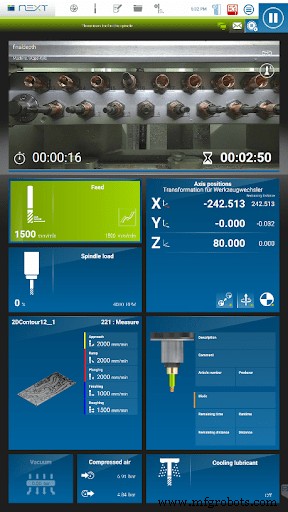
While machining, the status screen shows:
- Feed rate
- RPM
- Spindle load
- Current cycle time
- Active tool and parameters
- Live camera image of the cutting process
When remote overrides—like feed reduction or coolant changes—are applied, a green indicator alerts the operator.
An optional remote app lets you monitor the machine from a smartphone.
Built‑In Manual Machining Functions
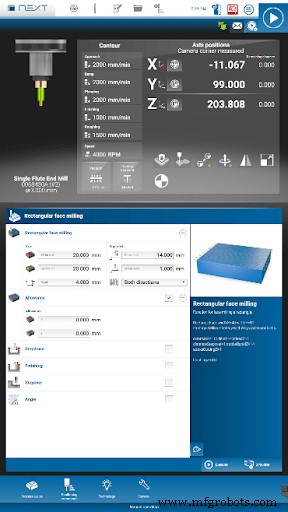
Beyond CAM programs, DATRON next incorporates manual machining and service functions (canned cycles).
Examples include:
- Face milling the top of stock directly from the control
- Milling a rectangular or circular pocket
- Engraving text – part marking
- Automated Z‑axis positioning for guideway greasing
These features streamline routine tasks, accelerating maintenance.
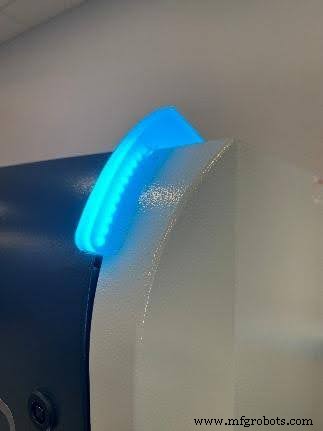
Status Lights
To reduce spindle idle time, DATRON places status lights—either atop the machine or on the gantry—indicating the machine’s state:
- Green – Machine running
- Red – Machine cannot move (possibly an alarm or error)
- Cyan – The operator is moving the machine
- Blue – Machine is idle
Opening the Door to a New Type of User
DATRON has succeeded: CNC machining is now accessible to non‑machinists.
Today, many DATRON customers have engineers running machines instead of dedicated operators. If a part can be loaded and run in minutes, a full‑time operator isn’t essential.
Moreover, when the same person programs and machines the part, their machining knowledge deepens, yielding superior programming and higher‑quality parts.
Redefining the CNC Control
True innovation emerges when companies challenge entrenched conventions and adopt new technologies.
With DATRON next, the company didn't merely refresh an interface; it redefined human interaction with CNC machines.
In doing so, they opened manufacturing to a new generation of users.
Experience a Smarter CNC Interface
Ready to experience intuitive CNC machining?
Book a live demo of the DATRON next control and see firsthand how visual setup, touchscreen navigation, and built‑in simulation can revolutionize your workflow.
Request a demo today and discover the future of CNC operation.
CNC Machine
- Galvanization Explained: How Zinc Coatings Extend the Life of Metal Parts
- How Coordinate Measuring Machines (CMMs) Optimize Precision in Modern Manufacturing
- DMG Mori Seiki CNC Milling Machines: Advanced Solutions for Precision Manufacturing
- Heidenhain CNC Milling Program: Precision Toolpath for Efficient Manufacturing
- Absolute Tool Length: The Gold Standard for Milling Tool Calibration
- 1530 ATC 4-Axis CNC Router: Advanced Build with Automatic Tool Changer & Rotary
- Mini 6090 CNC Router Delivered to Incheon, South Korea – Ideal for Woodworking & Furniture Production
- Maximize CNC Efficiency: Key Advantages of Real-Time Machine Monitoring
- Profitable Laser Engraving Projects & Ideas to Boost Your Income
- Changing Tools in the Syntec 6MB Control System: Automatic and Manual Methods