



SnapEDA Unveils Desktop App to Seamlessly Bridge Online CAD Model Library with Popular PCB Design Tools
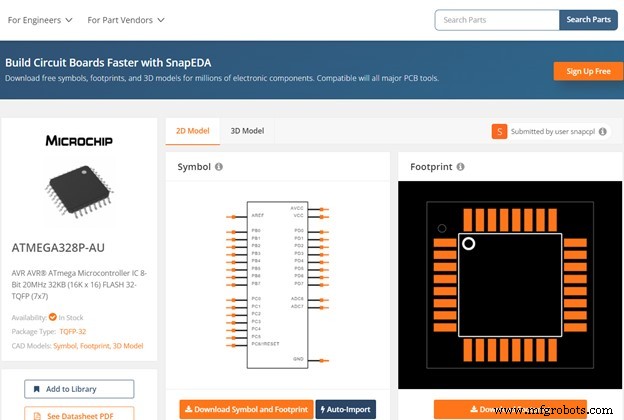
SnapEDA, the industry‑leading online library of verified electronic component CAD models, has released SnapEDA Desktop—a seamless bridge between its web platform and the most widely used desktop PCB design tools.
CEO and founder Natasha Baker explained to embedded.com that engineers repeatedly requested tighter integration with their existing desktop CAD environments. "Until cloud tools become mainstream, professionals will continue to rely on robust desktop solutions," Baker said. "SnapEDA Desktop connects the web to the desktop, delivering a frictionless experience.”

Baker likens SnapEDA’s platform to a “Google Analytics” tool for the electronics design industry (see Electronics Design Search Engine Introduces Analytics and Insights). The search engine serves over one million engineers annually, delivering component footprints, schematic symbols, and digital models for EDA tools. The platform’s “stickiness” ensures that once a model is downloaded, engineers are more likely to use that component—providing manufacturers with actionable insights into design‑in rates, market trends, and user behavior.
Through feedback calls and annual surveys, engineers expressed a strong desire for an even more streamlined workflow. They wanted to locate and import CAD models without leaving their primary design environment. SnapEDA Desktop addresses this by integrating the search engine directly into the desktop, eliminating the need for separate plugins or web‑based navigation.
While many professional engineers still rely on desktop tools for security, performance, and decades‑long investment, SnapEDA acknowledges that the shift to cloud‑based PCB design is inevitable but will take time. The desktop app offers a modern, fast experience that bypasses plugin limitations and firewall concerns, while maintaining full compatibility with Altium, KiCad, Eagle, Fusion 360, Proteus, TARGET3001!, DipTrace, PCB123, ExpressPCB, and more.
What SnapEDA Provides
Creating CAD models for each component can consume days or weeks, especially when models are scarce or of uncertain quality. SnapEDA solves this by delivering a dedicated search engine that filters for verified models, ensuring engineers receive accurate, ready‑to‑use files. The platform remains neutral—unaffiliated with any single CAD tool—so it supports every EDA environment it can.
Since its founding, SnapEDA has expanded beyond the search engine with products like InstaBuild, a computer‑vision symbol generator, and InstaPart, a symbol and footprint request service now used by major OEMs. In 2023, SnapEDA secured its first patent for CAD verification technology, providing engineers unprecedented insight into the quality of models they download.
Pros and Cons of Cloud‑Based CAD
Pros:
- Accessibility: Design from anywhere with a reliable internet connection.
- Collaboration: Real‑time interaction across global teams, boosting productivity.
- Scalable Storage: Unlimited cloud capacity—add space as needed without hardware upgrades.
Cons:
- Security: Data exposure and cyber‑attack risks are higher online; careful provider selection is essential. Research by Business Advantage and Jon Peddie Research highlights concerns over data leakage.
- Connectivity Dependency: A weak internet link can cause downtimes and project delays.
- Denial‑of‑Service (DoS) Vulnerabilities: Attackers can flood systems, disrupting service availability.
- Latency: Cloud performance may lag behind local desktop solutions, impacting real‑time design workflows.
Given the substantial effort and security considerations involved in migrating CAD to the cloud, many companies remain cautious. SnapEDA’s Desktop app offers a pragmatic bridge, allowing engineers to import parts directly from the web into their trusted desktop tools—eliminating tedious import steps and enhancing productivity.
Embedded
- Choosing the Ideal CAD Software for Your 3D Printing Workflow
- Top Free CAD Tools for Industrial 3D Printing
- ST Launches STM32MP1: Dual‑Core Arm Cortex MP1 with OpenSTLinux and Low‑Power Performance
- Microchip Launches First Commercial eSPI‑to‑LPC Bridge for Seamless Legacy Integration
- Optimizing Bolt Tightening with Torque Tools – Proven Strategies for Reliable Preload
- Master Cost Renegotiation with Existing Suppliers – A Practical Guide
- Eliminate Production Bottlenecks: 5 Proven Tools for Manufacturing Efficiency
- Fuzzy Logic Robotics Unveils All-in-One CAD‑to‑Control Platform, Cutting Robot Programming Costs by 10%
- Accelerate Additive Manufacturing Design with Autodesk PowerMill 2019's New DED Plug‑In
- Rapid Bridge Tooling via Urethane Casting: Fast, Precise, Cost‑Effective