



Deploy a TLS‑Enabled Web Server on a $3 ESP8266 in Under 30 Minutes
Modern browsers flag plain HTTP sites as “Not trusted,” prompting users to distrust the interface. A TLS‑enabled server displays a lock icon and conveys professional security, which is essential for device management applications. The ESP8266 is a popular Wi‑Fi chip available for just $1. For development, a USB‑enabled development board—costing around $3—simplifies firmware flashing and eliminates the need for an external USB‑to‑TTL converter. While the 80 MHz core is adequate for many applications, CPU‑intensive tasks such as TLS encryption push its limits. Understanding these constraints is crucial when designing web applications for such resource‑constrained microcontrollers. In this guide, we’ll walk through compiling and deploying the Minnow Server on the ESP8266. The repository contains the reference example and source code. We’ll use the pre‑configured FreeRTOS/lwIP environment from the esp‑open‑rtos project, bundled with a user‑friendly web‑based IDE. This eliminates the need for a complex local setup. Visit Real Time Logic and download the IDE. The package includes VMware or VirtualBox (VMware is free for non‑commercial use) and an embedded TLS stack (SharkSSL). Once the VM is running, the web‑based IDE detects the ESP8266 connected via USB and displays it as ready for flashing. Figure 1 demonstrates the virtual machine and web‑IDE interface.
LEDs on a breadboard are optional; they’re included only if you wish to control external LEDs in the sample application. Because the VM’s IP address may differ, click inside the VM window and press Enter to reveal it, then open the address in your browser to launch the IDE. The Minnow Server example is not part of the IDE package and must be installed manually. The following screenshot shows the installation commands being executed in the VM’s web shell.
When prompted for credentials, use Username: sharkssl, Password: SharkSSL. The ESP8266 Minnow Server tutorial on GitHub details VM configuration, compilation, and flashing. For a concise walkthrough, watch the accompanying video below. Video 1: How to download and install the Minnow Server example, compile, and upload the code. (Source: Real Time Logic) The Minnow Server defaults to TLS when compiled with SharkSSL. Using TLS adds administrative overhead—primarily managing certificates—but is often required in production environments. In the video, we demonstrate how to import the CA certificate into your browser to eliminate the “certificate error” warning. Many embedded devices reside on private networks, where standard certificate authorities won’t issue certificates for internal IPs or hostnames. One solution is to run your own CA. Our How to act as a Certificate Authority tutorial walks you through that process. Because the ESP8266 is slow, TLS handshake can noticeably delay initial connections, especially when browsers open multiple TCP connections simultaneously. Our Single‑Page Application example leverages WebSockets and is optimized for CPU‑constrained devices. For more on browser behavior and microcontroller constraints, see our Creating Single‑Page Apps with the Minnow Server tutorial.Why Secure (TLS) Web Servers Matter
The ESP8266 Wi‑Fi Chip & Minnow Server
Getting Started
Download the ESP8266 FreeRTOS/lwIP IDE
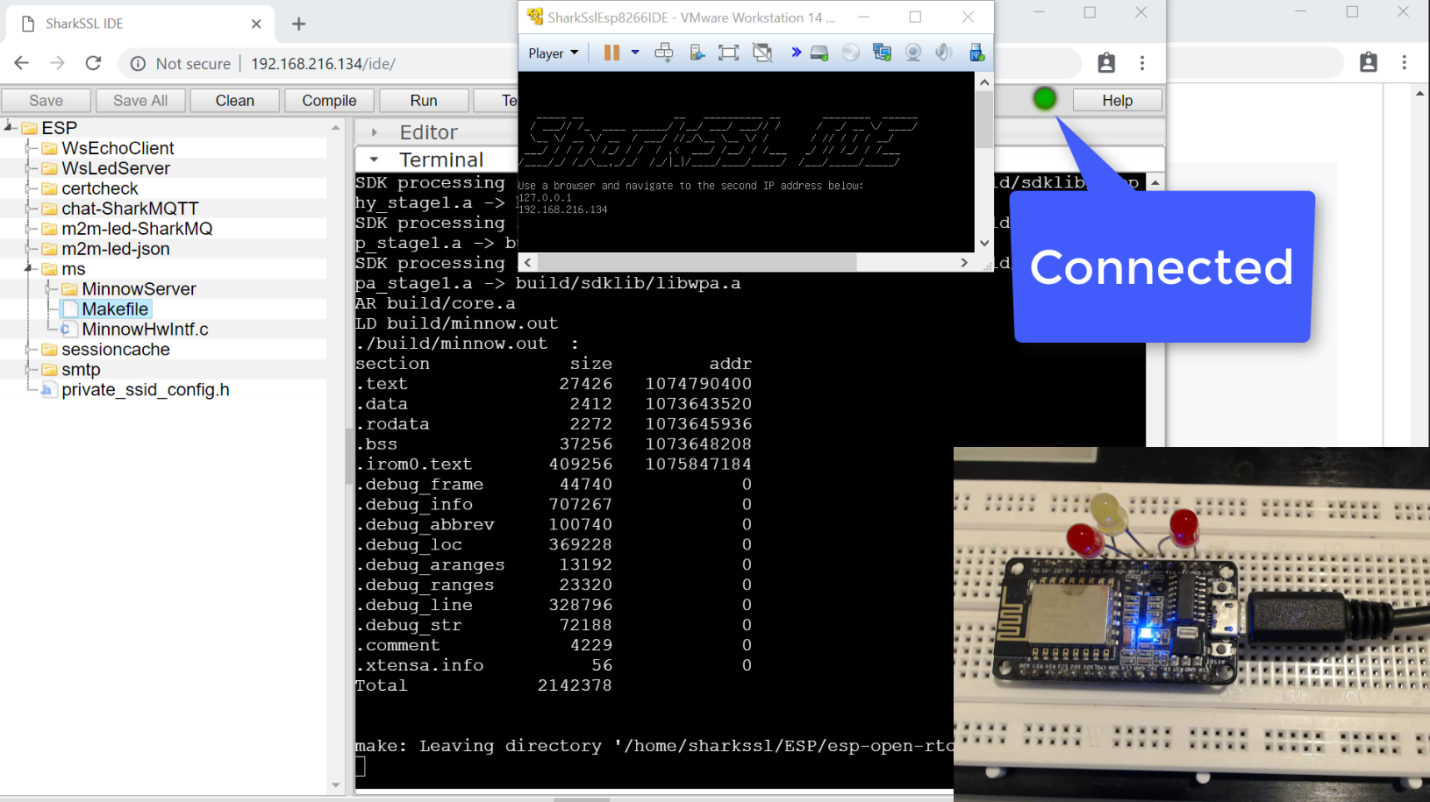
Figure 1: Web‑based IDE connected to the VM’s IP address. (Source: Real Time Logic)
Installing the Minnow Server Example
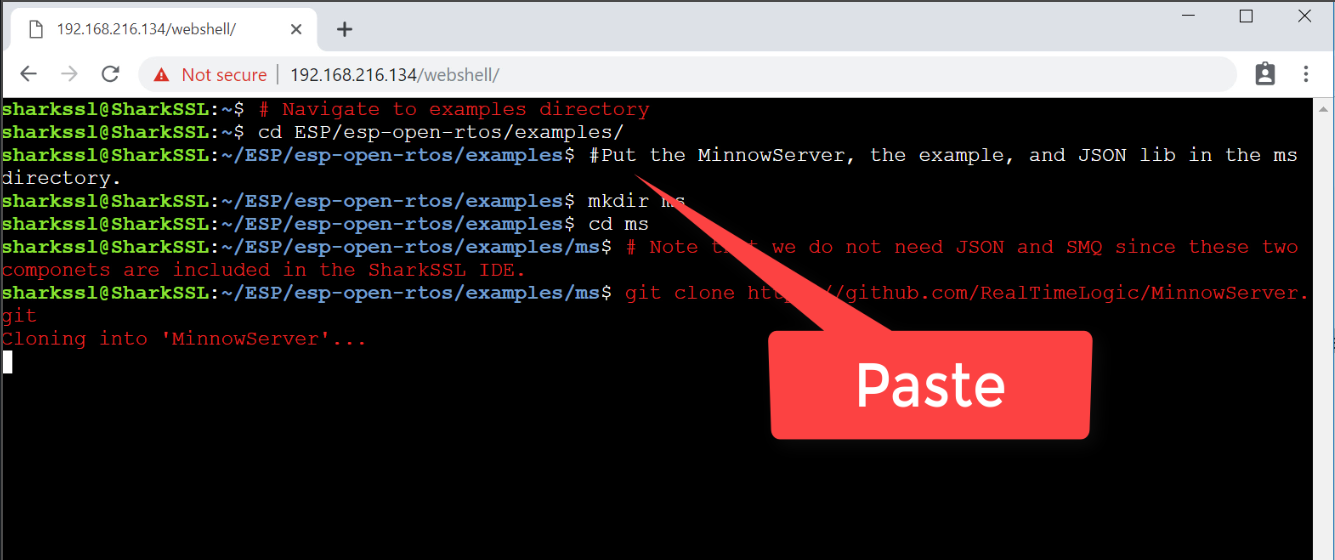
Figure 2: Minnow Server installation commands pasted into the Linux web shell. (Source: Real Time Logic)
Secure vs. Non‑Secure Operation
Internet of Things Technology
- Securing Cloud Technology: Best Practices for Data Protection and Risk Mitigation
- How to Install WordPress on Google Cloud: A Step‑by‑Step Guide
- Secure IoT: Best Practices for Building Trustworthy Connected Products
- Fuzz Testing: A Key Tool for Securing IoT Devices
- Securing UART in IoT Devices: From RSA Key Exchange to AES Encryption
- Efficient Web Server Solutions for Resource-Constrained Microcontrollers
- Understanding How IoT Devices Work: A Practical Guide for Product Managers
- Embedded Hardware Hacking for IoT Devices: Tools, Techniques, and Business Implications
- WiFi‑Enabled IR Blaster: DIY Project with ESP8266 and Arduino
- WiFi vs. Bluetooth: Key Differences and Similarities Explained