



Find Parts Instantly with Visual Search in Eiger
Skip to navigation
Find Parts Instantly with Visual Search in Eiger
Holding a part in hand and struggling to locate its digital file is a common frustration for engineers. The issue isn’t the design itself—it’s the discovery process.
Even the best‑organized part libraries can become opaque. Filenames like 20260401_Bracket01 or 20260415_NewBracket01_FINAL_v2 offer little context. When a catalog expands beyond a thousand items, text search only works if you already know the exact name. Missing that, engineers resort to re‑uploading CAD geometry, creating duplicates, and compounding the problem.
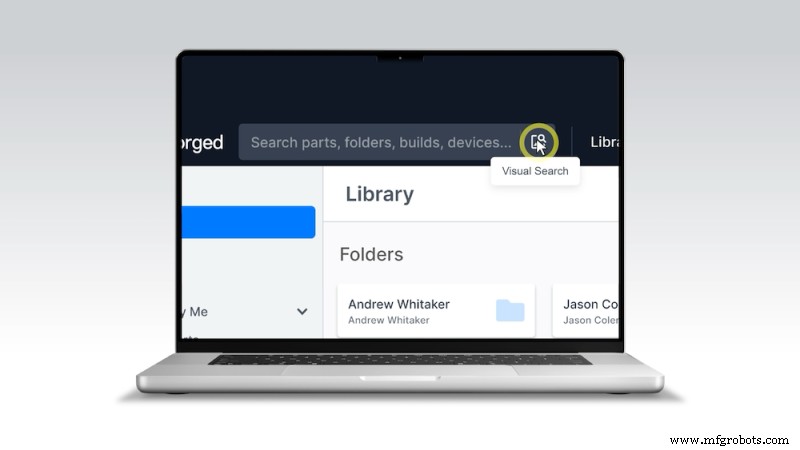
Visual Search in Eiger eliminates that friction. Simply upload or snap a photo of any part, and Eiger retrieves the correct file—no filename required.
See Visual Search in action — upload a photo, find your part.
The Hidden Challenge in Your Part Library
As libraries grow, discoverability becomes a real operational cost. Markforged customers with large deployments manage thousands of parts across multiple sites and teams. The gap between the physical world and your digital catalog can cost time and resources.
We’ve heard firsthand accounts of engineers unknowingly re‑uploading files, teams inheriting unsorted printed parts, and field technicians unable to identify broken components. In every case, the solution is simple—find the existing file—but the tools to do so were missing until now.
In fact, thousands of organizations on Eiger already manage libraries of 1,000 parts or more. For these teams, visual search isn’t just a convenience; it’s essential infrastructure.
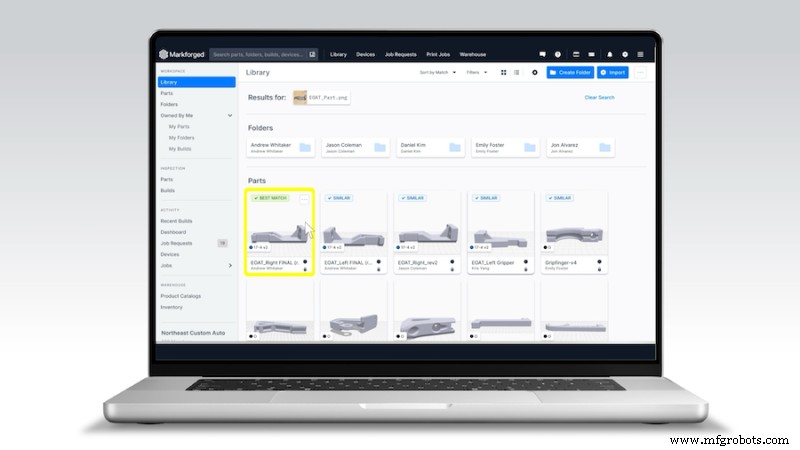
Visual Search lets you navigate your Eiger part library using an image instead of a keyword.
- Upload a photo from your desktop or scan a QR code and snap a picture with your phone.
- Eiger’s AI analyzes the part’s geometry and returns the closest matches, ranking results by similarity. The correct file appears in the top five results 90% of the time.
- It works on photos taken from any angle, in any lighting, including screenshots, blueprints, renders, and even broken parts—provided the geometry is visible.
How It Works: The Technology Behind the Search
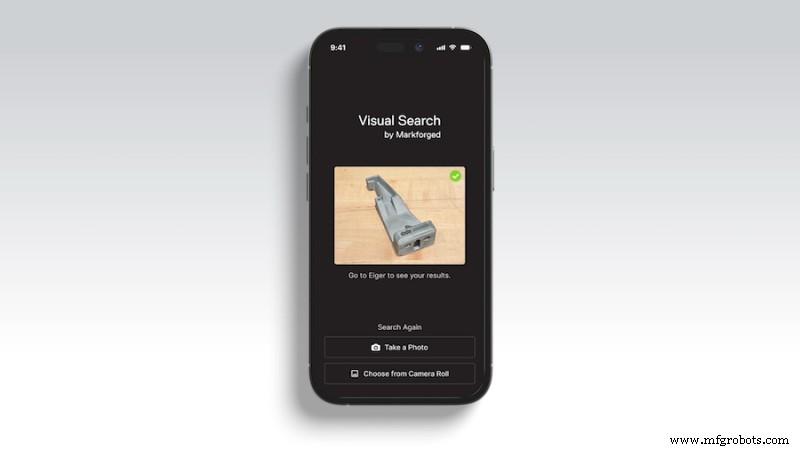
Matching a real‑world photograph to a 3D model is challenging. The photograph contains shadows, a single viewpoint, surface texture, and color, while the model exists as a clean digital file. Bridging this gap requires more than simple image comparison.
Rather than attempting a direct photo‑to‑model match, we convert the problem into one of finding visually similar images—an area where AI excels. We generate a comprehensive set of renders for each part in your library: 14 views per part (six cardinal directions and eight diagonal views) using a high‑fidelity renderer. These renders capture the geometry from angles that users are likely to photograph.
When you submit a query image, an embedding model translates it into a mathematical representation that encodes visual and structural meaning. Parts that look alike cluster together in this space, allowing us to return the closest matches quickly.
All of this runs within the secure Eiger platform, ensuring that any part uploaded through Visual Search remains yours. Learn more about Eiger’s enterprise‑grade security.
Pooling: Combining Multiple Views
Each part has 14 renders, so we need a way to aggregate these into a single fingerprint. Our pooling algorithm weights each view based on image statistics—edge density, visible surface area, aspect ratio, and more—to give more influence to the most informative views. In practice, diagonal views tend to be more valuable than flat cardinal views, and the system learns to weight them accordingly.
Who Benefits Most
While in Beta, Visual Search is available to all Eiger users. Its value scales with library size. Key scenarios where it delivers maximum impact include:
- Large enterprise teams with multi‑site operations: Avoid duplicating work by photographing a physical part and searching across the organization’s catalog to confirm it already exists elsewhere.
- Teams managing legacy or inherited part libraries: Audit and identify parts visually, even when metadata is incomplete.
- Maintenance and field repair workflows: Quickly identify broken components by snapping a photo, pulling up the file, and submitting a print job in under a minute.
- Duplicate detection and library cleanup: Identify multiple versions of the same part, consolidate them, and reduce print errors.
- Additive conversion initiatives: Accelerate audits by photographing traditionally manufactured parts and checking for equivalent digital geometry.
Why Now, and Why Markforged
Visual search for manufactured parts isn’t new, but many existing tools require significant integration work and rely on older visual AI that struggles with the photo‑to‑render gap. Eiger’s Visual Search is ready to use out of the box—one button press, no setup, no additional tooling.
Our underlying model is among the most capable vision foundation models available, delivering results that outperform earlier implementations. We will continue to improve ranking, expand classification capabilities, and integrate Visual Search into more workflows across the platform.
It’s live now. If you have a camera and a part, you have everything you need.
Visual Search is available today in beta for all Eiger online users. Log in to try it, or reach out to your Markforged contact for a guided walkthrough.
All of the blogs and the information contained within those blogs are copyright by Markforged, Inc. and may not be copied, modified, or adopted in any way without our written permission. Our blogs may contain our service marks or trademarks, as well as those of our affiliates. Your use of our blogs does not constitute any right or license for you to use our service marks or trademarks without our prior permission. Markforged Information provided in our blogs should not be considered professional advice. We are under no obligation to update or revise blogs based on new information, subsequent events, or otherwise.
Never miss an article
Subscribe to get new Markforged content in your inbox
3D printing
- How 3D Printing Is Revolutionizing Aircraft Cabin Interiors
- ADAM Metal 3D Printing: A Breakthrough for Low‑Volume, High‑Mix Production
- Interview with Jan Tremel: How Bosch Leverages 3D Printing in Its Powertrain Center of Competence
- Bridging the 3D Printing Skills Gap: Insights from the 2024 AMUG Conference
- PPprint: Expert FDM 3D Printing of Polypropylene Parts
- Polylactic Acid (PLA) 3D Printing: A Comprehensive Guide for Professionals
- Why ABS 3D Printing Requires an Enclosure: Boost Quality, Safety, and Longevity
- SUNLU Filament Connector Review: Does It Truly Save Filament and Reduce Print Waste?
- Mastering Isotropic Fiber 3D Printing: Build Ultra‑Strong Parts with the Mark Two
- Stratasys F123 Series: Rapid, Quiet, and Cost‑Effective 3D Printing Innovation