



Practical Design Strategies for Additive Manufacturing and Rapid Prototyping
Designing for additive manufacturing demands a fresh mindset. Traditional manufacturers already juggle constraints, but now designers must also consider how 3D printing—or Direct Digital Manufacturing (DDM)—will influence every detail. Below are proven techniques that simplify your workflow, reduce support material, and accelerate prototype production.
1. Optimize Inlet Holes for Self‑Support
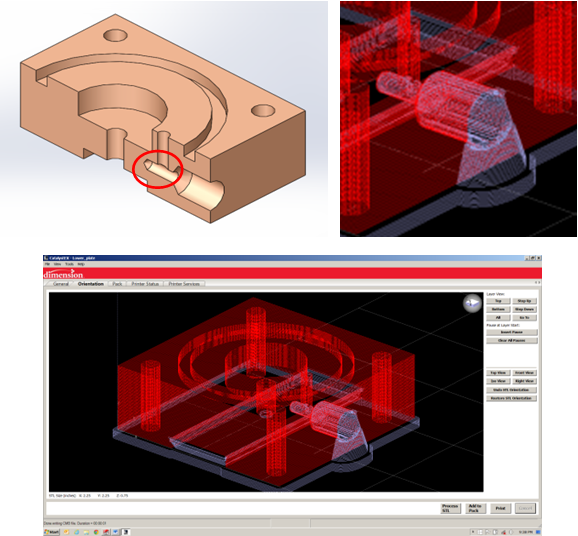
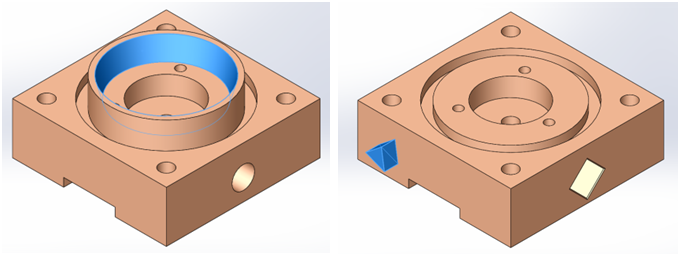
Small drilled holes are a common source of support waste. In the example below, a traditional round hole (left) requires extensive blue support that dissolves slowly with SR‑20 material. By converting the inlet to a 45° diamond shape (right) and adding a chamfer equal to the layer height, the entire feature becomes self‑supporting. Catalyst confirms that no support is needed, saving print time and post‑processing effort.
2. Create Hidden Channels with Self‑Support Angles
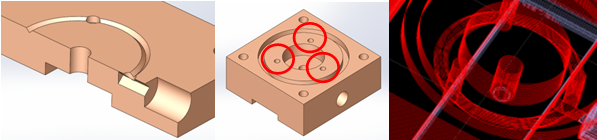
In conventional machining, a block may only accommodate a single top inlet to reduce material usage. Additive manufacturing lets you design a hidden channel that connects multiple holes without any support. By revolving a diamond cut on the front plane and patterning the original cut, three inlets are added (right), improving air and fluid flow while keeping the part printable.
3. Eliminate Stock Constraints
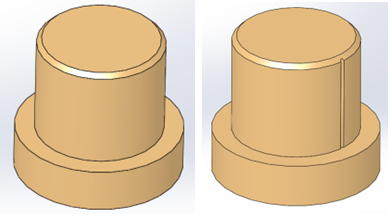
Traditional manufacturing often requires thicker stock for locator features, driving up cost. AM allows you to print precise, thin elements that would be impossible or expensive to machine. The locator on the left illustrates this limitation, while the right shows a lightweight, AM‑friendly version.
4. Seam Control for FDM
Reducing the need for sanding and filing can dramatically cut post‑processing time. Refer to our dedicated Seam Control post for in‑depth strategies and practical tips.
5. Use Configurations to Manage Tolerances
Regardless of the AM technology, tolerances can be handled cleanly by creating a SOLIDWORKS configuration that holds AM‑specific features. The base design (left) remains unchanged for shop drawings, while the AM configuration (right) adds necessary features such as support anchors or overhang relief.
6. Blend FDM and Laser Cutting for Cost Efficiency
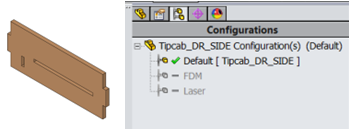
Flat components can be cheaper to laser cut than to print, especially if you lack a laser cutter. Use configurations to generate a laser‑cut version of the part (right) while retaining the full 3D model for printing when necessary.
By applying these techniques, you’ll streamline prototyping, reduce material waste, and unlock design possibilities that traditional manufacturing cannot match.
Tags: Catalyst, Configurations, Direct Digital Manufacturing, Insight, Seam Control
3D printing
- Why an Additive Manufacturing Execution System Is a Game‑Changer for Rapid Prototyping
- Hybrid Additive & Injection Molding: A New Paradigm for Production Lifecycles
- Four Critical Questions Facing Additive Manufacturing in 2019
- Optimizing Fixtures and Tooling for Additive Manufacturing
- Introducing AM Fridays and the Additive Podcast: Your New Resources for 3D Printing Insights
- Essentium & Lehvoss Forge Advanced Materials for Industrial 3D Printing
- Scaling Additive Manufacturing from Prototyping to Production: Unlocking Design Flexibility and Cost Savings
- Optimizing 3D Printing: The Crucial Role of Support Structures and Design Strategies
- Revolutionizing Medicine & Dentistry: The Power of Additive Manufacturing
- Integrating Additive and Subtractive Manufacturing for Optimal Production