



Installing a 15A Wi‑Fi Smart Outlet in a Smart Panel: Step‑by‑Step Wiring Guide
Installing a 15A Wi‑Fi Smart Outlet in a Smart Panel
What Is a Smart Outlet?
Smart Wi‑Fi outlets bring the convenience of remote control, scheduling, and energy monitoring to your home. They replace standard duplex receptacles in single‑gang boxes and can be managed via a mobile app or voice assistants such as Alexa, Google Assistant, Apple HomeKit, SmartThings, or Sonos.
Reputable manufacturers like Leviton and Legrand design these devices for direct retrofit, requiring no hub and minimal structural changes. The outlet can be swapped back to a conventional receptacle later if desired.
Key Installation Requirements
- The electrical box must have sufficient cubic‑inch capacity for the added conductors.
- A neutral conductor is required for most smart outlets.
- The circuit rating must match the device rating (15A or 20A).
When the conditions above are met, the outlet can be installed without modifying the wall box.
Device Specifications
- Model: Smart Wi‑Fi Outlet – NEMA 5‑15
- Poles: 2‑pole, 3‑wire grounding
- Voltage: 125 V, single‑phase AC, 60 Hz
- Current: 5 A (LED/CFL) – 15 A magnetic load
- Wattage: 1,500 W incandescent/halogen or ¾ HP motor
- Wire size: #14 AWG copper
- Termination: Quick‑wire push‑in, side‑wired screw terminals
- Compatibility: Alexa, Google Assistant, HomeKit, SmartThings, Sonos
Wiring Steps for a 15A Smart Outlet in a Smart Panel
Use a 15A single‑pole Wi‑Fi smart breaker in a 120/240 V smart panel. The wiring diagram below illustrates the connection to the branch circuit conductors.
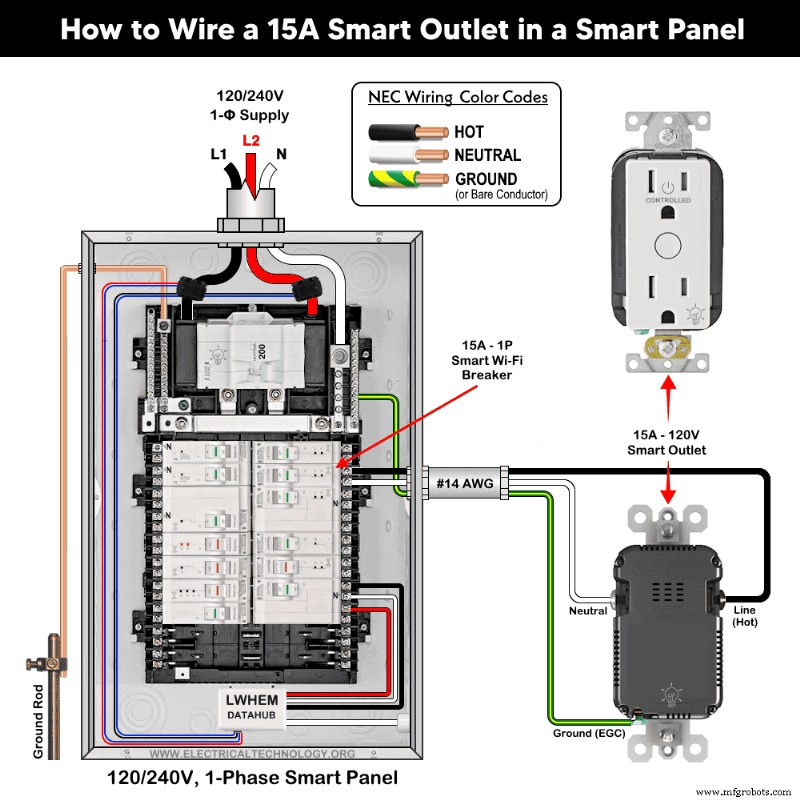
⚠️ Safety First: Turn off the main breaker before starting any work.
Step 1 – Confirm Circuit Rating
Verify the outlet is protected by a 15A single‑pole breaker.
Step 2 – Verify Wire Size
Use a minimum of #14 AWG copper conductors, as required by NEC Table 310.16.
Step 3 – Connect the Wires
Strip the insulation (3/4″ for side wiring, 1/2″ for back wiring). Terminate as follows:
- Black (hot) to the brass/black screw.
- White (neutral) to the silver screw.
- Bare copper or green/green‑yellow (ground) to the green screw.
Apply the specified torque (approximately 14–18 in·lbs or 1.6–2 N·m).
Step 4 – Secure and Restore Power
Mount the outlet, install the cover plate, restore power, and test the device.
Wiring a Smart Outlet with a Standard Outlet
When a smart receptacle (e.g., WWMRR15) is paired with a conventional 15A outlet, the following wiring diagram shows the correct termination.
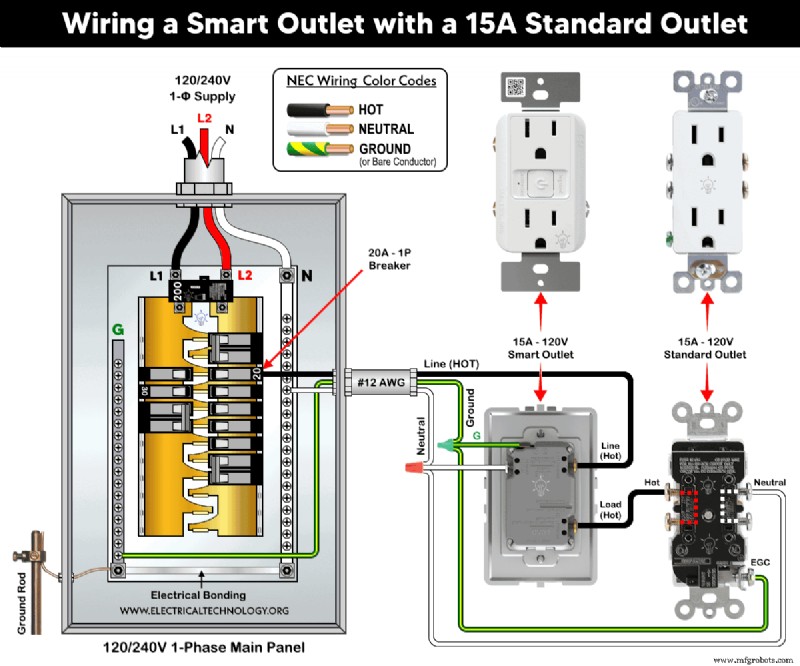
- Black (hot) to brass/black terminal.
- White (neutral) to silver terminal.
- Ground to green screw.
- Load side of smart outlet to brass screw of the standard outlet.
Device Setup and Remote Control
Install the My Leviton app (Leviton) or Home + Control app (Legrand) from the Google Play Store or Apple App Store. Follow the on‑screen prompts to add the new device, then use the app to toggle the outlet on/off or schedule operations.
Essential Wiring Precautions
- Use #14 AWG for 15A circuits and #12 AWG for 20A circuits.
- Strip insulation per the device’s instructions.
- Adhere to the torque specifications on the device nameplate.
- Never use a 15A outlet for a 20A load.
- NEC Table 310.16 and 210.24.(1) dictate #14 AWG copper (or #12 AWG aluminum) for a 15A NEMA 5‑15R outlet.
- Use #14/2 cable (hot, neutral, ground) for a 15A 120 V circuit.
- A 15A outlet supports up to a 12A continuous load and a 15A non‑continuous load (NEC 210.19(A), 215.2, 230.42(A)).
- Install 15A outlets on 15A breakers only.
Safety Warning
- Always disconnect power by turning off the main breaker before working.
- If unsure, hire a licensed electrician to ensure compliance with local codes.
- The author is not liable for any injury or damage resulting from improper use of this information.
Further Resources
Explore our comprehensive wiring series:
- Smart Load Center with Smart Breakers
- Smart Breaker Installation in a Smart 120/240 V Panel
- Smart GFCI Breaker Wiring
- Smart AFCI/GFCI Breaker Wiring
- 120 V/208 V Single‑Phase Main Panel Wiring
- Three‑Phase Main Service Panel Wiring
- Subpanel Wiring and Lug Installation
- GFCI and AFCI Receptacle Wiring Guides
- Switch Wiring (SPST, SPDT, DPST, DPDT, 4‑Way)
- Breaker and Wire Sizing Fundamentals
- General Wiring Installation Tutorials
Electrical Technology Community
Join our Electrical Technology Official WhatsApp Channel for the latest insights, articles, and updates. Follow us on social media or subscribe via email for premium engineering content delivered straight to your inbox.
Industrial Technology
- Revolutionizing Supply Chains: Emerging Tech Set to Transform the Industry
- How Autodesk Fusion 360 Enables Efficient Concurrent Engineering
- Step-by-Step Guide to Wiring a 120V Simultaneous Water Heater Thermostat
- Top 7 Advantages of Powder Coating for Fabricated Parts
- Heat Treatment Methods for Sand Castings: Enhancing Strength and Durability
- The Essential Guide to Wood: Uses, History, and Modern Applications
- July 2021 Guest Opinion: Should OT Executives Adopt Cloud? A Strategic Decision for Modern Networks
- Camcode’s UID Labels Simplify MIL-STD‑130 Compliance for Military Contractors
- Strengthen Your Concrete Silo with Cost‑Effective Steel Reinforcement
- Special‑Purpose Batteries: From Mercury Standards to Fuel, Solar, and Chemical Detection Cells