Voice-Activated Home Appliances: Bluetooth Control with Google Assistant
Components and supplies
Arduino UNO
×
1
4 channel Relay board
×
1
HC-05 Bluetooth Module
×
1
jumper wires for arduino
×
1
Necessary tools and machines
Hot glue gun (generic)
Soldering iron (generic)
Apps and online services
pro
About this project
My project is about controlling home appliances with Google Assistant and Bluetooth. I decided to make this project as when I was searching the web regarding voice controlled home automation projects, I found that most of the projects were based on WiFi. I gathered information regarding how Google Home and Amazon Echo are controlling home appliances, I was really astonished knowing how the technology has evolved. After gathering information regarding WiFi-based home automation, I started to gather information regarding Bluetooth-based home automation. While digging out the information from the web, a thought suddenly struck my mind. The thought was "why, in the case of Bluetooth home automation, does the user need to click on the button of the application every time for saying a command". I know that the button was acting as a trigger for activating Google Speech Recognizer and Google Text-to-Speech. So I made up my mind to build a project where the user doesn't have to press the button at all and everything will be automated. Later on when I started working on the project, I came to know that Google Home is capable of connecting to Bluetooth speakers to play music but is unable to connect to Bluetooth-based home appliances. So to remove the button on the Android App, I used Google Assistant ('OK Google'), a voice-activated trigger switch, to activate the app and Google Speech Recognizer and Google Text-to-Speech.
Watch this video to know how I made it:
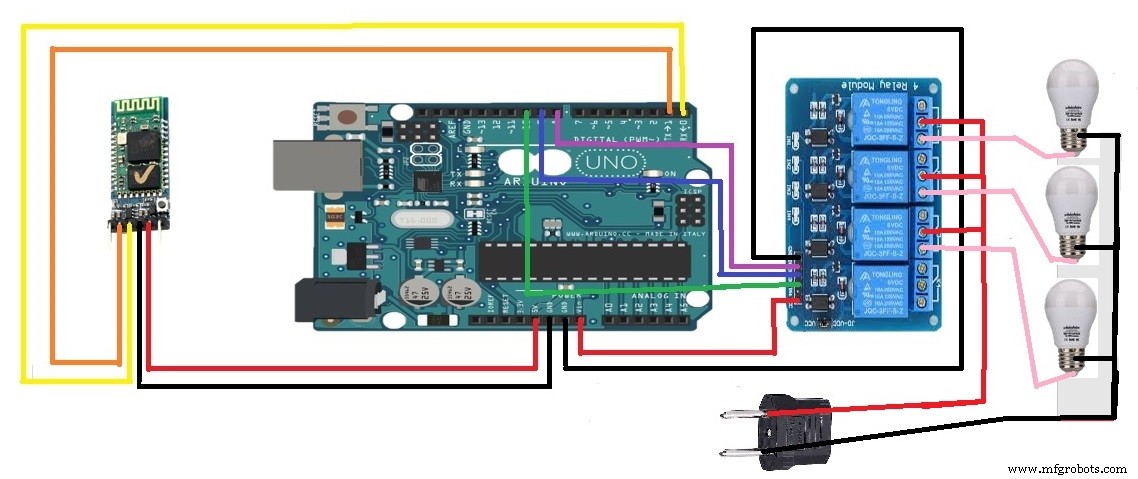
Block Diagram:Circuit Diagram:
Code
Code for Bluetooth voice controlled appliances with 'OK GOOGLE'
Code for Bluetooth voice controlled appliances with 'OK GOOGLE'Arduino
Bluetooth voice controlled appliances with 'OK GOOGLE'
 String voice;

#define FAN 10
#define TUBELIGHT 9
#define BULB 8

void setup()
{                                            // put your setup code here, to run once:
  Serial.begin(9600);
  pinMode(FAN, OUTPUT);
  pinMode(TUBELIGHT, OUTPUT);
  pinMode(BULB, OUTPUT);
   analogWrite(TUBELIGHT,255);                    // Since LED must be off in the beginning
   analogWrite(FAN,255);
   digitalWrite(BULB,HIGH);
}

void loop() {

  while (Serial.available())   //Check if there is an available byte to read
  {
  delay(10);                   //Delay added to make thing stable
  char c = Serial.read();      //Conduct a serial read
  if (c == '#') {break;}       //Exit the loop when the # is detected after the word
  voice += c;                  //Shorthand for voice = voice + c
  }

  if (voice.length() > 0) {
    Serial.println(voice);
  //----------Control Multiple Pins/ LEDs----------//

       if(voice == "tubelight")//
     {
     analogWrite(TUBELIGHT,0);
     analogWrite(FAN,255);
     digitalWrite(BULB,HIGH);
     }
  else if(voice == "green")//
     {
    analogWrite(TUBELIGHT,255);
    analogWrite(FAN,255);
    digitalWrite(BULB,HIGH);
     }
  else if(voice == "fan")//
     {
    analogWrite(TUBELIGHT,255);
    analogWrite(FAN,0);
    digitalWrite(BULB,HIGH);
     }

      else if(voice == "bulb")//
     {
    analogWrite(TUBELIGHT,0);
    analogWrite(FAN,255);
    digitalWrite(BULB,LOW);
     }

       else if(voice == "go")//
     {
    digitalWrite(BULB,HIGH);
     }
  else if(voice == "lights")//
     {
    analogWrite(TUBELIGHT,0);
    analogWrite(FAN,0);
    digitalWrite(BULB,LOW);
     }
   else if(voice == "good night")//
     {
    analogWrite(TUBELIGHT,255);
    analogWrite(FAN,255);
    digitalWrite(BULB,HIGH);
     }

voice="";                                                       //Reset the variable after initiating
  }}
Schematics
circuit diagram for Bluetooth voice controlled appliances with 'OK GOOGLE'