Real‑Time Forest Fire Monitoring System with SMS Alerts
Components and supplies
Itead Gboard Pro 800 SIM800 GSM / GPRS Module 3.3v ATmega2560 Mainboard For Arduino Starter
×
1
Arduino UNO
×
1
DHT11 Temperature & Humidity Sensor (3 pins)
×
2
Jumper wires (generic)
×
1
Apps and online services
Arduino IDE
About this project
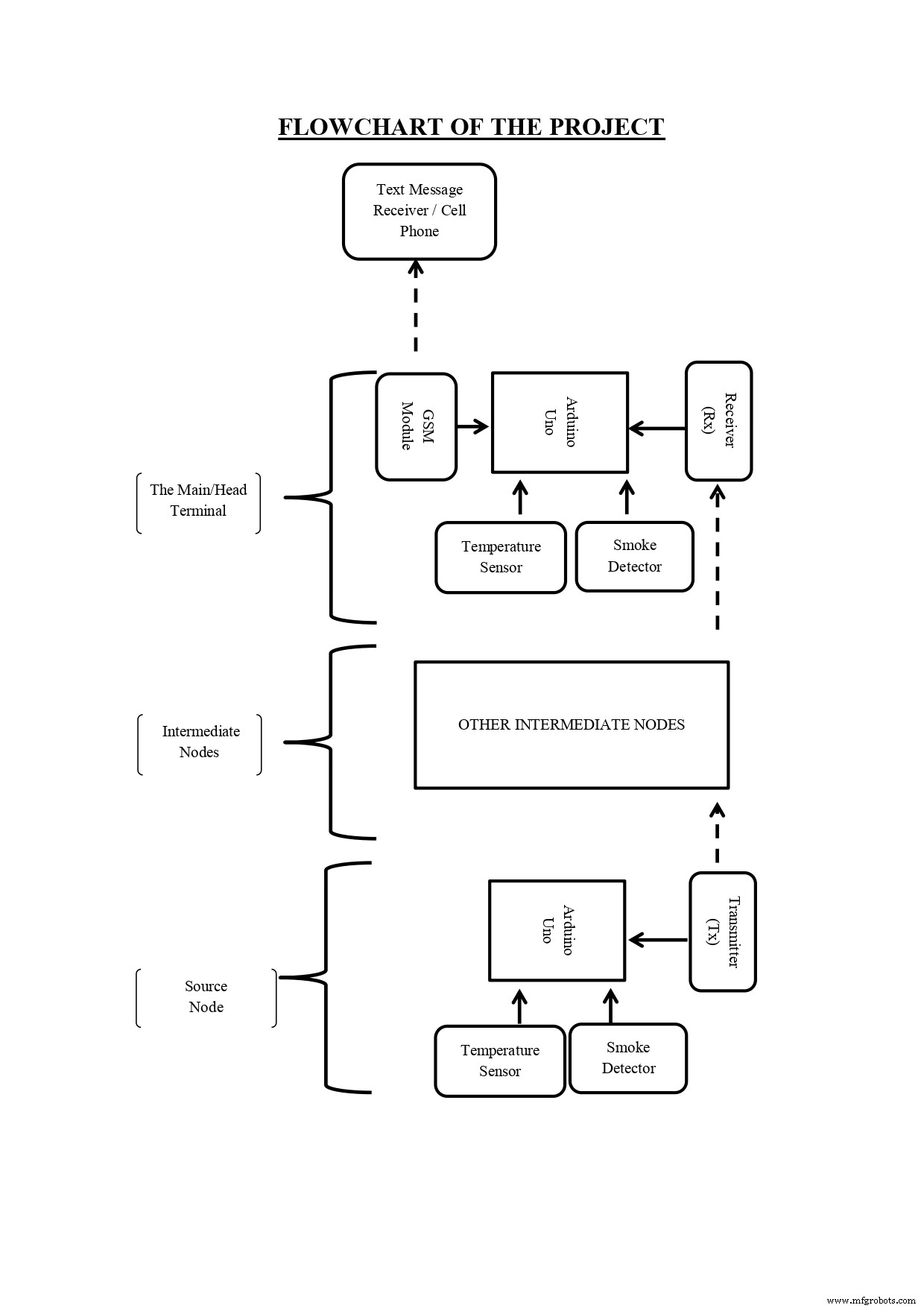
The process of detection of forest fire initiates at any of the nodes planted on atree inside the forest. The forest has a network of nodes placed at suitable distances from each other, the nodes have a capability to communicate through devices ( RF module in our case) and by using Arduino. If any change above a threshold value is found in the atmospheric parameters (temperature rise, contamination of air with smoke, etc.) near a node (source node), the information is passed to a nearest intermediate node until it reaches to the main/head terminal. The main/head terminal uses a GSM modem to pass the information to a cell phone (the forest fire monitoring centre).
TRANSMITTER PART OF PHYSICAL MODEL
The forest fire detection module works in three different stages. The first stageconsists of reading some external environmental parameters like temperature andsmoke. The first stage is done with the help of some sensors which are used tosense and convert analog data to digital data. The sensors read parameters liketemperature, humidity and air quality then sends this information to the nextnearest node. This process goes on until the information reaches to the finalnode or the main terminal which is the second stage of the overall process. Thethird stage consists of transmission of the information to the forest firemonitoring unit.
Eachnode has a temperature and humidity sensor, a smoke sensor and amicrocontroller unit. Arduino has been used as the microcontroller device. Thesensors interact with the Arduino and store the information for comparisonprocess. There is a predefined threshold value to each of these parameters. Themicroprocessor compares the sensor values at regular intervals of times withthe threshold values. Based on the comparison if the input values of sensorsexceed the threshold the node transmits the information to the next nearby nodewhich again in turn transmits the information to the other nearby node. In thisway the message flow is regulated in this model.
PHYSICAL MODEL OF THE APPARATUSTRANSMITTER PART OF PHYSICAL MODELSERIAL READING IN THE SERIAL MONITORMESSEGES RECEIVED BY THE GSM MODULE
Code
Receiver and Transmitter Side Arduino Module Codes
Receiver and Transmitter Side Arduino Module CodesPython
This code configures the receiving side Arduino Module for Temperature and Humidity Monitoring, If the values exceed a threshold an SMS is sent to the base station alerting them about the same. If there is a value rise at transmitter side node then this is communicated through RF-Transmitter module on transmitter side Arduino Uno to the RF-Receiver module on Receiving side Arduino Uno. NOTE that the code below consists of two parts one for "Receiver side arduino" and the other for "Transmitter side arduino"
########( PART-1  )######  Receiver Side Arduino CODE ##########################
// Include RadioHead Amplitude Shift Keying Library
#include <SoftwareSerial.h>
#include <RH_ASK.h>
// Include dependant SPI Library
#include <SPI.h>

#include <DHT.h>

SoftwareSerial mySerial(4, 3);

//Constants
#define DHTPIN 2     // what pin we're connected to
#define DHTTYPE DHT11   // DHT11

int smokeA0 = A5;
// Your threshold value
int sensorThres = 400;
// Define Variables

DHT dht(DHTPIN, DHTTYPE); // Initialize DHT sensor for normal 16mhz Arduino

//Variables
float hum;  //Stores humidity value
float temp; //Stores temperature value

// Define output strings

String str_humid;
String str_temp;
String str_smk;
String str_out;

// Create Amplitude Shift Keying Object
RH_ASK rf_driver;


void setup()
{
    pinMode(smokeA0, INPUT);
    dht.begin();
    // Initialize ASK Object
    rf_driver.init();
    // Setup Serial Monitor
    Serial.begin(9600);
    mySerial.begin(115200);
}

void loop()
{
    delay(2000);
    hum = dht.readHumidity();
    temp= dht.readTemperature();
    Serial.print("Reciever Humidity = ");
    Serial.print(hum);
    Serial.print('\n');
    Serial.print("Reciever Temperature = ");
    Serial.println(temp);

    int analogSensor = analogRead(smokeA0);
    String smk;
    // Checks if it has reached the threshold value
    if (analogSensor > sensorThres)
    {
      Serial.print("Smoke at Reciever");
      Serial.print('\n');
      smk = "Smoke";
    }
    else
    {
      Serial.print("Clean at Reciever");
      Serial.print('\n');
      smk = "Clean";
    }

    // Set buffer to size of expected message
    uint8_t buf[20];
    uint8_t buflen = sizeof(buf);
    // Check if received packet is correct size
   if (rf_driver.recv(buf, &buflen))
   {
     str_out = String((char*)buf);
     for (int i = 0; i < str_out.length(); i++)
     {
      if (str_out.substring(i, i+1) == ",")
        {
        str_humid = str_out.substring(0, i);
        str_temp = str_out.substring(i+1, i+6);
        str_smk = str_out.substring(i+7,i+12 );
        break;
        }
      }
    }

      // Print values to Serial Monitor
      Serial.print("Humidity: ");
      Serial.print(str_humid);
      Serial.print("  - Temperature: ");
      Serial.println(str_temp);
      Serial.print("  - Air Quality: ");
      Serial.println(str_smk);


      if( hum >= 60 && temp >= 25 )
      {
      Serial.print("Fire Detected at Reciever ");
      mySerial.println("AT+CMGF=1");    //Sets the GSM Module in Text Mode
      delay(1000);  // Delay of 1000 milli seconds or 1 second
      mySerial.println("AT+CMGS=\"+918744984131\"\r"); // Replace x with mobile number
      delay(1000);
      mySerial.println("    FIRE ALERT  !! ");
      Serial.println('\n');
      mySerial.println("Fire at Reciever Node ");
      Serial.println('\n');
      mySerial.println("Temperature : " + String(temp));
      Serial.print('\n');
      mySerial.println("Humidity : " + String(hum));
      Serial.print('\n');
      mySerial.println("Air Quality : " + smk);
      delay(100);
      mySerial.println((char)26);// ASCII code of CTRL+Z
      delay(1000);
      }
      if( str_humid.toInt() >= 60 && str_temp.toInt() >= 25 )
      {
      Serial.print("Fire Detected at Transmitter ");
      mySerial.println("AT+CMGF=1");    //Sets the GSM Module in Text Mode
      delay(1000);
      mySerial.println("AT+CMGS=\"+918744984131\"\r"); // Replace x with mobile number
      delay(1000);
      mySerial.println("    FIRE ALERT !! ");
      Serial.println('\n');
      mySerial.println("Fire at Transmitter Node ");
      Serial.println('\n');
      mySerial.println("Temperature : " + str_temp);
      Serial.print('\n');
      mySerial.println("Humidity : " + str_humid);
      Serial.print('\n');
      mySerial.println("Air Quality : " + String(str_smk));
      delay(100);
      mySerial.println((char)26);// ASCII code of CTRL+Z
      delay(1000);
      }

}

#######(  PART-2   )############  Transmitter Side Arduino Code ############
############################################################################

#include <RH_ASK.h>
#include <SPI.h>
#include <DHT.h>

//Constants
#define DHTPIN 2     // what pin we're connected to
#define DHTTYPE DHT11   // DHT11

DHT dht(DHTPIN, DHTTYPE); // Initialize DHT sensor for normal 16mhz Arduino

int smokeA0 = A5;
// Your threshold value
int sensorThres = 400;
// Define Variables

float hum;    // Stores humidity value in percent
float temp;   // Stores temperature value in Celcius
float smk;

// Define output strings

String str_humid;
String str_temp;
String str_smk;
String str_out;


// Create Amplitude Shift Keying Object
RH_ASK rf_driver;

// Initialize DHT sensor for normal 16mhz Arduino

void setup() {
  dht.begin();
  pinMode(smokeA0, INPUT);
  // Initialize ASK Object
  rf_driver.init();

}

void loop()
{

    delay(2000);  // Delay so DHT-22 sensor can stabalize

    hum = dht.readHumidity();  // Get Humidity value
    temp= dht.readTemperature();  // Get Temperature value

    // Convert Humidity to string
    str_humid = String(hum);
    Serial.print(hum);
    // Convert Temperature to string
    str_temp = String(temp);
    Serial.print(temp);
    int analogSensor = analogRead(smokeA0);
    // Checks if it has reached the threshold value
    if (analogSensor > sensorThres)
    {
      str_smk = "1";
    }
    else
    {
      str_smk = "0";
    }

    // Combine Humidity and Temperature
    if(str_smk == "1")
    {
    str_out = str_humid + "," + str_temp + "," + "Smoke";
    }
    if(str_smk == "0")
    {
    str_out = str_humid + "," + str_temp+ "," + "Clean";
    }
    // Compose output character
    const char *msg = str_out.c_str();

    rf_driver.send((uint8_t *)msg, strlen(msg));
    rf_driver.waitPacketSent();

}