



Retro Arcade Clock: Arduino-Powered Interactive Bedside Timer with Arcade Animations
Components and supplies
 |
| × | 1 |
Necessary tools and machines
 |
|
Apps and online services
 |
|
About this project
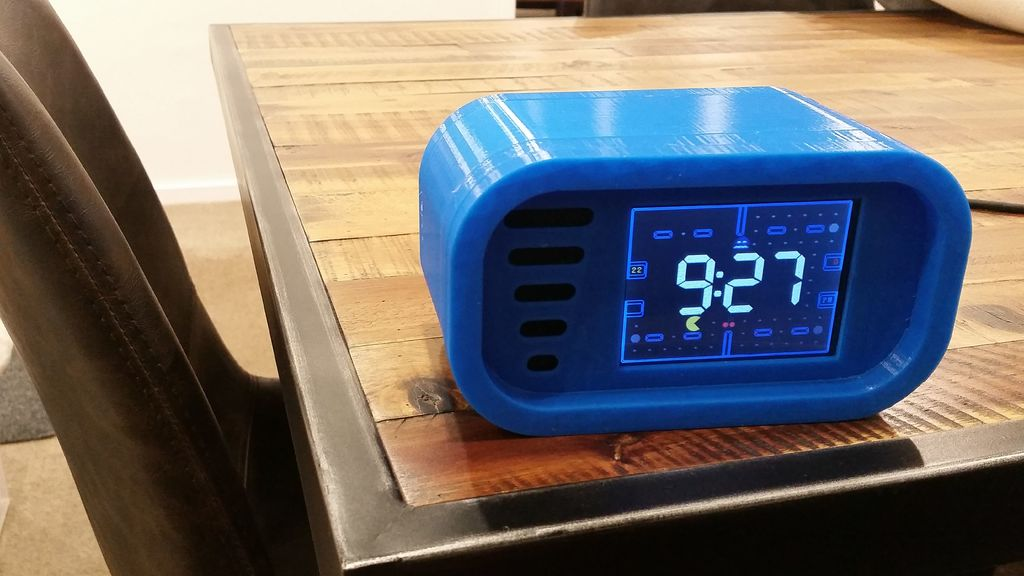
Intro: Retro Arcade Clock - ArduinoBuild an interactive arcade bedside clock, with a touchscreen, and animated arcade figures that you can record a sound of your choice for the alarm.
The project includes a 3D-printed case and four separate programs to choose from
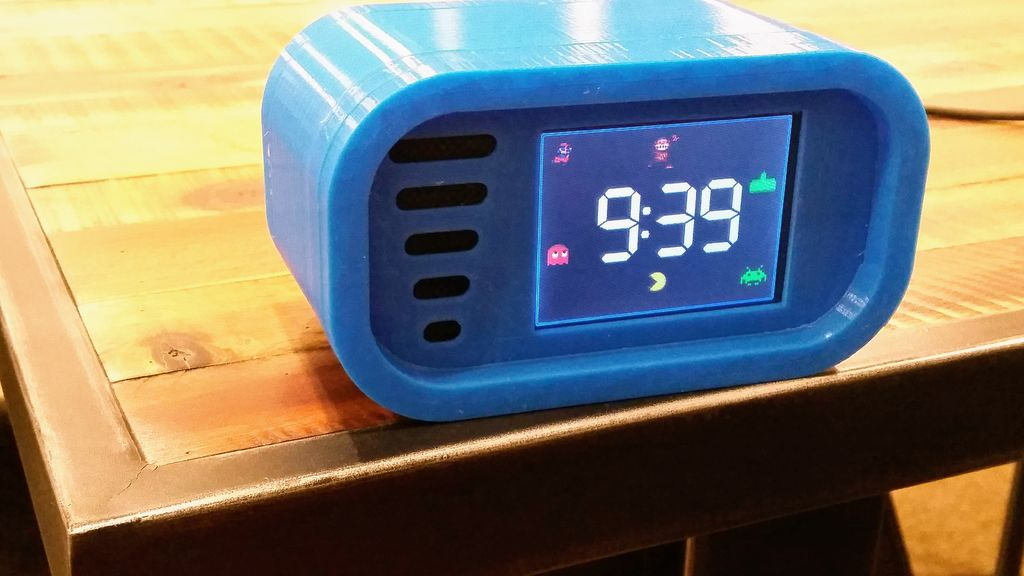
1. Arcade Clock - DK Mario, Space Invaders and Pac-Man animation
2. Pacman Clock - Interactive animated Pac-Man game with clock functions
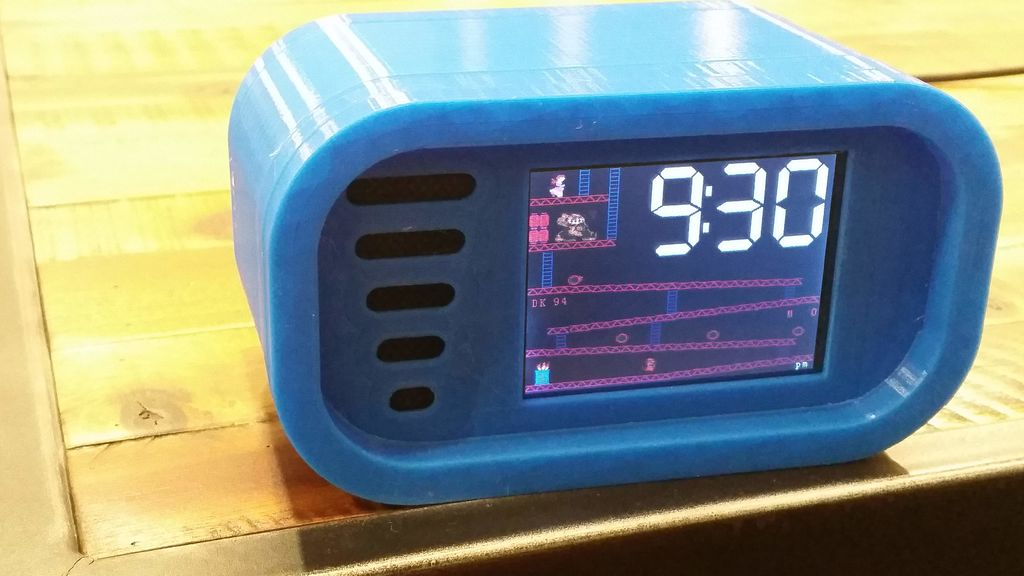
3. DK Clock - Interactive animated DK game with clock functions
4. Tumble Ghost - Animated Pac-Man ghost game based on Flappy Bird
Lots of fun to build and a great gift for anyone who likes to relive the nostalgia of '80s arcade game characters.
Step 1: Gather the Materials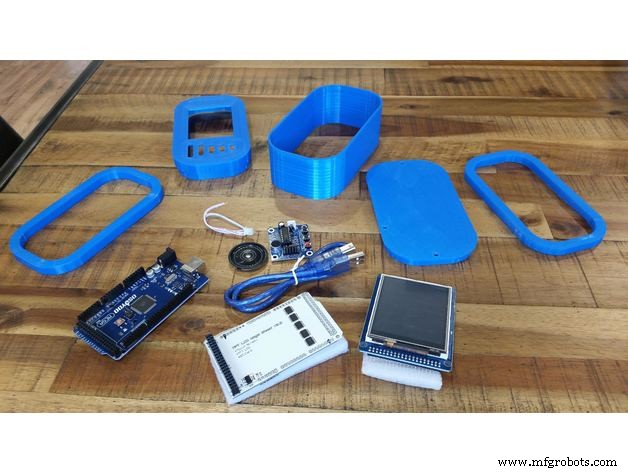
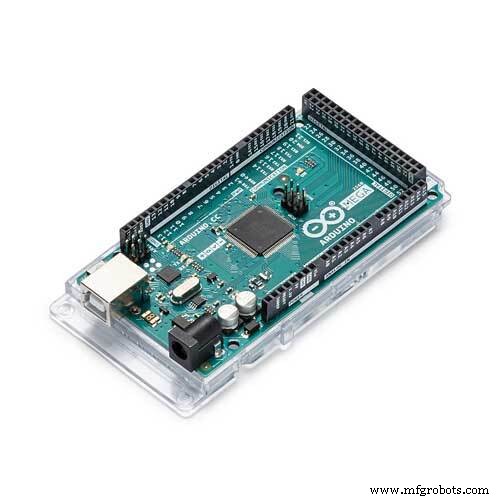
- Arduino Board - Arduino Mega 2560 (Items 1, 2 and 3 can be purchased as one bundled order)
- Touchscreen Arduino Shield - 3.2" Mega Touch LCD expansion board shield
- Touchscreen - 3.2" TFT LCD display + touchscreen for Arduino Mega 2560
- Real-time clock module - DS3231 RTC
- Voice recorder module - ISD1820 voice recorder
- PLA filament for 3D printer
- Two-part epoxy resin for gluing case together
- USB cable 2m length USB charger (used for the power supply for the clock)
- Hot glue gun
- Cable ties X 3
Optional auto back-light dimming components only required if a bedside clock:
- Resistor 270k ohm
- Zener diode 3.3v
- 0.5 watt resistor 47 ohm
- Light dependent resistor (LDR)
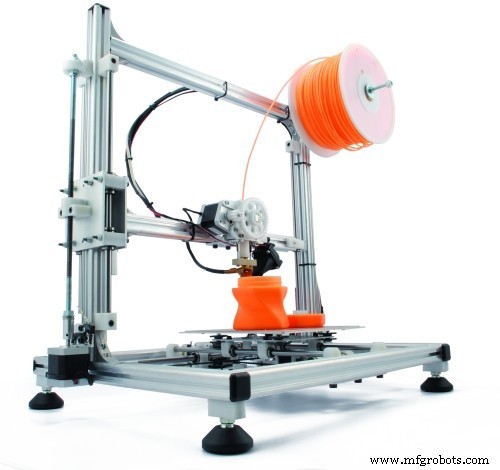
I printed the clock case on a Creality Ender 3. All of the 3D print files and instructions for the case can be found here on Thingiverse.
Step 3: Build the Circuit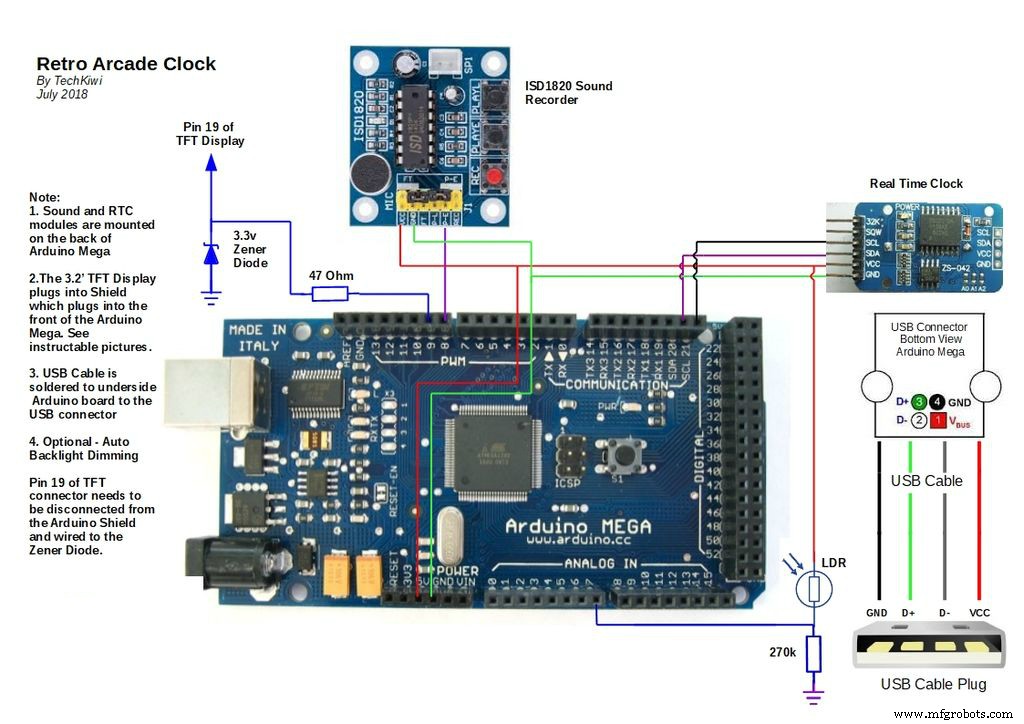
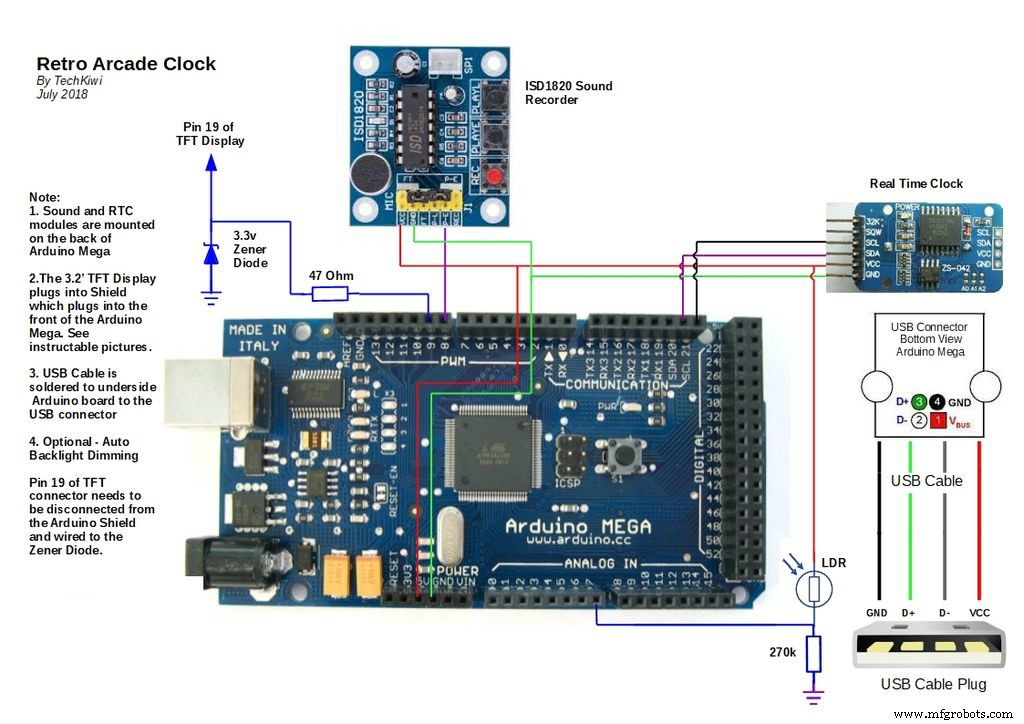
The overall circuit contains a real-time Clock, Arduino Mega, sound module, touchscreen, and a screen shield.
1. Real-Time Clock
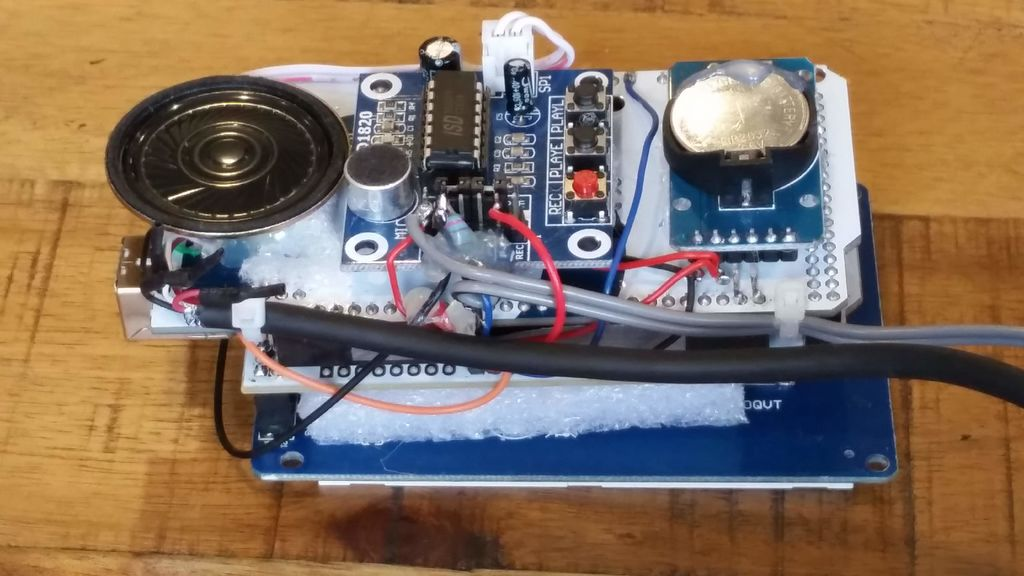
Mount the real-time clock on the back of the Arduino Mega as in the picture provided. I used a hot glue gun and packing foam to ensure they are not touching and there is some cushioning to absorb movement. In my case, I soldered 2 of the RTC legs directly to the Arduino and used hookup wire to connect 5v and GND to the Arduino.
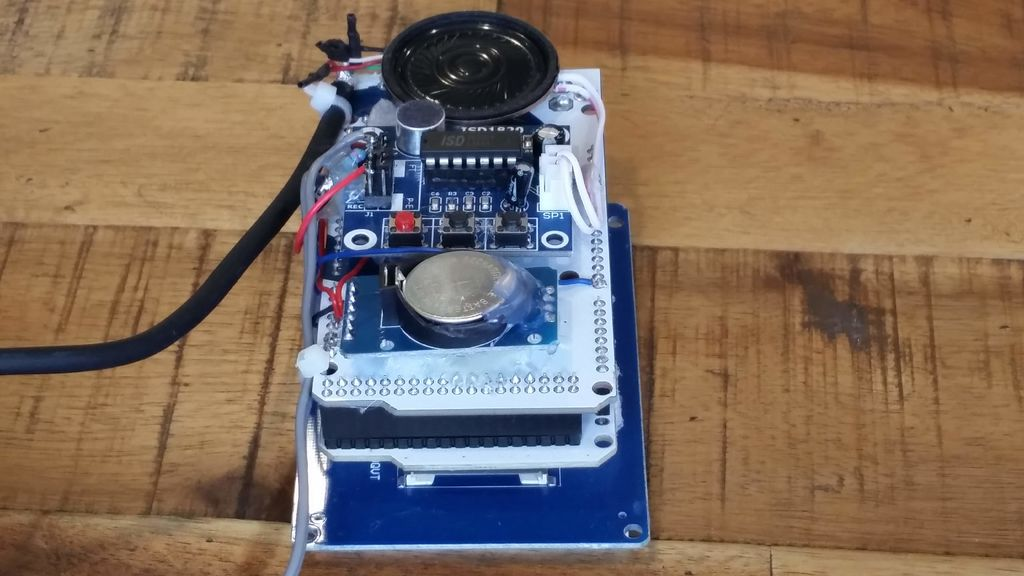
2. Sound Recording Module
These are really cool and easy to use. In a similar fashion as above, use foam and hot glue to position the module and the speaker on the back of the Arduino taking care to ensure they are insulated from touching. The Sound Module is triggered by D8 on the Arduino, so this and the power supply need connecting as per the circuit diagram provided.
3. Auto Backlight Dimmer (Optional)
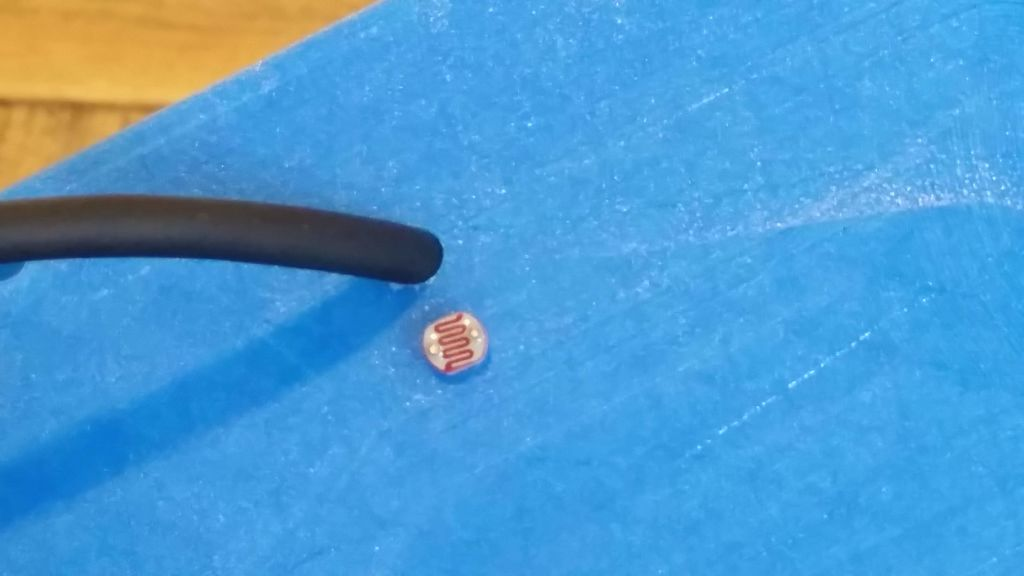
If you intend on using as a bedside clock, then you will likely want to automatically dim the backlight at night so it doesn't affect your sleep. (If not then you can skip this step!) Unfortunately, the backlight in the TFT screen is hard-wired into +3.3v and cannot be adjusted with the Arduino. This means we have to disconnect it and reconnect to a PWM pin on the Arduino to control the Backlight brightness. I wanted to do this with minimal damage to pins or tracks on the components so took the following approach. Follow the steps below carefully
(a) To achieve this a Light Dependent Resistor (LDR) is positioned at the back of the unit to detect the light. Drill two 3mm holes in the case and push the LDR legs through the holes. Use hot glue on the inside of the cabinet to hold the legs in place. Solder two wires on the inside of the case and connect them as per the circuit diagram. Add a 270k Ohm Resistor to A7 of the Arduino as per the circuit diagram.
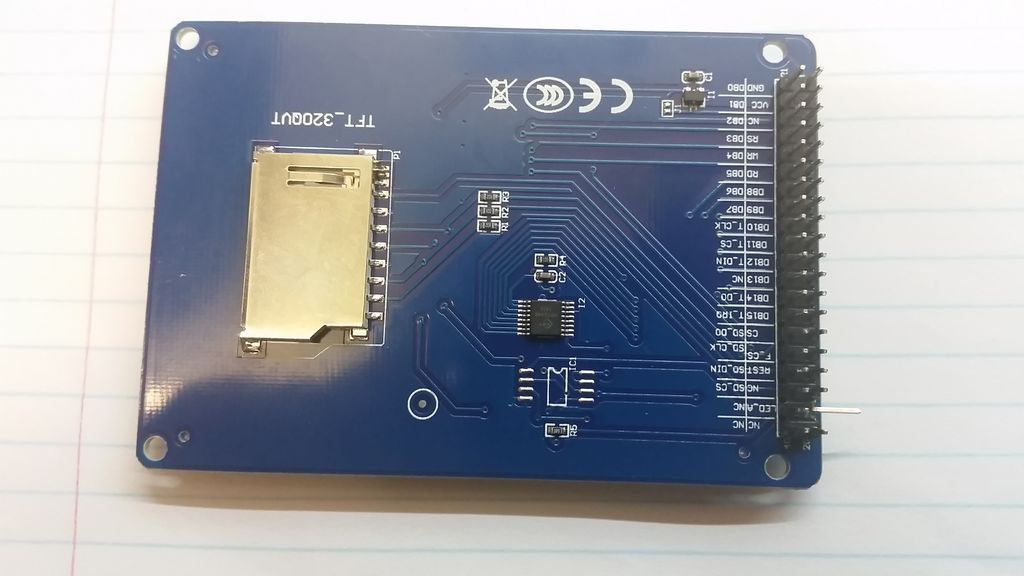
(b) Remove the TFT Display, and place it on a firm surface. Identify pin 19 (LED_A) and carefully remove a few millimeters of the plastic at the base of the pin. Bend the pin flat and away from the connector as per the picture above. Check that the TFT Sheild can plug in snugly and that the bent pin does not obstruct the plug or socket.
(c) Solder a 47 Ohm register to the bent over the pin and connect a wire from the resistor to D9 of the Arduino Mega. The Arduino D9 pin can sink up to 40mA so the resistor limits this to less than this. Attach a 3.3v Zener Diode to the same pin (LED_A) and connect this to earth as per the diagram. The purpose of this is to protect the backlight from overvoltage as it will regulate the voltage to 3.3v.
4. TFT Screen and Arduino Shield
Carefully push the 3.2' TFT touchscreen connectors into the TFT Arduino Shield. Then carefully connect to the top of the Arduino as per the picture provided. The RTC has a battery so will retain the correct time even if power has been removed. The Alarm time is stored in Eeprom on the Arduino which means it will be retained if there is a power cut.
Step 4: Load the CodeThe Project will require the following files and libraries to be loaded before it will compile and run. The code is unique and built around the capability of the libraries, the hardware, some custom graphics and other projects that I've borrowed from.
Please Note: Development of the code for this project has used IDE v1.06 and some of the required libraries are dated. This means some people are having issues with the new IDE version 1.6 and above when loading code. Therefore in the interests of simplicity, I recommend people use IDE v1.06 and have included the correct version library files in zip files at the bottom of step 4 of the tutorial.
1. Arduino IDE
I have been using an earlier version of the Arduino IDE, therefore in the interests of simplicity, I recommend that you download Arduino IDE version 1.06 on your desktop machine before you install the code. You can get his version from here.
2. Libraries
These need to be downloaded and added to the IDE (Integrated Development Environment) that runs on your computer, used to write and upload computer code to the physical board.
- UTFT.h and URtouch.h located in zip file below
- Time.h located in zip file below
- DS1307RTC.h located in zip file below
- Wire.h and EEPROM.h are already included in IDE V1.06
Credit for UTFT.h and URtouch.h goes to Rinky-Dink Electronics I've included these zip files as it appears the source Website is down.
4. TFT Screen Variations
The vagueries of TFT screens and manufacturers have led to these notes.
(a) Sainsmart - If you have purchased a 3.2' TFT screen that is branded Sainsmart on the back of the TFT device you will have found they have to modify libraries to resolve display issues. If you have purchased a Sainsmart TFT Display already there is a fix below
Edit the file "initlcd.h" and modify the following line from
LCD_Write_COM_DATA(0x01, 0x2B3F);
to
LCD_Write_COM_DATA(0x01, 0x3B3F);
You will need to restart the IDE and then reload the code to the Arduino.
(b.) TFT Controller Chipset - People who have purchased a 3.2" TFT screen may find they could also have one of two different chipsets "SSD1289" or "ILI9341" The annoying thing is that it's not easy to distinguish the difference online. The good news is that its easy to fix. If you get a blank screen after loading the code then it's probably because it's an ILI9341 controller.
To fix you need to make the following changes to the code. Edit the code and modify the following line of code
from
UTFT myGLCD(SSD1289, 38, 39, 40, 41); //Parameters should be adjusted to your Display/Schield model
to
UTFT myGLCD(ILI9341_16, 38, 39, 40, 41); //Parameters should be adjusted to your Display/Schield model
Now try reloading the code to the Arduino.
(c.) Inverted Touch Screen Controls
Some makers have reported that the Y axis touch screen buttons has been reversed. A fix for this was identified where two lines of code to change to flip the touch screen reading.
Do a find for: "yT = myTouch.getY();" Change it to be: "yT = 240 - myTouch.getY();"
Don't forget to search twice, the first instance is for controlling pacman in clock mode, the second is for in the setup menu.
5. Graphics Files
There are a group of bitmap files that I have included below that need to sit in the same subdirectory as the Arduino code when you begin to load into the Arduino. Therefore download the files below and use the IDE to load.
6. Setup the Clock
Once the code has loaded successfully press the center of the screen and this should bring up the setup screen. Use the menu to set the time and the alarm in 24-hour format. Press the SAVE button to store the setting. The RTC has a battery so will retain the correct time even if power has been removed. The Alarm time is stored in EEPROM which means it will be retained if there is a powercut.
7. Testing the Alarm
The Sound module is used to provide the Alarm. The ISD1820 is controlled by the Arduino D8 pin. Sound can be easily added by playing sound into the microphone while simultaneously pushing the record button on the ISD1820. In my case, I recorded the original Pac-Man introduction music from an audio file played through another device. Once the sound is recorded the recording can be tested by pushing the PLAY-E button which should play the sound through the speaker. Use the setup menu to set the clock time and the alarm time a few minutes apart. Be sure to "SET" the alarm and push the "SAVE" menu buttons. Once back to the main screen the Alarm should sound when the time occurs. Turning off the Alarm can be done by pressing the center of the touchscreen panel resulting in the Setup Screen.
8. Touchscreen Calibration
Some makers have found that the buttons on the setup screen do not align with the TFT touch controls. In these cases the touchscreen needs calibration. This can be easily done by using the touchscreen calibration code and instructions provided in the URtouch library. Follow these instructions if you observe this issue.
9. Four Different Programs to choose from
1. Arcade Clock - DK Mario, Space Invaders & Pacman animation2. Pacman Clock - Interactive Animated Pacman/Ms Pacman game with clock functions
3. DK Clock - Interactive Animated DK game with clock functions
4. Tumble Ghost - Animated Pacman Ghost game based on Flappy Bird
1.%2BRetroArcadeClockTechKiwigadgetsV1.zip2.%2BRetro_Pacman_Clock_V10.zip3.%2BRetro_DK_Clock_V3.zip4.%2BTumble_Ghost_V10.zipDS1307RTC.zipTime.zipURTouch.zipUTFT.zipStep 5: Putting It All Together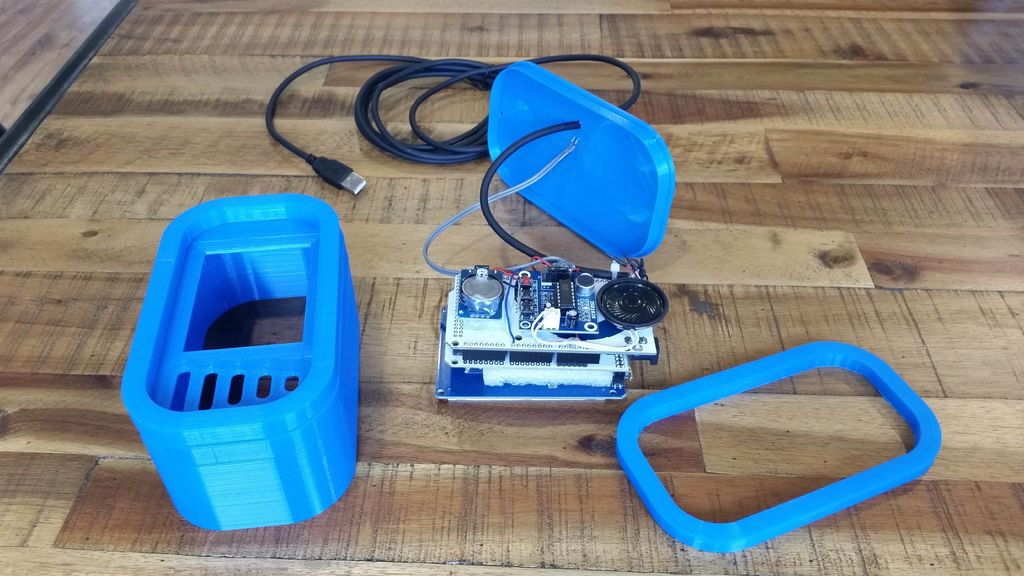
1. Adding External Power
The final step is to add the external power. Using a drill bit, add a hole in the back of the cabinet. Thread the USB cable through the back panel and then attach the USB cable VCC, GND, D+ and D- wires to the base of the Arduino USB Connector as per the circuit diagram. This has two advantages, firstly the USB input to Arduino Mega Boards has overcurrent protection, and secondly, you can use the USB cable to upload code changes without having to dismantle the box. Hot glue the power cable insulation to the back of the Arduino to provide protection from cable tension when assembling front and back panels. Add a cord grip to the cable by placing a cable tie tightly around the cable on the inside of the case on the power cable 6-8 cm from the Arduino connection. The cable tie should avoid tension on the joints when the USB cable is pulled by butting up against the inside of the case.
2. Mounting the Electronics in the case
Place the circuit on top of the front panel with the four hole guides which should align the screen centrally in the cutout. Power on the circuit so you can see the front panel screen, check the screen image is in the correct position then glue into place with hot glue. The outcome is a snug fit with a square screen which is centered in the cutout hole.
3. Final Assembly
Gently push the front panel onto the back panel and gently pulling the USB power cord to take up the slack in the back panel. The cord grip is useful here and should protect any damage to wiring. Plug into the USB charger and you're good to go.
I hope you enjoy!
Code
- Retro Arcade Clock
Retro Arcade ClockC/C++
Arduino IDE/* Retro Arcade Clock - TechKiwigadgets
V1 - First Production Release
*/
#include <UTFT.h>
#include <URTouch.h>
#include <EEPROM.h>
#include <Time.h>
#include <Wire.h>
#include <DS1307RTC.h> // a basic DS1307 library that returns time as a time_t
// Alarm Variables
boolean alarmstatus = false; // flag where false is off and true is on
boolean soundalarm = false; // Flag to indicate the alarm needs to be initiated
int alarmhour = 0; // hour of alarm setting
int alarmminute = 0; // Minute of alarm setting
byte ahour; //Byte variable for hour
byte amin; //Byte variable for minute
int actr = 300; // When alarm sounds this is a counter used to reset sound card until screen touched
int act = 0;
int p = 0; // Animation position E.G Pacman Graphic Flag 0 = Closed, 1 = Medium Open, 2 = Wide Open, 3 = Medium Open
int m = 0; // Animation position mario 3 postions
// Graphics X,Y coordinates
// myGLCD.drawBitmap (30, 14, 40, 40, rd_ghost); // Closed Ghost
int ghostX = 15;
int ghostY = 14;
int ghostD = 0; // direction d == 0 = right, 1 = down, 2 = left, 3 = up
// myGLCD.drawBitmap (140, 14, 40, 40, MarioR3); // Closed Ghost
int MarioX = 141;
int MarioY = 14;
int MarioD = 0; // direction d == 0 = right, 1 = down, 2 = left, 3 = up
// myGLCD.drawBitmap (240, 14, 40, 40, Monkey2); // Closed Ghost
int MonkeyX = 261;
int MonkeyY = 14;
int MonkeyD = 0; // direction d == 0 = right, 1 = down, 2 = left, 3 = up
// myGLCD.drawBitmap (30, 180, 40, 40, pacman); // Closed Ghost
int pacmanX = 15;
int pacmanY = 185;
int pacmanD = 2; // direction d == 0 = right, 1 = down, 2 = left, 3 = up
// myGLCD.drawBitmap (140, 180, 40, 40, Alien); // Closed Ghost
int AlienX = 141;
int AlienY = 185;
int AlienD = 2; // direction d == 0 = right, 1 = down, 2 = left, 3 = up
// myGLCD.drawBitmap (240, 180, 40, 40, Cannon); // Closed Ghost
int CannonX = 270;
int CannonY = 185;
int CannonD = 2; // direction d == 0 = right, 1 = down, 2 = left, 3 = up
// Initializes RTC time values:
const int DS1307 = 0x68; // Address of DS1307 see data sheets
// Display Dimmer Variables
int dimscreen = 255; // This variable is used to drive the screen brightness where 255 is max brightness
int LDR = 100; // LDR variable measured directly from Analog 7
//==== Creating Objects
UTFT myGLCD(SSD1289,38,39,40,41); //Parameters should be adjusted to your Display/Schield model
URTouch myTouch( 6, 5, 4, 3, 2);
//==== Defining Fonts
extern uint8_t SmallFont[];
extern uint8_t BigFont[];
extern uint8_t SevenSegNumFont[];
extern uint8_t SevenSeg_XXXL_Num[];
// Define bitmaps
extern unsigned int Alien1[0x640]; // Alien 1 graphic
extern unsigned int Alien2[0x640]; // Alien 2 graphic
extern unsigned int Cannon[0x640]; // Space invaders cannon
extern unsigned int MarioL1[0x310]; // M Left 1
extern unsigned int MarioL2[0x310]; // Ghost Bitmap Straight ahead
extern unsigned int MarioL3[0x310]; // Ghost Bitmap Straight ahead
extern unsigned int MarioR1[0x310]; // Ghost Bitmap Straight ahead
extern unsigned int MarioR2[0x310]; // Ghost Bitmap Straight ahead
extern unsigned int MarioR3[0x310]; // Ghost Bitmap Straight ahead
extern unsigned int MarioStop[0x310]; // Ghost Bitmap Straight ahead
extern unsigned int MarioU1[0x310]; // Ghost Bitmap Straight ahead
extern unsigned int MarioU2[0x310]; // Ghost Bitmap Straight ahead
extern unsigned int MarioU3[0x310]; // Ghost Bitmap Straight ahead
extern unsigned int MarioU4[0x310]; // Ghost Bitmap Straight ahead
extern unsigned int rd_ghost[784]; // Ghost Bitmap Straight ahead
extern unsigned int ru_ghost[784]; // Ghost Bitmap Straight ahead
extern unsigned int rl_ghost[784]; // Ghost Bitmap Straight ahead
extern unsigned int rr_ghost[784]; // Ghost Bitmap Straight ahead
extern unsigned int r_o_pacman[784]; // Ghost Bitmap Straight ahead
extern unsigned int r_m_pacman[784]; // Ghost Bitmap Straight ahead
extern unsigned int l_o_pacman[784]; // Ghost Bitmap Straight ahead
extern unsigned int l_m_pacman[784]; // Ghost Bitmap Straight ahead
extern unsigned int u_m_pacman[784]; // Ghost Bitmap Straight ahead
extern unsigned int u_o_pacman[784]; // Ghost Bitmap Straight ahead
extern unsigned int d_m_pacman[784]; // Ghost Bitmap Straight ahead
extern unsigned int d_o_pacman[784]; // Ghost Bitmap Straight ahead
extern unsigned int c_pacman[784]; // Ghost Bitmap Straight ahead
extern unsigned int Monkey2[0x640]; // Ghost Bitmap Straight ahead
extern unsigned int Monkey3[0x640]; // Ghost Bitmap Straight ahead
// Touch screen coordinates
boolean screenPressed = false;
int xT,yT;
int userT = 4; // flag to indicate directional touch on screen
boolean setupscreen = false; // used to access the setup screen
//Alarm setup variables
boolean xsetup = false; // Flag to determine if existing setup mode
// Animation delay to slow movement down
int dly = 0; // Orignally 30
// Time Refresh counter
int rfcvalue = 300; // wait this long untiul check time for changes
int rfc = 1;
// Declare global variables for previous time, to enable refesh of only digits that have changed
// There are four digits that bneed to be drawn independently to ensure consisitent positioning of time
int c1 = 20; // Tens hour digit
int c2 = 20; // Ones hour digit
int c3 = 20; // Tens minute digit
int c4 = 20; // Ones minute digit
void setup() {
//Initialize RTC
Serial.begin(9600);
// while (!Serial) ; // wait until Arduino Serial Monitor opens
delay(200);
setSyncProvider(RTC.get); // the function to get the time from the RTC
setSyncInterval(60); // sync the time every 60 seconds (1 minutes)
if(timeStatus()!= timeSet){
Serial.println("Unable to sync with the RTC");
RTC.set(1408278800); // set the RTC to Aug 25 2014 9:00 am
setTime(1408278800);
}
else{
Serial.println("RTC has set the system time");
}
// Setup Alarm enable pin to play back sound on the ISD1820 board
pinMode(8, OUTPUT); // D8 used to toggle sound
digitalWrite(8,LOW); // Set to low to turn off sound
// Initiate display
myGLCD.InitLCD();
myGLCD.clrScr();
myTouch.InitTouch();
myTouch.setPrecision(PREC_LOW);
drawscreen(); // Initiate the game
UpdateDisp(); // update value to clock
}
void loop() {
// increment Pacman Graphic Flag 0 = Closed, 1 = Medium Open, 2 = Wide Open
p=p+1;
if(p==4){
p=0; // Reset counter to closed
}
// increment Pacman Graphic Flag 0 = Closed, 1 = Medium Open, 2 = Wide Open
m=m+1;
if(m==3){
m=0; // Reset counter to closed
}
// Set Screen Brightness
// Check the ambient light and adjust LED brightness to suit Ambient approx 500 dark is below 100
LDR = analogRead(A7);
/* Test value range of LDR
myGLCD.setColor(237, 28, 36);
myGLCD.setBackColor(0, 0, 0);
myGLCD.printNumI(LDR,250,60);
*/
if (LDR >=121){
dimscreen = 255;
}
if (LDR <=120) {
dimscreen = 45;
}
analogWrite(9, dimscreen); // Controls brightness 0 is Dark, Ambient room is approx 25 and 70 is direct sunlight
// Read the current date and time from the RTC and reset board
rfc++;
if (rfc >= rfcvalue) { // count cycles and print time
UpdateDisp(); // update value to clock then ...
dly = 18; // reset delay
rfc = 0;
}
//=== Check if Alarm needs to be sounded
if (alarmstatus == true){
if ( (alarmhour == hour()) && (alarmminute == minute())) { // Sound the alarm
soundalarm = true;
}
}
//=== Start Alarm Sound - Sound pays for 10 seconds then will restart at 20 second mark
if ((alarmstatus == true)&&(soundalarm==true)){ // Set off a counter and take action to restart sound if screen not touched
if (act == 0) { // Set off alarm by toggling D8, recorded sound triggered by LOW to HIGH transition
digitalWrite(8,HIGH); // Set high
digitalWrite(8,LOW); // Set low
UpdateDisp(); // update value to clock
}
act = act +1;
if (act == actr) { // Set off alarm by toggling D8, recorded sound triggered by LOW to HIGH transition
digitalWrite(8,HIGH); // Set high
digitalWrite(8,LOW); // Set low
act = 0; // Reset counter hopfully every 20 seconds
}
}
// Check if user input to touch screen
// UserT sets direction 0 = right, 1 = down, 2 = left, 3 = up, 4 = no touch input
myTouch.read();
if (myTouch.dataAvailable() && !screenPressed) {
xT = myTouch.getX();
yT = myTouch.getY();
// **********************************
// ******* Enter Setup Mode *********
// **********************************
if (((xT>=120) && (xT<=200) && (yT>=105) && (yT<=140)) && (soundalarm !=true)) { // Call Setup Routine if alarm is not sounding
xsetup = true; // Toggle flag
clocksetup(); // Call Clock Setup Routine
UpdateDisp(); // update value to clock
} else // If centre of screen touched while alarm sounding then turn off the sound and reset the alarm to not set
if (((xT>=120) && (xT<=200) && (yT>=105) && (yT<=140)) && ((alarmstatus == true) && (soundalarm ==true))) {
alarmstatus = false;
soundalarm = false;
digitalWrite(8,LOW); // Set low
}
screenPressed = true;
}
// Doesn't allow holding the screen / you must tap it
else if ( !myTouch.dataAvailable() && screenPressed){
screenPressed = false;
}
drawghost(ghostX, ghostY, ghostD, p); // Increment position and Draw image
// ghost Direction //
// direction d == 0 = right, 1 = down, 2 = left, 3 = up
if(ghostD == 0){ // Right
// Increment Counter and test results
ghostX = ghostX + 3;
if (ghostX == 270){
myGLCD.fillRect(ghostX-3, ghostY, ghostX, ghostY+28); // Clear trail off graphic before changing position
ghostD = 1; // Change direction down
}
} else if(ghostD == 1) { // Down
// Increment Counter and test results
ghostY = ghostY + 3;
if (ghostY == 185){
myGLCD.fillRect(ghostX+3, ghostY-3, ghostX+36, ghostY); // Clear trail off graphic before changing position
ghostD = 2; // Change direction down
}
} else if(ghostD == 2) { // Left
// Increment Counter and test results
ghostX = ghostX - 3;
if (ghostX == 12){
myGLCD.fillRect(ghostX+28, ghostY, ghostX+31, ghostY+28); // Clear trail off graphic before printing new positi
ghostD = 3; // Change direction down
}
} else if(ghostD == 3) { // Up
// Increment Counter and test results
ghostY = ghostY - 3;
if (ghostY == 14){
myGLCD.fillRect(ghostX, ghostY+29, ghostX+28, ghostY+28); // Clear trail off graphic before printing new position
ghostD = 0; // Change direction down
}
}
drawMonkey(MonkeyX, MonkeyY, MonkeyD, p); // Increment position and Draw image
// Monkey Direction //
// direction d == 0 = right, 1 = down, 2 = left, 3 = up
if(MonkeyD == 0){ // Right
// Increment Counter and test results
MonkeyX = MonkeyX + 3;
if (MonkeyX == 270){
myGLCD.fillRect(MonkeyX-3, MonkeyY, MonkeyX, MonkeyY+40); // Clear trail off graphic before changing direction
MonkeyD = 1; // Change direction down
}
} else if(MonkeyD == 1) { // Down
// Increment Counter and test results
MonkeyY = MonkeyY + 3;
if (MonkeyY == 185){
myGLCD.fillRect(MonkeyX+3, MonkeyY-3, MonkeyX+38, MonkeyY); // Clear trail off graphic before printing new position
MonkeyD = 2; // Change direction down
}
} else if(MonkeyD == 2) { // Left
// Increment Counter and test results
MonkeyX = MonkeyX - 3;
if (MonkeyX == 12){
myGLCD.fillRect(MonkeyX+41, MonkeyY+1, MonkeyX+40, MonkeyY+38); // Clear trail off graphic before printing new positi
MonkeyD = 3; // Change direction down
}
} else if(MonkeyD == 3) { // Up
// Increment Counter and test results
MonkeyY = MonkeyY - 3;
if (MonkeyY == 14){
myGLCD.fillRect(MonkeyX, MonkeyY+38, MonkeyX+40, MonkeyY+43); // Clear trail off graphic before printing new position
MonkeyD = 0; // Change direction down
}
}
drawCannon(CannonX, CannonY, CannonD, p); // Increment position and Draw image
// Cannon Direction //
// direction d == 0 = right, 1 = down, 2 = left, 3 = up
if(CannonD == 0){ // Right
// Increment Counter and test results
CannonX = CannonX + 3;
if (CannonX == 270){
myGLCD.fillRect(CannonX-3, CannonY+3, CannonX, CannonY+36); // Clear trail off graphic before changing direction
CannonD = 1; // Change direction down
}
} else if(CannonD == 1) { // Down
// Increment Counter and test results
CannonY = CannonY + 3;
if (CannonY == 185){
CannonD = 2; // Change direction down
}
} else if(CannonD == 2) { // Left
// Increment Counter and test results
CannonX = CannonX - 3;
if (CannonX == 12){
myGLCD.fillRect(CannonX+41, CannonY+3, CannonX+40, CannonY+36); // Clear trail off graphic before printing new positi
CannonD = 3; // Change direction down
}
} else if(CannonD == 3) { // Up
// Increment Counter and test results
CannonY = CannonY - 3;
if (CannonY == 14){
CannonD = 0; // Change direction down
}
}
drawpacman(pacmanX, pacmanY, pacmanD, p); // Increment position and Draw image
// pacman Direction //
// direction d == 0 = right, 1 = down, 2 = left, 3 = up
if(pacmanD == 0){ // Right
// Increment Counter and test results
pacmanX = pacmanX + 3;
if (pacmanX == 270){
myGLCD.fillRect(pacmanX-3, pacmanY+3, pacmanX, pacmanY+36); // Clear trail off graphic before changing direction
pacmanD = 1; // Change direction down
}
} else if(pacmanD == 1) { // Down
// Increment Counter and test results
pacmanY = pacmanY + 3;
if (pacmanY == 185){
myGLCD.fillRect(pacmanX+3, pacmanY-3, pacmanX+36, pacmanY); // Clear trail off graphic before changing position
pacmanD = 2; // Change direction down
}
} else if(pacmanD == 2) { // Left
// Increment Counter and test results
pacmanX = pacmanX - 3;
if (pacmanX == 12){
myGLCD.fillRect(pacmanX+28, pacmanY, pacmanX+31, pacmanY+28); // Clear trail off graphic before printing new positi
pacmanD = 3; // Change direction down
}
} else if(pacmanD == 3) { // Up
// Increment Counter and test results
pacmanY = pacmanY - 3;
if (pacmanY == 14){
myGLCD.fillRect(pacmanX, pacmanY+29, pacmanX+28, pacmanY+28); // Clear trail off graphic before printing new position
pacmanD = 0; // Change direction down
}
}
drawAlien(AlienX, AlienY, AlienD, p); // Increment position and Draw image
// Alien Direction //
// direction d == 0 = right, 1 = down, 2 = left, 3 = up
if(AlienD == 0){ // Right
// Increment Counter and test results
AlienX = AlienX + 3;
if (AlienX == 270){
myGLCD.fillRect(AlienX-3, AlienY+3, AlienX, AlienY+36); // Clear trail off graphic before changing direction
AlienD = 1; // Change direction down
}
} else if(AlienD == 1) { // Down
// Increment Counter and test results
AlienY = AlienY + 3;
if (AlienY == 185){
AlienD = 2; // Change direction down
}
} else if(AlienD == 2) { // Left
// Increment Counter and test results
AlienX = AlienX - 3;
if (AlienX == 12){
myGLCD.fillRect(AlienX+41, AlienY+3, AlienX+40, AlienY+36); // Clear trail off graphic before printing new positi
AlienD = 3; // Change direction down
}
} else if(AlienD == 3) { // Up
// Increment Counter and test results
AlienY = AlienY - 3;
if (AlienY == 14){
AlienD = 0; // Change direction down
}
}
drawMario(MarioX, MarioY, MarioD, p); // Increment position and Draw image
// Mario Direction //
// direction d == 0 = right, 1 = down, 2 = left, 3 = up
if(MarioD == 0){ // Right
// Increment Counter and test results
MarioX = MarioX + 3;
if (MarioX == 270){
myGLCD.fillRect(MarioX-3, MarioY+3, MarioX, MarioY+36); // Clear trail off graphic before changing direction
MarioD = 1; // Change direction down
}
} else if(MarioD == 1) { // Down
// Increment Counter and test results
MarioY = MarioY + 3;
if (MarioY == 185){
myGLCD.fillRect(MarioX+3, MarioY-3, MarioX+36, MarioY); // Clear trail off graphic before printing new position
MarioD = 2; // Change direction down
}
} else if(MarioD == 2) { // Left
// Increment Counter and test results
MarioX = MarioX - 3;
if (MarioX == 12){
MarioD = 3; // Change direction down
}
} else if(MarioD == 3) { // Up
// Increment Counter and test results
MarioY = MarioY - 3;
if (MarioY == 14){
myGLCD.fillRect(MarioX, MarioY+30, MarioX+28, MarioY+28); // Clear trail off graphic before printing new position
MarioD = 0; // Change direction down
}
}
delay(dly);
}
// ************************************************************************************************************
// ===== Update Digital Clock
// ************************************************************************************************************
void UpdateDisp(){
// Clear the time area
myGLCD.setColor(0, 0, 0);
myGLCD.setBackColor(0, 0, 0);
// myGLCD.fillRect(60, 80 ,262, 166);
int h; // Hour value in 24 hour format
int e; // Minute value in minute format
int pm = 0; // Flag to detrmine if PM or AM
// There are four digits that need to be drawn independently to ensure consisitent positioning of time
int d1; // Tens hour digit
int d2; // Ones hour digit
int d3; // Tens minute digit
int d4; // Ones minute digit
h = hour(); // 24 hour RT clock value
e = minute();
/* TEST
h = 12;
e = 8;
*/
// Calculate hour digit values for time
if ((h >= 10) && (h <= 12)) { // AM hours 10,11,12
d1 = 1; // calculate Tens hour digit
d2 = h - 10; // calculate Ones hour digit 0,1,2
} else
if ( (h >= 22) && (h <= 24)) { // PM hours 10,11,12
d1 = 1; // calculate Tens hour digit
d2 = h - 22; // calculate Ones hour digit 0,1,2
} else
if ((h <= 9)&&(h >= 1)) { // AM hours below ten
d1 = 0; // calculate Tens hour digit
d2 = h; // calculate Ones hour digit 0,1,2
} else
if ( (h >= 13) && (h <= 21)) { // PM hours below 10
d1 = 0; // calculate Tens hour digit
d2 = h - 12; // calculate Ones hour digit 0,1,2
} else {
// If hour is 0
d1 = 1; // calculate Tens hour digit
d2 = 2; // calculate Ones hour digit 0,1,2
}
// Calculate minute digit values for time
if ((e >= 10)) {
d3 = e/10 ; // calculate Tens minute digit 1,2,3,4,5
d4 = e - (d3*10); // calculate Ones minute digit 0,1,2
} else {
// e is less than 10
d3 = 0;
d4 = e;
}
if (h>=12){ // Set
// h = h-12; // Work out value
pm = 1; // Set PM flag
}
// *************************************************************************
// Print each digit if it has changed to reduce screen impact/flicker
// Set digit font colour to white
myGLCD.setColor(255, 255, 255);
myGLCD.setBackColor(0, 0, 0);
myGLCD.setFont(SevenSeg_XXXL_Num);
// First Digit
if(((d1 != c1)||(xsetup == true))&&(d1 != 0)){ // Do not print zero in first digit position
myGLCD.printNumI(d1,10,70); // Printing thisnumber impacts LFH walls so redraw impacted area
// ---------------- Clear lines on Outside wall
myGLCD.setColor(0,0,0);
myGLCD.drawRoundRect(1, 238, 318, 1);
}
//If prevous time 12:59 or 00:59 and change in time then blank First Digit
if((c1 == 1) && (c2 == 2) && (c3 == 5) && (c4 == 9) && (d2 != c2) ){ // Clear the previouis First Digit and redraw wall
myGLCD.setColor(0,0,0);
myGLCD.fillRect(50, 70, 70, 165);
}
if((c1 == 0) && (c2 == 0) && (c3 == 5) && (c4 == 9) && (d2 != c2) ){ // Clear the previouis First Digit and redraw wall
myGLCD.setColor(0,0,0);
myGLCD.fillRect(50, 70, 70, 165);
}
myGLCD.setColor(255, 255, 255);
myGLCD.setBackColor(0, 0, 0);
myGLCD.setFont(SevenSeg_XXXL_Num);
// Second Digit
if((d2 != c2)||(xsetup == true)){
myGLCD.printNumI(d2,70,70); // Print 0
}
// Third Digit
if((d3 != c3)||(xsetup == true)){
myGLCD.printNumI(d3,143,70); // Was 145
}
// Fourth Digit
if((d4 != c4)||(xsetup == true)){
myGLCD.printNumI(d4,204,70); // Was 205
}
if (xsetup == true){
xsetup = false; // Reset Flag now leaving setup mode
}
// Print PM or AM
// myGLCD.setColor(1, 73, 240);
myGLCD.setBackColor(0, 0, 0);
myGLCD.setFont(BigFont);
if (pm == 0) {
myGLCD.print("AM", 270, 147);
} else {
myGLCD.print("PM", 270, 147);
}
// ----------- Alarm Set on LHS lower pillar
if (alarmstatus == true) { // Print AS on fron screenleft hand side
myGLCD.print("AS", 7, 147);
}
// Round dots
myGLCD.setColor(255, 255, 255);
myGLCD.setBackColor(0, 0, 0);
myGLCD.fillCircle(137, 105, 5);
myGLCD.fillCircle(137, 135, 5);
//--------------------- copy exising time digits to global variables so that these can be used to test which digits change in future
c1 = d1;
c2 = d2;
c3 = d3;
c4 = d4;
}
// ===== initiateGame - Custom Function
void drawscreen() {
// Setup Clock Background
//Draw Background lines
myGLCD.setColor(1, 73, 240);
// myGLCD.setColor(229, 14, 122);
// myGLCD.setColor(255, 0, 131);
// ---------------- Outside wall
myGLCD.drawRoundRect(0, 239, 319, 0);
myGLCD.drawRoundRect(2, 237, 317, 2);
myGLCD.drawBitmap (ghostX, ghostY, 28, 28, rd_ghost); // Closed Ghost
myGLCD.drawBitmap (MarioX, MarioY, 28, 28, MarioR3); // Closed Ghost
myGLCD.drawBitmap (MonkeyX, MonkeyY, 40, 40, Monkey2); // Closed Ghost
myGLCD.drawBitmap (pacmanX, pacmanY, 28, 28, r_o_pacman); // Closed Ghost
myGLCD.drawBitmap (AlienX, AlienY, 40, 40, Alien1); // Closed Ghost
myGLCD.drawBitmap (CannonX, CannonY, 40, 40, Cannon); // Closed Ghost
}
// **********************************
// ******* Enter Setup Mode *********
// **********************************
// Use up down arrows to change time and alrm settings
void clocksetup(){
int timehour = hour();
int timeminute = minute();
// Read Alarm Set Time from Eeprom
// read a byte from the current address of the EEPROM
ahour = EEPROM.read(100);
alarmhour = (int)ahour;
if (alarmhour >24 ) {
alarmhour = 0;
}
amin = EEPROM.read(101);
alarmminute = (int)amin;
if (alarmminute >60 ) {
alarmminute = 0;
}
boolean savetimealarm = false; // If save button pushed save the time and alarm
// Setup Screen
myGLCD.clrScr();
// ---------------- Outside wall
myGLCD.setColor(255, 255, 0);
myGLCD.setBackColor(0, 0, 0);
myGLCD.drawRoundRect(0, 239, 319, 0);
myGLCD.drawRoundRect(2, 237, 317, 2);
//Reset screenpressed flag
screenPressed = false;
// Read in current clock time and Alarm time
// Setup buttons
myGLCD.setFont(BigFont);
// Time Set buttons
myGLCD.print("+ +", 135, 38);
myGLCD.print("- -", 135, 82);
myGLCD.drawRoundRect(132, 35, 152, 55); // time hour +
myGLCD.drawRoundRect(180, 35, 200, 55); // time minute +
myGLCD.drawRoundRect(132, 80, 152, 100); // time hour -
myGLCD.drawRoundRect(180, 80, 200, 100); // time minute -
// Alarm Set buttons
myGLCD.print("+ +", 135, 138);
myGLCD.print("- -", 135, 182);
myGLCD.drawRoundRect(132, 135, 152, 155); // alarm hour +
myGLCD.drawRoundRect(180, 135, 200, 155); // alarm minute +
myGLCD.drawRoundRect(132, 180, 152, 200); // alarm hour -
myGLCD.drawRoundRect(180, 180, 200, 200); // alarm minute -
myGLCD.print("SAVE", 13, 213);
myGLCD.print("EXIT", 245, 213);
myGLCD.drawRoundRect(10, 210, 80, 230);
myGLCD.drawRoundRect(243, 210, 310, 230);
// Get your Ghost on
myGLCD.drawBitmap (50, 20, 28, 28, rd_ghost); // Closed Ghost
myGLCD.drawBitmap (240, 100, 28, 28, r_o_pacman); // Closed Ghost
myGLCD.drawBitmap (240, 20, 40, 40, Alien1); // Closed Ghost
// Begin Loop here
while (xsetup == true){
if (alarmstatus == true){ // flag where false is off and true is on
myGLCD.print("SET", 220, 160);
} else {
myGLCD.print("OFF", 220, 160);
}
myGLCD.drawRoundRect(218, 157, 268, 177);
// Draw Sound Button
myGLCD.print("TEST", 50, 110); // Triggers alarm sound
myGLCD.drawRoundRect(48, 108, 116, 128);
// Display Current Time
myGLCD.print("Time", 40, 60);
// myGLCD.printNumI(timehour, 130, 60);
if(timehour>=10){ // Annoyingly if number less than 10 doesnt print on RHS and misses zero so need to compensate
myGLCD.printNumI(timehour, 130, 60); // If >= 10 just print minute
} else {
myGLCD.print("0", 130, 60);
myGLCD.printNumI(timehour, 146, 60);
}
myGLCD.print(":", 160, 60);
if(timeminute>=10){ // Annoyingly if number less than 10 doesnt print on RHS and misses zero so need to compensate
myGLCD.printNumI(timeminute, 175, 60); // If >= 10 just print minute
} else {
myGLCD.print("0", 175, 60);
myGLCD.printNumI(timeminute, 193, 60);
}
//Display Current Alarm Setting
myGLCD.print("Alarm", 40, 160);
// myGLCD.printNumI(alarmhour, 130, 160);
if(alarmhour>=10){ // Annoyingly if number less than 10 doesnt print on RHS and misses zero so need to compensate
myGLCD.printNumI(alarmhour, 130, 160); // If >= 10 just print minute
} else {
myGLCD.print("0", 130, 160);
myGLCD.printNumI(alarmhour, 146, 160);
}
myGLCD.print(":", 160, 160);
if(alarmminute>=10){ // Annoyingly if number less than 10 doesnt print on RHS and misses zero so need to compensate
myGLCD.printNumI(alarmminute, 175, 160); // If >= 10 just print minute
} else {
myGLCD.print("0", 175, 160);
myGLCD.printNumI(alarmminute, 193, 160);
}
// Read input to determine if buttons pressed
myTouch.read();
if (myTouch.dataAvailable()) {
xT = myTouch.getX();
yT = myTouch.getY();
// Capture input command from user
if ((xT>=230) && (xT<=319) && (yT>=200) && (yT<=239)) { // (243, 210, 310, 230) Exit Button
xsetup = false; // Exit setupmode
}
else if ((xT>=0) && (xT<=90) && (yT>=200) && (yT<=239)) { // (243, 210, 310, 230) Save Alarm and Time Button
savetimealarm = true; // Exit and save time and alarm
xsetup = false; // Exit setupmode
}
else if ((xT>=130) && (xT<=154) && (yT>=32) && (yT<=57)) { // Time Hour + (132, 35, 152, 55)
timehour = timehour + 1; // Increment Hour
if (timehour == 24) { // reset hour to 0 hours if 24
timehour = 0 ;
}
}
else if ((xT>=130) && (xT<=154) && (yT>=78) && (yT<=102)) { // (132, 80, 152, 100); // time hour -
timehour = timehour - 1; // Increment Hour
if (timehour == -1) { // reset hour to 23 hours if < 0
timehour = 23 ;
}
}
else if ((xT>=178) && (xT<=202) && (yT>=32) && (yT<=57)) { // Time Minute + (180, 35, 200, 55)
timeminute = timeminute + 1; // Increment Hour
if (timeminute == 60) { // reset minute to 0 minutes if 60
timeminute = 0 ;
}
}
else if ((xT>=178) && (xT<=202) && (yT>=78) && (yT<=102)) { // (180, 80, 200, 100); // time minute -
timeminute = timeminute - 1; // Increment Hour
if (timeminute == -1) { // reset minute to 0 minutes if 60
timeminute = 59 ;
}
}
else if ((xT>=130) && (xT<=154) && (yT>=133) && (yT<=157)) { // (132, 135, 152, 155); // alarm hour +
alarmhour = alarmhour + 1; // Increment Hour
if (alarmhour == 24) { // reset hour to 0 hours if 24
alarmhour = 0 ;
}
}
else if ((xT>=130) && (xT<=154) && (yT>=178) && (yT<=202)) { // (132, 180, 152, 200); // alarm hour -
alarmhour = alarmhour - 1; // Increment Hour
if (alarmhour == -1) { // reset hour to 23 hours if < 0
alarmhour = 23 ;
}
}
else if ((xT>=178) && (xT<=202) && (yT>=133) && (yT<=157)) { // (180, 135, 200, 155); // alarm minute +
alarmminute = alarmminute + 1; // Increment Hour
if (alarmminute == 60) { // reset minute to 0 minutes if 60
alarmminute = 0 ;
}
}
else if ((xT>=178) && (xT<=202) && (yT>=178) && (yT<=202)) { // (180, 180, 200, 200); // alarm minute -
alarmminute = alarmminute - 1; // Increment Hour
if (alarmminute == -1) { // reset minute to 0 minutes if 60
alarmminute = 59 ;
}
}
else if ((xT>=216) && (xT<=270) && (yT>=155) && (yT<=179)) { // (218, 157, 268, 177); // alarm set button pushed
if (alarmstatus == true) {
alarmstatus = false; // Turn off Alarm
} else {
alarmstatus = true; // Turn on Alarm
}
}
else if ((xT>=46) && (xT<=118) && (yT>=106) && (yT<=130)) { // ((48, 108, 116, 128); // alarm test button pushed
// Set off alarm by toggling D8, recorded sound triggered by LOW to HIGH transition
digitalWrite(8,HIGH); // Set high
digitalWrite(8,LOW); // Set low
}
// Should mean changes should scroll if held down
delay(250);
}
}
if ( savetimealarm == true) {
// The following codes transmits the data to the RTC
Wire.beginTransmission(DS1307);
Wire.write(byte(0));
Wire.write(decToBcd(0));
Wire.write(decToBcd(timeminute));
Wire.write(decToBcd(timehour));
Wire.write(decToBcd(0));
Wire.write(decToBcd(0));
Wire.write(decToBcd(0));
Wire.write(decToBcd(0));
Wire.write(byte(0));
Wire.endTransmission();
// Ends transmission of data
// Write the Alarm Time to EEPROM so it can be stored when powered off
//alarmhour = (int)ahour;
ahour = (byte)alarmhour;
amin = (byte)alarmminute;
EEPROM.write(100, ahour);
EEPROM.write(101, amin);
// Now time and alarm data saved reset flag
savetimealarm = false;
}
//* Clear Screen
myGLCD.setColor(0, 0, 0);
myGLCD.setBackColor(0, 0, 0);
myGLCD.fillRect(0,239,319,0);
xsetup = true; // Set Flag now leaving setup mode in order to draw Clock Digits
setSyncProvider(RTC.get); // the function to get the time from the RTC
setSyncInterval(60); // sync the time every 60 seconds (1 minutes)
drawscreen(); // Initiate the screen
UpdateDisp(); // update value to clock
}
// ================= Decimal to BCD converter
byte decToBcd(byte val) {
return ((val/10*16) + (val%10));
}
/*
myGLCD.drawBitmap (ghostX, ghostY, 28, 28, ghost); // Closed Ghost
myGLCD.drawBitmap (MarioX, MarioY, 40, 40, Mario); // Closed Ghost
myGLCD.drawBitmap (MonkeyX, MonkeyY, 40, 40, Monkey); // Closed Ghost
myGLCD.drawBitmap (pacmanX, pacmanY, 28, 28, r_o_pacman); // Closed Ghost
myGLCD.drawBitmap (AlienX, AlienY, 40, 40, Alien); // Closed Ghost
myGLCD.drawBitmap (CannonX, CannonY, 40, 40, Cannon); // Closed Ghost
*/
//**********************************************************************************************************
//====== Draws the rd_ghost - bitmap
void drawghost(int x, int y, int d, int p) {
// Draws the ghost - bitmap
// knotting direction d == 0 = right, 1 = down, 2 = left, 3 = up
myGLCD.setColor(0, 0, 0);
myGLCD.setBackColor(0, 0, 0);
if ( d == 0){ // Right
myGLCD.fillRect(x-3, y, x, y+28); // Clear trail off graphic before printing new position
// draw image
myGLCD.drawBitmap (ghostX, ghostY, 28, 28, rr_ghost);
} else if ( d == 1){ // Down
myGLCD.fillRect(x+3, y-3, x+36, y); // Clear trail off graphic before printing new position
// draw image
myGLCD.drawBitmap (ghostX, ghostY, 28, 28, rd_ghost);
} else if ( d == 2){ // Left
myGLCD.fillRect(x+28, y, x+31, y+28); // Clear trail off graphic before printing new positi
// draw image
myGLCD.drawBitmap (ghostX, ghostY, 28, 28, rl_ghost);
// draw image
} else if ( d == 3){ // Up
myGLCD.fillRect(x, y+29, x+28, y+28); // Clear trail off graphic before printing new position
// draw image
myGLCD.drawBitmap (ghostX, ghostY, 28, 28, ru_ghost);
}
}
//**********************************************************************************************************
//====== Draws the Mario - bitmap
void drawMario(int x, int y, int d, int p) {
// Draws the Mario - bitmap
// Mario direction d == 0 = right, 1 = down, 2 = left, 3 = up
myGLCD.setColor(0, 0, 0);
myGLCD.setBackColor(0, 0, 0);
if ( d == 0){ // Right
myGLCD.fillRect(x-3, y+3, x, y+36); // Clear trail off graphic before printing new position
// draw image
if (p==0) {
myGLCD.drawBitmap (MarioX, MarioY, 28, 28, MarioR1);
} else if (p==1) {
myGLCD.drawBitmap (MarioX, MarioY, 28, 28, MarioR3);
} else if (p==2) {
myGLCD.drawBitmap (MarioX, MarioY, 28, 28, MarioR2);
} else if (p==3) {
myGLCD.drawBitmap (MarioX, MarioY, 28, 28, MarioR3);
}
} else if ( d == 1){ // Down
myGLCD.fillRect(x+3, y-3, x+36, y); // Clear trail off graphic before printing new position
// draw image
if (p==0) {
myGLCD.drawBitmap (MarioX, MarioY, 28, 28, MarioU1);
} else if (p==1) {
myGLCD.drawBitmap (MarioX, MarioY, 28, 28, MarioU2);
} else if (p==2) {
myGLCD.drawBitmap (MarioX, MarioY, 28, 28, MarioU1);
} else if (p==3) {
myGLCD.drawBitmap (MarioX, MarioY, 28, 28, MarioU2);
}
} else if ( d == 2){ // Left
myGLCD.fillRect(x+28, y, x+31, y+28); // Clear trail off graphic before printing new positi
// draw image
if (p==0) {
myGLCD.drawBitmap (MarioX, MarioY, 28, 28, MarioL1);
} else if (p==1) {
myGLCD.drawBitmap (MarioX, MarioY, 28, 28, MarioL3);
} else if (p==2) {
myGLCD.drawBitmap (MarioX, MarioY, 28, 28, MarioL2);
} else if (p==3) {
myGLCD.drawBitmap (MarioX, MarioY, 28, 28, MarioL3);
}
} else if ( d == 3){ // Up
myGLCD.fillRect(x, y+30, x+28, y+28); // Clear trail off graphic before printing new position
// draw image
if (p==0) {
myGLCD.drawBitmap (MarioX, MarioY, 28, 28, MarioU1);
} else if (p==1) {
myGLCD.drawBitmap (MarioX, MarioY, 28, 28, MarioU2);
} else if (p==2) {
myGLCD.drawBitmap (MarioX, MarioY, 28, 28, MarioU1);
} else if (p==3) {
myGLCD.drawBitmap (MarioX, MarioY, 28, 28, MarioU2);
}
}
// myGLCD.drawBitmap (MarioX, MarioY, 40, 40, MarioR3);
}
//**********************************************************************************************************
//====== Draws the Cannon - bitmap
void drawCannon(int x, int y, int d, int p) {
// Draws the Cannon - bitmap
// Cannon direction d == 0 = right, 1 = down, 2 = left, 3 = up
myGLCD.setColor(0, 0, 0);
myGLCD.setBackColor(0, 0, 0);
if ( d == 0){ // Right
myGLCD.fillRect(x-3, y+3, x, y+36); // Clear trail off graphic before printing new position
// draw image
} else if ( d == 1){ // Down
myGLCD.fillRect(x+3, y-3, x+36, y); // Clear trail off graphic before printing new position
// draw image
} else if ( d == 2){ // Left
myGLCD.fillRect(x+41, y+3, x+40, y+36); // Clear trail off graphic before printing new positi
// draw image
} else if ( d == 3){ // Up
myGLCD.fillRect(x, y+41, x+40, y+40); // Clear trail off graphic before printing new position
// draw image
}
myGLCD.drawBitmap (CannonX, CannonY, 40, 40, Cannon);
}
//**********************************************************************************************************
//====== Draws the Monkey - bitmap
void drawMonkey(int x, int y, int d, int p) {
// Draws the Monkey - bitmap
// Monkey direction d == 0 = right, 1 = down, 2 = left, 3 = up
myGLCD.setColor(0, 0, 0);
myGLCD.setBackColor(0, 0, 0);
if ( d == 0){ // Right
myGLCD.fillRect(x-3, y, x, y+40); // Clear trail off graphic before printing new position
// draw image
if (p==0) {
myGLCD.drawBitmap (MonkeyX, MonkeyY, 40, 40, Monkey2);
} else if (p==1) {
myGLCD.drawBitmap (MonkeyX, MonkeyY, 40, 40, Monkey2);
} else if (p==2) {
myGLCD.drawBitmap (MonkeyX, MonkeyY, 40, 40, Monkey3);
}else {
myGLCD.drawBitmap (MonkeyX, MonkeyY, 40, 40, Monkey3);
}
} else if ( d == 1){ // Down
myGLCD.fillRect(x, y-3, x+40, y); // Clear trail off graphic before printing new position
// draw image
myGLCD.drawBitmap (MonkeyX, MonkeyY, 40, 40, Monkey3);
} else if ( d == 2){ // Left
myGLCD.fillRect(x+41, y, x+40, y+40); // Clear trail off graphic before printing new positi
// draw image
if (p==0) {
myGLCD.drawBitmap (MonkeyX, MonkeyY, 40, 40, Monkey2);
} else if (p==1) {
myGLCD.drawBitmap (MonkeyX, MonkeyY, 40, 40, Monkey2);
} else if (p==2) {
myGLCD.drawBitmap (MonkeyX, MonkeyY, 40, 40, Monkey3);
}else {
myGLCD.drawBitmap (MonkeyX, MonkeyY, 40, 40, Monkey3);
}
} else if ( d == 3){ // Up
myGLCD.fillRect(x, y+43, x+40, y+40); // Clear trail off graphic before printing new position
// draw image
myGLCD.drawBitmap (MonkeyX, MonkeyY, 40, 40, Monkey3);
}
}
//**********************************************************************************************************
//====== Draws the pacman - bitmap
void drawpacman(int x, int y, int d, int p) {
// Draws the pacman - bitmap
// pacman direction d == 0 = right, 1 = down, 2 = left, 3 = up
myGLCD.setColor(0, 0, 0);
myGLCD.setBackColor(0, 0, 0);
if ( d == 0){ // Right
myGLCD.fillRect(x-3, y+3, x, y+36); // Clear trail off graphic before printing new position
// draw image
if (p==0) {
myGLCD.drawBitmap (pacmanX, pacmanY, 28, 28, c_pacman);
} else if (p==1) {
myGLCD.drawBitmap (pacmanX, pacmanY, 28, 28, r_m_pacman);
} else if (p==2) {
myGLCD.drawBitmap (pacmanX, pacmanY, 28, 28, r_o_pacman);
}else {
myGLCD.drawBitmap (pacmanX, pacmanY, 28, 28, r_m_pacman);
}
} else if ( d == 1){ // Down
myGLCD.fillRect(x+3, y-3, x+36, y); // Clear trail off graphic before printing new position
// draw image
if (p==0) {
myGLCD.drawBitmap (pacmanX, pacmanY, 28, 28, c_pacman);
} else if (p==1) {
myGLCD.drawBitmap (pacmanX, pacmanY, 28, 28, d_m_pacman);
} else if (p==2) {
myGLCD.drawBitmap (pacmanX, pacmanY, 28, 28, d_o_pacman);
}else {
myGLCD.drawBitmap (pacmanX, pacmanY, 28, 28, d_m_pacman);
}
} else if ( d == 2){ // Left
myGLCD.fillRect(x+28, y, x+31, y+28); // Clear trail off graphic before printing new positi
// draw image
if (p==0) {
myGLCD.drawBitmap (pacmanX, pacmanY, 28, 28, c_pacman);
} else if (p==1) {
myGLCD.drawBitmap (pacmanX, pacmanY, 28, 28, l_m_pacman);
} else if (p==2) {
myGLCD.drawBitmap (pacmanX, pacmanY, 28, 28, l_o_pacman);
}else {
myGLCD.drawBitmap (pacmanX, pacmanY, 28, 28, l_m_pacman);
}
} else if ( d == 3){ // Up
myGLCD.fillRect(x, y+29, x+28, y+28); // Clear trail off graphic before printing new position
// draw image
if (p==0) {
myGLCD.drawBitmap (pacmanX, pacmanY, 28, 28, c_pacman);
} else if (p==1) {
myGLCD.drawBitmap (pacmanX, pacmanY, 28, 28, u_m_pacman);
} else if (p==2) {
myGLCD.drawBitmap (pacmanX, pacmanY, 28, 28, u_o_pacman);
}else {
myGLCD.drawBitmap (pacmanX, pacmanY, 28, 28, u_m_pacman);
}
}
// myGLCD.drawBitmap (pacmanX, pacmanY, 28, 28, r_o_pacman);
}
//**********************************************************************************************************
//====== Draws the Alien - bitmap
void drawAlien(int x, int y, int d, int p) {
// Draws the Alien - bitmap
// Alien direction d == 0 = right, 1 = down, 2 = left, 3 = up
myGLCD.setColor(0, 0, 0);
myGLCD.setBackColor(0, 0, 0);
if ( d == 0){ // Right
myGLCD.fillRect(x-3, y+3, x, y+36); // Clear trail off graphic before printing new position
// draw image
if((p == 1)||(p == 3)){
myGLCD.drawBitmap (AlienX, AlienY, 40, 40, Alien1);
} else {
myGLCD.drawBitmap (AlienX, AlienY, 40, 40, Alien2);
}
} else if ( d == 1){ // Down
myGLCD.fillRect(x+3, y-3, x+36, y); // Clear trail off graphic before printing new position
// draw image
if((p == 1)||(p == 3)){
myGLCD.drawBitmap (AlienX, AlienY, 40, 40, Alien1);
} else {
myGLCD.drawBitmap (AlienX, AlienY, 40, 40, Alien2);
}
} else if ( d == 2){ // Left
myGLCD.fillRect(x+41, y+3, x+40, y+36); // Clear trail off graphic before printing new positi
// draw image
if((p == 1)||(p == 3)){
myGLCD.drawBitmap (AlienX, AlienY, 40, 40, Alien1);
} else {
myGLCD.drawBitmap (AlienX, AlienY, 40, 40, Alien2);
}
} else if ( d == 3){ // Up
myGLCD.fillRect(x, y+41, x+40, y+40); // Clear trail off graphic before printing new position
// draw image
if((p == 1)||(p == 3)){
myGLCD.drawBitmap (AlienX, AlienY, 40, 40, Alien1);
} else {
myGLCD.drawBitmap (AlienX, AlienY, 40, 40, Alien2);
}
}
}
Custom parts and enclosures
Thingiverse
https://www.thingiverse.com/thing:3017701CAD file on thingiverse.comSchematics
Manufacturing process
- Cuckoo Clock: History, Craftsmanship, and Modern Evolution
- Arduino POV Clock: Build a Persistance‑of‑Vision LED Display
- Verilog Clock Generator: Design & Implementation Guide
- DIY Arduino Word Clock – Build a Sleek Real-Time Display
- Build a Custom LED Master Clock with Alarm – Viewable from 12 Meters
- Build an Italian Word Clock with Arduino Nano, NeoPixel, LCD, and RTC
- Build a Berlin Clock with Arduino UNO – DIY LED Matrix Clock
- DCF77 Radio Clock & Analyzer v2.0 – Arduino Mega/UNO Project
- Infinity Mirror Clock: Endless Elegance Meets Accurate Time
- Mini LED Matrix Clock – Arduino Nano Powered Timepiece