



Build a Precise Clock with Arduino Nano and 16x2 LCD
Components and supplies
 |
| × | 1 | |||
 |
| × | 1 | |||
 |
| × | 3 | |||
 |
| × | 1 | |||
| × | 1 |
About this project
I started this as an academic exercise, but ended up with a very accurate clock. After running for 5 days, it had not lost or gained any time.
The main issue with using just an Arduino is that its internal clock speed is not 100% accurate. Hence if you just rely on this then the count of the milliseconds elapsed will be out by a small percentage and the clock you are creating will either loose or gain time. My approach was to test the accuracy of the Arduino I was using and determine how many milliseconds it lost or gained per hour. All that was then needed was to program a speed adjustment to add or deduct this difference from the internally tracked milliseconds each hour.
My other concern was whether the Arduino clock was consistently inaccurate, but as indicated, the clock I programmed has maintained very accurate time over 5 days so it appears that the inaccuracy is consistent.
The second issue is that the internal millis() function resets itself every 50 days or so and you cannot manipulate the millisecond count. Hence, the answer was to replace the millis() interrupt using a counter that I could manipulate and that would count the milliseconds from midnight, resetting each day removing any run time restrictions.
Assessing the inaccuracyTo assess the inaccuracy, I made the assumption that my computer clock, and hence the millis() in Processing was accurate. I therefore created a program for the Arduino to send the number of milliseconds elapsed since handshaking to Processing once every 2 seconds and a script for Processing to read this and compare it to its elapsed milliseconds displaying a real time result and the difference after an hour had elapsed. This gave the number of milliseconds that had been lost or gained in an hour and therefore the value to use for the speed adjustment in the clock program.
The code for the Arduino program and the Processing script are provided below.
If you do not have Processing installed, visit https://processing.org where you can download and learn about it.
The clock codeThe main areas of interest in the clock code are the setting of the interrupt, how this is used and the way the date is held and manipulated.
The interrupt
The following code will set an interrupt that will trigger every millisecond. This diverts the interrupt used to maintain millis() so millis() and delay() will no longer work.
 // Set up  time interrupt - millis() rolls over after 50 days so
 // we are using our own millisecond counter which we can reset at
 // the end of each day
 //Set the CTC mode Compare time and trigger interrupt
 TCCR0A = (1 << WGM01);
 //Set value for time to compare to ORC0A for 1ms = 249  (8 bits so max is 256)
 //[(Clock speed/Prescaler value)*Time in seconds] - 1
 //[(16,000,000/64) * .001] - 1 = 249 = 1 millisecond
 OCR0A = 0xF9;
 //set timer compare interrupt
 TIMSK0 |= (1 << OCIE0A);
 //Set the prescale 1/64 clock
 // ie 110 for last 3 bits
 TCCR0B |= (1 << CS01);
 TCCR0B |= (1 << CS00);
 //initialize counter value to 0
 TCNT0  = 0;
 //Enable interrupt
 sei();
This is the code that will be called every second:
// This is interrupt is called when the compare time has been reached
// hence will be called once a millisecond based on the
// OCR0A register setting.
ISR(TIMER0_COMPA_vect) {
 if (currentMode != SET_TIME)
   currentTime++;
 elapsed++;
}
currentTime and elapsed are unsigned long variables. Note that these are qualified as volatile when defined as we are also manipulating the variables in the main code. This forces the system to read the variable every time it is used and not use a cached value.
currentTime stores the number of milliseconds since midnight and there are routines to convert this to HH:MM:SS and reset it when you set the time.
When 24 hours have elapsed, the system deducts the number of milliseconds in a day from the time and increases the date by 1 day. The clock is not therefore impacted by the maximum value that the variable can store, unlike millis().
 // If at end of the day reset time and increase date
 if ((currentMode == SHOW_TIME) &&
     (currentTime > millisecondsInADay)) {
   //Next day
   // Stop interrupts while reset time
   noInterrupts();
   currentTime -= millisecondsInADay;
   interrupts();
   currentDate++;
 }
Note that we disable interrupts while manipulating the currentTime variable otherwise the interrupt call could be triggered in the middle of the calculation to deduct millisecondsInADay corrupting the calculation.
After each hour has passed, the system adjust the number of milliseconds elapsed by the speed adjustment we calculated earlier, adjusting the current time to compensate for the fast or slow internal clock.
 // At the end of each hour adjust the elapsed time for
 // the inacuracy in the Arduino clock
 if (elapsed >= millisecondsInHour) {
   noInterrupts();
   // Adjust time for slow/fast running Arduino clock
   currentTime += speedCorrection;
   // Reset to count the next hour
   elapsed = 0;
   interrupts();
 }
Date storage and calculation
The date is held as a Julian date, which is the number of days that have elapsed since Monday, January 1, 4713 BC. Routines are included to calculate the Julian date and convert it back to the Gregorian calendar.
float JulianDate(int iday, int imonth, int iyear) {
 // Calculate julian date (tested up to the year 20,000)
 unsigned long d = iday;
 unsigned long m = imonth;
 unsigned long y = iyear;
 if (m < 3) {
   m = m + 12;
   y = y - 1;
 }
 unsigned long t1 = (153 * m - 457) / 5;
 unsigned long t2 = 365 * y + (y / 4) - (y / 100) + (y / 400);
 return 1721118.5 + d + t1 + t2;
}
void GregorianDate(float jd, int &iday, int &imonth, int &iyear) {
 // Note 2100 is the next skipped leap year - compensates for skipped leap years
 unsigned long f = jd + 68569.5;
 unsigned long e = (4.0 * f) / 146097;
 unsigned long g = f - (146097 * e + 3) / 4;
 unsigned long h = 4000ul * (g + 1) / 1461001;
 unsigned long t = g - (1461 * h / 4) + 31;
 unsigned long u = (80ul * t) / 2447;
 unsigned long v = u / 11;
 iyear = 100 * (e - 49) + h + v;
 imonth = u + 2 - 12 * v;
 iday = t - 2447 * u / 80;
}
The adjusting buttons
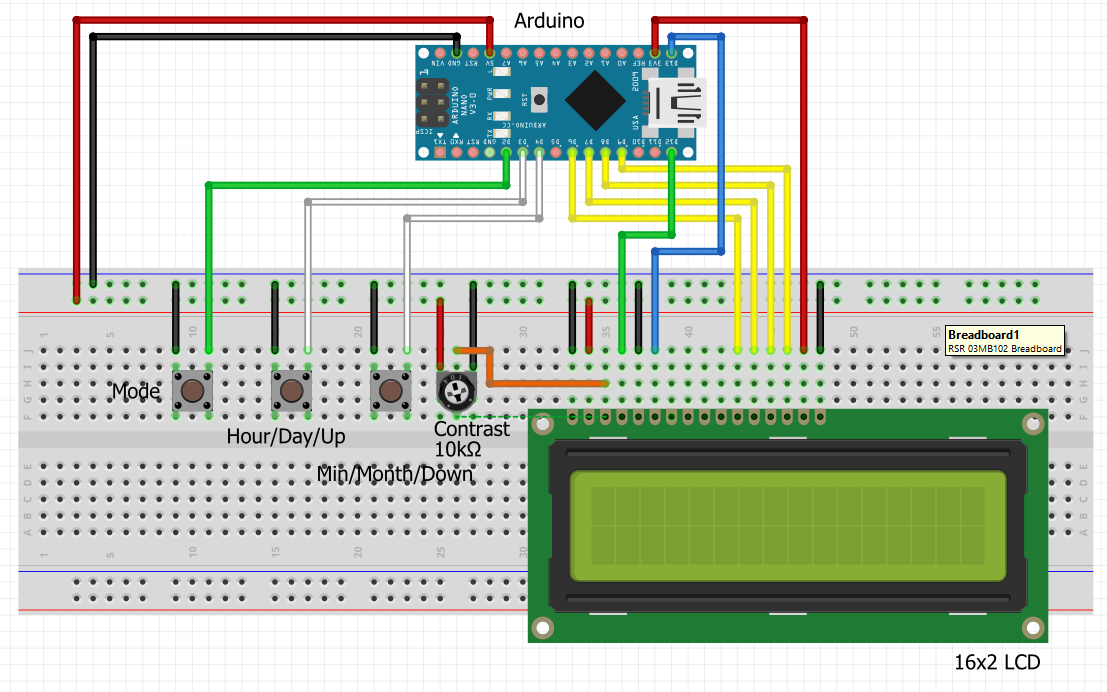
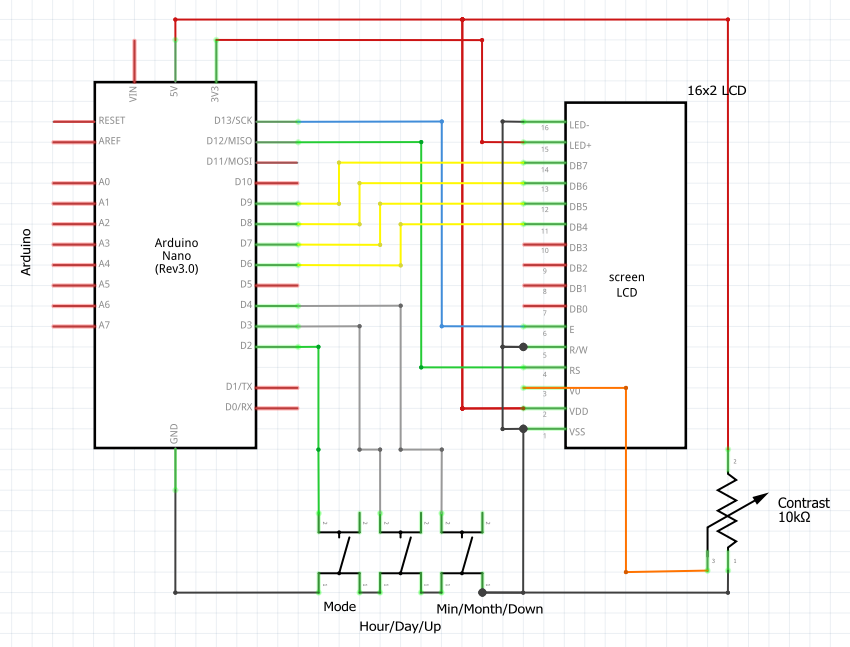
The Mode button advances the current mode from Show Time, to Set Time, Set Year, Set Date, Set Speed Adjustment and back to Show Time. Each of these are self explanatory and use the other 2 buttons to adjust the current setting.
Once the clock is running, if it is gaining or loosing time, you can change the speed adjustment, by accessing the Set Speed Adjustment mode and using the up and down button to increase or reduce this by 5 seconds at a time.
Code
- Clock programme
- Arduino timer program
- Processing timer testing script
Clock programmeArduino
Accurate clock with date just using and Arduino// Paul Brace - Feb 2021
// Simple Clock with Date created just using a Arduino - no RTC module
// Program incorporates a time correction adjustment to compensate for the internal
// clock speed not being 100% accurate.
// Once correct speed adjustment set the clock is surprisingly accurate.
// In my test it did not lose or gain any time over a 5 day period.
// Displays time on a 16x2 LCD display
// Buttons to set time
// Mode button (pin 2) toggles set time, set date and run
// Button 1 (pin 3) Increments Minutes and Month and decreases Year/speed adj
// Button 2 (pin 4) Increments Hour and Day and increases Year./speed adj
// 24 Hour display
// Include the library driver for display:
#include <LiquidCrystal.h>
// LiquidCrystal lcd( RS, EN, D4,D5, D6, D7)
LiquidCrystal lcd(12, 13, 6, 7, 8, 9); // create an lcd object and assign the pins
// Define buttons and buzzer connections
#define MODE_BUTTON 2
#define HOUR_BUTTON 3 // Same button different definitions to
#define UP_BUTTON 3 // make code easier to understand
#define DAY_BUTTON 3
#define MINUTE_BUTTON 4 // Same button different definitions to
#define DOWN_BUTTON 4 // make code easier to understand
#define MONTH_BUTTON 4
// Current mode settings
#define SHOW_TIME 1 // 1 = running - show time
#define SET_TIME 2 // 2 = time set
#define SET_YEAR 3 // 3 = year set
#define SET_DATE 4 // 4 = day/month set
#define SET_SPEED_ADJ 5 // 5 = amend the speedCorrection variable
int speedCorrection = 3545; // Number of milliseconds my Nano clock runs slow per hour
// negative number here if it is running fast
// change to match your Arduino
// Volatile variables as changed in an interrupt and we
// need to force the system to read the actual variable
// when used outside the interrupt and not use a cached version
volatile unsigned long currentTime; // Duration in milliseconds from midnight
unsigned long lastTime = -1000; // lastTime that ShowTime was called initialised to -1000 so shows immediately
volatile unsigned long elapsed; // Timer used for delay and hour count
unsigned long millisecondsInADay; // Milliseconds in 24 hours
unsigned long millisecondsInHour; // Milliseconds in 1 hour
int currentMode; // 1 = running - show time
// 2 = time set
// 3 = year set
// 4 = day/month set
float currentDate; // Julian date
float lastDate = 0.0; // last date that ShowDate was called
int currentDay;
int currentMonth;
int currentYear;
char *dayArray[] = { "Tue. ", // Will show a compiler warning but works fine
"Wed. ",
"Thur. ",
"Fri. ",
"Sat. ",
"Sun. ",
"Mon. "
};
void setup() {
// Set up time interrupt - millis() rolls over after 50 days so
// we are using our own millisecond counter which we can reset at
// the end of each day
TCCR0A = (1 << WGM01); //Set the CTC mode Compare time and trigger interrupt
OCR0A = 0xF9; //Set value for time to compare to ORC0A for 1ms = 249 (8 bits so max is 256)
//[(Clock speed/Prescaler value)*Time in seconds] - 1
//[(16,000,000/64) * .001] - 1 = 249 = 1 millisecond
TIMSK0 |= (1 << OCIE0A); //set timer compare interrupt
TCCR0B |= (1 << CS01); //Set the prescale 1/64 clock
TCCR0B |= (1 << CS00); // ie 110 for last 3 bits
TCNT0 = 0; //initialize counter value to 0
sei(); //Enable interrupt
pinMode(MINUTE_BUTTON, INPUT_PULLUP);
pinMode(HOUR_BUTTON, INPUT_PULLUP);
pinMode(MODE_BUTTON, INPUT_PULLUP);
//pinMode(BUZZER, OUTPUT);
currentTime = 0; // Set to current time to mindnight
currentDate = JulianDate(1, 1, 2021); // Set base date
elapsed = 0; // Set period counter to 0
millisecondsInADay = 24ul * 60 * 60 * 1000;
millisecondsInHour = 60ul * 60 * 1000;
currentMode = SHOW_TIME; // Initial mode is running and showing time and date
// Setup LCD
lcd.begin(16, 2);
lcd.noAutoscroll();
lcd.display();
lcd.clear();
ShowTime(currentTime);
}
void loop() {
// loop runs every 150 milliseconds
// If at end of the day reset time and increase date
if ((currentMode == SHOW_TIME) &&
(currentTime > millisecondsInADay)) {
//Next day
// Stop interrupts while reset time
noInterrupts();
currentTime -= millisecondsInADay;
interrupts();
currentDate++;
}
// At the end of each hour adjust the elapsed time for
// the inacuracy in the Arduino clock
if (elapsed >= millisecondsInHour) {
noInterrupts();
// Adjust time for slow/fast running Arduino clock
currentTime += speedCorrection;
// Reset to count the next hour
elapsed = 0;
interrupts();
}
// Check if any buttons have been pressed
CheckButtons();
// Show display based on current mode
switch (currentMode) {
case SHOW_TIME:
// Display current time and date
ShowTime(currentTime);
ShowDate(currentDate);
break;
case SET_TIME:
// Display screen for setting the time
ShowTimeSet(currentTime);
break;
case SET_YEAR:
// Display screen for setting the year
ShowYearSet(currentDate);
break;
case SET_DATE:
// Display screen for setting the day and month
ShowDDMMSet(currentDate);
break;
case SET_SPEED_ADJ:
// Display screen for adjusting the speed correction
ShowSpeedSet();
break;
}
Wait(150);
}
// This is interrupt is called when the compare time has been reached
// hence will be called once a millisecond based on the
// OCR0A register setting.
ISR(TIMER0_COMPA_vect) {
if (currentMode != SET_TIME)
currentTime++;
elapsed++;
}
float JulianDate(int iday, int imonth, int iyear) {
// Calculate julian date (tested up to the year 20,000)
unsigned long d = iday;
unsigned long m = imonth;
unsigned long y = iyear;
if (m < 3) {
m = m + 12;
y = y - 1;
}
unsigned long t1 = (153 * m - 457) / 5;
unsigned long t2 = 365 * y + (y / 4) - (y / 100) + (y / 400);
return 1721118.5 + d + t1 + t2;
}
void GregorianDate(float jd, int &iday, int &imonth, int &iyear) {
// Note 2100 is the next skipped leap year - compensates for skipped leap years
unsigned long f = jd + 68569.5;
unsigned long e = (4.0 * f) / 146097;
unsigned long g = f - (146097 * e + 3) / 4;
unsigned long h = 4000ul * (g + 1) / 1461001;
unsigned long t = g - (1461 * h / 4) + 31;
unsigned long u = (80ul * t) / 2447;
unsigned long v = u / 11;
iyear = 100 * (e - 49) + h + v;
imonth = u + 2 - 12 * v;
iday = t - 2447 * u / 80;
}
void SplitTime(unsigned long curr, unsigned long &ulHour,
unsigned long &ulMin, unsigned long &ulSec) {
// Calculate HH:MM:SS from millisecond count
ulSec = curr / 1000;
ulMin = ulSec / 60;
ulHour = ulMin / 60;
ulMin -= ulHour * 60;
ulSec = ulSec - ulMin * 60 - ulHour * 3600;
}
unsigned long SetTime(unsigned long ulHour, unsigned long ulMin,
unsigned long ulSec) {
// Sets the number of milliseconds from midnight to current time
return (ulHour * 60 * 60 * 1000) +
(ulMin * 60 * 1000) +
(ulSec * 1000);
}
void Wait(unsigned long value) {
// Create our own dealy function
// We have set our own interrupt on TCCR0A
// hence millis() and delay() will no longer work
unsigned long startTime = elapsed;
while ((elapsed - startTime) < value) {
// Just wait
}
}
void CheckButtons() {
// If the mode button has been pressed pin will go LOW
if (digitalRead(MODE_BUTTON) == LOW) {
// Advance to next mode
switch (currentMode) {
case SHOW_TIME:
currentMode = SET_TIME;
lcd.clear();
break;
case SET_TIME:
currentMode = SET_YEAR;
lcd.clear();
break;
case SET_YEAR:
currentMode = SET_DATE;
lcd.clear();
break;
case SET_DATE:
currentMode = SET_SPEED_ADJ;
lcd.clear();
break;
case SET_SPEED_ADJ:
currentMode = SHOW_TIME;
lcd.clear();
// Reset variables so that the display will be forced to update
// the next time ShowTime and ShowDate are called
lastTime = 0;
lastDate = 0.0;
break;
}
}
if (currentMode != SHOW_TIME) {
switch (currentMode) {
// If mode anyhting other than SHOW_TIME check buttons
// Pin goes LOW when ssociated button pressed
case SET_TIME:
if (digitalRead(MINUTE_BUTTON) == LOW) {
// Advance minute
unsigned long iHours;
unsigned long iMinutes;
unsigned long iSeconds;
SplitTime(currentTime, iHours, iMinutes, iSeconds);
if (iMinutes < 59) {
iMinutes++;
}
else {
iMinutes = 0;
}
// Set stored milliseconds based on current setting
noInterrupts();
currentTime = SetTime(iHours, iMinutes, 0);
elapsed = 0;
interrupts();
}
if (digitalRead(HOUR_BUTTON) == LOW) {
// Advance hour
unsigned long iHours;
unsigned long iMinutes;
unsigned long iSeconds;
SplitTime(currentTime, iHours, iMinutes, iSeconds);
if (iHours < 23) {
iHours++;
}
else {
iHours = 0;
}
// Set stored milliseconds based on current setting
noInterrupts();
currentTime = SetTime(iHours, iMinutes, 0);
elapsed = 0;
interrupts();
}
break;
case SET_YEAR:
if (digitalRead(UP_BUTTON) == LOW) {
// Increase year
int iDay;
int iMonth;
int iYear;
GregorianDate(currentDate, iDay, iMonth, iYear);
iYear++;
// Set stored date based on current settings
currentDate = JulianDate(iDay, iMonth, iYear);
}
if (digitalRead(DOWN_BUTTON) == LOW) {
// Decrease year
int iDay;
int iMonth;
int iYear;
GregorianDate(currentDate, iDay, iMonth, iYear);
iYear--;
// Set stored date based on current settings
currentDate = JulianDate(iDay, iMonth, iYear);
}
break;
case SET_DATE:
if (digitalRead(MONTH_BUTTON) == LOW) {
// Advance month
int iDay;
int iMonth;
int iYear;
GregorianDate(currentDate, iDay, iMonth, iYear);
iMonth++;
if (iMonth > 12) {
iMonth = 1;
}
// Set stored date based on current settings
currentDate = JulianDate(iDay, iMonth, iYear);
}
if (digitalRead(DAY_BUTTON) == LOW) {
// Advance day
int iDay;
int iMonth;
int iYear;
GregorianDate(currentDate, iDay, iMonth, iYear);
iDay++;
if (iDay > 31) {
iDay = 1;
}
if (((iMonth == 4) || (iMonth == 6) || (iMonth == 9) || (iMonth == 11))
&& (iDay > 30)) {
iDay = 1;
}
if ((iMonth == 2) && (iDay > 29)) {
iDay = 1;
}
if ((iMonth == 2) && ((iYear % 4) != 0) && (iDay > 28)) {
iDay = 1;
}
// Set stored date based on current settings
// If subsequently adjust the month so day is not valid
// then display will advance to next valid date
currentDate = JulianDate(iDay, iMonth, iYear);
}
break;
case SET_SPEED_ADJ:
// increase or decrease correcton by 5 milliseconds
if (digitalRead(UP_BUTTON) == LOW) {
speedCorrection += 5;
}
if (digitalRead(DOWN_BUTTON) == LOW) {
speedCorrection -= 5;
}
break;
}
}
}
String FormatNumber(int value) {
// To add a leading 0 if required
if (value < 10) {
return "0" + String(value);
}
else {
return String(value);
}
}
void ShowTime(unsigned long value) {
// Update display once a second
// or when rolls over midnight
if ((value > lastTime + 1000) || (value < lastTime)) {
lastTime = value;
unsigned long iHours;
unsigned long iMinutes;
unsigned long iSeconds;
SplitTime(value, iHours, iMinutes, iSeconds);
// Display the time on line 0
lcd.setCursor(0, 0);
lcd.print("Time: " + FormatNumber(iHours) + ":" +
FormatNumber(iMinutes) + ":" +
FormatNumber(iSeconds));
}
}
void ShowDate(float value) {
// Update display if date has changed since
// the date was last displayed
if (lastDate != value) {
lastDate = value;
int iday;
int imonth;
int iyear;
String currentDay;
GregorianDate(value, iday, imonth, iyear);
int dayOfWeek = (unsigned long)value % 7;
// Display the date on line 0
lcd.setCursor(0, 1);
lcd.print(dayArray[dayOfWeek]);
lcd.print(FormatNumber(iday) + ":" +
FormatNumber(imonth) + ":" +
iyear);
}
}
void ShowDDMMSet(float value) {
int iday;
int imonth;
int iyear;
String currentDay;
GregorianDate(value, iday, imonth, iyear);
// Display day and month for adjusting
lcd.setCursor(0, 0);
lcd.print("Set day & month:");
lcd.setCursor(0, 1);
lcd.print("Day:" + FormatNumber(iday) + " Month:" +
FormatNumber(imonth));
}
void ShowYearSet(float jd) {
int iday;
int imonth;
int iyear;
GregorianDate(jd, iday, imonth, iyear);
// Display year for adjusting
lcd.setCursor(0, 0);
lcd.print("Set year:");
lcd.setCursor(0, 1);
lcd.print("Year: " + FormatNumber(iyear));
}
void ShowTimeSet(unsigned long value) {
unsigned long iHours;
unsigned long iMinutes;
unsigned long iSeconds;
// Display time for adjusting
SplitTime(value, iHours, iMinutes, iSeconds);
lcd.setCursor(0, 0);
lcd.print("Set time:");
lcd.setCursor(0, 1);
lcd.print("Hours:" + FormatNumber(iHours) + " Mins:" +
FormatNumber(iMinutes));
}
void ShowSpeedSet() {
// Display speed correction figure for adjusting
// could be + or -
lcd.setCursor(0, 0);
lcd.print("Set speed adj:");
lcd.setCursor(0, 1);
lcd.print("Millis: ");
lcd.print(speedCorrection);
lcd.print(" ");
}
Arduino timer programArduino
This program sends the number of elapsed milliseconds to the serial port evert 2 seconds.// Paul Brace Feb 2021
// For use with corresponding Processing script
// to compare millis() from here to millis() in
// Processing using the computer clock
int inByte = 0;
unsigned long firstReading = 100000; // millis() when first reading sent
void setup() {
Serial.begin(9600);
// Send the hello byte to Processing
sayHello();
}
void loop() {
// if a byte is received on the serial port
// then read and discard it and send current
// value of millis()
if (Serial.available() > 0){
// get incoming byte
inByte = Serial.read();
// send time elapsed since first reading processing
Serial.print(millis() - firstReading);
Serial.print('E');
// repeat every 2 seconds
delay(2000);
}
}
void sayHello(){
// Wait until the serial port is available
// then send hello byte to start handshake
while (Serial.available() <=0){
Serial.print('Z'); // Send Z to processing to say Hello
delay(200);
}
firstReading = millis();
}
Processing timer testing scriptProcessing
This is the script for Processing that will read the milliseconds sent from the Arduino and compare it to the elapsed milliseconds in processing.// Paul Brace Feb 2021
// Script to accept millis() from Arduino
// and compare it to internal millis() to
// assess inaccuracy of the Arduino clock.
// Assumes that the computer clock is accurate
// -ve = Arduino is running slow so enter as a +ve adjustment in the clock program
// +ve = Arduino is running fast so enter as a -ve adjustment to slow the clock down
import processing.serial.*;
Serial theSerialPort; // create the serial port object
int[] serialBytesArray = new int[15]; // array to store incoming bytes
int bytesCount = 0; // current number of bytes received
boolean init = false; // false until handshake completed by receiving the character Z
int fillColor = 255; // defining the initial fill colour
long mills = 0; // last reading received
long first = 0; // time of first mills received so we can calculate the difference over an hour
long now; // number of millis elapsed since first mills received
long firstReading = 100000; // millis() in processing of first message received from Arduino
long DiffPerHour = 0; // the difference after the first hour has passed
int inByte; // last byte read
void setup() {
// define some canvas and drawing parameters
size(500, 500);
background(70);
noStroke();
// print the list of all serial devices so you know which one to set for the Arduino
// will need to run program and edit if the correct port is not set below
printArray(Serial.list());
// instantate the Serial Communication
String thePortName = Serial.list()[1];
theSerialPort = new Serial(this, thePortName, 9600);
}
void draw() {
// Display time settings
background(70);
fill(fillColor);
textSize(25);
text(hour() + ":" + minute() + ":" + second(), 50, 50);
// the last read millis sent by the Arduino
text("Incoming elapsed: " + mills, 50, 100);
// the current elapsed since first read in Processing
text("Local elapsed: " + (now - firstReading), 50, 150);
// display the current difference
text("Diff: " + (mills - (now - firstReading)), 50, 200);
// Check if 1 hour has passed and if the first hour store the difference
if (((now - firstReading)>= 3600000) && (DiffPerHour == 0)){
DiffPerHour = mills - (now - firstReading);
}
// Display the first difference and the difference after the first hour
text("Diff after 1 hour: " + DiffPerHour, 50, 300);
}
void serialEvent(Serial myPort) {
// read a byte from the serial port
inByte = myPort.read();
if (init == false) { // if not yet handshaked the see if handshake byte
if (inByte == 'Z') { // if the byte read is Z
myPort.clear(); // clear the serial port buffer
init = true; // store the fact we had the first hello
myPort.write('Z'); // tell the Arduino to send more
if (first == 0){
first = millis();
}
}
}
else {
// if there already was the first hello
// Add the latest byte from the serial port to array
if (inByte != 69) { // Check not the end of message character E
if (bytesCount < 14) {
serialBytesArray[bytesCount] = inByte;
bytesCount++;
}
}
if (inByte == 69) {
// End of message
// store local time elapsed
now = millis();
// calculate incoming millis()
mills = 0;
for (int i = 1; i <= bytesCount; i++) {
mills += (serialBytesArray[i - 1] - 48) * pow(10, (bytesCount - i));
}
// Say we are ready to accept next message
// if this is the first reading then set the first difference
if (firstReading == 100000) {
firstReading = now;
}
myPort.write('Z');
// Reset bytesCount:
bytesCount = 0;
}
}
}
Schematics
Manufacturing process
- Arduino POV Clock: Build a Persistance‑of‑Vision LED Display
- Build a DTMF Decoder Using Only an Arduino – No Extra ICs Needed
- Build a Stylish Wall Clock with Adafruit 60‑LED Neopixel Ring & Arduino
- DIY Arduino Word Clock – Build a Sleek Real-Time Display
- Build a Custom LED Master Clock with Alarm – Viewable from 12 Meters
- Build a Precise 7‑Segment Clock with Arduino Pro Mini & DS1302 RTC
- Build a Compact FM Radio with Arduino Nano and RDA8057M
- Build a Real-Time Face-Tracking System with Arduino & OpenCV
- Arduino DCF77 Analyzer Clock MK2 – Accurate 60‑LED Ring Time Code Display
- DCF77 Radio Clock & Analyzer v2.0 – Arduino Mega/UNO Project