



Build an Arduino Real‑Time Clock for Islamic Prayer Times
Components and supplies
 |
| × | 1 | |||
| × | 1 | ||||
 |
| × | 1 |
Necessary tools and machines
|
| |||
 |
|
Apps and online services
 |
|
About this project
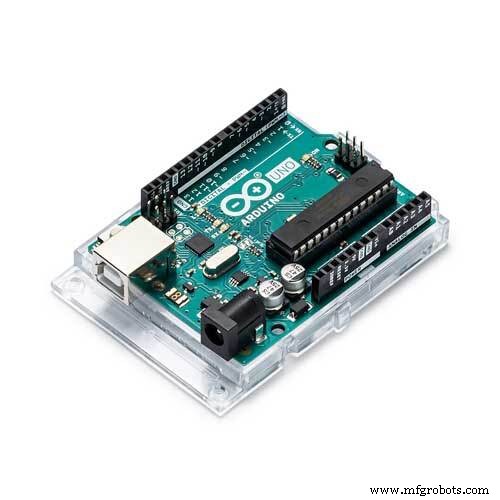
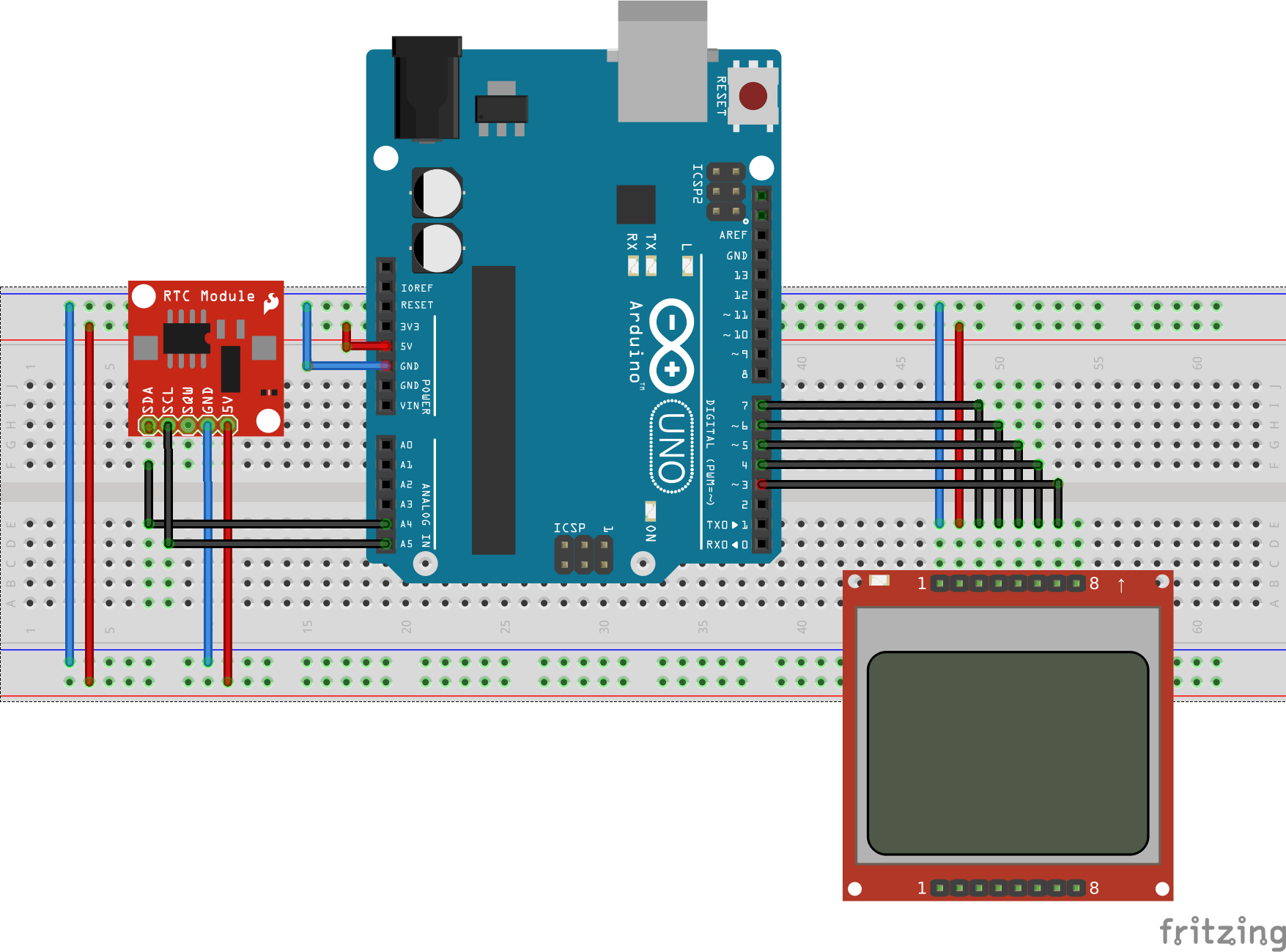
This is a real-time clock with the ability to show Gregorian date and daily prayer times. For this simple circuit, we need to use an Arduino UNO (or any Arduino board), an RTC DS1307 and NOKIA 5110 LCD.
You can buy the parts here (affiliate links):
- Arduino UNO
- DS1307
- NOKIA 5110 LCD
Arduino UNO
The Arduino Uno is an open-source microcontroller board based on the ATmega328P microcontroller. This board is equipped with sets of analog and digital GPIOs (General-purpose input/output) that may be interfaced to various sensors, actuators, expansion boards and other circuits.
The Arduino UNO has:
- 14 digital input/output pins (of which 6 can be used as PWM outputs)
- 6 analog inputs
- 16 MHz ceramic resonator
- 32 KB Flash Memory (0.5 KB used by bootloader)
- 2 KB SRAM
- 1 KB EEPROM
- DC Power Jack & USB Port
DS1307
The DS1307 serial real-time clock (RTC) is a low-power, full binary-coded decimal (BCD) clock/calendar.
The clock/calendar provides seconds, minutes, hours, day, date, month, and year information. The end of the month date is automatically adjusted for months with fewer than 31 days, including corrections for leap year.
The DS1307 operates in either the 24-hour or 12-hour format with AM/PM indicator. It has a built-in power sense circuit that detects power failures and automatically switches to the battery supply.
Pin Function of the DS1307
- VCC, GND: DC power is provided to the device on these pins.
- SCL (Serial Clock Input): used to synchronize data movement on the serial interface.
- SDA (Serial Data Input/Output): SDA is the input/output pin for the 2-wire serial interface. The SDA pin is an open drain that requires an external pullup resistor.
- SQW/OUT (Square Wave/Output Driver): When enabled, the SQWE bit is set to 1, the SQW/OUT pin outputs one of four square wave frequencies (1Hz, 4kHz, 8kHz, 32kHz). The SQW/OUT pin is an open-drain and requires an external pull-up resistor. It will operate with either Vcc or Vbat applied.
- X1, X2: Connections for a standard 32.768kHz quartz crystal. The internal oscillator circuitry is designed for operation with a crystal having a specified load capacitance of 12.5pF
NOKIA 5110 LCD
Nokia 5110 LCD is an 84*48 pixels monochrome screen, it comes with a backlight and can be used to draw text, graphics or images. The LCD uses the PCD8544 controller (same used in the Nokia 3310 LCD), this controller interfaces to microcontrollers through a serial bus interface similar to SPI.
Nokia 5110 LCD Pinout
- VCC, GND: DC power is provided to the device on these pins.
- RST: it resets the display. It’s an active low pin. You can also connect this pin to the Arduino reset so that it will reset the screen automatically.
- CE (Chip Enable): an active low pin, it helps to select one of many connected devices sharing the same SPI bus.
- D/C (Data/Command): it tells the display whether it is receiving or displaying data. The HIGH signal is for data and the LOW signal for command.
- DIN: it is a serial data pin for the SPI interface, it will send the data from the microcontroller to the LCD.
- CLK (Clock): the LCD and the microcontroller will require a common clock to operate because of their SPI communication. this pin will help to make it.
- BL (Backlight): it controls the backlight of the display. You can control its brightness by adding a potentiometer or connecting it to a PWM-capable Arduino pin (Pin # 3, 5, 6, 9, 10 and 11).
You should adapt line 161 of the code:
calcPrayerTimes(year, month, dayOfMonth, 41.3, 20.6, 3, -18.5, -19, fajr, sunRise, zuhr, asr, maghrib, isha);The parameters needed are:
- Longitude/Latitude/Time Zone of the desired place.
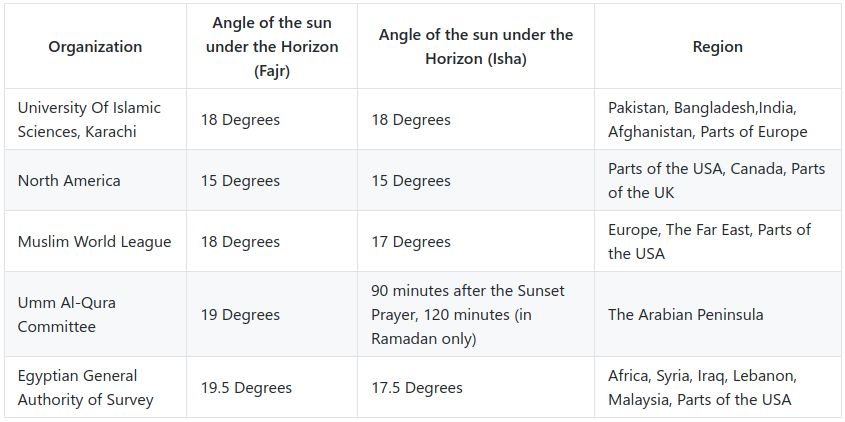
- Fajr Twilight/ Esha Twilight differ in calculations from one country to another.
You can also get the geographical coordinates of your city, such as latitude and longitude, which the program needs in order to calculate prayer times by visiting the IslamicFinder website then search for your city.
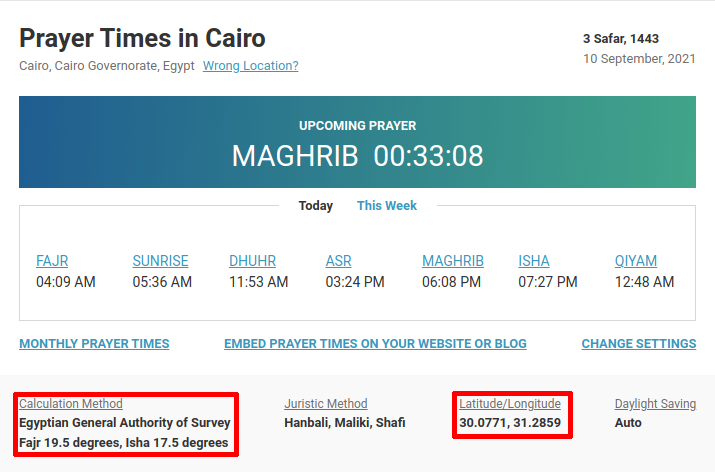
As we note in the image above, after I searched for the city of Cairo, prayer times appeared in addition to some information. What matters to us is latitude, longitude, Isha angle and Fajr angle, you will change those numbers in the program to suit your city.
How does the program work?The function takes the data of Year/Month/Day/Longitude/Latitude/TimeZone/FajrTwilight/IshaTwilight plus 6 references to double variables (Fajr/SunRise/Zuhr/Asr/Maghrib/Isha). These 6 variables are the ones to return data into. there are also some functions to help in some number conversions (for example, Radians to Degrees and vice versa).
So, if we take Cairo as an example:
- Longitude: 30.2
- Latitude: 30
- Time Zone: +2
- Fajr Twilight: -19.5
- Esha Twilight: -17.5
We should adapt line 161 like this:
calcPrayerTimes(year, month, dayOfMonth, 30.2, 30, 2, -19.5, -17.5, fajr, sunRise, zuhr, asr, maghrib, isha);Note that these prayer times are still "double" and should be converted to a time format. Mahmoud Adly Ezzat made the doubleToHrMin function (you can find it before the calcPrayerTimes function) which splits the number into Hours and Minutes. It takes the double and two references to int variables.
Don’t forget to drop a thumb up if you find it useful.
P.S: the Prayer time calculation algorithm is written by Mahmoud Adly Ezzat. You can read more about it in his blog post.
Code
- Arduino clock with Islamic prayer times
Arduino clock with Islamic prayer timesArduino
- Prayer time on Nokia 5510/3310 display by Hatem Zehir- Prayer time calculation is from http://3adly.blogspot.com/2010/07/prayer-times-calculations-pure-c-code.html
#include "Wire.h"
#include <Adafruit_GFX.h>
#include <Adafruit_PCD8544.h>
Adafruit_PCD8544 display = Adafruit_PCD8544(7, 6, 5, 4, 3);

int xegg, yegg;

#define DS1307_I2C_ADDRESS 0x68  // This is the I2C address
long previousMillis = 0;        // will store last time time was updated
byte second, minute, hour, dayOfWeek, dayOfMonth, month, year;
long interval = 200;
int displayx, displayy, displayradius, x2, y2, x3, y3;
int zero = 0;
char  *Day[] = {"", "Sun", "Mon", "Tue", "Wed", "Thu", "Fri", "Sat"};
double fajr, sunRise, zuhr, asr, maghrib, isha;

// Convert normal decimal numbers to binary coded decimal
byte decToBcd(byte val)
{
  return ( (val / 10 * 16) + (val % 10) );
}

// Convert binary coded decimal to normal decimal numbers
byte bcdToDec(byte val)
{
  return ( (val / 16 * 10) + (val % 16) );
}

// Gets the date and time from the ds1307 and prints result
void getDateDs1307()
{
  // Reset the register pointer
  Wire.beginTransmission(DS1307_I2C_ADDRESS);
  //Wire.write(0x00);
  Wire.write(zero);
  Wire.endTransmission();
  Wire.requestFrom(DS1307_I2C_ADDRESS, 7);

  second     = bcdToDec(Wire.read() & 0x7f);
  minute     = bcdToDec(Wire.read());
  hour       = bcdToDec(Wire.read() & 0x3f);
  dayOfWeek  = bcdToDec(Wire.read());
  dayOfMonth = bcdToDec(Wire.read());
  month      = bcdToDec(Wire.read());
  year       = bcdToDec(Wire.read());

}

void setDateDs1307()
{
  Wire.beginTransmission(DS1307_I2C_ADDRESS);
  Wire.write(zero);
  Wire.write(decToBcd(second));    // 0 to bit 7 starts the clock
  Wire.write(decToBcd(minute));
  Wire.write(decToBcd(hour));      // for 12 hour am/pm, need to set bit 6 (also need to change readDateDs1307)
  Wire.write(decToBcd(dayOfWeek));
  Wire.write(decToBcd(dayOfMonth));
  Wire.write(decToBcd(month));
  Wire.write(decToBcd(year));
  Wire.endTransmission();
}


void printTime()
{
  int hours, minutes;
  char s[12];
  display.clearDisplay();
  display.setCursor(0, 16);
  display.print(Day[dayOfWeek]);
  display.print(":");
  display.print(char(dayOfMonth / 10 + 0x30));
  display.print(char(dayOfMonth % 10 + 0x30));
  display.print("/");
  display.print(char(month / 10 + 0x30));
  display.print(char(month % 10 + 0x30));
  display.print("/");
  display.print("20");
  display.print(char(year / 10 + 0x30));
  display.print(char(year % 10 + 0x30));

  display.setCursor(18, 26);
  display.print( char( hour / 10 + 0x30) );
  display.print( char( hour % 10 + 0x30) );
  display.print(":");
  display.print( char(minute / 10 + 0x30));
  display.print( char(minute % 10 + 0x30));
  display.print(":");
  display.print(char (second / 10 + 0x30));
  display.print(char (second % 10 + 0x30));
  display.display();
  delay(1000);

  doubleToHrMin(fajr, hours, minutes);
  display.clearDisplay();
  display.setCursor(1, 1);
  display.print("Fajr ");
  display.print(hours);
  display.print(":");
  display.print(minutes);
  display.display();

  doubleToHrMin(zuhr, hours, minutes);
  display.setCursor(1, 10);
  display.print("Zuhr ");
  display.print(hours);
  display.print(":");
  display.print(minutes);
  display.display();

  doubleToHrMin(asr, hours, minutes);
  display.setCursor(1, 20);
  display.print("Asr ");
  display.print(hours);
  display.print(":");
  display.print(minutes);
  display.display();

  doubleToHrMin(maghrib, hours, minutes);
  display.setCursor(1, 30);
  display.print("Maghrib ");
  display.print(hours);
  display.print(":");
  display.print(minutes);
  display.display();

  doubleToHrMin(isha, hours, minutes);
  display.setCursor(1, 40);
  display.print("Isha ");
  display.print(hours);
  display.print(":");
  display.print(minutes);
  display.display();
  delay(5000);
}


void setup()  {
  Wire.begin();
  display.begin();
  display.clearDisplay();
  display.setContrast(25);
  xegg = (display.width()) / 2;
  yegg = (display.height()) / 2;
  display.setTextColor(BLACK);
  display.setTextSize(1);
  display.setCursor(22, 18);
  display.print("Hatem");
  display.display();
  delay(500);
  display.setCursor(24, 28);
  display.print("ZEHIR");
  display.display();
  delay(500);
  getDateDs1307() ;
}


void loop() {
  getDateDs1307() ;
  calcPrayerTimes(year, month, dayOfMonth, 39.8, 21.4, 3, -18.5, -19, fajr, sunRise, zuhr, asr, maghrib, isha); // year , month, day, Longitude, Latitude, Time Zone, Fajr Twilight, Esha Twilight

  unsigned long currentMillis = millis();

  if (currentMillis - previousMillis > interval) {
    previousMillis = currentMillis;
    //getDateDs1307() ;
    printTime();
  }

}

/*-------------------------------------------------------------------------------------*/
// PRAYER TIME (by Mahmoud Adly Ezzat, Cairo)

//convert Degree to Radian
double degToRad(double degree)
{
  return ((3.1415926 / 180) * degree);
}

//convert Radian to Degree
double radToDeg(double radian)
{
  return (radian * (180 / 3.1415926));
}

//make sure a value is between 0 and 360
double moreLess360(double value)
{
  while (value > 360 || value < 0)
  {
    if (value > 360)
      value -= 360;

    else if (value < 0)
      value += 360;
  }

  return value;
}

//make sure a value is between 0 and 24
double moreLess24(double value)
{
  while (value > 24 || value < 0)
  {
    if (value > 24)
      value -= 24;

    else if (value < 0)
      value += 24;
  }

  return value;
}

//convert the double number to Hours and Minutes
void doubleToHrMin(double number, int &hours, int &minutes)
{
  hours = floor(moreLess24(number));
  minutes = floor(moreLess24(number - hours) * 60);
}

void calcPrayerTimes(int year, int month, int day,
                     double longitude, double latitude, int timeZone,
                     double fajrTwilight, double ishaTwilight,
                     double &fajrTime, double &sunRiseTime, double &zuhrTime,
                     double &asrTime, double &maghribTime, double &ishaTime)
{
  double D = (367 * year) - ((year + (int)((month + 9) / 12)) * 7 / 4) + (((int)(275 * month / 9)) + day - 730531.5);

  double L = 280.461 + 0.9856474 * D;
  L = moreLess360(L);

  double M = 357.528 + (0.9856003) * D;
  M = moreLess360(M);

  double Lambda = L + 1.915 * sin(degToRad(M)) + 0.02 * sin(degToRad(2 * M));
  Lambda = moreLess360(Lambda);

  double Obliquity = 23.439 - 0.0000004 * D;
  double Alpha = radToDeg(atan((cos(degToRad(Obliquity)) * tan(degToRad(Lambda)))));
  Alpha = moreLess360(Alpha);

  Alpha = Alpha - (360 * (int)(Alpha / 360));
  Alpha = Alpha + 90 * (floor(Lambda / 90) - floor(Alpha / 90));

  double ST = 100.46 + 0.985647352 * D;
  double Dec = radToDeg(asin(sin(degToRad(Obliquity)) * sin(degToRad(Lambda))));
  double Durinal_Arc = radToDeg(acos((sin(degToRad(-0.8333)) - sin(degToRad(Dec)) * sin(degToRad(latitude))) / (cos(degToRad(Dec)) * cos(degToRad(latitude)))));

  double Noon = Alpha - ST;
  Noon = moreLess360(Noon);


  double UT_Noon = Noon - longitude;


  ////////////////////////////////////////////
  // Calculating Prayer Times Arcs & Times //
  //////////////////////////////////////////

  // 2) Zuhr Time [Local noon]
  zuhrTime = UT_Noon / 15 + timeZone;

  // Asr Hanafi
  //double Asr_Alt =radToDeg(atan(2+tan(degToRad(latitude - Dec))));
  double Asr_Alt = radToDeg(atan(1.7 + tan(degToRad(latitude - Dec))));
  // Asr Shafii
  //double Asr_Alt = radToDeg(atan(1 + tan(degToRad(latitude - Dec))));
  double Asr_Arc = radToDeg(acos((sin(degToRad(90 - Asr_Alt)) - sin(degToRad(Dec)) * sin(degToRad(latitude))) / (cos(degToRad(Dec)) * cos(degToRad(latitude)))));
  Asr_Arc = Asr_Arc / 15;
  // 3) Asr Time
  asrTime = zuhrTime + Asr_Arc;

  // 1) Shorouq Time
  sunRiseTime = zuhrTime - (Durinal_Arc / 15);

  // 4) Maghrib Time
  maghribTime = zuhrTime + (Durinal_Arc / 15);

  double Esha_Arc = radToDeg(acos((sin(degToRad(ishaTwilight)) - sin(degToRad(Dec)) * sin(degToRad(latitude))) / (cos(degToRad(Dec)) * cos(degToRad(latitude)))));
  // 5) Isha Time
  ishaTime = zuhrTime + (Esha_Arc / 15);

  // 0) Fajr Time
  double Fajr_Arc = radToDeg(acos((sin(degToRad(fajrTwilight)) - sin(degToRad(Dec)) * sin(degToRad(latitude))) / (cos(degToRad(Dec)) * cos(degToRad(latitude)))));
  fajrTime = zuhrTime - (Fajr_Arc / 15);

  return;
}
Schematics
Manufacturing process
- Build a Custom LED Master Clock with Alarm – Viewable from 12 Meters
- How to Display Images on a 1.17‑inch TFT LCD with Arduino UNO
- Mastering an 8×8 LED Matrix with Arduino Uno: A Step‑by‑Step Guide
- Real-Time Arduino Weather Clock: OLED Display for Time, Date & Temperature
- Build a Simple Nixie Tube Clock Using Arduino – Step‑by‑Step Guide
- Build a 7‑Segment Clock with Arduino Nano, DS3231 RTC, and LDR Auto‑Brightness
- Build an IR Sensor Project with Arduino UNO – Simple Guide
- Build a Reliable Alarm Clock with DS1302 RTC and Arduino UNO
- 25 kHz 4‑Pin PWM Fan Control Using Arduino Uno – Build, Code & Test
- Efficiently Program ATtiny85 Using Arduino Uno: A Cost‑Effective Multi‑Sensor Solution