



Open-Source COVID-19 Pulmonary Ventilator – Arduino-Based DIY Respiratory Support System
Components and supplies
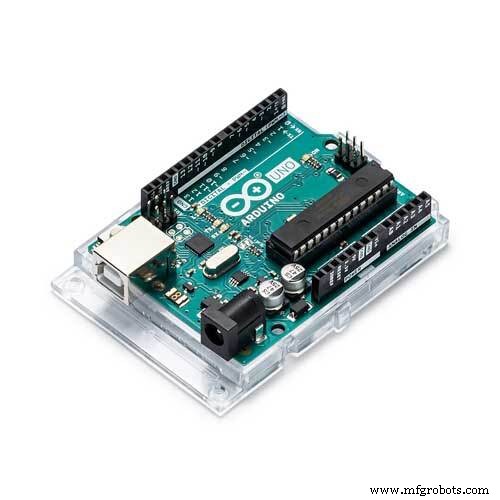 |
| × | 1 | |||
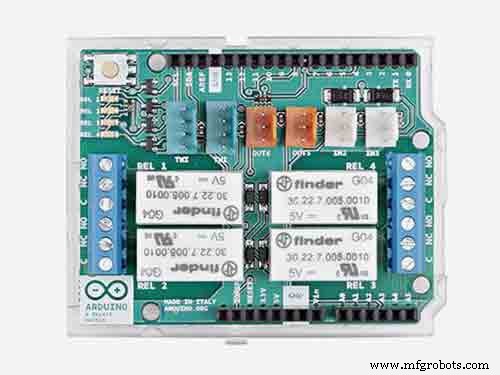 |
| × | 1 | |||
| × | 1 | ||||
| × | 2 | ||||
| × | 1 | ||||
 |
| × | 1 | |||
 |
| × | 1 | |||
 |
| × | 1 | |||
 |
| × | 1 | |||
| × | 1 | ||||
| × | 1 | ||||
 |
| × | 1 |
Necessary tools and machines
 |
| |||
|
Apps and online services
 |
| |||
| ||||
 |
|
About this project
Open source non-invasive ventilator Its low-cost and easy to build, an emergency respirator to combat the health crisis Covid19 if there are no ventilators available and as long as the patient is not sedated or intubated.
This project was the result of a challenge launched by my ex teacher and friend Serafim Pires who contacted me showing a Spanish project, saying that it would be good if I could develop a project to help fight this world crisis.
After several researches and studies on the topic of non-invasive Ventilation I built this functional prototype based on 2 existing technologies,
All tests were successful and with a functional test with more than 20 days without any problem or interruption.
Non-invasive ventilation is delivered using facemasks nasal masks, which push a set amount of pressurized air into the lungs. This supports the natural breathing process when disease has caused the lungs to fail, enabling the body to fight infection and get better.
Based on research conducted in Italy, I used this technology In my project that turns a Decathlon snorkel mask into an emergency ventilator for patients suffering from COVID-19, to help mitigate the lack of ventilators during the peak of the coronavirus pandemic.
These masks have been adapted and used in locations around the world due to their low cost and easy adaptation.
The results were evident and, recently, this technology was also used here in Portugal at the Hospital of Santarém.
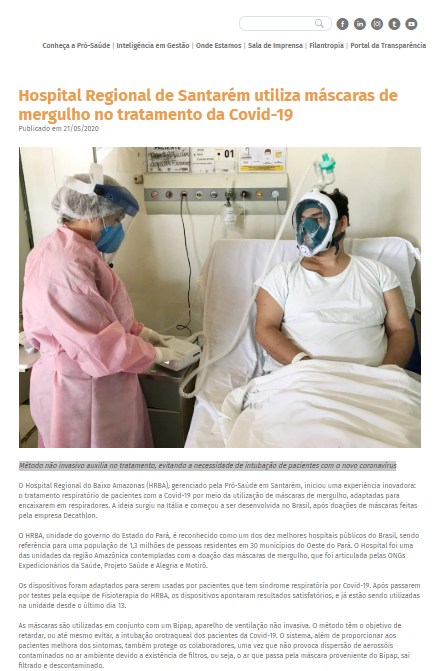
https://www.prosaude.org.br/noticias/hospital-regional-de-santarem-utiliza-mascaras-de-mergulho-no-tratamento-da-covid-19/?fbclid=IwAR36UVLXCztk0zSSJwTCBQ1lgb5iYmY1Ha_tqwIT74BjpH0-QrYaqvQ-Xqk
News in the newspaper in portugal.
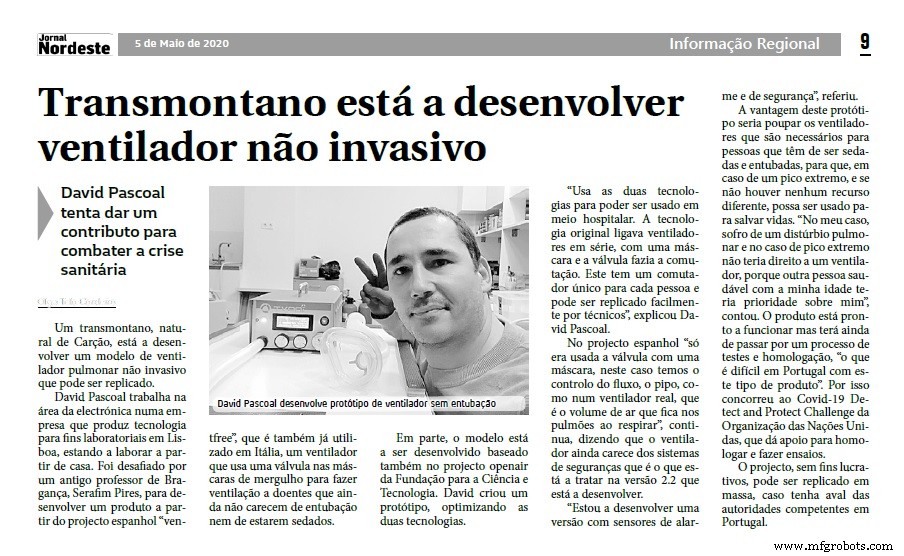
Iterview on a local radio went viral on social networks in Portugal.
.
Firts operation test using a small volume of air and using 15 breathing cycles changing the breathing frequency and the peep for demonstration.
WARNING: This prototype is not yet validated by any official body and I decline all responsibility for its use.
In addition, it will be used as a last resort and by trained medical personnel, this equipment is intended to save lives in an extreme peak situation.
The non-profit project can be replicated en masse, if approved by the competent authorities in Portugal.
Code
- INOVT_COVID19_Version_2.2.ino
- INOVT_COVID19_Version_2.2.rar
INOVT_COVID19_Version_2.2.inoArduino
/* Program pulmonary ventilator INOVT COVID-19  Versio 2.2
 * Autor: David Pascoal
 * The equipment has been tested and proven,security with pressure sensor,
 * Alarm output to turn on Buzer or beetle.
*/
#include <Wire.h>
#include <LiquidCrystal_I2C.h>
#include <Servo.h>

LiquidCrystal_I2C lcd(0x27,20,4);

#define PIN_SERVO 6
#define PIN_FREQ A1
#define PIN_PEEP A0
#define PIN_LED 2
#define PIN_LED2 3
#define PIN_Alarm_Relay 8
#define PIN_Safety_Valve 9
#define SENSOR_FLOW A3
#define EXPIRANDO  0
#define INSPIRANDO  1
#define MIN_ANGLE 92
#define MAX_ANGLE 139


int frecuencia = 0;
int valInspira = 0;
int valExpira = 0;
int valPeep = 0;
int aux;
int x = 500;
int y = 1000;

unsigned long time;
Servo myServo;
int frecuencia_ant;
int valPeep_ant;

int estado;

void logo()
{


byte a3[8]= { B00011,
              B00111,
              B01100,
              B11000,
              B10000,
              B00000,
              B00000
};

byte a2[8]= {B00000,
             B00000,
             B00000,
             B00000,
             B10001,
             B11111,
             B01110
};

byte a1[8]={B11000,
            B01100,
            B00110,
            B00011,
            B00001,
            B00000,
            B00000
};

byte a4[9]={ B00000,
             B00000,
             B00000,
             B00001,
             B00011,
             B00110,
             B01100,
             B11000

};

byte a5[9]={ B00000,
             B01110,
             B11111,
             B10001,
             B00000,
             B00000,
             B00000,
             B01110,
             B00000,
};

byte a6[8]={  B00000,
              B00000,
              B00000,
              B10000,
              B11000,
              B01100,
              B00110,
              B00011
};

byte a7[10]={ B00000,
              B01110,
              B11111,
              B10001,
              B00000,
              B00000,
              B00000,
              B00000,

};

byte a8[8]={B00100,
            B01110,
            B00100,
            B00000,
            B10001,
            B11111,
            B01110
};


  lcd.print("*COVID19*");
  lcd.setCursor(0,1);
  lcd.print("..INOVT..");

  lcd.createChar(0,a1);
  lcd.createChar(1,a2);
  lcd.createChar(2,a3);
  lcd.createChar(7,a8);
  lcd.createChar(3,a4);
  lcd.createChar(4,a5);
  lcd.createChar(5,a6);
  lcd.createChar(6,a7);

  lcd.setCursor(10,0);
  lcd.write(byte(3));
  lcd.write(byte(4));
  lcd.write(byte(5));
  lcd.write(byte(3));
  lcd.write(byte(6));
  lcd.write(byte(5));
  lcd.setCursor(10,1);
  lcd.write(byte(0));
  lcd.write(byte(1));
  lcd.write(byte(2));
  lcd.write(byte(0));
  lcd.write(byte(7));
  lcd.write(byte(2));

}

void initior() {
byte c11[8] = {
B00000,
B00000,
B11111,
B11111,
B11111,
B11111,
B00000,
B00000
};
lcd.createChar(3, c11);
lcd.setCursor(0, 2);
lcd.write(3);
 delay(x);
lcd.setCursor(1, 2);
lcd.write(3);
 delay(x);
  digitalWrite(PIN_LED,HIGH);
lcd.setCursor(2, 2);
lcd.write(3);
 delay(x);
lcd.setCursor(3, 2);
lcd.write(3);
 delay(x);
 digitalWrite(PIN_LED2,HIGH);
lcd.setCursor(4, 2);
lcd.write(3);
 delay(x);
lcd.setCursor(5, 2);
lcd.write(3);
 delay(x);
  digitalWrite(PIN_LED,LOW);
lcd.setCursor(6, 2);
lcd.write(3);
 delay(x);
lcd.setCursor(7, 2);
lcd.write(3);
 delay(x);
  digitalWrite(PIN_LED2,LOW);
lcd.setCursor(8, 2);
lcd.write(3);
 delay(x);
 digitalWrite(PIN_LED,HIGH);
 digitalWrite(PIN_LED2,HIGH);
lcd.setCursor(9, 2);
lcd.write(3);
 delay(x);
  myServo.write(100);
 digitalWrite(PIN_LED,LOW);
 digitalWrite(PIN_LED2,LOW);
lcd.setCursor(10, 2);
lcd.write(3);
 delay(x);
 digitalWrite(PIN_LED,HIGH);
 digitalWrite(PIN_LED2,HIGH);
lcd.setCursor(11, 2);
lcd.write(3);
 delay(x);
  myServo.write(110);
 digitalWrite(PIN_LED,LOW);
 digitalWrite(PIN_LED2,LOW);
lcd.setCursor(12, 2);
lcd.write(3);
 delay(x);
 digitalWrite(PIN_LED,HIGH);
 digitalWrite(PIN_LED2,HIGH);
 lcd.setCursor(13, 2);
lcd.write(3);
 delay(x);
  myServo.write(115);
 digitalWrite(PIN_LED,LOW);
 digitalWrite(PIN_LED2,LOW);
lcd.setCursor(14, 2);
lcd.write(3);
 delay(x);
 digitalWrite(PIN_LED,HIGH);
 digitalWrite(PIN_LED2,HIGH);
lcd.setCursor(15, 2);
lcd.write(3);
 delay(x);
  myServo.write(120);
 digitalWrite(PIN_LED,LOW);
 digitalWrite(PIN_LED2,LOW);
 lcd.setCursor(16, 2);
lcd.write(3);
 delay(x);
 digitalWrite(PIN_LED,HIGH);
 digitalWrite(PIN_LED2,HIGH);
 lcd.setCursor(17, 2);
lcd.write(3);
 delay(x);
myServo.write(130);
 digitalWrite(PIN_LED,LOW);
 digitalWrite(PIN_LED2,LOW);
lcd.setCursor(18, 2);
lcd.write(3);
 delay(x);
 lcd.setCursor(19, 2);
lcd.write(3);
 delay(x);

}
void maobc() {
        thumbdownA();
        delay(x);
        lcd.clear();
        thumbsup();
        delay(x);
        thumbdownA();
        delay(x);
        lcd.clear();
        thumbsup();
        delay(x);
        thumbdownA();
        delay(x);
        lcd.clear();
        thumbsup();
        delay(x);
        thumbdownA();
        delay(x);
        lcd.clear();
        thumbsup();
        delay(1000);
        lcd.clear();
}

void thumbdownA() {
  byte thumb1[8] = {B00001,B00010,B00011,B00100,B00011,B00100,B00011,B00100};
  byte thumb2[8] = {B00011,B00000,B00000,B00000,B00000,B00000,B00000,B00000};
  byte thumb3[8] = {B11110,B00001,B00000,B00000,B00000,B00000,B00000,B00000};
  byte thumb4[8] = {B00000,B11110,B01000,B10001,B10010,B10010,B01100,B00000};
  byte thumb5[8] = {B00000,B10000,B01110,B00010,B00010,B00010,B00010,B00010};
  byte thumb6[8] = {B00110,B01000,B10000,B00000,B00000,B00000,B00000,B00000};
  lcd.createChar(6, thumb1);
  lcd.createChar(1, thumb2);
  lcd.createChar(2, thumb3);
  lcd.createChar(3, thumb4);
  lcd.createChar(4, thumb5);
  lcd.createChar(5, thumb6);
  lcd.setCursor(7,0);
  lcd.write(6);
  lcd.setCursor(7,1);
  lcd.write(1);
  lcd.setCursor(8,0);
  lcd.write(2);
  lcd.setCursor(8,1);
  lcd.write(3);
  lcd.setCursor(9,0);
  lcd.write(4);
  lcd.setCursor(9,1);
  lcd.write(5);
}

void thumbsup() {
 byte thumb1[8] = {B00100,B00011,B00100,B00011,B00100,B00011,B00010,B00001};
 byte thumb2[8] = {B00000,B00000,B00000,B00000,B00000,B00000,B00000,B00011};
 byte thumb3[8] = {B00000,B00000,B00000,B00000,B00000,B00000,B00001,B11110};
 byte thumb4[8] = {B00000,B01100,B10010,B10010,B10001,B01000,B11110,B00000};
 byte thumb5[8] = {B00010,B00010,B00010,B00010,B00010,B01110,B10000,B00000};
 byte thumb6[8] = {B00000,B00000,B00000,B00000,B00000,B10000,B01000,B00110};
 lcd.createChar(6, thumb1);
 lcd.createChar(1, thumb2);
 lcd.createChar(2, thumb3);
 lcd.createChar(3, thumb4);
 lcd.createChar(4, thumb5);
 lcd.createChar(5, thumb6);
 lcd.setCursor(7,1);
 lcd.write(6);
 lcd.setCursor(7,0);
 lcd.write(1);
 lcd.setCursor(8,1);
 lcd.write(2);
 lcd.setCursor(8,0);
 lcd.write(3);
 lcd.setCursor(9,1);
 lcd.write(4);
 lcd.setCursor(9,0);
 lcd.write(5);

}

void setServo()
{
	if ( millis() > time )
	{
		if ( estado == EXPIRANDO )
		{
			// Pasar a inspirandO
      digitalWrite(PIN_LED2,LOW);
		  digitalWrite(PIN_LED,HIGH);
			myServo.write(MIN_ANGLE);
			time = millis() + (valInspira * 100);
			estado = INSPIRANDO;
      lcd.setCursor(8, 2);

       lcd.print("EXPIRANDO > ");
		}
		else if ( estado == INSPIRANDO )
		{
			// P0asar a expirando
      digitalWrite(PIN_LED2,HIGH);
      digitalWrite(PIN_LED,LOW);
			myServo.write(MAX_ANGLE - valPeep);
			time = millis() + (valExpira * 100);
			estado = EXPIRANDO;
      lcd.setCursor(8, 2);
      lcd.print("INSPIRANDO  < ");
		}
	}
}

void setup()
{

  myServo.attach(PIN_SERVO);
  myServo.write(92);
  //digitalWrite(PIN_LED,LOW);
	pinMode(PIN_FREQ,INPUT_PULLUP);
  pinMode(PIN_PEEP,INPUT_PULLUP);
  pinMode(SENSOR_FLOW,INPUT);
	pinMode(PIN_LED,OUTPUT);
  pinMode(PIN_LED2,OUTPUT);
	pinMode(PIN_Alarm_Relay,OUTPUT);
  pinMode(PIN_Safety_Valve,OUTPUT);
  lcd.init();
  lcd.backlight();
  lcd.clear();
  lcd.setCursor(0,0);
  logo();
  lcd.setCursor(4,2);
  lcd.print("OPEN-SOURCE");
  lcd.setCursor(0,3);
  lcd.print("Pulmonary Ventilator");
  delay(4000);
  lcd.clear();
  lcd.print("....Initializing....");
  initior();
  delay(500);
  lcd.clear();
  maobc();
  lcd.clear();
        if(digitalRead(SENSOR_FLOW) ==  LOW)
                    {
                    thumbsup();
                    lcd.setCursor(0,0);
                    lcd.print("SYSTEM");
                    lcd.setCursor(2,1);
                    lcd.print("OK");
                    delay(5000);
                    lcd.clear();
                    }
                                 else
                    {
                    myServo.write(139);
                    thumbdownA();
                    lcd.setCursor(0,0);
                    lcd.print("SYSTEM");
                    lcd.setCursor(1,1);
                    lcd.print("FAIL");
                    delay(5000);
                    lcd.clear();
                    Serial.begin(9600);
                    time = millis();
                    frecuencia_ant=-1;
                    valPeep_ant=-1;                  }
	                  delay(500);
                  	estado=EXPIRANDO;

}

void loop()
{
digitalRead(SENSOR_FLOW);


	aux = analogRead(PIN_FREQ);
	frecuencia = map(aux,0,1023, 10, 60);
	valInspira = ((1.0 / frecuencia )* 600.0 ) * (1.0/3.0);
	valExpira = ((1.0 / frecuencia ) * 600.0 ) * (2.0/3.0);


	aux = analogRead(PIN_PEEP);
	valPeep = map(aux,0,1023, 0, 10);

  if ( (frecuencia_ant != frecuencia) || (valPeep_ant != valPeep))
	{
    //Pode monitorizar os valores de Frequencia e PEEP sem display usando o Monitor serie do Arduino IDE.

		Serial.print("Frecuencia: ");
		Serial.println(frecuencia);
		Serial.print("Inspira: ");
		Serial.println(valInspira);
		Serial.print("Expira: ");
		Serial.println(valExpira);
		Serial.print("Peep: ");
		Serial.println(valPeep);

		lcd.setCursor(1, 0);
		lcd.print("FREQUENCIA: ");
		lcd.setCursor(13, 0);
		lcd.print(frecuencia);
		lcd.setCursor(1, 1);
	  lcd.print("PEEP:  ");
		lcd.setCursor(13, 1);
		lcd.print(valPeep);
   // delay(500);
    lcd.setCursor(0, 2);
    lcd.print("ESTADO: ");
    lcd.setCursor(0, 3);
    lcd.print("VENTILADOR D.PASCOAL ");
    frecuencia_ant = frecuencia;
    valPeep_ant = valPeep;
	}
    if(digitalRead(SENSOR_FLOW) ==   HIGH)

  {
    myServo.write(139);
    digitalWrite(PIN_Alarm_Relay,HIGH);
    digitalWrite( PIN_Safety_Valve,HIGH);
    lcd.clear();
    thumbdownA();
    lcd.setCursor(0,0);
    lcd.print("SYSTEM");
    lcd.setCursor(1,1);
    lcd.print("FAIL");
    lcd.setCursor(1,2);
    lcd.print("******************");
    lcd.setCursor(3,3);
    lcd.print("Check AR flow");
    lcd.setCursor(12,1);
    lcd.print("ALARM");
    digitalWrite(PIN_LED,HIGH);
    digitalWrite(PIN_LED2,HIGH);
    delay(500);
    lcd.setCursor(12,1);
    lcd.print("        ");
    delay(500);
    lcd.setCursor(12,1);
    lcd.print("ALARM");
    digitalWrite(PIN_LED,LOW);
    digitalWrite(PIN_LED2,LOW);
    delay(1000);
    lcd.clear();
 }
   else
 {
	digitalWrite(PIN_Alarm_Relay,LOW);
  digitalWrite( PIN_Safety_Valve,LOW);
	setServo();

	delay(10);
}
}
INOVT_COVID19_Version_2.2.rarC/C++
No preview (download only).
Custom parts and enclosures
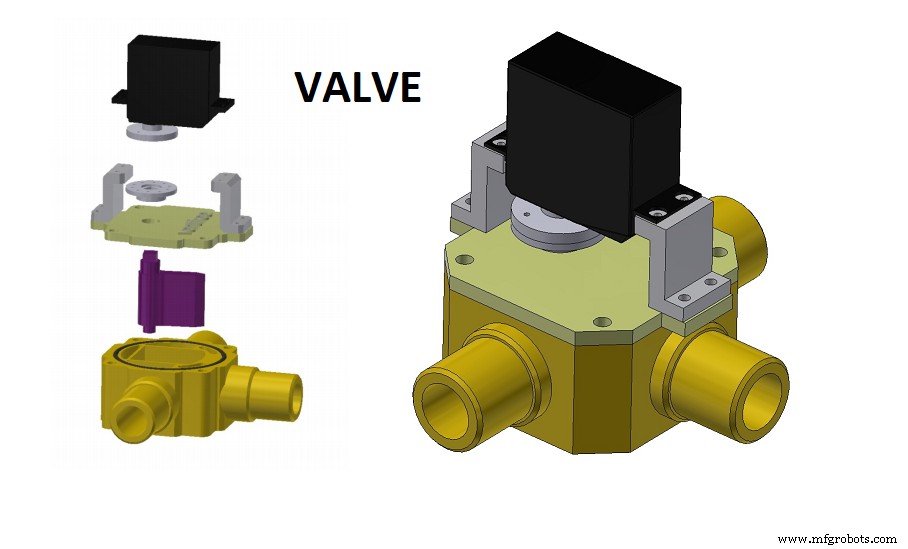
They must bé printed on a 3D printer.Requires some Precision.
 Complete step-by-step instructions for changing the diving mask and turning it into a pressurized breathing mask
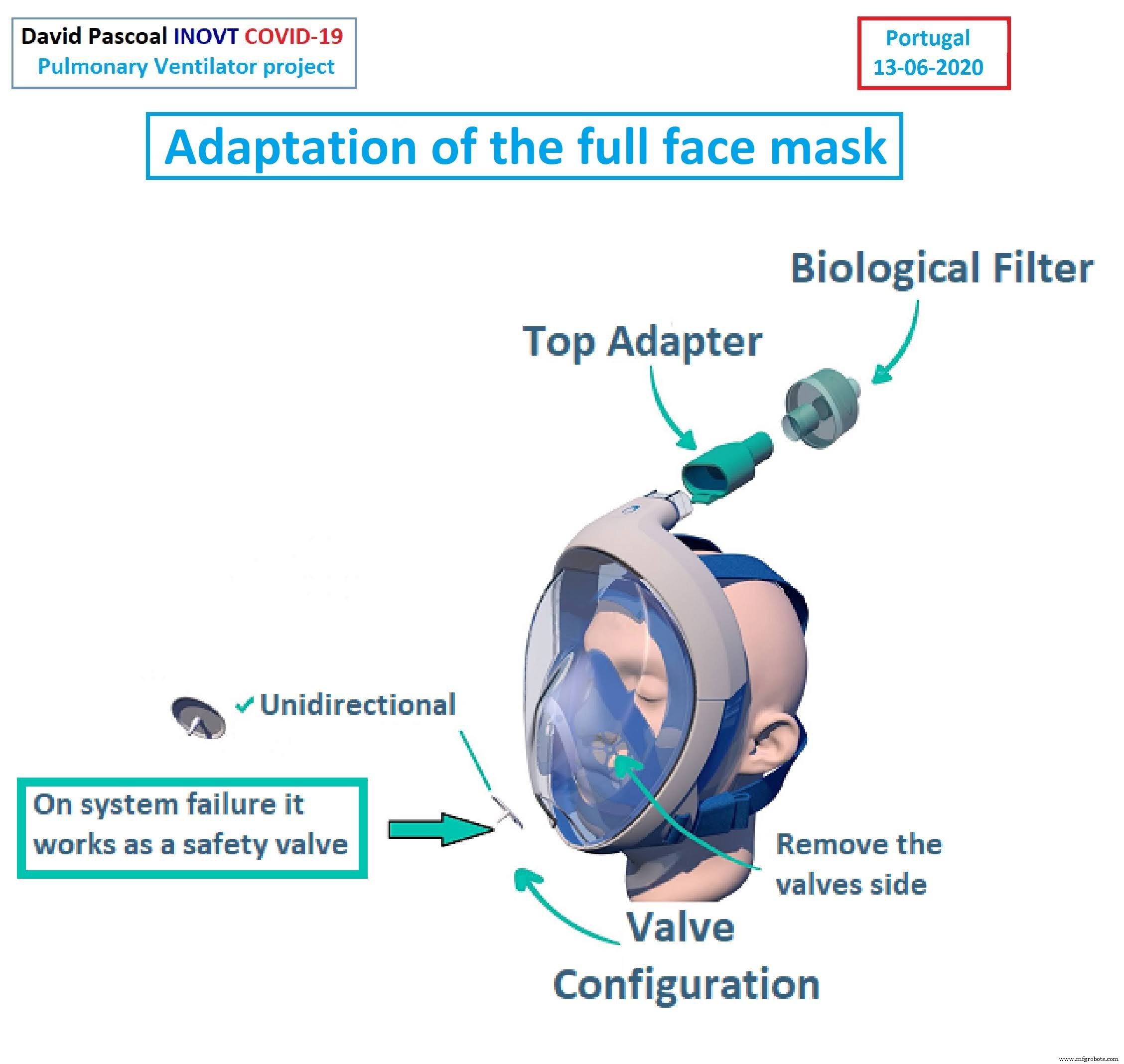 Requires some precision.
High resolution 3d printerinovt_covid19_version_2_0_david_pascoal_0mbFUa0ce1.rar
Schematics
Diagram of the autonomous version,does not need the hospital air column.
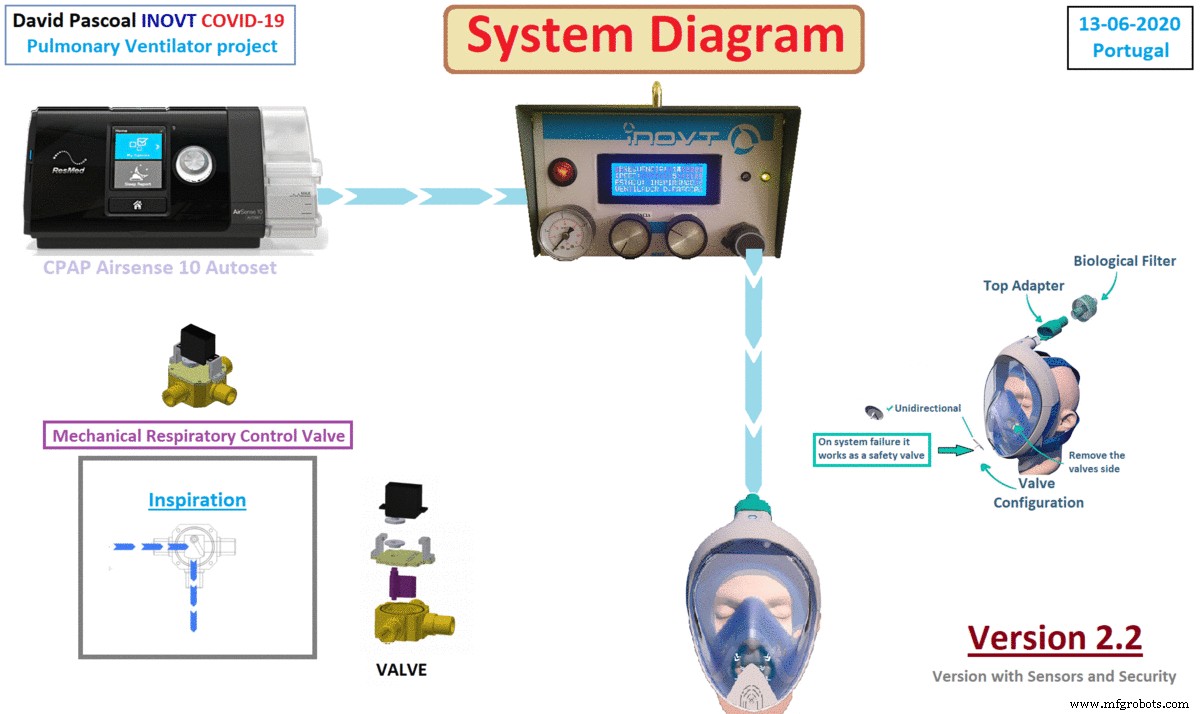 Version 2.2 .
With security guarde and alarm output.
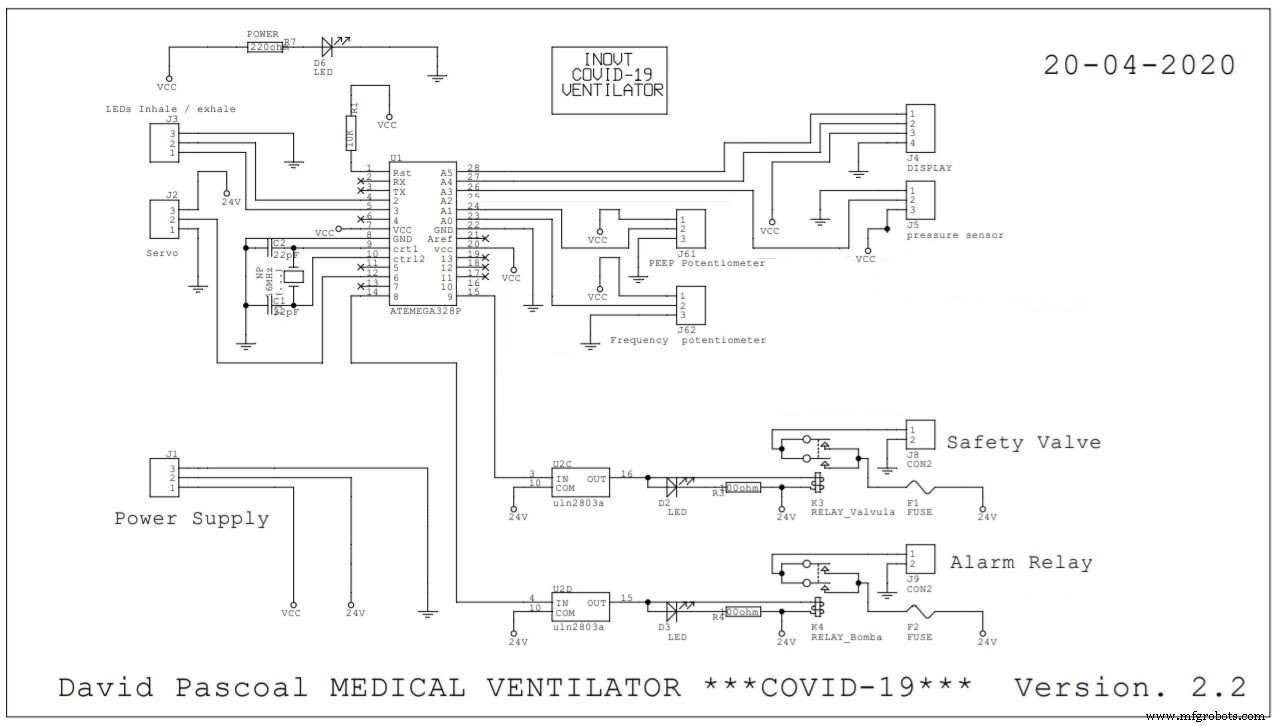 Version 2.2 .
With security guarde and alarm output.
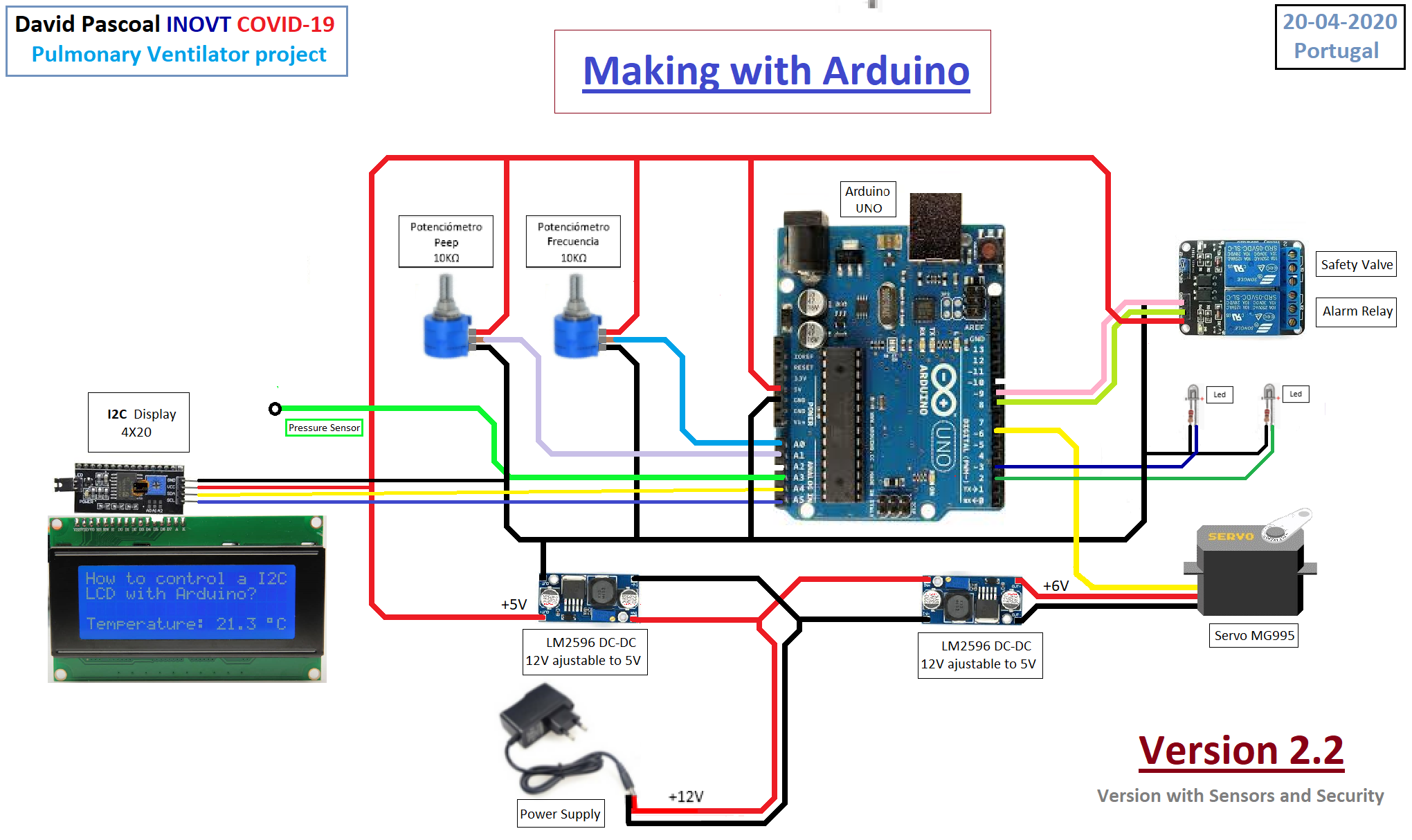
Manufacturing process
- Open-Source Reference Board Accelerates Rapid Development of Medical Ventilators
- Build a Bluetooth‑controlled Arduino Spybot
- FlickMote: Gesture‑Controlled IR Remote for Smart Home
- DIY Arduino TV B-Gone: Universal Remote for All TVs
- Build a Custom LED Master Clock with Alarm – Viewable from 12 Meters
- Find Me: Smart Item Locator with Arduino and Bluetooth
- Optimized Power Solutions for Arduino Projects
- Open-Source COVID-19 Pulmonary Ventilator – Arduino-Based DIY Respiratory Support System
- ArduTester Millennium: The Ultimate Arduino UNO & Mega 2560 Starter Kit
- DIY Open-Source Pulse Oximeter for COVID-19: Arduino Build