



Java TreeMap: Master Sorted Maps with Practical Examples
Java TreeMap
Explore the Java TreeMap class – a powerful, naturally‑sorted map implementation – with clear examples, key operations, and advanced navigation techniques.
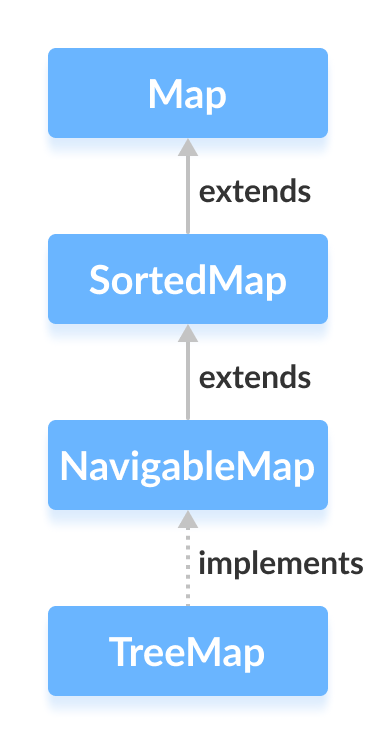
The TreeMap class is part of the Java Collections Framework and provides a red‑black tree implementation that keeps its entries sorted according to the natural ordering of the keys or a custom Comparator. It implements the NavigableMap interface, which adds convenient methods for traversing and querying the map.
Creating a TreeMap
Before you can use a TreeMap, import the package:
import java.util.TreeMap;
Then create an instance:
TreeMap<Key, Value> numbers = new TreeMap<>();
By default, keys are sorted in natural ascending order. If you need a custom order, pass a Comparator to the constructor.
- Key – unique identifier for each entry.
- Value – data associated with the key.
TreeMap Methods Overview
The class offers a rich set of operations. Below are key categories with code snippets.
Inserting Elements
put()– adds or replaces a key/value pair.putAll()– merges another map into this one.putIfAbsent()– inserts only if the key is missing.
Example:
import java.util.TreeMap;

class Main {
    public static void main(String[] args) {
        TreeMap<String, Integer> evenNumbers = new TreeMap<>();
        evenNumbers.put("Two", 2);
        evenNumbers.put("Four", 4);
        evenNumbers.putIfAbsent("Six", 6);
        System.out.println("TreeMap of even numbers: " + evenNumbers);

        TreeMap<String, Integer> numbers = new TreeMap<>();
        numbers.put("One", 1);
        numbers.putAll(evenNumbers);
        System.out.println("TreeMap of numbers: " + numbers);
    }
}
Output
TreeMap of even numbers: {Four=4, Six=6, Two=2}
TreeMap of numbers: {Four=4, One=1, Six=6, Two=2}
Accessing Elements
Using Collection Views
entrySet()– returns all key/value pairs.keySet()– returns all keys.values()– returns all values.
Example:
import java.util.TreeMap;

class Main {
    public static void main(String[] args) {
        TreeMap<String, Integer> numbers = new TreeMap<>();
        numbers.put("One", 1);
        numbers.put("Two", 2);
        numbers.put("Three", 3);
        System.out.println("TreeMap: " + numbers);
        System.out.println("Key/Value mappings: " + numbers.entrySet());
        System.out.println("Keys: " + numbers.keySet());
        System.out.println("Values: " + numbers.values());
    }
}
Output
TreeMap: {One=1, Three=3, Two=2}
Key/Value mappings: [One=1, Three=3, Two=2]
Keys: [One, Three, Two]
Values: [1, 3, 2]
Retrieving Values
get()– returns the value for a key ornullif absent.getOrDefault()– returns a default if the key is missing.
Example:
import java.util.TreeMap;

class Main {
    public static void main(String[] args) {
        TreeMap<String, Integer> numbers = new TreeMap<>();
        numbers.put("One", 1);
        numbers.put("Two", 2);
        numbers.put("Three", 3);
        System.out.println("TreeMap: " + numbers);

        int value1 = numbers.get("Three");
        System.out.println("Using get(): " + value1);

        int value2 = numbers.getOrDefault("Five", 5);
        System.out.println("Using getOrDefault(): " + value2);
    }
}
Output
TreeMap: {One=1, Three=3, Two=2}
Using get(): 3
Using getOrDefault(): 5
Removing Entries
remove(key)– deletes the entry and returns its value.remove(key, value)– deletes only if key maps to the specified value.
Example:
import java.util.TreeMap;

class Main {
    public static void main(String[] args) {
        TreeMap<String, Integer> numbers = new TreeMap<>();
        numbers.put("One", 1);
        numbers.put("Two", 2);
        numbers.put("Three", 3);
        System.out.println("TreeMap: " + numbers);

        int removed = numbers.remove("Two");
        System.out.println("Removed value: " + removed);

        boolean removedPair = numbers.remove("Three", 3);
        System.out.println("Is the entry {Three=3} removed? " + removedPair);
        System.out.println("Updated TreeMap: " + numbers);
    }
}
Output
TreeMap: {One=1, Three=3, Two=2}
Removed value: 2
Is the entry {Three=3} removed? true
Updated TreeMap: {One=1}
Replacing Values
replace(key, value)– updates the value for a key.replace(key, old, new)– updates only if the current value matchesold.replaceAll(function)– applies a function to every entry.
Example:
import java.util.TreeMap;

class Main {
    public static void main(String[] args) {
        TreeMap<String, Integer> numbers = new TreeMap<>();
        numbers.put("First", 1);
        numbers.put("Second", 2);
        numbers.put("Third", 3);
        System.out.println("Original TreeMap: " + numbers);

        numbers.replace("Second", 22);
        numbers.replace("Third", 3, 33);
        System.out.println("After replace(): " + numbers);

        numbers.replaceAll((k, v) -> v + 2);
        System.out.println("After replaceAll(): " + numbers);
    }
}
Output
Original TreeMap: {First=1, Second=2, Third=3}
After replace(): {First=1, Second=22, Third=33}
After replaceAll(): {First=3, Second=24, Third=35}
Navigational Methods
Because TreeMap implements NavigableMap, it offers methods to query the structure efficiently.
First and Last Elements
firstKey()– first key in order.firstEntry()– entry for the first key.lastKey()– last key.lastEntry()– entry for the last key.
Example:
import java.util.TreeMap;

class Main {
    public static void main(String[] args) {
        TreeMap<String, Integer> numbers = new TreeMap<>();
        numbers.put("First", 1);
        numbers.put("Second", 2);
        numbers.put("Third", 3);
        System.out.println("TreeMap: " + numbers);
        System.out.println("First Key: " + numbers.firstKey());
        System.out.println("Last Key: " + numbers.lastKey());
        System.out.println("First Entry: " + numbers.firstEntry());
        System.out.println("Last Entry: " + numbers.lastEntry());
    }
}
Output
TreeMap: {First=1, Second=2, Third=3}
First Key: First
Last Key: Third
First Entry: First=1
Last Entry: Third=3
Ceiling, Floor, Higher, and Lower
These methods return keys or entries relative to a given key, facilitating range queries.
higherKey(),higherEntry()– next higher key/entry.lowerKey(),lowerEntry()– previous lower key/entry.ceilingKey(),ceilingEntry()– smallest key/entry ≥ given key.floorKey(),floorEntry()– greatest key/entry ≤ given key.
Example:
import java.util.TreeMap;

class Main {
    public static void main(String[] args) {
        TreeMap<String, Integer> numbers = new TreeMap<>();
        numbers.put("First", 1);
        numbers.put("Second", 5);
        numbers.put("Third", 4);
        numbers.put("Fourth", 6);
        System.out.println("TreeMap: " + numbers);
        System.out.println("higherKey('Fourth'): " + numbers.higherKey("Fourth"));
        System.out.println("higherEntry('Fourth'): " + numbers.higherEntry("Fourth"));
        System.out.println("lowerKey('Fourth'): " + numbers.lowerKey("Fourth"));
        System.out.println("lowerEntry('Fourth'): " + numbers.lowerEntry("Fourth"));
        System.out.println("ceilingKey('Fourth'): " + numbers.ceilingKey("Fourth"));
        System.out.println("ceilingEntry('Fourth'): " + numbers.ceilingEntry("Fourth"));
        System.out.println("floorKey('Fourth'): " + numbers.floorKey("Fourth"));
        System.out.println("floorEntry('Fourth'): " + numbers.floorEntry("Fourth"));
    }
}
Output
TreeMap: {First=1, Fourth=6, Second=5, Third=4}
higherKey('Fourth'): Second
higherEntry('Fourth'): Second=5
lowerKey('Fourth'): First
lowerEntry('Fourth'): First=1
ceilingKey('Fourth'): Fourth
ceilingEntry('Fourth'): Fourth=6
floorKey('Fourth'): Fourth
floorEntry('Fourth'): Fourth=6
Polling and Ranges
pollFirstEntry() and pollLastEntry() remove and return the first/last entries, respectively.
import java.util.TreeMap;

class Main {
    public static void main(String[] args) {
        TreeMap<String, Integer> numbers = new TreeMap<>();
        numbers.put("First", 1);
        numbers.put("Second", 2);
        numbers.put("Third", 3);
        System.out.println("TreeMap: " + numbers);
        System.out.println("pollFirstEntry(): " + numbers.pollFirstEntry());
        System.out.println("pollLastEntry(): " + numbers.pollLastEntry());
        System.out.println("Updated TreeMap: " + numbers);
    }
}
Output
TreeMap: {First=1, Second=2, Third=3}
pollFirstEntry(): First=1
pollLastEntry(): Third=3
Updated TreeMap: {Second=2}
headMap, tailMap, subMap
These methods provide views over specific key ranges.
headMap(toKey, inclusive)– keys < toKey (or ≤ if inclusive).tailMap(fromKey, inclusive)– keys ≥ fromKey (or > if exclusive).subMap(fromKey, fromInclusive, toKey, toInclusive)– keys between the two bounds.
Example:
import java.util.TreeMap;

class Main {
    public static void main(String[] args) {
        TreeMap<String, Integer> numbers = new TreeMap<>();
        numbers.put("First", 1);
        numbers.put("Second", 2);
        numbers.put("Third", 3);
        numbers.put("Fourth", 4);
        System.out.println("TreeMap: " + numbers);
        System.out.println("headMap('Fourth'): " + numbers.headMap("Fourth"));
        System.out.println("headMap('Fourth', true): " + numbers.headMap("Fourth", true));
        System.out.println("tailMap('Second'): " + numbers.tailMap("Second"));
        System.out.println("tailMap('Second', false): " + numbers.tailMap("Second", false));
        System.out.println("subMap('Fourth', true, 'Third', false): " + numbers.subMap("Fourth", true, "Third", false));
    }
}
Output
TreeMap: {First=1, Fourth=4, Second=2, Third=3}
headMap('Fourth'): {First=1}
headMap('Fourth', true): {First=1, Fourth=4}
tailMap('Second'): {Second=2, Third=3, Fourth=4}
tailMap('Second', false): {Third=3, Fourth=4}
subMap('Fourth', true, 'Third', false): {Fourth=4, Second=2}
Additional Utility Methods
| Method | Description |
|---|---|
clone() | Creates a shallow copy of the map. |
containsKey() | Checks for the presence of a key. |
containsValue() | Checks for a specific value. |
size() | Returns the number of entries. |
clear() | Removes all entries. |
Custom Key Ordering with Comparator
To sort keys differently—such as reverse order or case‑insensitive strings—implement Comparator and pass it to the TreeMap constructor.
import java.util.TreeMap;
import java.util.Comparator;

class Main {
    public static void main(String[] args) {
        TreeMap<String, Integer> numbers = new TreeMap<>(new CustomComparator());
        numbers.put("First", 1);
        numbers.put("Second", 2);
        numbers.put("Third", 3);
        numbers.put("Fourth", 4);
        System.out.println("TreeMap: " + numbers);
    }

    static class CustomComparator implements Comparator<String> {
        @Override
        public int compare(String a, String b) {
            // Reverse natural order
            return a.compareTo(b) * -1;
        }
    }
}
Output
TreeMap: {Third=3, Second=2, Fourth=4, First=1}
For more on Comparator, see the official Java documentation.
Java
- Master Java Operators: Types, Syntax, & Practical Examples
- Mastering Java's super Keyword: Advanced Usage & Practical Examples
- Mastering Java Interfaces: Concepts, Implementation, and Best Practices
- Java List Interface: Overview, Implementations, and Key Methods
- Mastering Java ConcurrentHashMap: Operations, Examples, and Best Practices
- Java HashSet Class: Complete Guide to Operations, Methods, and Set Theory
- Mastering Java TreeSet: Operations, Methods, and Practical Examples
- Mastering Java Collection Algorithms: Sorting, Shuffling, and More
- Generate Random Numbers in Java: Practical Guide with Random and Math.random
- Java Numbers Class – Wrapper Classes & Inheritance Explained