



MATLAB Loop Types: Mastering Repeated Code Execution
There may be a situation when you need to execute a block of code several number of times. In general, statements are executed sequentially. The first statement in a function is executed first, followed by the second, and so on.
Programming languages provide various control structures that allow for more complicated execution paths.
A loop statement allows us to execute a statement or group of statements multiple times and following is the general form of a loop statement in most of the programming languages −
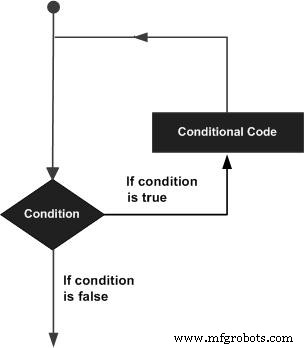
MATLAB provides following types of loops to handle looping requirements. Click the following links to check their detail −
| Sr.No. | Loop Type & Description |
|---|---|
| 1 | while loop
Repeats a statement or group of statements while a given condition is true. It tests the condition before executing the loop body. |
| 2 | for loop
Executes a sequence of statements multiple times and abbreviates the code that manages the loop variable. |
| 3 | nested loops
You can use one or more loops inside any another loop. |
Loop Control Statements
Loop control statements change execution from its normal sequence. When execution leaves a scope, all automatic objects that were created in that scope are destroyed.
MATLAB supports the following control statements. Click the following links to check their detail.
| Sr.No. | Control Statement & Description |
|---|---|
| 1 | break statement
Terminates the loop statement and transfers execution to the statement immediately following the loop. |
| 2 | continue statement
Causes the loop to skip the remainder of its body and immediately retest its condition prior to reiterating. |
MATLAB
- Java Continue Statement – Mastering Loop Control with Examples
- Mastering Java Loop Control: Efficient Repetition Techniques
- Mastering C Loops: A Comprehensive Guide to Repetition Control
- Understanding C++ Loop Types: For, While, Do-While Explained
- Understanding Variables in MATLAB: Basics and Examples
- Understanding MATLAB Data Types: A Comprehensive Guide
- Mastering Decision-Making in MATLAB: A Comprehensive Guide
- Master MATLAB Matrix Basics: Create, Reference, and Manipulate Data
- Master C# Loops: Efficient Code Repetition Techniques
- Master Python Loops: Control Flow & Repetition Techniques