



MATLAB Transforms: Laplace, Fourier, and FFT Explained
MATLAB provides command for working with transforms, such as the Laplace and Fourier transforms. Transforms are used in science and engineering as a tool for simplifying analysis and look at data from another angle.
For example, the Fourier transform allows us to convert a signal represented as a function of time to a function of frequency. Laplace transform allows us to convert a differential equation to an algebraic equation.
MATLAB provides the laplace, fourier and fft commands to work with Laplace, Fourier and Fast Fourier transforms.
The Laplace Transform
The Laplace transform of a function of time f(t) is given by the following integral −
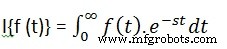
Laplace transform is also denoted as transform of f(t) to F(s). You can see this transform or integration process converts f(t), a function of the symbolic variable t, into another function F(s), with another variable s.
Laplace transform turns differential equations into algebraic ones. To compute a Laplace transform of a function f(t), write −
laplace(f(t))
Example
In this example, we will compute the Laplace transform of some commonly used functions.
Create a script file and type the following code −
syms s t a b w

laplace(a)
laplace(t^2)
laplace(t^9)
laplace(exp(-b*t))
laplace(sin(w*t))
laplace(cos(w*t))
When you run the file, it displays the following result −
ans =
   1/s^2

ans =
   2/s^3

ans =
   362880/s^10

ans =
   1/(b + s)

ans =
   w/(s^2 + w^2)

ans =
   s/(s^2 + w^2)
The Inverse Laplace Transform
MATLAB allows us to compute the inverse Laplace transform using the command ilaplace.
For example,
ilaplace(1/s^3)
MATLAB will execute the above statement and display the result −
ans =
   t^2/2
Example
Create a script file and type the following code −
syms s t a b w

ilaplace(1/s^7)
ilaplace(2/(w+s))
ilaplace(s/(s^2+4))
ilaplace(exp(-b*t))
ilaplace(w/(s^2 + w^2))
ilaplace(s/(s^2 + w^2))
When you run the file, it displays the following result −
ans =
   t^6/720

ans =
   2*exp(-t*w)

ans =
   cos(2*t)

ans =
   ilaplace(exp(-b*t), t, x)

ans =
   sin(t*w)

ans =
   cos(t*w)
The Fourier Transforms
Fourier transforms commonly transforms a mathematical function of time, f(t), into a new function, sometimes denoted by or F, whose argument is frequency with units of cycles/s (hertz) or radians per second. The new function is then known as the Fourier transform and/or the frequency spectrum of the function f.
Example
Create a script file and type the following code in it −
syms x
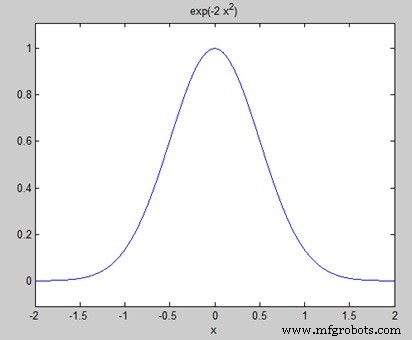
f = exp(-2*x^2);     %our function
ezplot(f,[-2,2])     % plot of our function
FT = fourier(f)      % Fourier transform
When you run the file, MATLAB plots the following graph −
The following result is displayed −
FT =
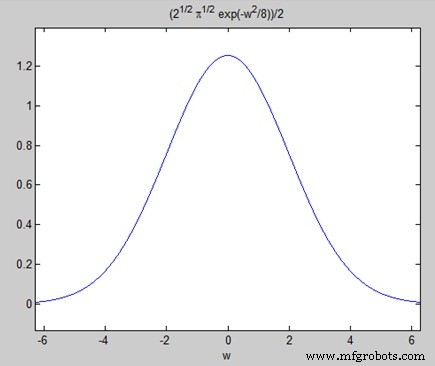
   (2^(1/2)*pi^(1/2)*exp(-w^2/8))/2
Plotting the Fourier transform as −
ezplot(FT)
Gives the following graph −
Inverse Fourier Transforms
MATLAB provides the ifourier command for computing the inverse Fourier transform of a function. For example,
f = ifourier(-2*exp(-abs(w)))
MATLAB will execute the above statement and display the result −
f =
   -2/(pi*(x^2 + 1))
MATLAB
- MATLAB: Comprehensive Overview of a Leading Numerical Computing Environment
- Understanding Variables in MATLAB: Basics and Examples
- Master MATLAB Matrix Basics: Create, Reference, and Manipulate Data
- MATLAB – Numbers: Types, Storage, and Conversion
- Master MATLAB Strings: Easy Creation & Usage Guide
- Plotting Functions in MATLAB: A Step-by-Step Guide
- Mastering MATLAB Graphics: Advanced Plotting Techniques
- MATLAB for Calculus: Solving Differential Equations, Integrals & Limits
- Computing Symbolic Derivatives in MATLAB with the diff Command
- Understanding Polynomials in MATLAB: Representation and Evaluation