



Copy Files in Python with shutil.copy() and shutil.copystat()
Python File‑Copying Basics
Python’s shutil module offers straightforward functions for copying files and preserving metadata. The two primary utilities are shutil.copy() and shutil.copystat().
copy(src, dst)
Copies the file located at src to the destination dst. The file contents are duplicated, but file permissions and timestamps are not preserved.
copystat(src, dst)
Copies file metadata—including permissions, timestamps, and other OS‑specific attributes—from src to dst. It must be called after a successful copy() to replicate the full file state.
Step‑by‑Step Example
- Locate the source file
Confirm thatguru99.txtexists in the current working directory and retrieve its absolute path.
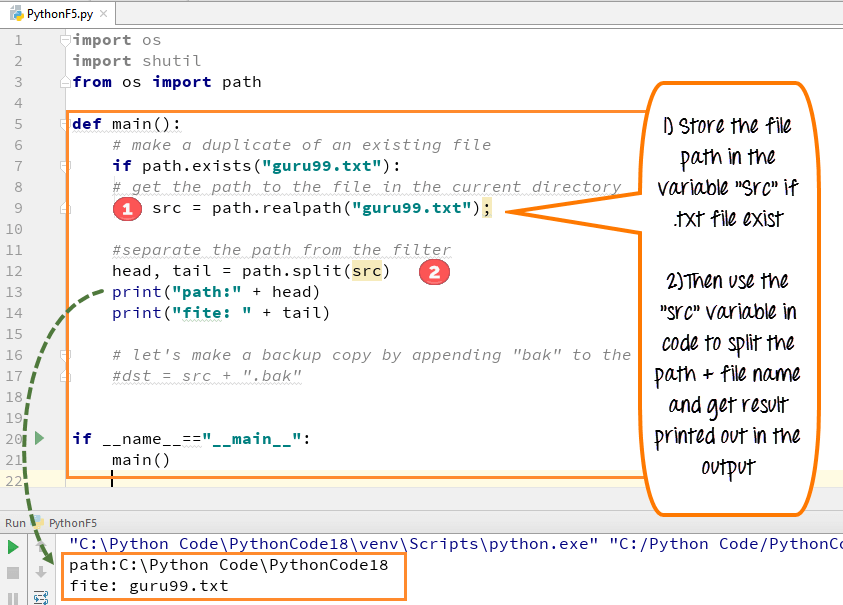
import os
from os import path

src_path = path.realpath("guru99.txt")
print("Source:", src_path)
- Create a backup name
Append.bakto the original filename to form the destination path.
dst_path = src_path + ".bak"
print("Destination:", dst_path)
- Copy the file contents
Useshutil.copy()to duplicate the file data.
import shutil
shutil.copy(src_path, dst_path)
- Copy the metadata
After the content copy, replicate the original file’s permissions and timestamps.
shutil.copystat(src_path, dst_path)
- Verify the copy
Use theos.path.getmtime()function to display the last‑modified time of the backup file.
import datetime
mod_time = path.getmtime(dst_path)
print("Last modified:", datetime.datetime.fromtimestamp(mod_time))
Running the script will create guru99.txt.bak in the same directory, complete with the same permissions and timestamps as the original.
Practical Tips
- Always perform
shutil.copy()beforeshutil.copystat()—the latter requires an existing destination file. - When working across different file systems, be aware that not all metadata attributes are supported;
copystat()will copy only what the OS exposes. - For recursive directory copying, consider
shutil.copytree()orshutil.copy2(), which combinescopy()andcopystat()in one step.
Summary
- Use
shutil.copy(src, dst)to duplicate file contents. - Use
shutil.copystat(src, dst)to duplicate permissions, timestamps, and other metadata.
Checking File and Directory Existence in Python – A Practical Guide
How to Rename Files and Directories in Python with os.rename() – Step-by-Step Guide
Python
- Python File I/O: Mastering File Operations, Reading, Writing, and Management
- Python len(): A Practical Guide to Measuring Object Lengths
- Master Python's String.find() Method: Syntax, Examples & Alternatives
- Understanding Python's Main Function: A Practical Guide to def main()
- Checking File and Directory Existence in Python – A Practical Guide
- How to Rename Files and Directories in Python with os.rename() – Step-by-Step Guide
- Creating ZIP Archives in Python: From Full Directory to Custom File Selection
- Mastering Python’s readline() – Efficient Line‑by‑Line File Reading
- How to Read and Write CSV Files in Python: A Comprehensive Guide
- Python File I/O: Mastering Input and Output Operations