



Usability: A Key Criterion for Selecting Enterprise Asset Management Software
Over the past few decades, enterprise applications have evolved to offer remarkably comprehensive functionality. With adequate budgets and resources, mid‑size to large manufacturers can now find enterprise solutions that cover nearly every business process they need to manage.
Yet, whether in the broad realm of enterprise resource planning (ERP) or the more focused domain of enterprise asset management (EAM), functionality alone no longer guarantees value. Usability often receives insufficient attention. Even if an EAM system lets technicians retrieve and enter data or allows executives to monitor asset health, a clunky interface can drain resources instead of adding value.
This article explores common usability challenges manufacturers face with EAM software, the impact on productivity, and the features that can transform an EAM system into a true productivity enabler.
Disparate Systems: The Most Common Usability Issue
In many manufacturing maintenance departments and MRO organizations, technicians use one point‑of‑sale solution for work orders, scheduling, and planning, a different system for inventory, and yet another for purchasing. Separate platforms may also manage human resources and employee credentials. Technicians, planners, and executives must navigate multiple, unique process flows and navigation schemes.
This fragmentation increases training time, reduces intuitiveness, and discourages users from exploring advanced features. The result is a drain on professional time and a failure to realize the full value of any single system.
Moreover, a fragmented ecosystem forces data re‑entry. For example, a work order may require parts issued through a second system, necessitating duplicate data entry and increasing the risk of errors.
Some manufacturers rely on legacy home‑grown solutions that grow in complexity over time. Similarly, packaged EAM software can become convoluted, especially when vendors integrate multiple point solutions in a point‑to‑point manner. Even then, usability challenges persist.
Why Usability Matters During Selection
Maintenance technicians are skilled problem‑solvers, not computer operators. Their primary role is to keep production systems running and to maintain capital equipment. An EAM system should therefore be the tool that enables them to perform their jobs more efficiently, not a barrier.
Key considerations include:
- The number of keystrokes or clicks required to retrieve or enter information.
- The amount of system‑specific knowledge needed for basic operation.
- The integration of automated data capture (e.g., RFID, barcode scanning) to eliminate manual data entry.
In many environments, a technician’s productive window in an eight‑hour shift is about six hours. Time spent on data entry can erode this window by 17 percent or more, reducing overall productivity.
Assessing Usability in Software Selection
Effective EAM solutions should provide a unified suite that encompasses:
- Inventory and supply chain management to secure necessary parts.
- Human resources functionality to verify qualified labor availability.
- Financial capabilities for full lifecycle cost analysis.
- Manufacturing operations integration to align maintenance and production schedules.
- Optional CRM integration for urgent customer‑driven maintenance.
When all these functions coexist in a single environment, users spend less time learning multiple systems, avoid redundant data entry, and can more easily automate data capture. Handheld devices that capture part usage, time, and notes directly into the system eliminate non‑value‑added work.
Furthermore, a system that mirrors familiar web navigation—intuitive menus, predictable layouts, and contextual help—reduces training time and accelerates mastery. Powerful, embedded search tools that allow users to find information across the entire system with a single query—much like a Google search—significantly enhance usability.
Figures below illustrate how embedded search and advanced visualization can streamline data access and decision‑making in IFS Applications.
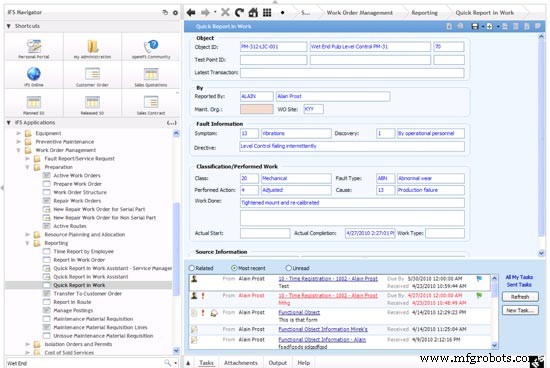
Figure 1. Quick Report In Work screen from IFS Applications demonstrates streamlined data entry.
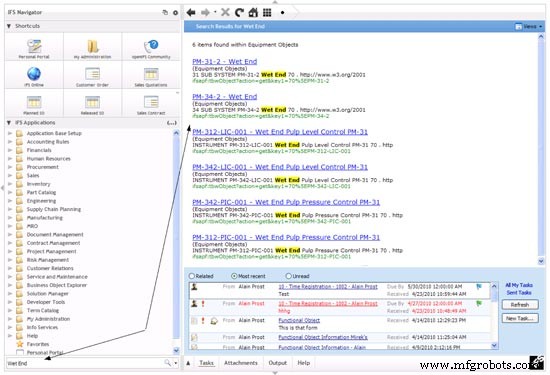
Figure 2. Embedded search results for “Wet End” and for work orders assigned to a specific employee.
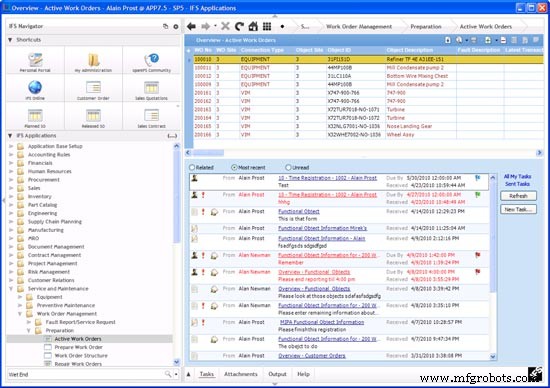
Figure 3. Search results highlighting relevant work orders and tasks.
Large volumes of asset data require intelligent organization and visualization. Tree maps and comprehensive dashboards enable executives to perform management by exception—quickly spotting critical issues and drilling down for detail.
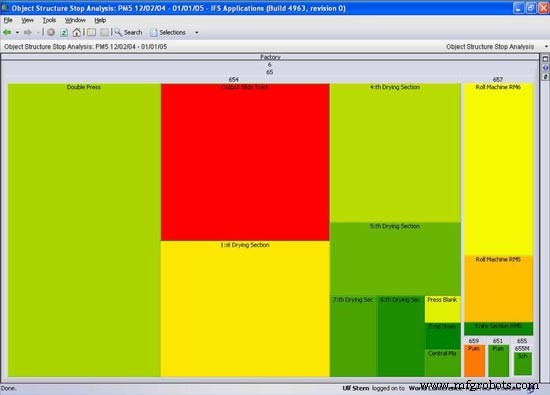
Figure 4. A tree map from IFS Applications where fault size and criticality are visualized.
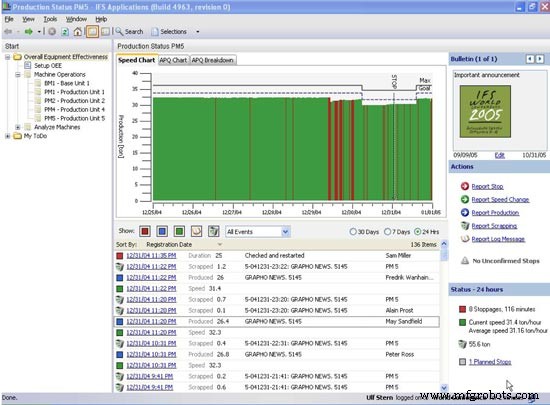
Figure 5. A consolidated executive screen with drill‑down capabilities.
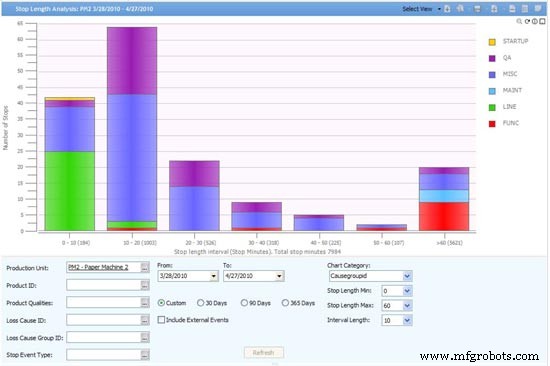
Figure 6. A clear view of production stops coded by reason.
Conclusion
Choosing an EAM system based on usability is straightforward when you keep these core principles in mind:
- Opt for a unified suite that covers all essential functions—inventory, HR, finance, operations, and optional CRM—to eliminate rework and streamline data capture.
- Select a system with web‑style navigation and an embedded, powerful search engine to reduce training time and accelerate adoption.
- Ensure the platform offers advanced visualization tools to turn raw data into actionable insights for managers and executives.
About the author:
Mike Auer is a senior business analyst at IFS North America with over 25 years of experience in aerospace, power generation, and high‑speed manufacturing. He specializes in implementing predictive and preventive maintenance processes. Prior to IFS, Mike held roles in industrial maintenance and engineering at Pergo Inc., Commonwealth Edison, Ford Aerospace, and other major corporations. He earned a degree in business management from the University of Georgia.
EAM tools generate vast amounts of data. Software that presents intelligent visualization options makes it easier for executives and managers to access real‑time asset performance data and make informed decisions.
Equipment Maintenance and Repair
- Understanding Numeration Systems: Roman, Place Value, Binary
- Building Redundancy with Reconfigurable Modular Conveyors: Boost Efficiency and Slash Maintenance
- Optimizing Compressed Air Systems: Practical Troubleshooting & Efficiency Strategies
- Choosing the Right PLC and Documentation System for Your Manufacturing Application
- Comprehensive Guide to Kor-Pak's Reliable Festoon Systems
- Top 50 Enterprise Asset Management Software Solutions for Optimized Asset Performance
- How Temperature Impacts Hydraulic System Performance and Efficiency
- Ensuring Reliability: Marine Hydraulic Systems for Safety and Performance
- How to Choose the Right Gear Reducer: Key Selection Criteria
- Why Hydraulic Systems Are Essential for Modern Engineering