



Create a Free, Cloud‑Based Maintenance Ticketing System with Google Sheets Templates
Every organization—regardless of size—faces operational hiccups, often stemming from equipment failures or infrastructure issues. Whether it’s a leaking HVAC unit, a malfunctioning bulldozer, or a stalled conveyor belt, a streamlined maintenance ticketing system is the fastest way to identify, assign, and resolve these problems.
Modern maintenance workflows rely on digital tools. While a commercial CMMS or fleet‑management platform offers robust ticketing capabilities, not every business can afford a paid solution right away. That’s why we’ve built a free maintenance ticketing system using Google Sheets—a flexible, cloud‑based alternative that can be customized to your workflow.
In this article we explain how the templates were developed and how you can deploy them immediately. If you prefer a ready‑made solution, download our guide below; it includes the templates and step‑by‑step instructions.
The Life Cycle of a Maintenance Ticket
A typical maintenance ticket follows these steps:
- Equipment misuse or wear leads to a malfunction.
- A user submits a maintenance request.
- The maintenance manager reviews the request and assigns a technician.
- The technician diagnoses and repairs the issue.
- Once fixed, the ticket is closed and the requester is notified.
The same flow is illustrated in the image below.
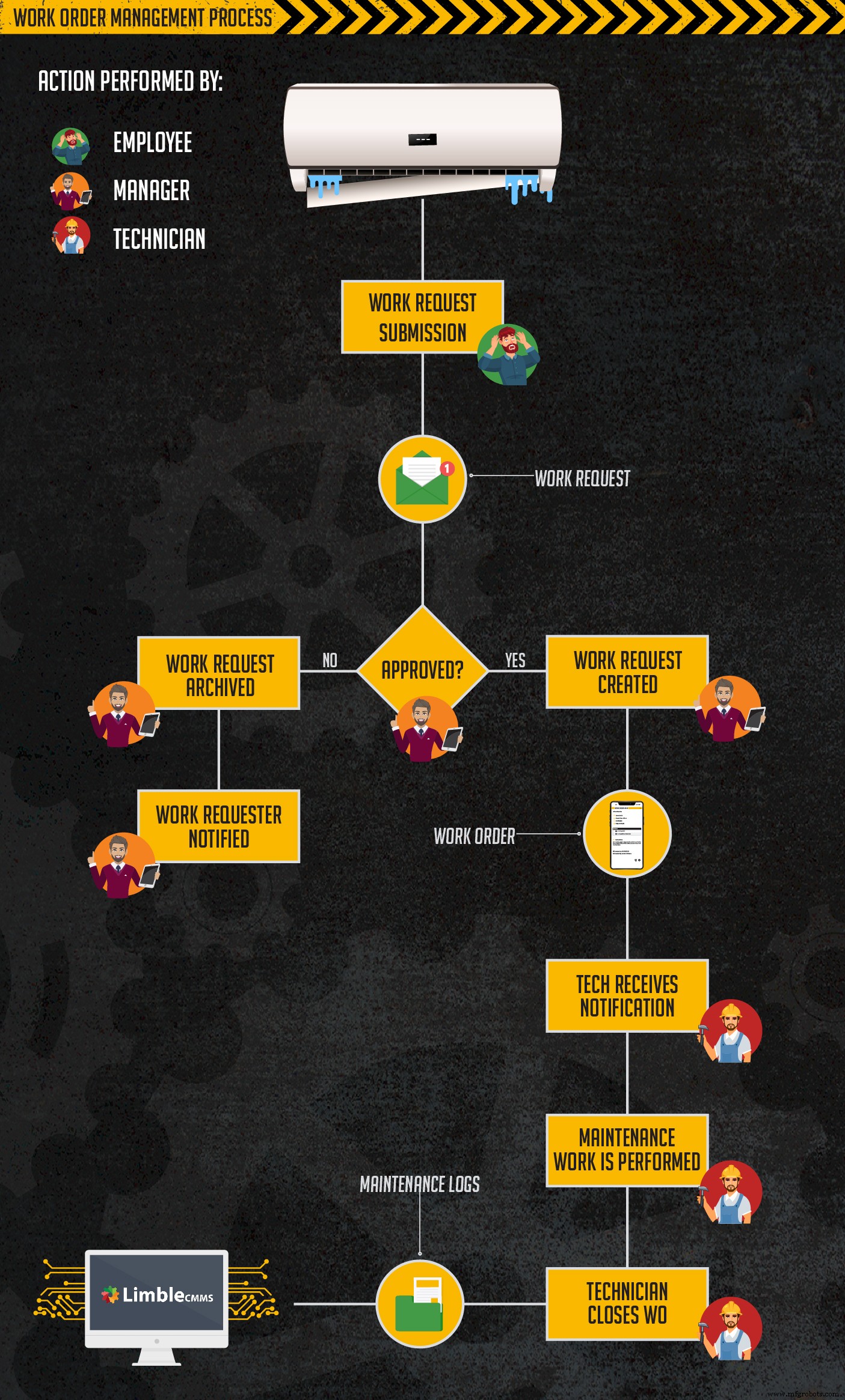
While the process seems simple, real‑world exceptions—ticket rejections, delays, or unforeseen complications—require a system that remains user‑friendly yet flexible. The goal is to provide a helpful tool, not an extra administrative burden.
Why Google Sheets?
Google Sheets offers several advantages for a lightweight ticketing solution:
- Cost‑free – requires only a Gmail account.
- Intuitive – minimal training is needed to add or edit entries.
- Cloud‑based – real‑time collaboration for all stakeholders.
- Customizable – add or remove columns to fit your workflow.
- Built‑in formulas – automate calculations and auto‑populate fields.
- Granular access control – view‑only or edit permissions for different users.
These templates are not a substitute for a full‑featured CMMS, but they serve as a pragmatic interim solution for teams that need to organize maintenance activities without significant investment.
Ideal for:
- Small teams (≤10 members)
- Organizations lacking any ticketing system
- Teams still using sticky notes, chalkboards, or whiteboards
- Teams seeking greater organization before adopting a commercial CMMS
Preparing for a Digital Transition
Introducing a new ticketing system is more than just handing out a spreadsheet; it demands thoughtful change management. Here’s what you need before launching:
Secure Stakeholder Buy‑In
- Top management – ensures funding and oversight.
- Maintenance staff – guarantees adoption and workflow alignment.
- Requesters – provides a clear, accessible channel for reporting issues.
Engage each group early, explain the pain points this system solves, and collaborate on workflow design. A well‑communicated transition reduces resistance and prevents back‑sliding to paper methods.
Basic Spreadsheet Literacy
Users only need to click a cell and type—an effort that even a novice spreadsheet user can perform. Managers, however, may benefit from familiarity with formulas to tweak the templates as needed.
Equip Mobile Devices
Give technicians tablets or smartphones so they can update tickets on‑the‑go, record completion notes, and plan subsequent work without returning to a fixed workstation. The advantages amplify once you transition to a mobile CMMS.
Core Functionality of the Free System
Our templates deliver a simple yet effective workflow: ticket submission, assignment, completion, and reporting. You’ll receive two Google Sheets—one for receiving tickets, the other for managing work orders and generating basic reports.
Ticket Submission Template
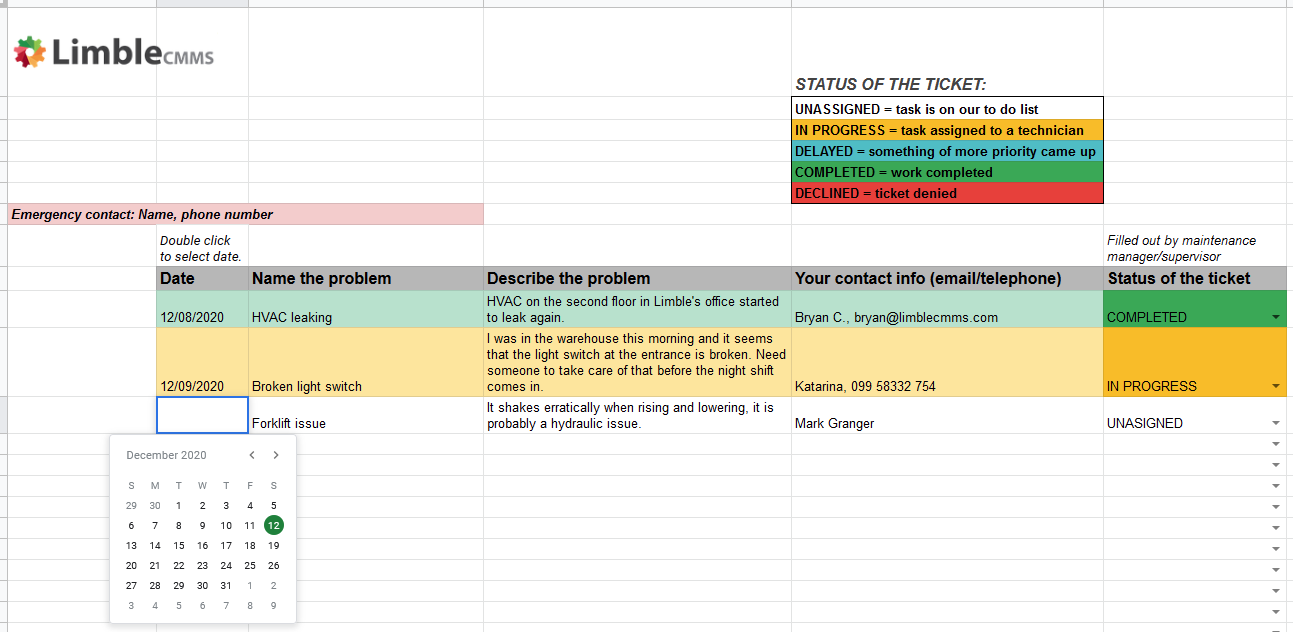
All incoming requests are collected in a single sheet, preventing loss or duplication. The “Submit Ticket” form includes essential fields such as date, problem description, contact info, and a status column that informs the requester of progress.
Work Order Management Template
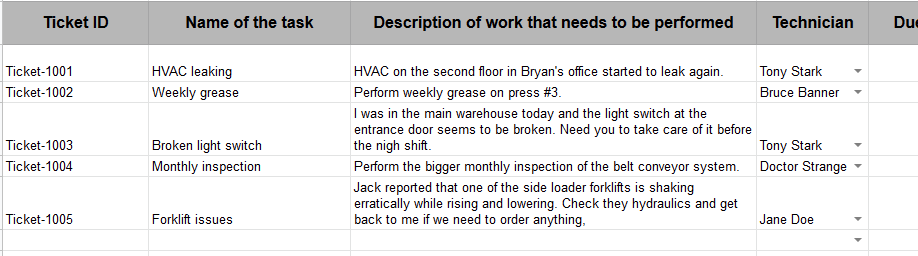
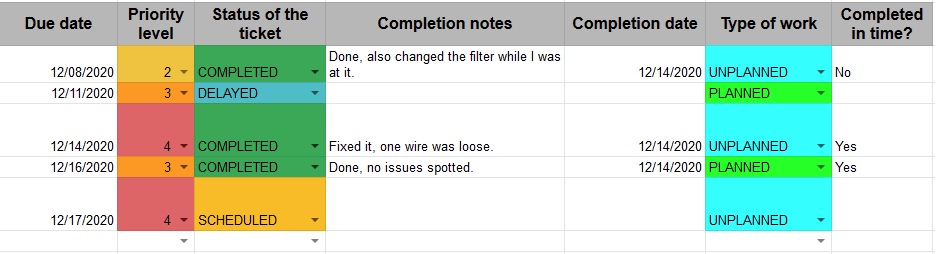
Beyond simple ticket tracking, this sheet serves as a full work‑order system, featuring:
- Ticket ID – auto‑generated from the task name.
- Task name – concise identifier.
- Work description – detailed explanation.
- Technician – drop‑down assignment.
- Due date – scheduled completion.
- Priority – helps rank tasks.
- Status – current stage of the ticket.
- Completion notes – final remarks.
- Completion date – auto‑filled when marked “Completed.”
- Work type – reactive or preventive.
- Completed on time? – automatically evaluates timeliness.
Drop‑down lists and formulas reduce manual entry errors and streamline the workflow.
Basic Reporting
The system can generate three straightforward reports:
- Priority Distribution – average urgency of tasks.
- Work Type Breakdown – counts of preventive vs. reactive work.
- Compliance % – percentage of tasks finished on schedule.
These reports rely on the data fields above. If you need more detailed insights, you can extend the template with additional columns and formulas.

When It’s Time to Scale Up
While spreadsheets provide a valuable stepping stone, they eventually plateau in terms of automation, analytics, and mobile integration. For teams aiming to maximize uptime, reduce costs, and hit maintenance KPIs, a dedicated mobile CMMS is the logical next step.
We invite you to explore Limble CMMS—a modern, mobile‑first platform that integrates ticketing, preventive scheduling, and real‑time analytics.
- SCHEDULE A DEMO – Book a walkthrough with our experts.
- TRY OUR SELF‑DEMO – Explore Limble at your own pace in a sandbox environment.
- START A FREE TRIAL – Sign up for a 30‑day trial and evaluate its fit for your organization.
Have questions about Limble or the templates? Want suggestions for improvement? Share your thoughts in the comments below!
Equipment Maintenance and Repair
- Mastering Maintenance Inventory Management: Strategies to Cut Costs and Boost Reliability
- Keep Maintenance Proactive: Lessons from Sisyphus on Continuous Improvement
- Setting Inspection Frequencies for Preventive Maintenance: A Practical Guide
- Elevating Maintenance: Aligning Strategy, Building Trust, and Driving Business Value
- Developing a Robust Electrical Maintenance Program: A Practical Guide
- Modernizing Maintenance: MMP’s 99.6% Uptime Through ISO 9000 & CMMS
- Defining World‑Class Maintenance: Metrics, Mindset, and Continuous Improvement
- Transforming Maintenance Culture: Strategies for Reliability & Accountability
- Build a Robust Fixed‑Asset Numbering System to Accelerate Maintenance
- Continuous Manufacturing: Setting Up and Sustaining a 24/7 Production System