



In‑Display Fingerprint Sensor: Evolution, Technology, and Benefits
Biometric authentication has largely displaced traditional passwords, replacing them with fingerprint and facial unlock methods. The first device to feature an in‑display fingerprint sensor was the Pantech GI100, launched in 2004. Subsequent early adopters included Toshiba’s G500 and G900 in 2007, followed by releases from Acer, Motorola, and HTC. Apple introduced its own version with the iPhone 5s in 2013. These sensors capture the unique ridge patterns on a finger, using optical, ultrasonic, or capacitive scanning technologies.
What Is an In‑Display Fingerprint Sensor?
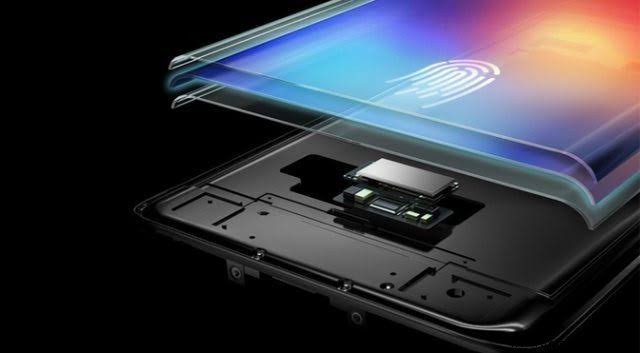
Modern smartphones increasingly rely on in‑display fingerprint sensors to provide fast, secure access. Key models featuring this technology include the Vivo X21, Huawei Mate 20 Pro, OnePlus 6T, Oppo R17 Pro, Vivo Nex, Huawei P30 Pro, OnePlus 7 Pro, Samsung Galaxy S10 series, Xiaomi Mi 9/9T, Realme X, Oppo Reno 10X Zoom Edition, and Vivo V11 Pro. The primary advantages are flexibility and robust anti‑spoofing capabilities.
How Does It Work?
To enroll, a user places their finger on the sensor to capture a high‑resolution image of the ridge patterns. For subsequent unlocks, the sensor compares the live scan to the stored template and grants access if the match is within tolerance. The sensor is typically positioned beneath the display, allowing full‑screen visibility while maintaining touch functionality.
Fingerprint patterns generally fall into three categories: loops, arches, and whorls. A loop pattern begins and ends on the same side of the finger; an arch resembles a wave, rising in the middle and terminating on the opposite side; a whorl forms a closed circular or spiral shape.
Advantages
- Located beneath the display, the sensor offers a seamless, full‑screen experience.
- It works reliably with both wet and dry fingers and adds minimal thickness to the device.
- Speed is a key benefit; Synaptics’ Clear ID, for example, can authenticate a fingerprint in 0.7 seconds.
- When compared to facial recognition, which averages 1.4 seconds, fingerprint unlock is noticeably quicker.
Applications in Modern Smartphones
In‑display fingerprint sensors are now standard on a wide range of Android devices, including the Vivo X21, Mate 20 Pro, OnePlus 6T, Vivo Nex, Oppo R17 Pro, Huawei P30 Pro, Xiaomi Mi 9/9T, Samsung Galaxy S10 series, Realme X, Vivo V11 Pro, and Oppo Reno 10X Zoom Edition. These sensors provide a secure, convenient method of unlocking the phone and authorizing transactions.
In summary, in‑display fingerprint sensors enhance mobile security by offering rapid, reliable, and touch‑friendly authentication. While they bring many advantages, it’s worth considering potential drawbacks such as sensor sensitivity to surface conditions and varying user experiences across devices.
Sensor
- DS18B20 Temperature Sensor – Precise 1‑Wire Digital Thermometer for Industrial & Consumer Use
- Fingerprint Sensor Technology: Working Principles, Applications, and Arduino Integration
- STMicroelectronics Unveils Advanced Time‑of‑Flight Sensor for Precise Ranging
- Understanding the Oxygen (O2) Sensor: Role, Placement, and Failure Signs
- Integrating a DFRobot Capacitive Fingerprint Sensor with Arduino or ESP8266
- Arduino Nano Fingerprint Sensor Project – Step‑by‑Step Tutorial
- Dual-Mode Electronic Skin: Touchless and Tactile Sensing via Magnetic Fields
- Advanced TOMOPLEX Sensor Film for Real-Time Aerospace Monitoring
- Miniature Chip‑Based Lung‑Heart Sensor Captures Clear Cardio‑Pulmonary Signals
- Fingerprint Sensors Explained: A Complete Beginner's Guide to Secure Authentication