



Designing UX for Seniors: A Comprehensive Guide
While the mobile app market boasts thousands of titles, most are tailored for younger users. Yet, technology adoption is soaring fastest among seniors. This disparity means that many seniors—who often face visual and motor challenges—are left with interfaces that don’t accommodate their needs. It’s time to shift the focus to senior‑friendly UX.
1. Identify Unmet Senior UX Needs
Traditional music apps frequently overlook issues that seniors encounter, such as lengthy classical track titles, dense information, and limited tactile affordances. In our recent project for a premium home audio system, we discovered these gaps while mapping out a digital library for a music‑enthusiast persona with 10,000+ tracks.
We conducted extensive user research and usability testing, which highlighted key pain points and informed the design solutions presented in this guide. The following sections detail our findings and best practices.
2. Simplify Long Titles with Expandable Truncation
Classical music’s descriptive titles often exceed the width of standard list columns. Users can’t distinguish between tracks, especially when scrolling or hovering is slow and cumbersome. We tested several techniques—including wrap, scale, and truncated displays—to determine the most senior‑friendly approach.
Solution A (engineering‑heavy) displays only essential information, while Solution B provides a tap‑to‑expand icon that reveals full titles and artist names. This method requires a few extra taps but significantly reduces confusion for senior users.
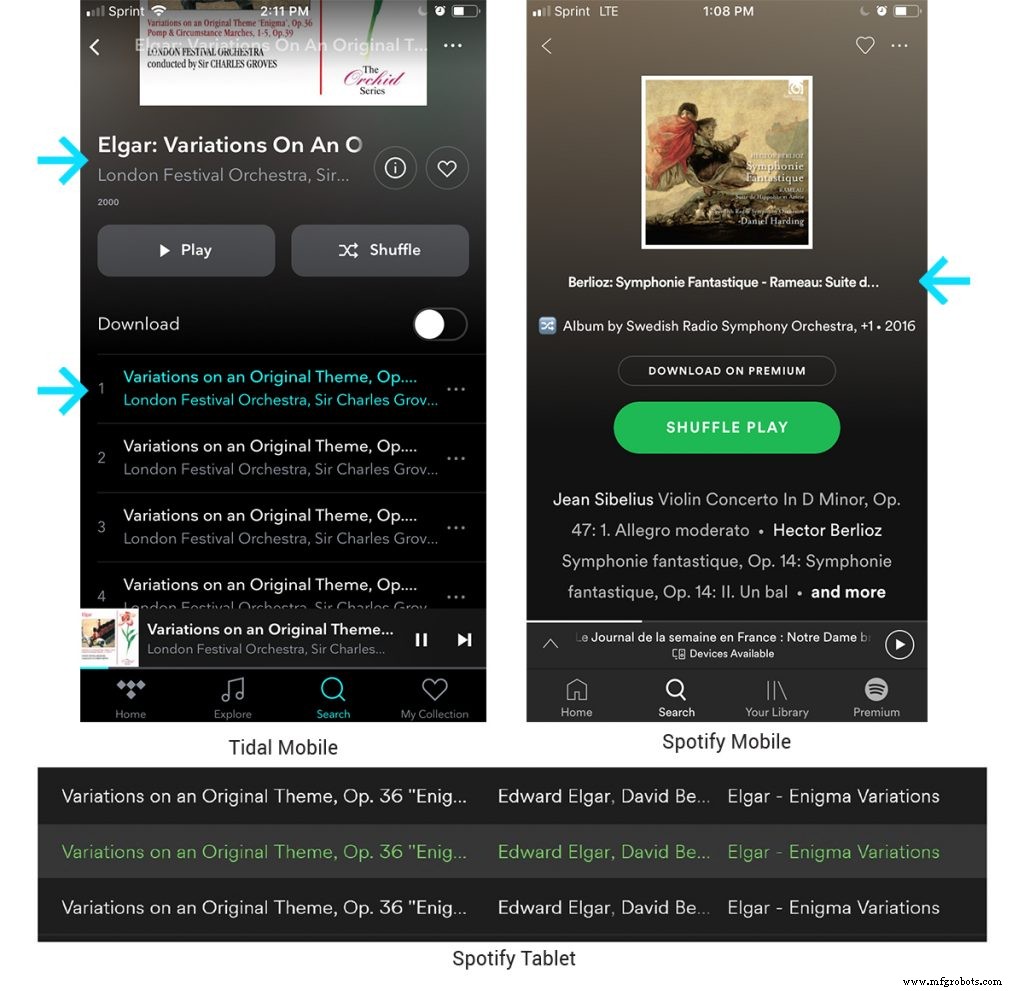
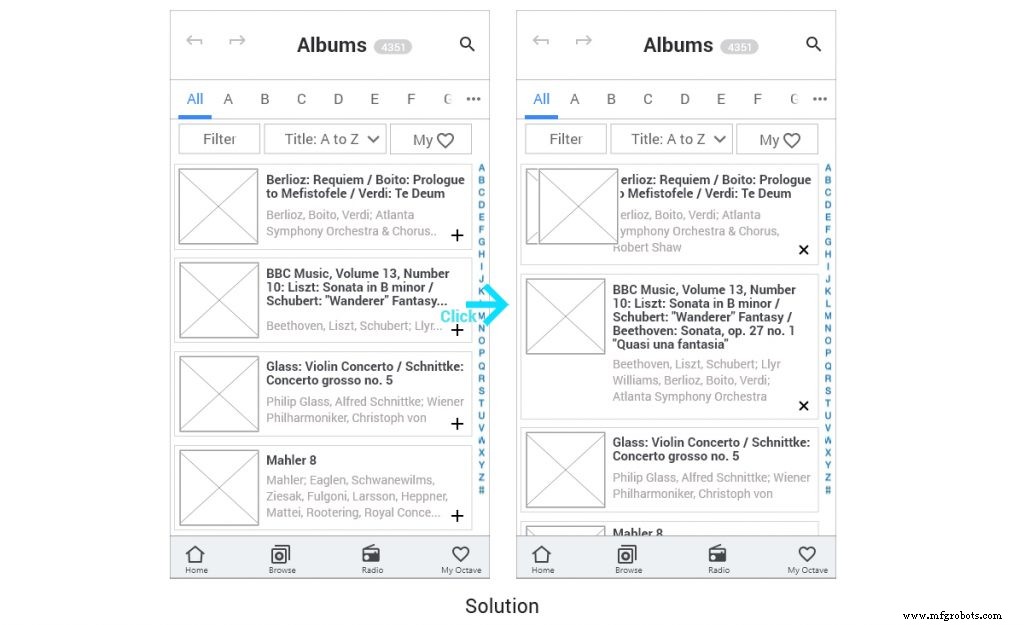
In practice, an expanded view can show an entire album title such as “BBC Music, Volume 13, Number 10: Liszt: Sonata in B minor / Schubert: “Wanderer” Fantasy / Beethoven: Sonata, op. 27 no. 1 – Quasi una fantasia.” This eliminates the need for users to scroll through long lists.
3. Handle Multi‑Part Classical Works Intuitively
Many classical pieces are split into multiple movements or acts, which can confuse users when each act is treated as a separate track. Our solution uses indentation to indicate hierarchical structure, allowing users to play a full symphony or individual movements as they prefer.
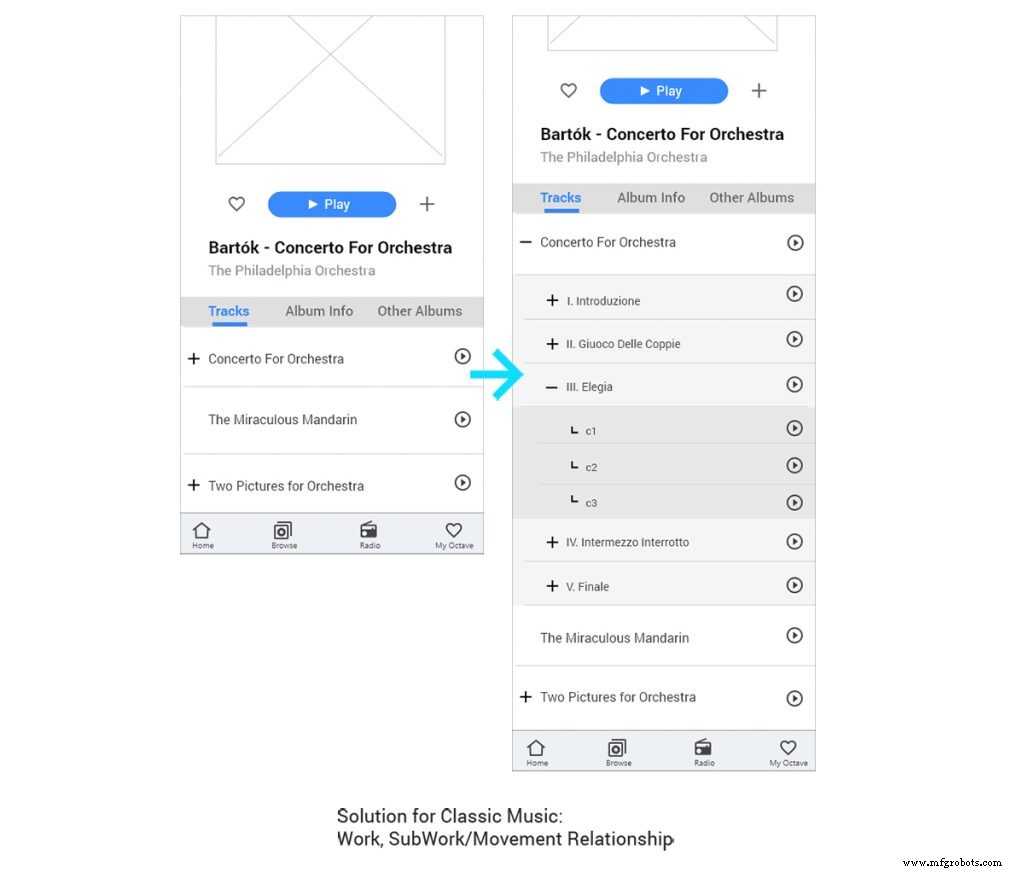
This approach respects the logical flow of classical compositions while maintaining a clear, sequential navigation path that seniors find intuitive.
4. Reduce Cognitive Load: Recognition Over Recall
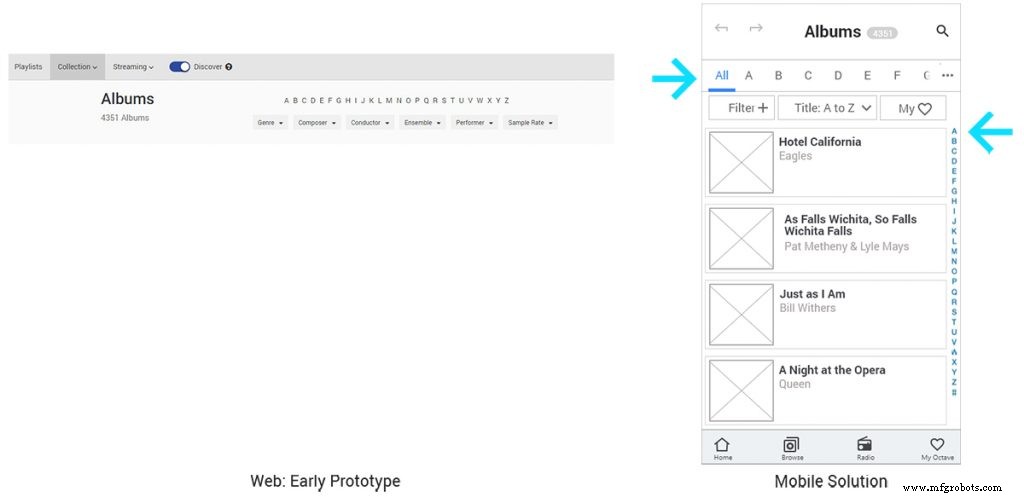
Declining memory can make it hard for seniors to recall artist names or album titles. By prioritizing recognition—such as providing large, readable labels and clickable filters—users can quickly identify content without extensive mental effort.
We introduced an alphabetic filter that allows seniors to tap a letter and instantly see all titles beginning with that character, mirroring the organization of a physical CD collection. This design reduces the need for typing, which can be challenging for users with reduced finger sensitivity.
5. Minimize Unintentional Interactions to Preserve Flow
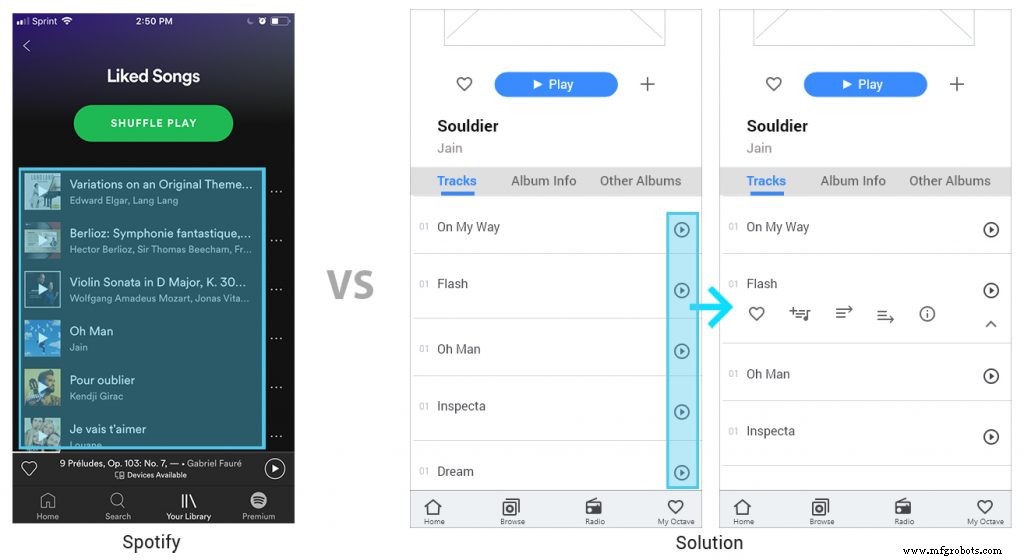
“Flow”—the immersive state where users lose track of time—can be disrupted by accidental taps. Many seniors experience reduced motor precision, so tapping a song title that immediately starts playback can be frustrating.
Our design places a dedicated play button adjacent to each track, limiting accidental starts. Tapping the title expands a secondary menu for queueing, liking, or viewing details, ensuring the user remains in control.
6. Cater to Sequential, Logical Information Processing
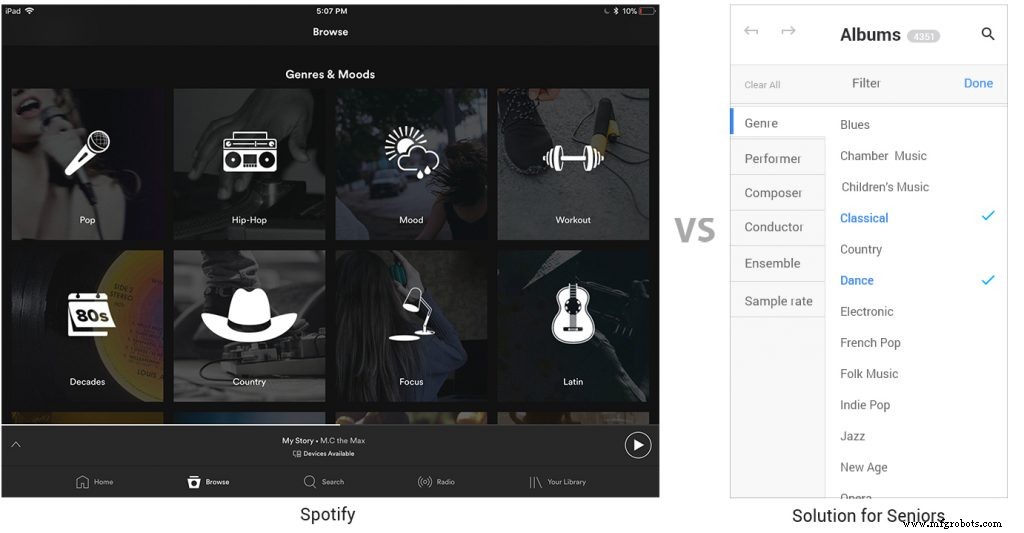
Research shows seniors process information sequentially, whereas younger users often skim in parallel. When we compared our design with Spotify’s genre‑mood mashup, seniors reported confusion. By presenting categories in a clear alphabetical order and providing step‑by‑step guidance, we align with senior users’ cognitive preferences.
7. Embrace Consistency and Familiarity
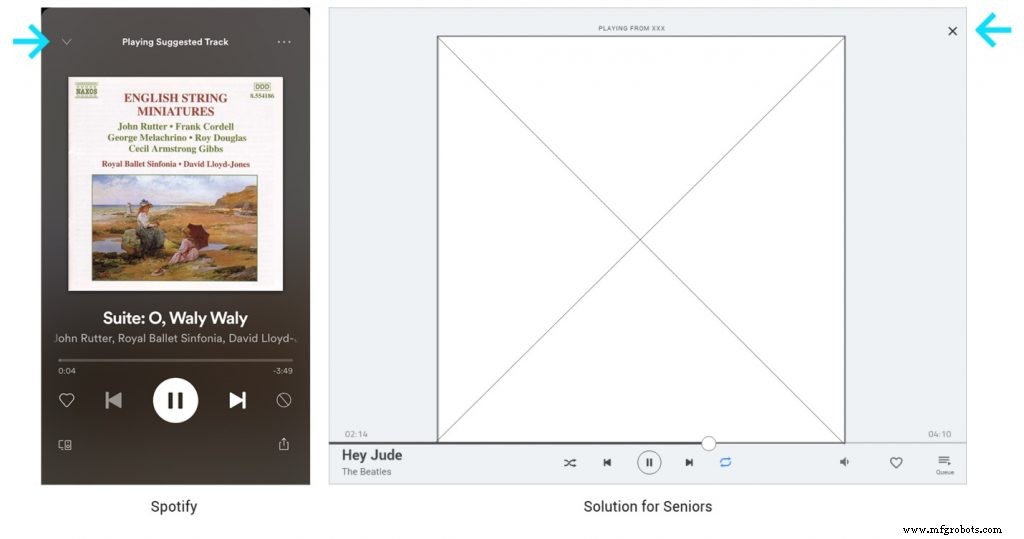
Inconsistencies—such as using a light arrow instead of a conventional “X” to close windows—can trip up seniors. Consistent iconography, button placement, and feedback messages reduce the learning curve and reinforce trust.
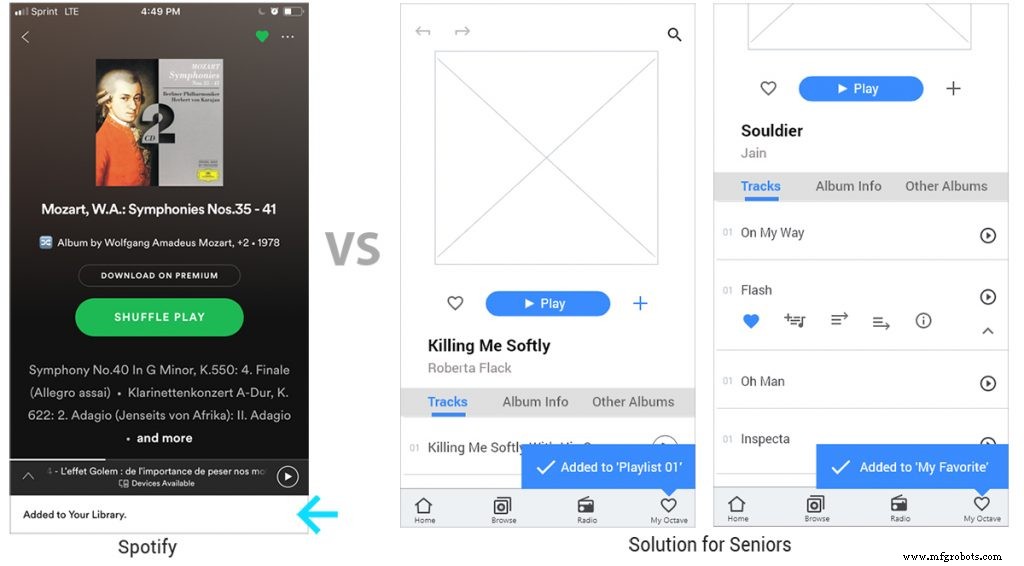
For example, when a user taps “like,” a clear notification appears: “Added to your library” with an explicit link to the favorites section. This transparent feedback prevents confusion about where the content is stored.
8. Optimize Visual Elements for Accessibility
Beyond layout, font size, color contrast, and button dimensions play critical roles in senior UX. Legible typography, high contrast color schemes, and large tap targets ensure that users with visual or motor impairments can interact comfortably.
About the Author
Soyun Kim is a Senior Product Designer at StudioRed, a Silicon Valley‑based consultancy known for award‑winning product development, research, and design. With a portfolio that includes HP, LG, JBL, and Unilever, Soyun’s work has earned accolades from IDSA, CES, and Core77. View her portfolio at www.studiored.com.
Further Resources
For more on senior‑friendly UX design, read our full guide. Looking for UX Design opportunities? Browse thousands of jobs on Jooble. StudioRed has been recognized as a Top User Experience Agency by DesignRush.
Manufacturing process
- Consumer Product Design: A Practical Guide for Success
- Design for Manufacturability: A Practical Guide for Engineers and Designers
- Optimizing PCB Design for Manufacturing: Key Strategies & Best Practices
- Comprehensive Guide to Shaft Keyway Design and Key Sizing: Calculations, Selection, and Standards
- Top 5 Design Strategies for Successful Reaction Injection Molding (RIM)
- Mastering Injection Molding Gate Design: Your Comprehensive Guide to Flawless Plastic Parts
- Top Online CAD Design Apps for Professionals
- Ultiboard: Comprehensive Beginner’s Guide to PCB Design
- Mastering Tooling & Mold Design: Your Essential Manufacturing Guide
- The Critical Role of Design for Manufacturing (DFM) in Hardware Success