



Arduino Mega: Capture Photos and Auto‑Upload to Google Drive
Components and supplies
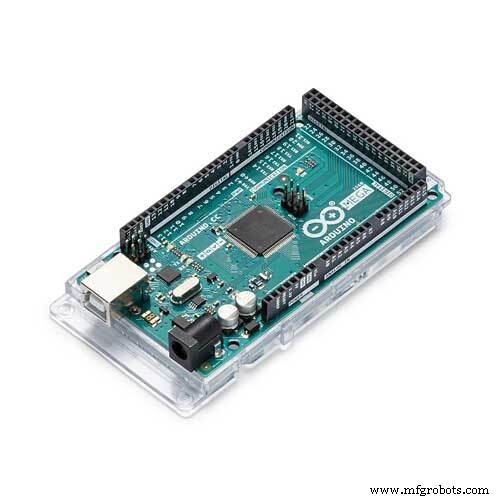 |
| × | 1 | |||
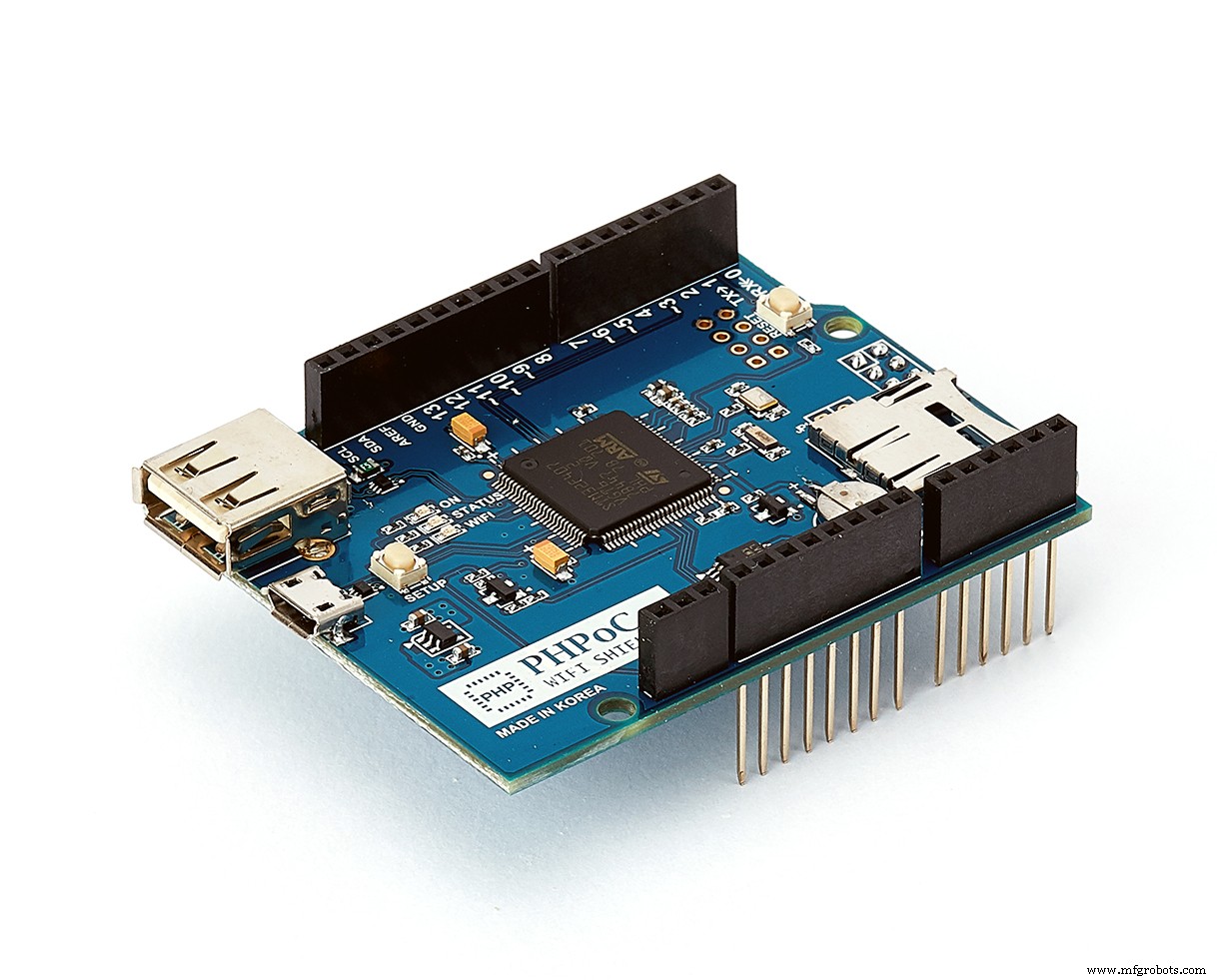 |
| × | 1 | |||
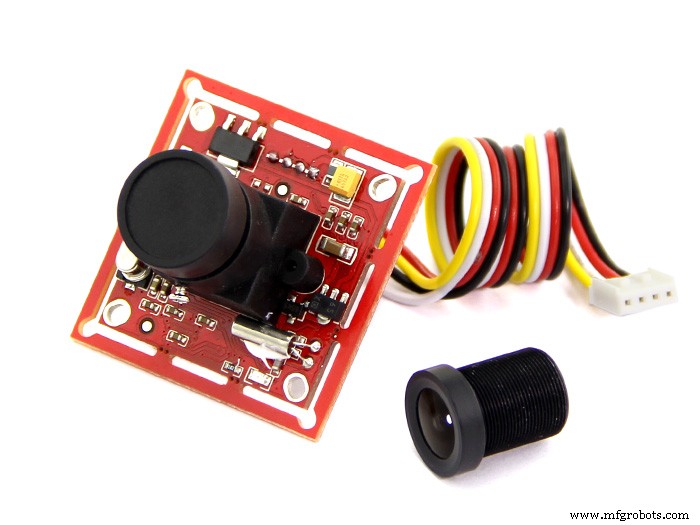 |
| × | 1 | |||
| × | 1 | ||||
| × | 1 |
About this project
If you are a beginner, you can learn about Arduino here.
DemonstrationHow It Works1. Log in to Google Account via OAuth 2.0 for IoT devices to obtain access_token.
Login process is described in this project on Hackster.
2. When the button is pressed, Arduino gets picture from camera, and then upload to Google Drive using access_token via Google Drive API.
Google Drive API for uploading file is described in Google document.
How To- Create Google Project from Google Developer Portal and obtain GOOGLE_CLIENT_ID and GOOGLE_CLIENT_SECRET
- Replace GOOGLE_CLIENT_ID and GOOGLE_CLIENT_SECRET in Arduino code
- Upload login.php file to PHPoC Shield. See instruction
- Compile and Upload Arduino code via Arduino IDE
- See ip_address of PHPoC shield on Serial Monitor
- Access Login Page on PHPoC Shield: http://ip_address/login.php and Login to Your Google Account
- Press Button to take Picture
- Check your Google Drive after two second, you will see the taken picture in your Drive.
I made the same project for another hardware platform here.
The Best Arduino Starter Kit for BeginnerIf you are looking for an Arduino kit, see The Best Arduino Kit for Beginners
- Serial.begin()
- Serial.println()
- delay()
- millis()
- for loop
- while loop
- if else
- loop()
- setup()
- String.toInt()
- String.substring()
- String.indexOf()
- String.remove()
- String.equals()
Code
- ArduinoGoogleDrive
- login.php
- grove_camera.h
ArduinoGoogleDriveArduino
This is main Arduino code.#include <Phpoc.h>
#include <Arduino_JSON.h>
#include "grove_camera.h"
// Replace your GOOGLE_CLIENT_ID and GOOGLE_CLIENT_SECRET here
String GOOGLE_CLIENT_ID = "xxxxxxxxxxxxxxxxxxxxxxxxxxxxxxxxxxxxxxxxxxxxx.apps.googleusercontent.com";
String GOOGLE_CLIENT_SECRET = "xxxxxxxxxxxxxxxxxxxxxxxx";
PhpocServer websocket_server(80);
String http_resp_hearder(PhpocClient &client){
String hearder = "";
while(1){
if(client.available()){
String line = client.readLine();
if(line == "\r\n")
break;
else
hearder += line;
}
if(!client.connected()){
client.stop();
break;
}
}
return hearder;
}
String http_resp_body(PhpocClient &client){
String body = "";
while(1){
if(client.available()){
char c = client.read();
body += c;
}
if(!client.connected()){
client.stop();
break;
}
}
return body;
}
String access_token = "";
String refresh_token = "";
unsigned long access_token_expire_at = 0;
void websocket_send(String msg)
{
char wbuf[256];
msg.toCharArray(wbuf, msg.length() + 1);
websocket_server.write(wbuf, msg.length());
}
void googleDeviceOAuthLogin(){
PhpocClient client;
// Step 1: Request device and user codes
if(client.connectSSL("accounts.google.com", 443)){
Serial.println(F("Connected to server"));
String body = F("client_id=");
body += GOOGLE_CLIENT_ID;
body += F("&scope=https://www.googleapis.com/auth/drive.file");
client.println(F("POST /o/oauth2/device/code HTTP/1.1"));
client.println(F("Host: accounts.google.com"));
client.println(F("Connection: close"));
client.println(F("Accept: */*"));
client.println(F("Content-Type: application/x-www-form-urlencoded"));
client.print(F("Content-Length: ")); client.println(body.length());
client.println();
client.print(body);
String response_hearder = http_resp_hearder(client);
String response_body = http_resp_body(client);
//Serial.println(response_hearder);
//Serial.println(response_body);
JSONVar body_json = JSON.parse(response_body);
if(JSON.typeof(body_json) == "undefined"){
Serial.println("Parsing input failed!");
return;
}
// Step 2: Handle the authorization server response
String device_code = "";
String user_code = "";
long expires_in = 0;
int interval = 0;
String verification_url = "";
bool is_valid = true;
if(body_json.hasOwnProperty("device_code"))
device_code = body_json["device_code"];
else
is_valid = false;
if(body_json.hasOwnProperty("user_code"))
user_code = body_json["user_code"];
else
is_valid = false;
if(body_json.hasOwnProperty("expires_in"))
expires_in = (long) body_json["expires_in"];
else
is_valid = false;
if(body_json.hasOwnProperty("interval"))
interval = (int) body_json["interval"];
else
is_valid = false;
if(body_json.hasOwnProperty("verification_url"))
verification_url = body_json["verification_url"];
else
is_valid = false;
if(is_valid){
// Step 3: Display the user code
Serial.print(F("Next, visit "));
Serial.print(verification_url);
Serial.print(F(" on your desktop or smartphone and enter this code: "));
Serial.println(user_code);
String msg;
msg = "{\"provider\": \"google\",";
msg += "\"action\": \"LOGIN\",";
msg += "\"verification_url\": \"" + verification_url + "\",";
msg += "\"user_code\": \"" + user_code + "\"}";
websocket_send(msg);
// Step 5: Poll authorization server
int poll_max = expires_in / interval;
body = F("client_id=");
body += GOOGLE_CLIENT_ID;
body += F("&client_secret=");
body += GOOGLE_CLIENT_SECRET;
body += F("&code=");
body += device_code;
body += F("&grant_type=http://oauth.net/grant_type/device/1.0");
for(int poll_count = 0; poll_count < poll_max; poll_count++){
if(client.connectSSL("www.googleapis.com", 443)){
client.println(F("POST /oauth2/v4/token HTTP/1.1"));
client.println(F("Host: www.googleapis.com"));
client.println(F("Connection: close"));
client.println(F("Accept: */*"));
client.println(F("Content-Type: application/x-www-form-urlencoded"));
client.print(F("Content-Length: ")); client.println(body.length());
client.println();
client.print(body);
response_hearder = http_resp_hearder(client);
response_body = http_resp_body(client);
//Serial.println(response_hearder);
//Serial.println(response_body);
body_json = JSON.parse(response_body);
if(JSON.typeof(body_json) == "undefined"){
Serial.println("Parsing input failed!");
return;
}
long token_expires_in = 0;
bool is_authorized = true;
if(body_json.hasOwnProperty("access_token"))
access_token = body_json["access_token"];
else
is_authorized = false;
if(body_json.hasOwnProperty("expires_in"))
token_expires_in = (long) body_json["expires_in"];
else
is_authorized = false;
if(body_json.hasOwnProperty("refresh_token"))
refresh_token = body_json["refresh_token"];
else
is_authorized = false;
if(is_authorized){
access_token_expire_at = millis() + token_expires_in * 1000;
//Serial.print("access_token:");
//Serial.println(access_token);
// send success message to web
msg = "{\"provider\": \"google\",";
msg += "\"action\": \"SUCCESS\"}";
websocket_send(msg);
break;
}
}
delay(interval * 1000);
}
}
else
Serial.println(F("Invalid resonse from Google"));
}
else
Serial.println(F("NOT Connected to server"));
}
void cameraToGoogleDrive()
{
if(access_token == ""){
Serial.println(F("access_token is invalid"));
return;
}
long picture_len = cameraGetPicture();
if(picture_len)
{
PhpocDateTime datetime;
PhpocClient client;
String file_name;
String metadata;
String jpeg_boundary;
String end_boundary;
datetime.date(F("YmdHis"));
file_name = datetime.date();
metadata = F("--foo_bar_baz\r\n");
metadata += F("Content-Type: application/json; charset=UTF-8\r\n\r\n");
metadata += "{\"title\": \"ARDUINO_" + file_name + "\"}\r\n\r\n";
jpeg_boundary = F("--foo_bar_baz\r\n");
jpeg_boundary += F("Content-Type: image/jpeg\r\n\r\n");
end_boundary = F("\r\n--foo_bar_baz--");
unsigned long body_len =metadata.length() + jpeg_boundary.length() + picture_len + end_boundary.length();
int total = 0;
if(client.connectSSL("www.googleapis.com", 443)){
Serial.println(F("Connected to server"));
String body = F("client_id=");
body += GOOGLE_CLIENT_ID;
body += F("&scope=https://www.googleapis.com/auth/drive.file");
client.println(F("POST /upload/drive/v2/files?uploadType=multipart HTTP/1.1"));
client.println(F("Host: www.googleapis.com"));
client.println(F("Connection: close"));
client.println(F("Accept: */*"));
client.println(F("Content-Type: multipart/related; boundary=foo_bar_baz"));
client.print(F("Content-Length: ")); client.println(body_len);
client.print(F("Authorization: Bearer ")); client.println(access_token);
client.println();
client.print(metadata);
client.print(jpeg_boundary);
int i;
int packet_num = cameraPacketNum();
char packet[PIC_PKT_LEN] = {0};
for(i = 0; i < packet_num; i++)
{
long packet_len = cameraGetPacket(i, packet);
client.write((const uint8_t *)&packet[4], packet_len - 6);
total += packet_len - 6;
}
cameraGetPacket(i, packet);
client.print(end_boundary);
String response_hearder = http_resp_hearder(client);
String response_body = http_resp_body(client);
//Serial.println(response_hearder);
Serial.println(response_body);
}
}
else
{
Serial.print("picture_len:");
Serial.println(picture_len);
}
}
int buttonState;
int lastButtonState = LOW;
unsigned long lastDebounceTime = 0;
unsigned long debounceDelay = 50;
bool isButtonPressed(int pin)
{
int reading = digitalRead(pin);
if (reading != lastButtonState)
lastDebounceTime = millis();
if ((millis() - lastDebounceTime) > debounceDelay) {
if (reading != buttonState) {
buttonState = reading;
if (buttonState == HIGH) {
return true;
}
}
}
lastButtonState = reading;
return false;
}
void setup(){
Serial.begin(115200);
while(!Serial)
;
Phpoc.begin(PF_LOG_SPI | PF_LOG_NET);
websocket_server.beginWebSocket("login");
Serial.print("WebSocket server address : ");
Serial.println(Phpoc.localIP());
pinMode(2, INPUT);
cameraInit(CT_JPEG, PR_160x120, JR_640x480);
}
void loop(){
PhpocClient client = websocket_server.available();
if (client) {
String ws_str = client.readLine();
if(ws_str == "google\r\n")
{
googleDeviceOAuthLogin();
}
}
if(isButtonPressed(2))
{
if(access_token != "" && access_token_expire_at > millis())
cameraToGoogleDrive();
else
Serial.println("access_token is invalid, please login again");
}
}
login.phpPHP
This file code is uploaded to PHPoC Shield. It provides Web User Interface for Google Login process<html>
<head>
<title>PHPoC / <?echo system("uname -i")?></title>
<meta content="initial-scale=1.0, maximum-scale=1.0, minimum-scale=0.5, width=device-width, user-scalable=yes" name="viewport">
<link rel="stylesheet" href="https://fonts.googleapis.com/css?family=Roboto" type="text/css">
<style>
body { text-align:center; }
.center {
margin: auto;
position: absolute;
-webkit-backface-visibility: hidden;
left:0;
right:0;
text-align: center;
top: 20%;
}
.hearder {
width: 100%;
max-width:400px;
color: #008B8B;
padding: 5px;
border-bottom: solid;
margin-bottom: 5px;
font-size: 200%;
display: inline-block;
}
.wc_text, .loader {
display: inline-block;
width: 100%;
max-width:300px;
line-height: 150%;
}
.code {
font-family: "Courier New", Courier, monospace;
font-size: 150%;
font-weight: bold;
color: #A52A2A;
}
.success {font-weight: bold; color: #A52A2A;}
/*loading icon*/
.lds-roller {
display: inline-block;
position: relative;
width: 64px;
height: 64px;
}
.lds-roller div {
animation: lds-roller 1.2s cubic-bezier(0.5, 0, 0.5, 1) infinite;
transform-origin: 32px 32px;
}
.lds-roller div:after {
content: " ";
display: block;
position: absolute;
width: 6px;
height: 6px;
border-radius: 50%;
background: #A52A2A;
margin: -3px 0 0 -3px;
}
.lds-roller div:nth-child(1) {animation-delay: -0.036s;}
.lds-roller div:nth-child(1):after {top: 50px;left: 50px;}
.lds-roller div:nth-child(2) {animation-delay: -0.072s;}
.lds-roller div:nth-child(2):after {top: 54px;left: 45px;}
.lds-roller div:nth-child(3) {animation-delay: -0.108s;}
.lds-roller div:nth-child(3):after {top: 57px;left: 39px;}
.lds-roller div:nth-child(4) {animation-delay: -0.144s;}
.lds-roller div:nth-child(4):after {top: 58px;left: 32px;}
.lds-roller div:nth-child(5) {animation-delay: -0.18s;}
.lds-roller div:nth-child(5):after {top: 57px;left: 25px;}
.lds-roller div:nth-child(6) {animation-delay: -0.216s;}
.lds-roller div:nth-child(6):after {top: 54px;left: 19px;}
.lds-roller div:nth-child(7) {animation-delay: -0.252s;}
.lds-roller div:nth-child(7):after {top: 50px;left: 14px;}
.lds-roller div:nth-child(8) {animation-delay: -0.288s;}
.lds-roller div:nth-child(8):after {top: 45px;left: 10px;}
@keyframes lds-roller {0% {transform: rotate(0deg);}100% {transform: rotate(360deg);}}
</style>
<script>
var ws;
function init()
{
ws = new WebSocket("ws://<?echo _SERVER("HTTP_HOST")?>/login", "text.phpoc");
ws.onopen = ws_onopen;
ws.onclose = ws_onclose;
ws.onmessage = ws_onmessage;
}
function ws_onopen()
{
if(ws && (ws.readyState == 1))
ws.send('google\r\n');
}
function ws_onclose()
{
alert('CANNOT connect to device. Please reload webpage');
ws.onopen = null;
ws.onclose = null;
ws.onmessage = null;
ws = null;
}
function ws_onmessage(e_msg)
{
e_msg = e_msg || window.event; // MessageEvent
var obj = JSON.parse(e_msg.data);
var wc_text = document.getElementById('wc_text');
if(obj.action == 'LOGIN')
{
wc_text.innerHTML = 'Next, visit <a href="' + obj.verification_url + '" target="_blank">' + obj.verification_url + '</a> and enter this code:<br>';
wc_text.innerHTML += '<span class="code">' + obj.user_code + '</span>';
}
else
if(obj.action == 'SUCCESS')
{
document.getElementById('loader').style.display = 'none';
wc_text.innerHTML = '<span class="success">Success!</span><br>';
wc_text.innerHTML += 'You are now logged in from Arduino via PHPoC Shield';
}
}
window.onload = init;
</script>
</head>
<body>
<div class="center">
<div class="hearder">
<div style="font-size: 150%">
<span style="color:#4285F4">G</span>
<span style="color:#EA4335;">o</span>
<span style="color:#FBBC05;">o</span>
<span style="color:#4285F4;">g</span>
<span style="color:#34A853;">l</span>
<span style="color:#EA4335;">e</span>
</div>
Login for Arduino
</div>
<br><br>
<div class="wc_text" id="wc_text"></div><br><br>
<div class="loader" id="loader">
<div class="lds-roller"><div></div><div></div><div></div><div></div><div></div><div></div><div></div><div></div></div>
</div>
</div>
</body>
</html>
grove_camera.hC/C++
Library for Grove Camera#define PIC_PKT_LEN 512 //data length of each read, dont set this too big because ram is limited
#define CAM_ADDR 0
//Color Type
#define CT_GRAYSCALE_2 0x01
#define CT_GRAYSCALE_4 0x02
#define CT_GRAYSCALE_8 0x03
#define CT_COLOR_12 0x05
#define CT_COLOR_16 0x06
#define CT_JPEG 0x07
//Preview Resolution
#define PR_80x60 0x01
#define PR_160x120 0x03
// JPEG Resolution
#define JR_80x64 0x01
#define JR_160x128 0x03
#define JR_320x240 0x05
#define JR_640x480 0x07
const byte camera_address = (CAM_ADDR << 5); // address
unsigned int camera_packet_num;
unsigned int camera_last_packet_len;
void cameraClearRxBuf(){
while (Serial.available()){
Serial.read();
}
}
void cameraSendCmd(char cmd[], int cmd_len){
for (char i = 0; i < cmd_len; i++) Serial.print(cmd[i]);
}
unsigned int cameraPacketNum(){
return camera_packet_num;
}
void cameraInit(int color_type, int preview_resolution, int jpeg_resolution){
char cmd[] = {0xaa,0x0d|camera_address,0x00,0x00,0x00,0x00} ;
unsigned char resp[6];
Serial.setTimeout(500);
while (1){
cameraSendCmd(cmd,6);
if(Serial.readBytes((char *)resp, 6) != 6)
continue;
if(resp[0] == 0xaa && resp[1] == (0x0e | camera_address) && resp[2] == 0x0d && resp[4] == 0 && resp[5] == 0) {
if(Serial.readBytes((char *)resp, 6) != 6) continue;
if(resp[0] == 0xaa && resp[1] == (0x0d | camera_address) && resp[2] == 0 && resp[3] == 0 && resp[4] == 0 && resp[5] == 0) break;
}
}
cmd[1] = 0x0e | camera_address;
cmd[2] = 0x0d;
cameraSendCmd(cmd, 6);
char cmd2[] = { 0xaa, 0x01 | camera_address, 0x00, color_type, preview_resolution, jpeg_resolution};
Serial.setTimeout(100);
while (1){
cameraClearRxBuf();
cameraSendCmd(cmd2, 6);
if(Serial.readBytes((char *)resp, 6) != 6) continue;
if(resp[0] == 0xaa && resp[1] == (0x0e | camera_address) && resp[2] == 0x01 && resp[4] == 0 && resp[5] == 0) break;
}
char cmd3[] = { 0xaa, 0x06 | camera_address, 0x08, PIC_PKT_LEN & 0xff, (PIC_PKT_LEN>>8) & 0xff ,0};
while (1) {
cameraClearRxBuf();
cameraSendCmd(cmd3, 6);
if(Serial.readBytes((char *)resp, 6) != 6) continue;
if(resp[0] == 0xaa && resp[1] == (0x0e | camera_address) && resp[2] == 0x06 && resp[4] == 0 && resp[5] == 0) break;
}
}
long cameraGetPicture(){
char cmd[] = { 0xaa, 0x04 | camera_address, 0x01, 0x00, 0x00, 0x00 };
unsigned char resp[6];
unsigned long picTotalLen = 0; // picture length
while (1){
cameraClearRxBuf();
cameraSendCmd(cmd, 6);
if(Serial.readBytes((char *)resp, 6) != 6) continue;
if(resp[0] == 0xaa && resp[1] == (0x0e | camera_address) && resp[2] == 0x04 && resp[4] == 0 && resp[5] == 0){
Serial.setTimeout(1000);
if(Serial.readBytes((char *)resp, 6) != 6)
continue;
if(resp[0] == 0xaa && resp[1] == (0x0a | camera_address) && resp[2] == 0x01){
picTotalLen = (resp[3]) | (resp[4] << 8) | (resp[5] << 16);
break;
}
}
}
camera_packet_num = (picTotalLen) / (PIC_PKT_LEN - 6);
camera_last_packet_len = PIC_PKT_LEN;
if((picTotalLen % (PIC_PKT_LEN-6)) != 0){
camera_packet_num += 1;
camera_last_packet_len = picTotalLen % (PIC_PKT_LEN - 6) + 6;
}
return picTotalLen;
}
long cameraGetPacket(unsigned int i, char* buf){
char cmd[] = { 0xaa, 0x0e | camera_address, 0x00, 0x00, 0x00, 0x00 };
Serial.setTimeout(100);
if(i < camera_packet_num) {
cmd[4] = i & 0xff;
cmd[5] = (i >> 8) & 0xff;
cameraClearRxBuf();
cameraSendCmd(cmd, 6);
int pkt_len;
if(i < (camera_packet_num - 1))
pkt_len = PIC_PKT_LEN ;
else
pkt_len = camera_last_packet_len;
uint16_t cnt = Serial.readBytes((char *)buf, pkt_len);
return cnt;
} else {
cmd[4] = 0xf0;
cmd[5] = 0xf0;
cameraSendCmd(cmd, 6);
}
return "";
}
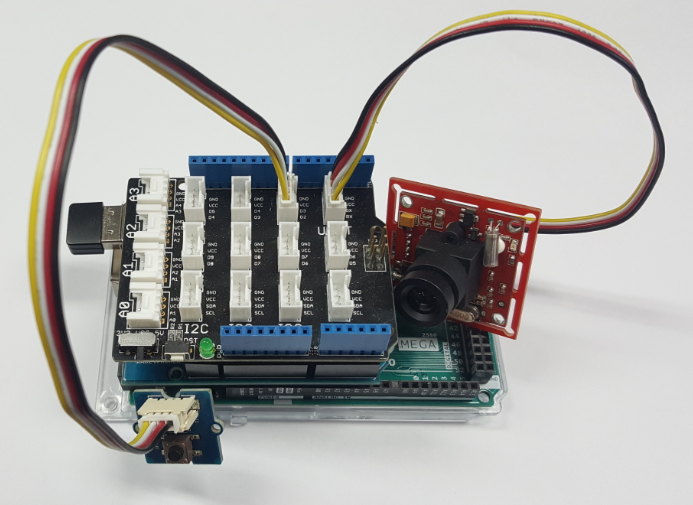
Schematics
Arduino Uno-Based Human Detection Robot: Step‑by‑Step Sensor Integration
Build an Ultrasonic Levitation Device with Arduino – Step‑by‑Step Guide
Manufacturing process
- Build a Bluetooth‑controlled Arduino Spybot
- FlickMote: Gesture‑Controlled IR Remote for Smart Home
- DIY Arduino TV B-Gone: Universal Remote for All TVs
- Voice-Activated Home Appliances: Bluetooth Control with Google Assistant
- Real-Time RFID Attendance System Powered by Arduino & Google Sheets
- Real‑Time IoT Pressure Monitoring with MKR GSM, Arduino Cloud, and Google Sheets
- Securely Link Arduino MKR GSM 1400 to Google Cloud IoT Core: Step‑by‑Step Guide
- Seamless MKR1000 to Google Sheets: Upload Sensor Data Over WiFi
- Control Your Arduino with Google Assistant – A Complete Step‑by‑Step Tutorial
- Google's $450M Investment in ADT Accelerates IoT Security Adoption