



Play ‘Happy Birthday’ with 3‑Way Polyphony on Arduino Nano – Endless, Light‑Sync Melody Demo
Components and supplies
 |
| × | 1 |
Apps and online services
 |
|
About this project
Play polyphony "Happy birthday" theme on Arduino Nano with three buzzers on a single mini breadboard.
First of all - demonstrationPlug this thing into any USB power source (not only a computer) and it will play "Happy birthday" melody indefinitely... like almost... until you get really sick of it =]
BTW, the lights are blinking in tact with every note change in a corresponding channel/buzzer.
SchematicsThe idea was to make a super compact device with (almost) no soldering.
Eventually I've managed to fit everything needed on a tiny breadboard like this:
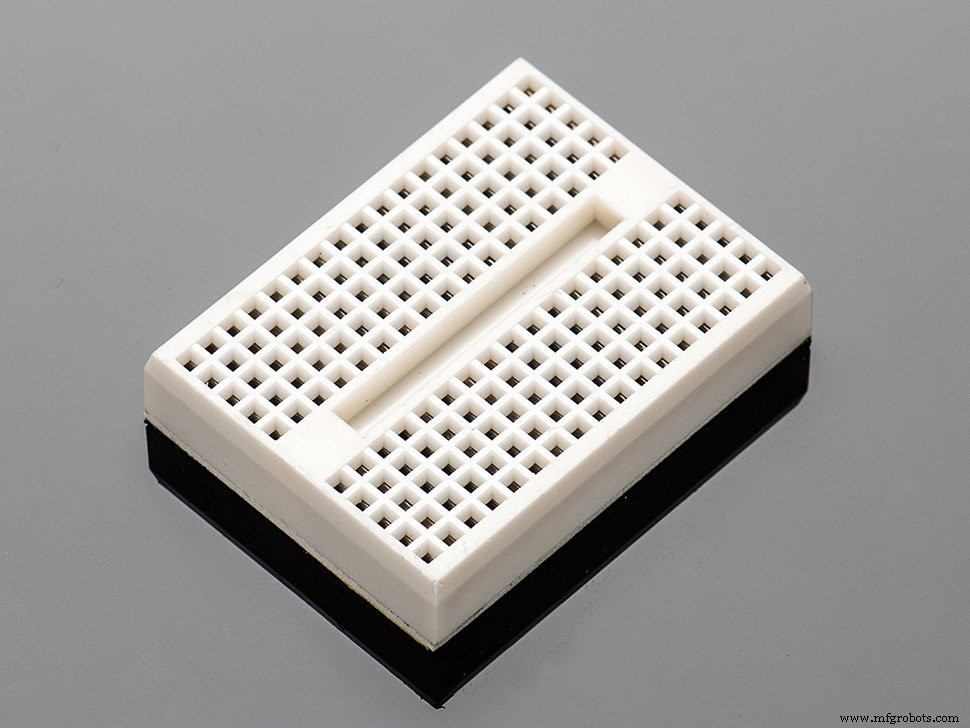
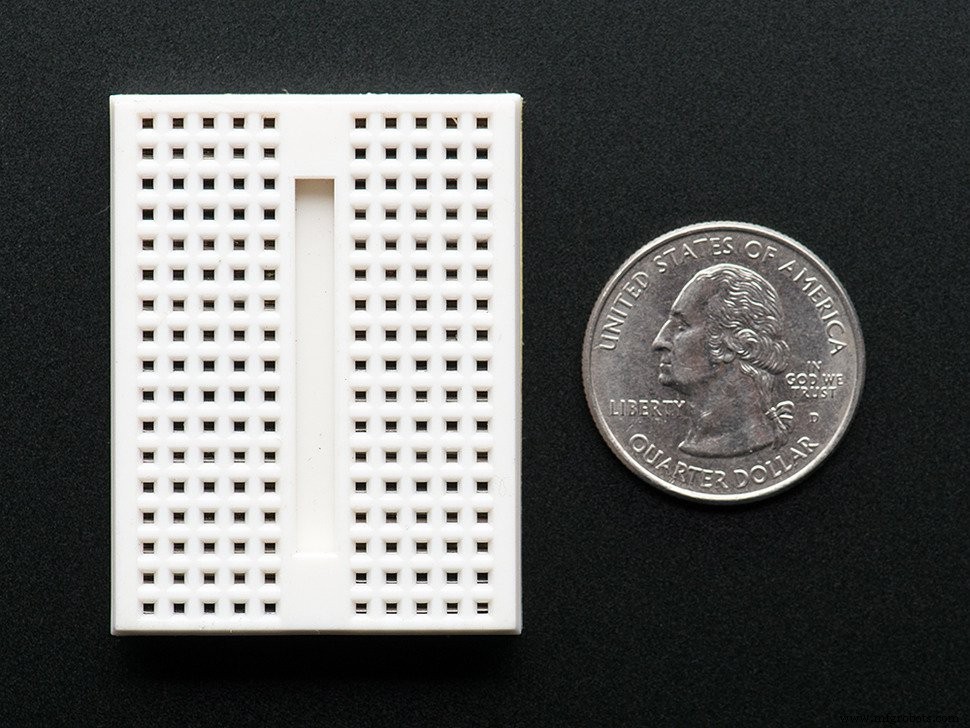
Holes are interconnected inside the breadboard in this way:
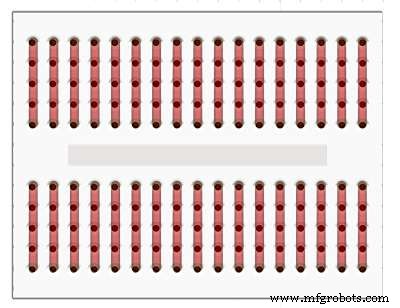
The trick here is that Arduino Nano board fits in such a breadboard just PERFECTLY allowing us to connect some additional components on both sides of the breadboard.
Sorry, guys... I'm too lazy to draw any diagrams here but this case is SO simple that I'm sure these close-ups will be more than enough to figure everything out =]
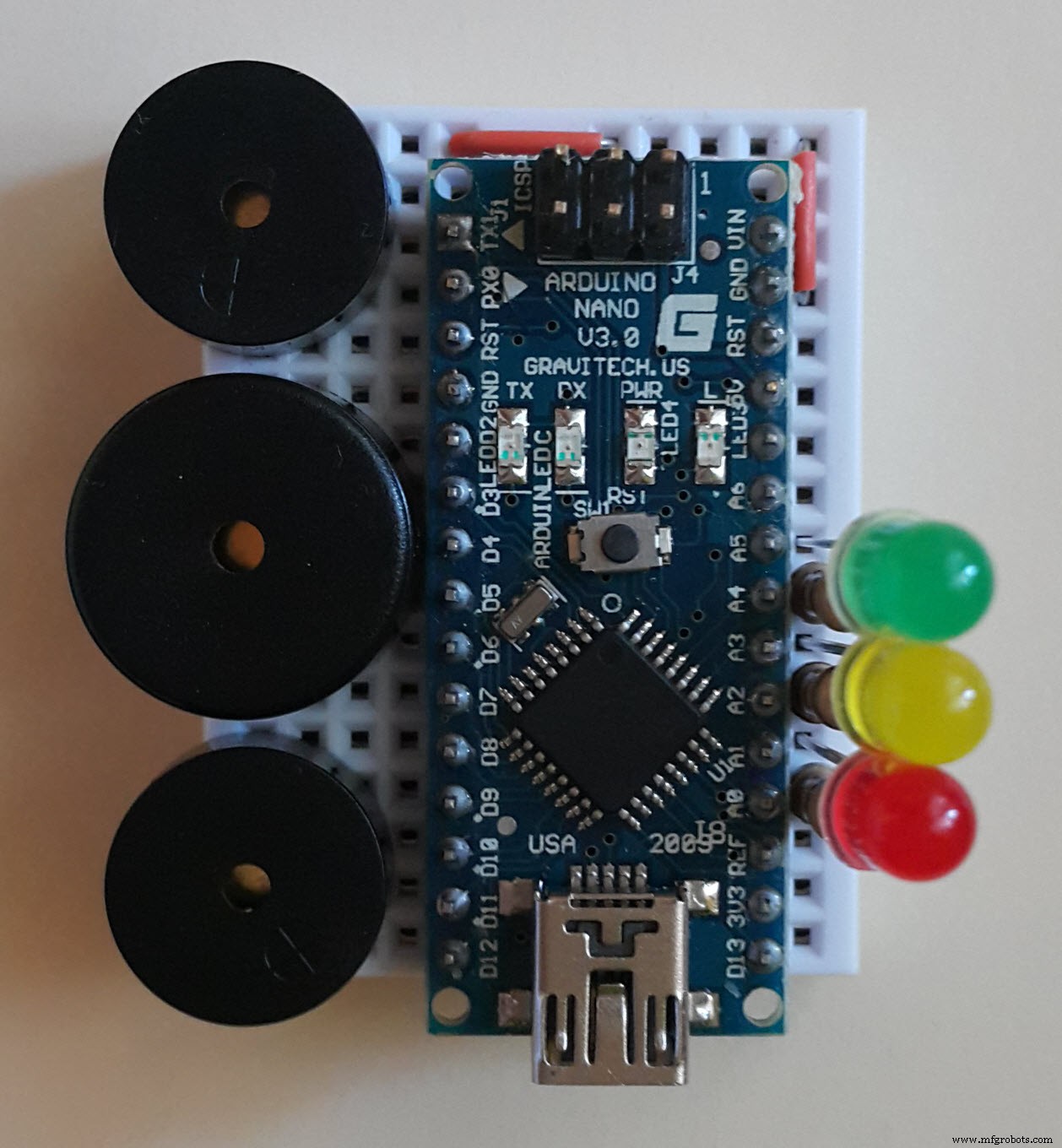
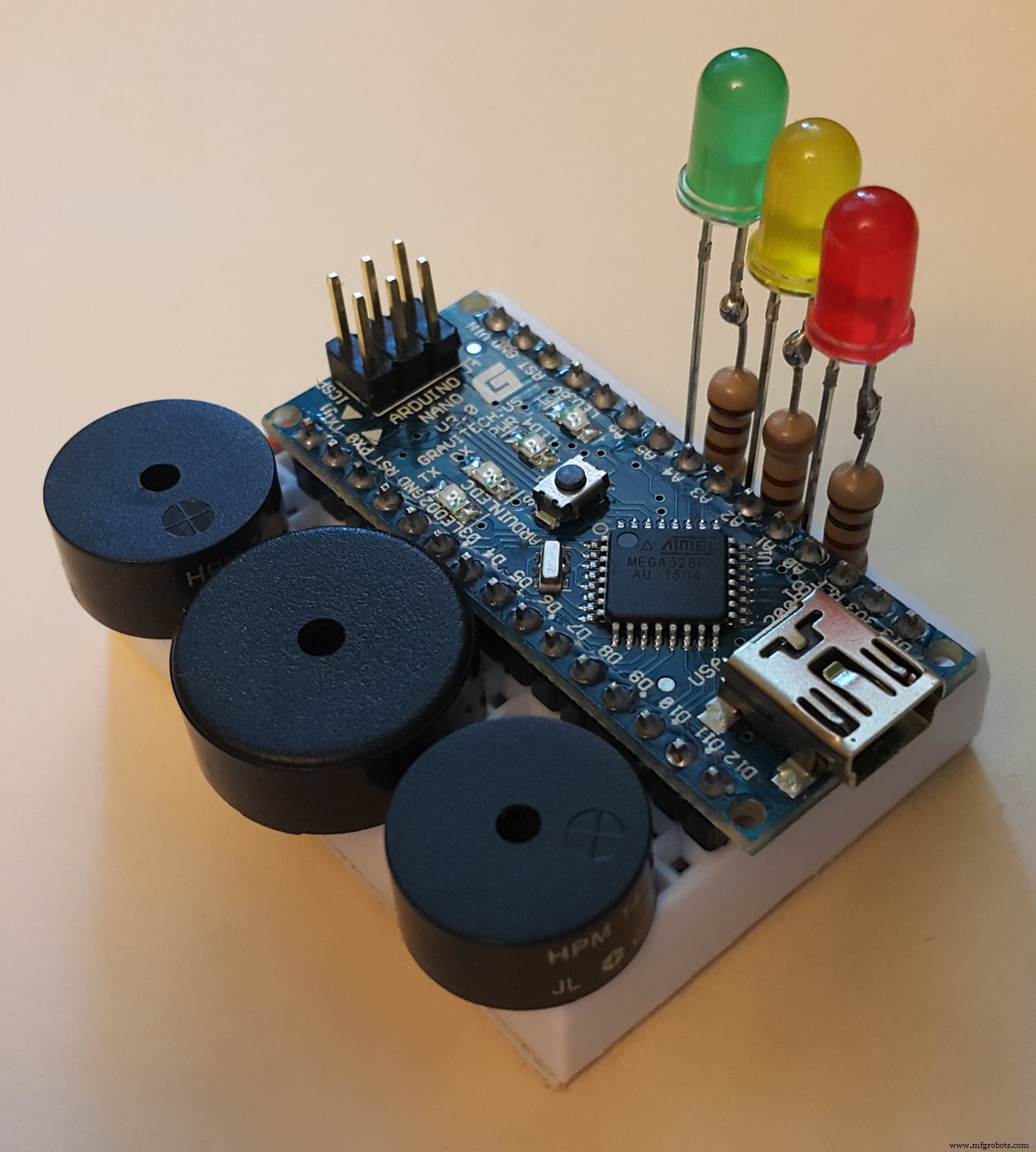
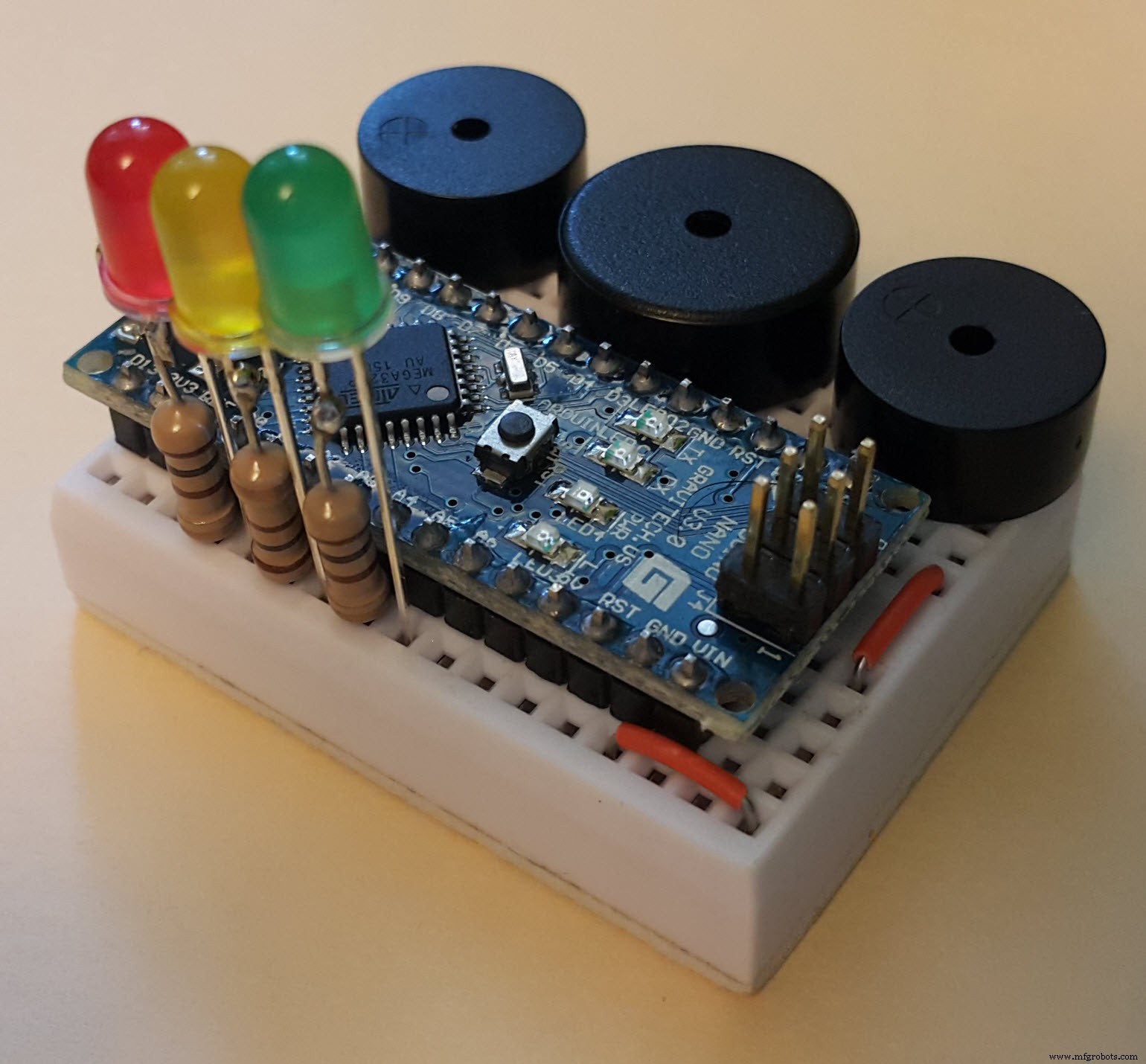
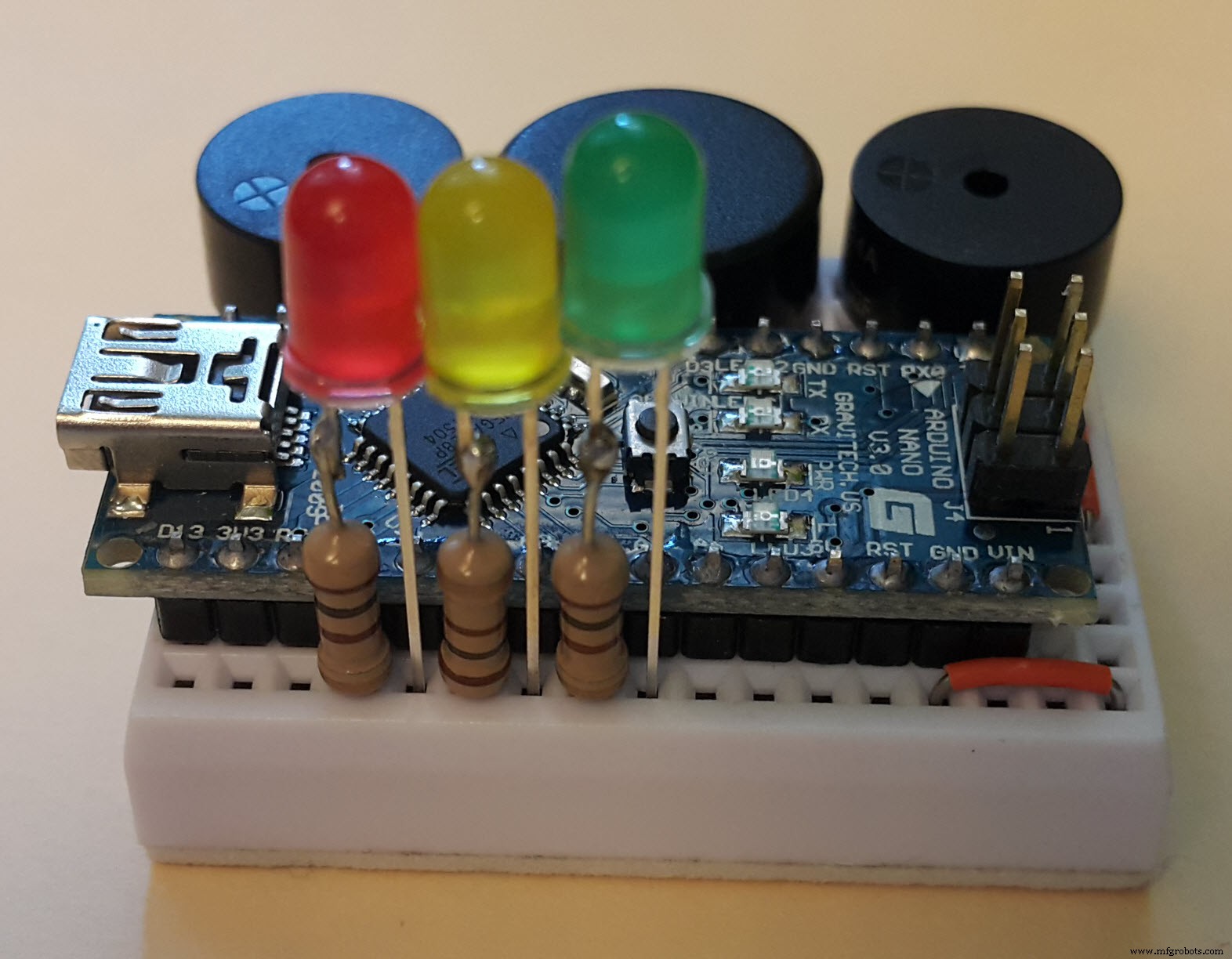
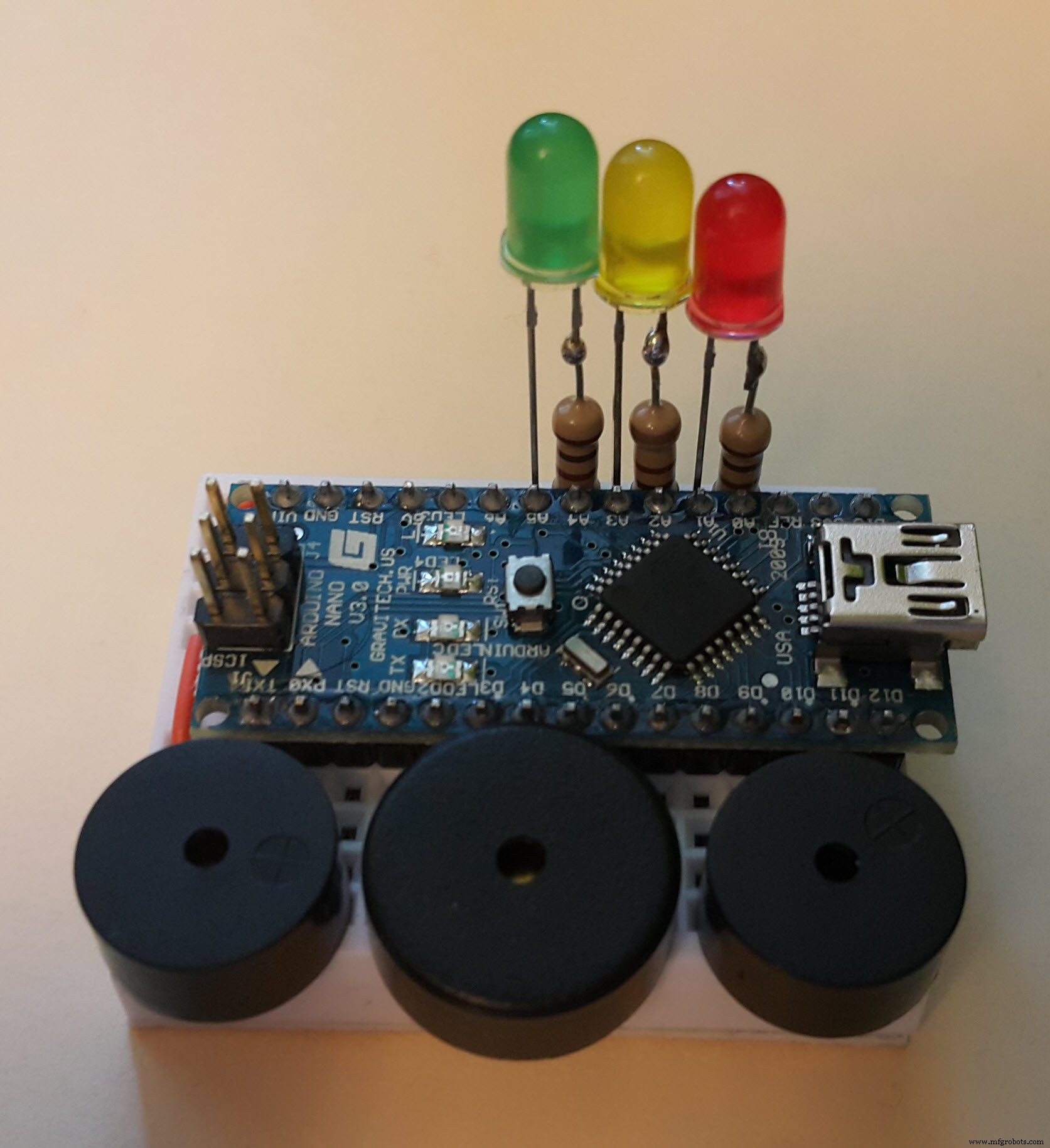
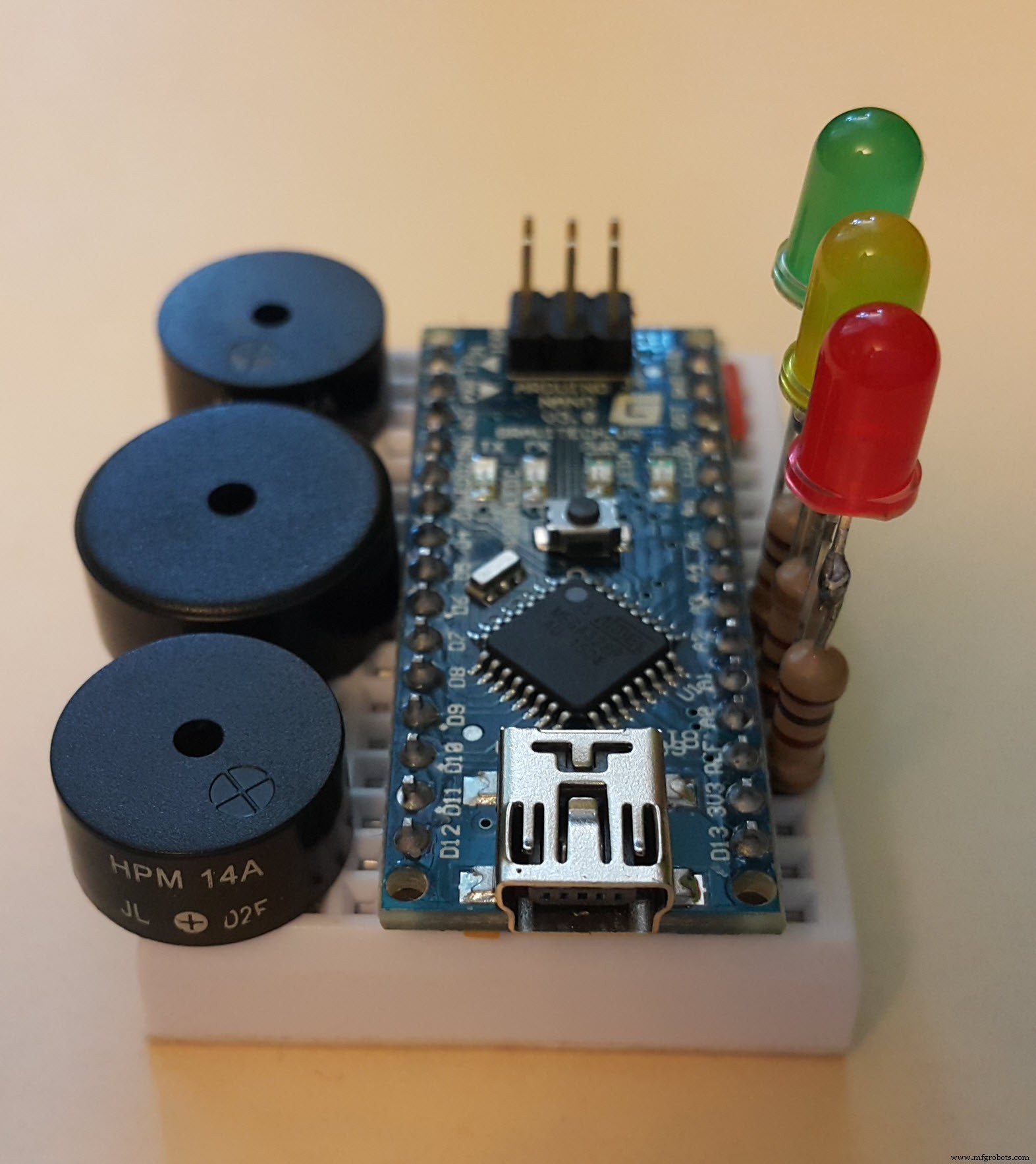
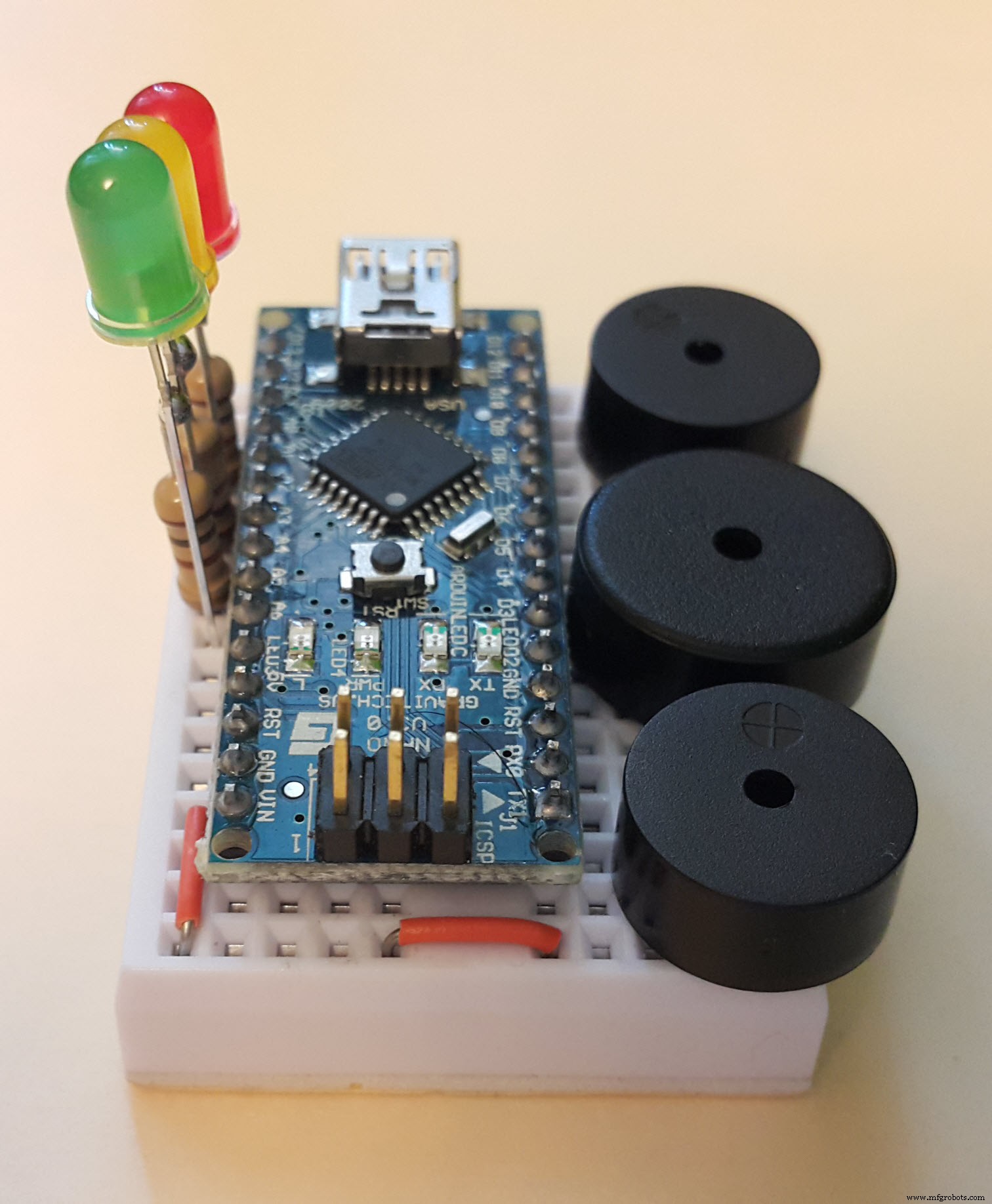
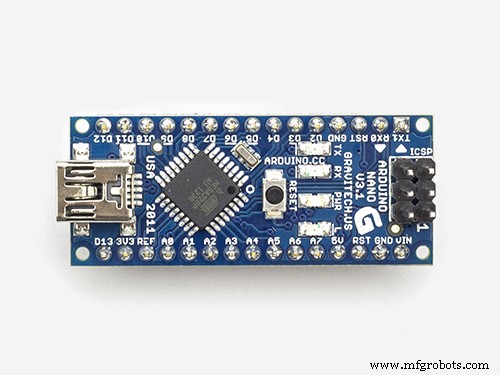
As you can see, I'm using Arduino Nano v3.0 board from Gravitech here but any analogue will do. The buzzers and the LEDs here are VERY ordinary ones. They don't have to match any special parameters actually.
The resistors here are 100 Ohm ones... although common "standard" for LED overload protection is 220 Ohm... but who cares... ¯\_(ツ)_/¯
The only thing that is probably not so obvious here on these photos is that the buzzers' pins are inserted into the breadboard this way:
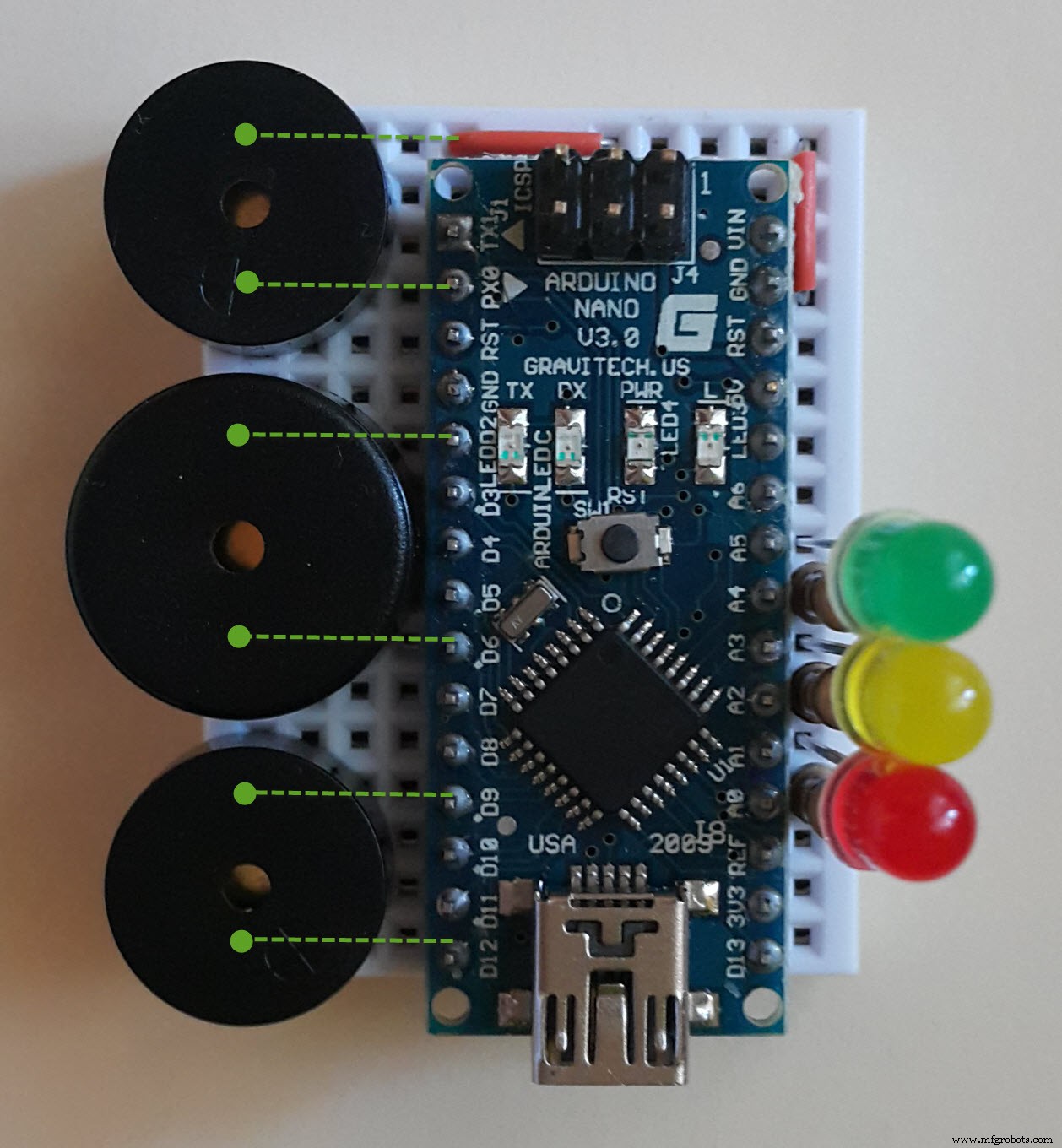
Also note that the center one is bigger than the others - that's because this one is used for the "bass" music channel ☝🏻
... just kidding! ^__^ They all squeak like a crazy mouse choir with totally no difference in their sound capabilities =]
So you can use three identical buzzers if you wish with no problem, however you'll have to place them in a little different positions on the breadboard and also to change output pin numbers in the program code according to your new buzzers placement.
Also, note another little "hack" here... anyway are we on Hackster here or what? =] So I'm using several Arduino's I/O pins here as a ground pins for buzzers and LEDs 😱😱 . Yes... that's right. Actually, if you set a "LOW" state for any Arduino I/O pin in your program, then you can use these pins in the very same way you use standard GND pins on Arduino boards. Cool, right? ;)
About the program...The full listing of the Arduino IDE sketch is provided below. However, you'll have to install an additional "Tone" library to be able compile the sketch which you can download here:
https://www.dropbox.com/s/q1udxg4yi47emeo/Tone.zip?dl=0
(if there is a pop-up window with а registration "proposal" just close it with "x" button in the corner)
The easiest way to install this library is the following: in Arduino IDE main menu choose Sketch - Include Library - Add .ZIP Library... and then select your downloaded zip-file... еasy ¯\_(ツ)_/¯
This library is necessary to perform simultaneous generation of several tones on a single controller (it uses some additional hardware timers and hardware interrupts "under the hood" to achieve this goal). Simply put, it's some kind of "redneck-multitasking" on a single processor core without any OS =]
BTW, here is the author of the library (thanks bro! =] ):
http://playground.arduino.cc/Profiles/Bhagman
... and the GitHub page of the library:
https://github.com/bhagman/Tone
DISCLAIMER 🙂 :
Frankly speaking, my program code here is rather bulky and hard to read. That's mostly because of this need to "juggle" with three "independent" melody threads simultaneously from only one linear command flow. I was really thinking to refactor the code later to be able to separate the melodies from each other and to use it in the future for playing different songs... but I probably won't =]
So good luck. Any feedback is appreciated.
Thanks for reading to the end =]
Code
- Happy_birthday
Happy_birthdayArduino
Don't forget to install Tone library!!#include <Tone.h>
Tone solo;
Tone bass;
Tone rythm;
const int t = 600; // quater note duration
const int tt = t*2;
const int t14 = round(t*1/4);
const int t24 = round(t*2/4);
const int t34 = round(t*3/4);
const int bassLedPin = 15; // bass led signal pin (aka A1)
const int rythmLedPin = 17; // rythm led signal pin (aka A3)
const int soloLedPin = 19; // solo led signal pin (aka A5)
void wait(Tone t)
{
while (t.isPlaying()) { }
}
int bassLedState = LOW;
void switchBassLed()
{
if (bassLedState == LOW)
bassLedState = HIGH;
else
bassLedState = LOW;
digitalWrite(bassLedPin, bassLedState);
}
int rythmLedState = LOW;
void switchRythmLed()
{
if (rythmLedState == LOW)
rythmLedState = HIGH;
else
rythmLedState = LOW;
digitalWrite(rythmLedPin, rythmLedState);
}
int soloLedState = LOW;
void switchSoloLed()
{
if (soloLedState == LOW)
soloLedState = HIGH;
else
soloLedState = LOW;
digitalWrite(soloLedPin, soloLedState);
}
void setup(void)
{
pinMode(14, OUTPUT); // led ground pin (aka A0)
pinMode(16, OUTPUT); // led ground pin (aka A2)
pinMode(18, OUTPUT); // led ground pin (aka A4)
pinMode(bassLedPin, OUTPUT); // bass led signal pin
pinMode(rythmLedPin, OUTPUT); // rythm led signal pin
pinMode(soloLedPin, OUTPUT); // solo led signal pin
pinMode(2, OUTPUT); // solo buzzer ground pin
pinMode(9, OUTPUT); // rythm buzzer ground pin
solo.begin(6); // solo buzzer signal pin
bass.begin(12); // bass buzzer signal pin
rythm.begin(0); // rythm buzzer signal pin
solo.play(NOTE_D4, t34); switchSoloLed();
wait(solo);
solo.play(NOTE_D4, t14); switchSoloLed();
wait(solo);
}
void loop(void)
{
bass.play(NOTE_G3, t); switchBassLed();
rythm.play(NOTE_G4, t24); switchRythmLed();
solo.play(NOTE_E4, t); switchSoloLed();
wait(rythm);
rythm.play(NOTE_B4, t14); switchRythmLed();
wait(rythm);
rythm.play(NOTE_D5, t14); switchRythmLed();
wait(rythm);
bass.play(NOTE_B3, t); switchBassLed();
rythm.play(NOTE_G4, t24); switchRythmLed();
solo.play(NOTE_D4, t); switchSoloLed();
wait(rythm);
rythm.play(NOTE_B4, t14); switchRythmLed();
wait(rythm);
rythm.play(NOTE_D5, t14); switchRythmLed();
wait(rythm);
bass.play(NOTE_D4, t); switchBassLed();
rythm.play(NOTE_G4, t24); switchRythmLed();
solo.play(NOTE_G4, t); switchSoloLed();
wait(rythm);
rythm.play(NOTE_B4, t14); switchRythmLed();
wait(rythm);
rythm.play(NOTE_D5, t14); switchRythmLed();
wait(rythm);
bass.play(NOTE_D4, t); switchBassLed();
rythm.play(NOTE_D5, t24); switchRythmLed();
solo.play(NOTE_FS4, tt); switchSoloLed();
wait(rythm);
rythm.play(NOTE_FS5, t14); switchRythmLed();
wait(rythm);
rythm.play(NOTE_A5, t14); switchRythmLed();
wait(rythm);
bass.play(NOTE_FS4, t); switchBassLed();
rythm.play(NOTE_D5, t24); switchRythmLed();
wait(rythm);
rythm.play(NOTE_FS5, t14); switchRythmLed();
wait(rythm);
rythm.play(NOTE_A5, t14); switchRythmLed();
wait(rythm);
bass.play(NOTE_A4, t); switchBassLed();
rythm.play(NOTE_D5, t24); switchRythmLed();
solo.play(NOTE_D4, t34); switchSoloLed();
wait(rythm);
rythm.play(NOTE_FS5, t14); switchRythmLed();
wait(rythm);
rythm.play(NOTE_A5, t14); switchRythmLed();
solo.play(NOTE_D4, t14); switchSoloLed();
wait(rythm);
bass.play(NOTE_D4, t); switchBassLed();
rythm.play(NOTE_D5, t24); switchRythmLed();
solo.play(NOTE_E4, t); switchSoloLed();
wait(rythm);
rythm.play(NOTE_FS5, t14); switchRythmLed();
wait(rythm);
rythm.play(NOTE_A5, t14); switchRythmLed();
wait(rythm);
bass.play(NOTE_FS4, t); switchBassLed();
rythm.play(NOTE_D5, t24); switchRythmLed();
solo.play(NOTE_D4, t); switchSoloLed();
wait(rythm);
rythm.play(NOTE_FS5, t14); switchRythmLed();
wait(rythm);
rythm.play(NOTE_A5, t14); switchRythmLed();
wait(rythm);
bass.play(NOTE_A4, t); switchBassLed();
rythm.play(NOTE_D5, t24); switchRythmLed();
solo.play(NOTE_A4, t); switchSoloLed();
wait(rythm);
rythm.play(NOTE_FS5, t14); switchRythmLed();
wait(rythm);
rythm.play(NOTE_A5, t14); switchRythmLed();
wait(rythm);
bass.play(NOTE_G3, t); switchBassLed();
rythm.play(NOTE_G4, t24); switchRythmLed();
solo.play(NOTE_G4, tt); switchSoloLed();
wait(rythm);
rythm.play(NOTE_B4, t14); switchRythmLed();
wait(rythm);
rythm.play(NOTE_D5, t14); switchRythmLed();
wait(rythm);
bass.play(NOTE_B3, t); switchBassLed();
rythm.play(NOTE_G4, t24); switchRythmLed();
wait(rythm);
rythm.play(NOTE_B4, t14); switchRythmLed();
wait(rythm);
rythm.play(NOTE_D5, t14); switchRythmLed();
wait(rythm);
bass.play(NOTE_D4, t); switchBassLed();
rythm.play(NOTE_G4, t24); switchRythmLed();
solo.play(NOTE_D4, t34); switchSoloLed();
wait(rythm);
rythm.play(NOTE_B4, t14); switchRythmLed();
wait(rythm);
rythm.play(NOTE_D5, t14); switchRythmLed();
solo.play(NOTE_D4, t14); switchSoloLed();
wait(rythm);
bass.play(NOTE_G3, t); switchBassLed();
rythm.play(NOTE_G4, t24); switchRythmLed();
solo.play(NOTE_D5, t); switchSoloLed();
wait(rythm);
rythm.play(NOTE_B4, t14); switchRythmLed();
wait(rythm);
rythm.play(NOTE_D5, t14); switchRythmLed();
wait(rythm);
bass.play(NOTE_B3, t); switchBassLed();
rythm.play(NOTE_G4, t24); switchRythmLed();
solo.play(NOTE_B4, t); switchSoloLed();
wait(rythm);
rythm.play(NOTE_B4, t14); switchRythmLed();
wait(rythm);
rythm.play(NOTE_D5, t14); switchRythmLed();
wait(rythm);
bass.play(NOTE_D4, t); switchBassLed();
rythm.play(NOTE_G4, t24); switchRythmLed();
solo.play(NOTE_G4, t); switchSoloLed();
wait(rythm);
rythm.play(NOTE_B4, t14); switchRythmLed();
wait(rythm);
rythm.play(NOTE_D5, t14); switchRythmLed();
wait(rythm);
bass.play(NOTE_C4, t); switchBassLed();
rythm.play(NOTE_C5, t24); switchRythmLed();
solo.play(NOTE_FS4, t); switchSoloLed();
wait(rythm);
rythm.play(NOTE_E5, t14); switchRythmLed();
wait(rythm);
rythm.play(NOTE_G5, t14); switchRythmLed();
wait(rythm);
bass.play(NOTE_E4, t); switchBassLed();
rythm.play(NOTE_C5, t24); switchRythmLed();
solo.play(NOTE_E4, t); switchSoloLed();
wait(rythm);
rythm.play(NOTE_E5, t14); switchRythmLed();
wait(rythm);
rythm.play(NOTE_G5, t14); switchRythmLed();
wait(rythm);
bass.play(NOTE_G4, t); switchBassLed();
rythm.play(NOTE_C5, t24); switchRythmLed();
solo.play(NOTE_C5, t34); switchSoloLed();
wait(rythm);
rythm.play(NOTE_E5, t14); switchRythmLed();
wait(rythm);
rythm.play(NOTE_G5, t14); switchRythmLed();
solo.play(NOTE_C5, t14); switchSoloLed();
wait(rythm);
bass.play(NOTE_G3, t); switchBassLed();
rythm.play(NOTE_G4, t24); switchRythmLed();
solo.play(NOTE_B4, t); switchSoloLed();
wait(rythm);
rythm.play(NOTE_B4, t14); switchRythmLed();
wait(rythm);
rythm.play(NOTE_D5, t14); switchRythmLed();
wait(rythm);
bass.play(NOTE_D3, t); switchBassLed();
rythm.play(NOTE_G4, t24); switchRythmLed();
solo.play(NOTE_G4, t); switchSoloLed();
wait(rythm);
rythm.play(NOTE_B4, t14); switchRythmLed();
wait(rythm);
rythm.play(NOTE_D5, t14); switchRythmLed();
wait(rythm);
bass.play(NOTE_FS3, t); switchBassLed();
rythm.play(NOTE_D5, t24); switchRythmLed();
solo.play(NOTE_A4, t); switchSoloLed();
wait(rythm);
wait(rythm);
rythm.play(NOTE_FS5, t14); switchRythmLed();
wait(rythm);
rythm.play(NOTE_A5, t14); switchRythmLed();
wait(rythm);
bass.play(NOTE_G3, t); switchBassLed();
rythm.play(NOTE_G4, t24); switchRythmLed();
solo.play(NOTE_G4, tt); switchSoloLed();
wait(rythm);
rythm.play(NOTE_B4, t14); switchRythmLed();
wait(rythm);
rythm.play(NOTE_D5, t14); switchRythmLed();
wait(rythm);
bass.play(NOTE_B3, t); switchBassLed();
rythm.play(NOTE_G4, t24); switchRythmLed();
wait(rythm);
rythm.play(NOTE_B4, t14); switchRythmLed();
wait(rythm);
rythm.play(NOTE_D5, t14); switchRythmLed();
wait(rythm);
solo.play(NOTE_D4, t34); switchSoloLed();
wait(solo);
solo.play(NOTE_D4, t14); switchSoloLed();
wait(solo);
}
Manufacturing process
- Control Two Stepper Motors with Arduino Nano & Joystick – Simple Tutorial
- Build a Handheld Geiger Counter Using Arduino Nano
- Build an Arduino Nano-Based Eating Robot – Step-by-Step Guide
- Build a Credit‑Card‑Sized Arduboy Clone with Arduino Nano & I2C OLED
- Arduino‑Powered HID UPS: Upgrade Your Dummy Power Supply to USB‑Compatible Backup
- Arduino Nano 33 BLE Sound Spectrum Visualizer: Real-Time Audio Display
- Arduino Nano‑Powered Spot Welder: DIY Precision Welding Control
- Build a 7‑Segment Clock with Arduino Nano, DS3231 RTC, and LDR Auto‑Brightness
- Build an IR Sensor Project with Arduino UNO – Simple Guide
- Arduino Nano 4x64 LED Matrix Clock – New Version