



Affordable $20 Zigbee Door Chime – Smart Home Audio Alert
Components and supplies
 |
| × | 1 | |||
| × | 1 |
Apps and online services
 |
|
About this project
My Setup
I have a pretty extensive zigbee/z-wave mesh network for my Internet connected Home Automation system (through SmartThings) that does everything from controlling my lights and monitoring electricity usage to alerting for extreme weather and reminding me to feed the dogs.
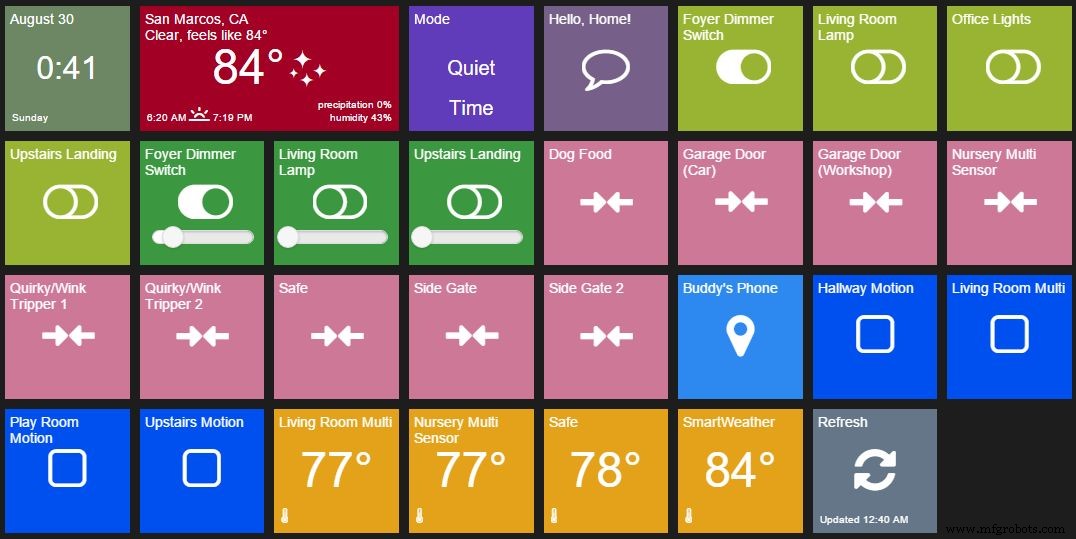
The entire user interface is through a smartphone app, and alerts can be pushed through the app or sent via SMS. One use case that I feel has slipped through the cracks is a friendly chime to alert occupants to state changes within the house (doors/windows/safes/gates opening, sever weather incoming, or temperature in the nursery being too high).
The Problem
There are a few options already out there to set off a super loud siren when a motion sensor or window/door sensor is tripped, but I wasn't able to find any simple door chimes. This is a basic feature of just about every home security system out there, so I was really surprised to find it didn't exist. I looked into hacking a remote doorbell sensor, but the difficult/expensive part was getting it on my z-wave/zigbee mesh network. SmartThings has an API for SONOS speakers [expensive], and I've seen people daisy chain multiple integrations from SmartThings to IFTTT to Twitter to a wifi connected arduino [overly complicated and slow].
All in, any of these solutions would be way over $40 and I want to have the same functionality with better performance for under $20.
Enter the Cree Connected LED Bulb
Home Depot sells the Cree Connected Bulb for $15 and they are by far my favorite smart bulb. Nothing else under $50 comes close in light output, color temperature, dimmable range, longevity, or wireless range.
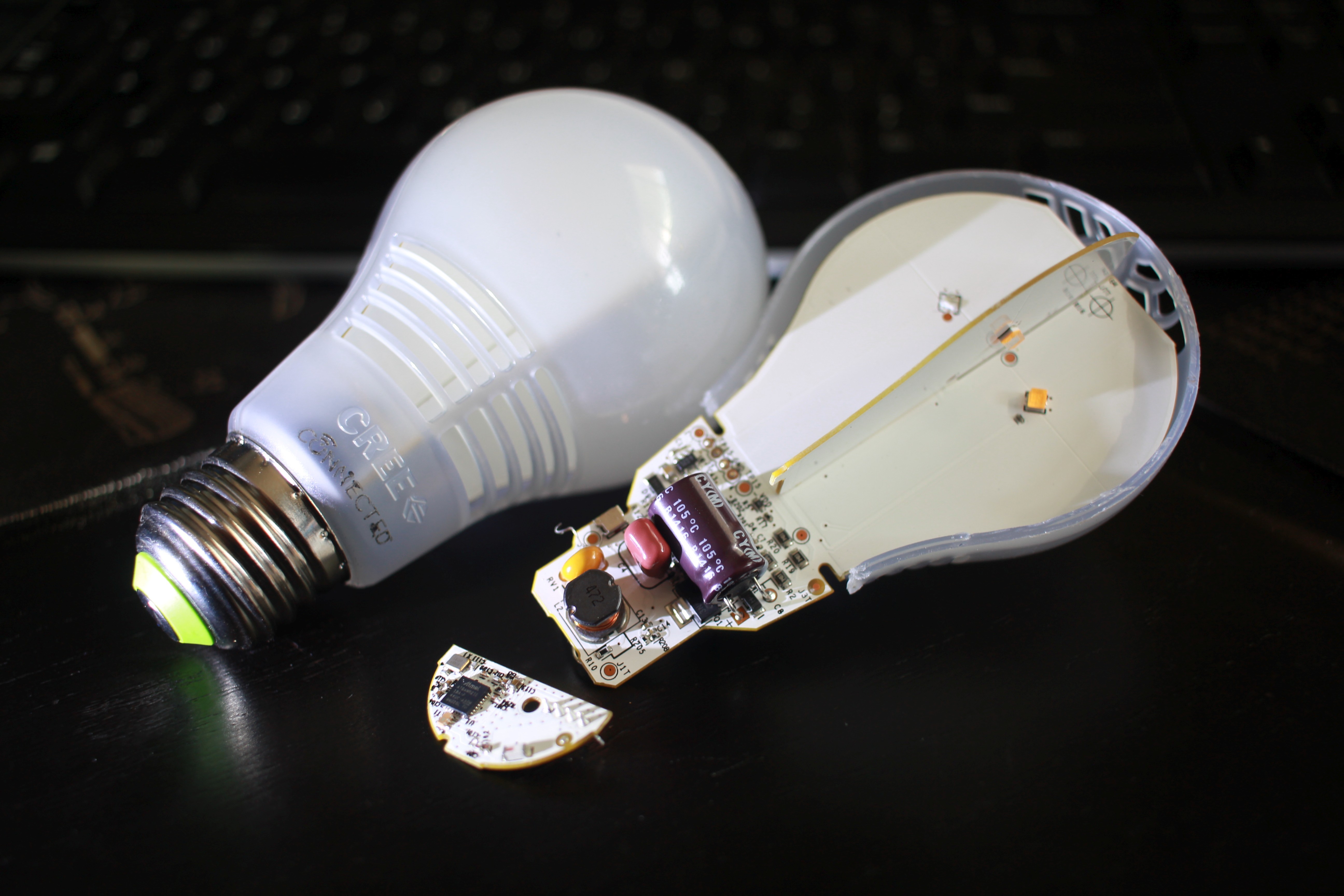
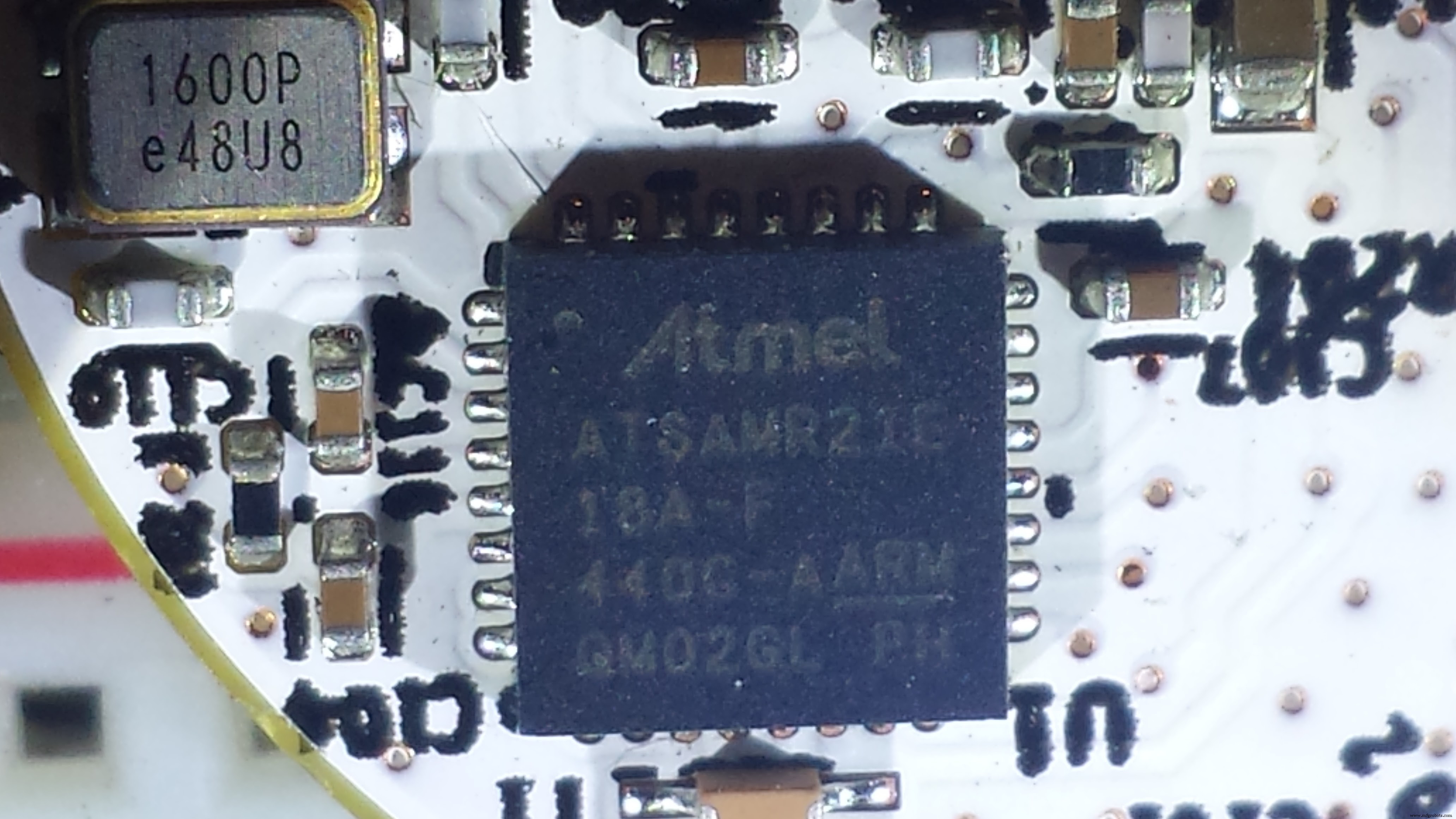
I've already swapped out all my old smart bulbs for these and had a few left over, so now I want to see what else I can do with this cheap and reliable hardware. Others have torn down the bulbs and found that all the zigbee components are on a single breakout board and are using 3.3v power...my arduino senses are tingling.
It turns out the zigbee board actually has an Atmel SAMR21 which is a 32bit ARM Cortex chip with 256KB of flash memory (pdf). Atmel sells a dev SAMR21 board for $42, so getting this for $15 is a steal.
Less than $20 of hardware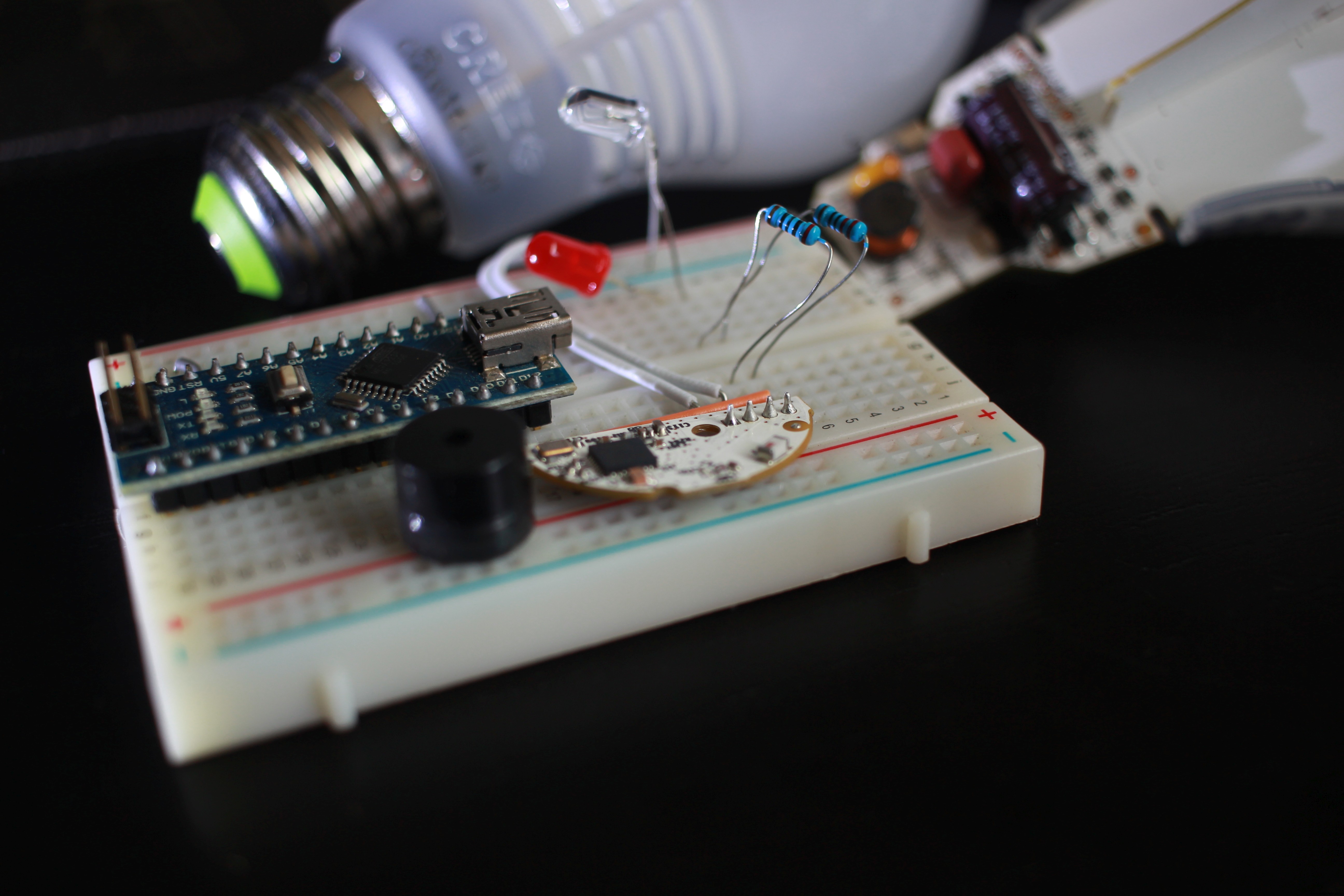
Proof of Concept using SmartThings
Here's a quick PoC that uses a state change monitor on an arduino to trigger a tone "chime" on a piezo buzzer. The bulb dimming and on/off output pins still function, and using the SmartThings app engine I can build out any logic I want.
Even without an arduino, you can have the digital pin connected directly to a relay to switch just about anything on/off. This can drive LED strip lights, open/close garage doors, turn on motors/pumps, etc.
Since one of the pins outputs PWM, I can tie that into one of the analog I/O pins on an arduino mapped to read values between 1-100%. In SmartThings, these are broken up into 10% intervals, so between that and on/off I have 11 distinct outputs I can send through the zigbee board. This would allow it to trigger different alerts based on which door/window is open.
This can expand beyond just an alert or chime. Another project I'm working on an arduino controlled IR blaster for my window AC units, and now that I can integrate directly with SmartThings using the method above, it will be cognizant of my presence/occupancy sensors and house state.
Also, since this is all 3.3v, it's a perfect use-case for an ATtiny85 and 3.7v Li-Ion batteries for a super small and portable package. I also kept the power supply from the bulb since it drops 120v AC to 3.3v DC and will no doubt come in handy for future projects.
I'm sure this community can come up with other uses, so please comment on how you'd use this or even build your own rendition and post the project!
Code
- DoorChime Sketch
- pitches.h
DoorChime SketchC/C++
Arduino Sketch for DoorChime#include <Tone.h>
#include "pitches.h"
/*
Quick sketch as PoC for viability of using Cree Connected LED's zigbee board to drive other devices (a speaker in this case).
Modified by Buddy Crotty - March 2015
version 0.1.2
Completely copied from Tom Igoe's example sketches:
State change detection (edge detection)
toneMelody
This example code is in the public domain.
http://arduino.cc/en/Tutorial/ButtonStateChange
http://arduino.cc/en/Tutorial/Tone
Zigbee board from Cree Connected LED
pin 1 ground
pin 2 3.3Vin
pin 3 PWM Out
pin 4 Digital Out
circuit:
* 8-ohm speaker on digital pin 8
* Pin 2 connected to zigbee board pin 4
*/
// this constant won't change:
const int buttonPin = 2; // the pin that the pushbutton is attached to
const int speakerPin = 8; // the pin that the speaker is attached to
// Variables will change:
int buttonPushCounter = 0; // counter for the number of button presses
int buttonState = 0; // current state of the button
int lastButtonState = 0; // previous state of the button
// notes in the melody (7nationArmy):
int melody[] = {
NOTE_GS2, NOTE_GS2, NOTE_B2, NOTE_GS2, NOTE_FS2, NOTE_E2, NOTE_DS2
};
// note durations: 4 = quarter note, 8 = eighth note, etc.:
int noteDurations[] = {
4, 8, 8, 8, 8, 3.5, 3
};
void setup() {
// initialize the button pin as a input:
pinMode(buttonPin, INPUT);
// initialize the LED as an output:
pinMode(speakerPin, OUTPUT);
}
void loop() {
// read the pushbutton input pin:
buttonState = digitalRead(buttonPin);
// compare the buttonState to its previous state
if (buttonState != lastButtonState) {
// if the state has changed, increment the counter
if (buttonState == HIGH) {
// if the current state is HIGH then the button
// wend from off to on:
buttonPushCounter++;
//play tone
// iterate over the notes of the melody:
for (int thisNote = 0; thisNote < 8; thisNote++) {
// to calculate the note duration, take one second
// divided by the note type.
//e.g. quarter note = 1000 / 4, eighth note = 1000/8, etc.
int noteDuration = 10000 / noteDurations[thisNote];
tone(speakerPin, melody[thisNote], noteDuration);
// to distinguish the notes, set a minimum time between them.
// the note's duration + 30% seems to work well:
int pauseBetweenNotes = noteDuration * .32;
delay(pauseBetweenNotes);
// stop the tone playing:
noTone(speakerPin);
}
}
else {
// if the current state is LOW then the button
// went from on to off:
Serial.println("off");
}
// Delay a little bit to avoid bouncing
delay(50);
}
// save the current state as the last state,
//for next time through the loop
lastButtonState = buttonState;
// turns on the Chime every two state changes (only when the door opens)
// the modulo function gives you the remainder of
// the division of two numbers:
if (buttonPushCounter % 2 == 0) {
digitalWrite(speakerPin, HIGH);
} else {
digitalWrite(speakerPin, LOW);
}
}
pitches.hC/C++
pitches library so you don't have to search for it yourself/************************************************* * Public Constants *************************************************/ #define NOTE_B0 31 #define NOTE_C1 33 #define NOTE_CS1 35 #define NOTE_D1 37 #define NOTE_DS1 39 #define NOTE_E1 41 #define NOTE_F1 44 #define NOTE_FS1 46 #define NOTE_G1 49 #define NOTE_GS1 52 #define NOTE_A1 55 #define NOTE_AS1 58 #define NOTE_B1 62 #define NOTE_C2 65 #define NOTE_CS2 69 #define NOTE_D2 73 #define NOTE_DS2 78 #define NOTE_E2 82 #define NOTE_F2 87 #define NOTE_FS2 93 #define NOTE_G2 98 #define NOTE_GS2 104 #define NOTE_A2 110 #define NOTE_AS2 117 #define NOTE_B2 123 #define NOTE_C3 131 #define NOTE_CS3 139 #define NOTE_D3 147 #define NOTE_DS3 156 #define NOTE_E3 165 #define NOTE_F3 175 #define NOTE_FS3 185 #define NOTE_G3 196 #define NOTE_GS3 208 #define NOTE_A3 220 #define NOTE_AS3 233 #define NOTE_B3 247 #define NOTE_C4 262 #define NOTE_CS4 277 #define NOTE_D4 294 #define NOTE_DS4 311 #define NOTE_E4 330 #define NOTE_F4 349 #define NOTE_FS4 370 #define NOTE_G4 392 #define NOTE_GS4 415 #define NOTE_A4 440 #define NOTE_AS4 466 #define NOTE_B4 494 #define NOTE_C5 523 #define NOTE_CS5 554 #define NOTE_D5 587 #define NOTE_DS5 622 #define NOTE_E5 659 #define NOTE_F5 698 #define NOTE_FS5 740 #define NOTE_G5 784 #define NOTE_GS5 831 #define NOTE_A5 880 #define NOTE_AS5 932 #define NOTE_B5 988 #define NOTE_C6 1047 #define NOTE_CS6 1109 #define NOTE_D6 1175 #define NOTE_DS6 1245 #define NOTE_E6 1319 #define NOTE_F6 1397 #define NOTE_FS6 1480 #define NOTE_G6 1568 #define NOTE_GS6 1661 #define NOTE_A6 1760 #define NOTE_AS6 1865 #define NOTE_B6 1976 #define NOTE_C7 2093 #define NOTE_CS7 2217 #define NOTE_D7 2349 #define NOTE_DS7 2489 #define NOTE_E7 2637 #define NOTE_F7 2794 #define NOTE_FS7 2960 #define NOTE_G7 3136 #define NOTE_GS7 3322 #define NOTE_A7 3520 #define NOTE_AS7 3729 #define NOTE_B7 3951 #define NOTE_C8 4186 #define NOTE_CS8 4435 #define NOTE_D8 4699 #define NOTE_DS8 4978
Schematics
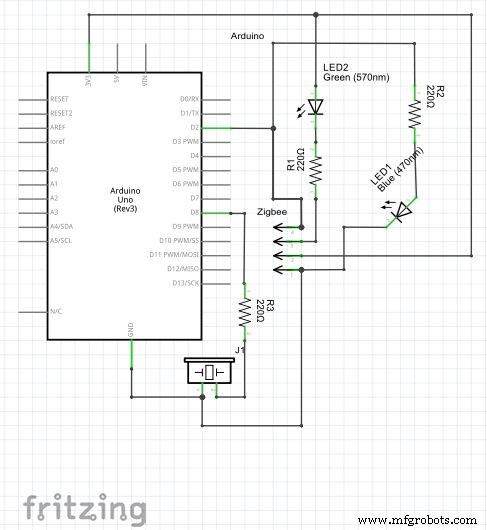
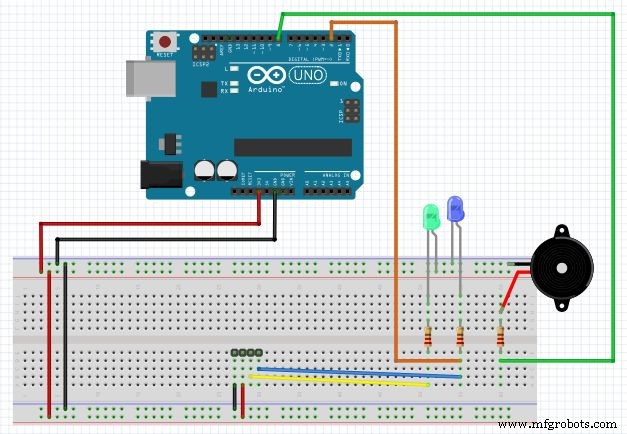 Fritzing Circuit Diagram of DoorChime with sketch codeDoorChime.fzz
Manufacturing process
- Inside Bank Vaults: History, Design, and Future of Security
- Revolving Doors: Design, History, and Energy‑Saving Benefits
- Wind Chimes: From Ancient Rituals to Modern Craftsmanship
- From Fire to Filament: The Evolution and Production of the Modern Light Bulb
- Z‑Wave vs. Zigbee: Choosing the Right Mesh Technology for Your Product
- Building an Interactive Laser Projector with Zigbee Sensors and Gravio Edge Platform
- Build a Secure Facial Recognition Door with Windows IoT and Raspberry Pi
- Secure Password-Based Door Lock with Arduino, Keypad & Linear Actuator
- Smart Door Access System with Facial Recognition Unlocking
- Which Bulb Glows Brighter: Series vs Parallel? Understand the Physics & Why It Happens