



Mastering PID Control for a 3D Robot Gripper in MATLAB/Simulink
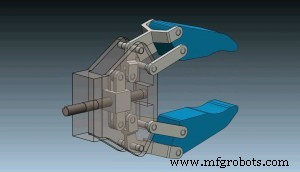
In this Tutorial we will see how we to make PID control of 3D Model of a Robot Gripper Mechanism. The Simulink model is organized in two subsystems. A DC Motor subsystem which is model using Simulink blocks and a 3D Model which is imported from Solidworks using the SimMechanics Link. We use a step function to activate the DC Motor to drive the Robot Gripper and we use the Simulink PID Block to automatically tune the PID’s parameters. You can watch the following video or read the written tutorial below. Download the Simulink Model from the example here: Find and Download the 3D Model of the Robot Gripper Mechanism on the following link:
Simulink Model - PID Control
1 file(s) 538.71 KB
Download
Manufacturing process
- Robotics in the 21st Century: Distributed Systems, Telepresence, and Space Exploration
- Simulink: MATLAB’s Advanced Simulation & Model-Based Design Tool
- Advanced Remote‑Controlled Gripper Robot for Precision Handling
- DIY Robot Gripper: Build an Arduino-Driven Plastic Hand
- PID-Controlled Line-Following Robot Kit – Arduino UNO, IR Sensors, Durable Chassis
- Build a Line-Following Robot with PID Control and Android Integration
- Gesture‑Controlled Robot Project: Build Your Own Motion‑Sensing Bot
- Remote Control of a 6‑DOF Arduino Robot Arm via Web Interface
- Build a Wire‑Free Arduino Robot Arm, Controlled from Your Smartphone
- Integrating SolidWorks with MATLAB/Simulink: A Step‑by‑Step Simulation Tutorial