



Master Arduino Control with MATLAB GUI: Step-by-Step Tutorial
In this Arduino and Matlab Tutorial we will learn how to control the Arduino Board using Matlab GUI (Graphic User Interface). We will make a Matlab GUI with two buttons for turning on and off a led and an axis for plotting the analog input from a photocell (light-dependent resistor). This is a step by step video Tutorial which is easy to be followed. Also, below the video you can find what componends needed for this tutorial and the Source Codes of the Examples in the video. You can get the components from any of the sites below: Download the Matlab files here:Components needed for this tutorial
Circuit schematic
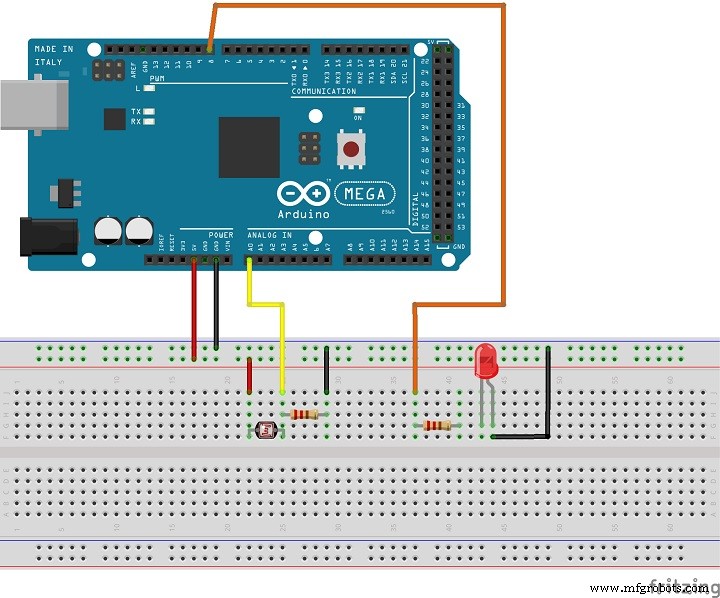

Example1.fig
1 file(s) 4.90 KB
Download
Example1.m
1 file(s) 5.00 KB
Download
Manufacturing process
- Create a Secure Arduino RFID Lock – Step‑by‑Step Guide
- Arduino Nano Fingerprint Sensor Project – Step‑by‑Step Tutorial
- Build a Raspberry Pi 3 & Arduino Laptop: Step‑by‑Step Guide
- Master the MPU6050: Accelerometer & Gyro Tutorial for Arduino
- Arduino Data Logging with SD Card & DS3231 RTC – Step‑by‑Step Tutorial
- Mastering Arduino with DS3231 RTC: Step‑by‑Step Tutorial
- Master Arduino Bluetooth: HC‑05 Module Tutorial for Smartphone & PC Control
- Master Arduino & MATLAB Integration: Step‑by‑Step Serial Communication Tutorial
- Arduino Tutorial 06: Connecting Arduino to Processing via Serial Communication
- Arduino Tutorial 02: Buttons & PWM – Master Digital I/O & LED Control